Can a CAO agent show its evidence? Yes, with one profile and no code

Can a CAO agent answer a research question with real evidence, meaning a citation count for every paper and a publication date for every news claim, without you writing any code? Yes. It takes one agent profile with a six-line mcpServers entry that points at a remote MCP server and passes an API key in a header. CAO resolves the key from its managed environment at launch, the provider connects to the server, and the agent gets fourteen search tools it did not have before. This post shows the result first, then how the wiring works, then the parts that did not go smoothly.
Everything below was run on 2026-09-16 against the CAO v2.5.1 release tag with the claude_code provider. The profile itself (examples/serply-research) merged after that release in #790, so copy it from main. The mechanism it relies on, header substitution and remote-URL passthrough, is in v2.5.1.
What this agent is for
The job is to answer a research question in a form a reader can check. Two examples: "which papers on retrieval augmented generation matter most, and what does each claim?" and "what did AWS announce about open source last month?". A checkable answer to the first names a citation count next to each paper. A checkable answer to the second names a publisher and a publication date next to each claim.
Coding agents already have a web search tool, so why not use that? Because a web search result carries neither field. The agent gets a title and a snippet, and it fills the gap with words like "influential" and "recently". Verifying that by hand means opening Google Scholar and sorting by citations, opening each abstract, then opening Google News and reading the dates off each article. It takes a while per question, and none of it leaves a trail you can hand to someone else.
CAO changes three things about that:
- The research policy lives in a file, not in a chat. An agent profile carries the instructions (which tool to use for which kind of question, report the count instead of the adjective, date every news claim), the tool allowlist, and the MCP wiring in one markdown document. It goes in a repository, gets reviewed, and behaves the same on every machine that installs it.
- The API key stays out of the file.
cao install --envwrites the key into CAO's managed environment once, and the profile references it by name. The profile you commit and share is the profile that runs. - One command runs it and leaves a record.
cao launch --headlesswith the question as an argument prints the answer in the terminal and leaves a tmux session behind, so you can scroll back through every tool call the agent made if a number looks wrong.
Without CAO the same setup is a provider-specific MCP config file per machine with the key written into it, a system prompt pasted into each new session, and no record of the run. With CAO it is one profile and two commands.
Executive summary
After the two commands in the Setup section below, I launched the agent headless with one question:
What are the three most cited papers on retrieval augmented generation, and what does each claim?
The agent called the Serply MCP server, ranked the results by citation count, fetched the three abstracts, and answered in the profile's required shape. This is the table it produced, unedited apart from width:
| Rank | Paper | Venue, year | Cited by |
|---|---|---|---|
| 1 | Retrieval-Augmented Generation for Knowledge-Intensive NLP Tasks (Lewis et al.) | NeurIPS 2020 | 29,550 |
| 2 | Retrieval-Augmented Generation for Large Language Models: A Survey (Gao et al.) | arXiv 2023, revised 2024 | 8,096 |
| 3 | RAGAs: Automated Evaluation of Retrieval Augmented Generation (Es et al.) | EACL 2024 demos | 2,327 |
Below the table it summarized what each paper claims from the abstract, listed the URLs, and closed with caveats I did not ask for: that the counts were read on 2026-09-16 and drift daily, that REALM and RETRO did not come back as canonical Scholar entries so the third slot is uncertain if you count retrieval-augmented language modeling as RAG, and that it skipped a few duplicate stubs with tiny counts. The whole run took a minute and a half.
That last paragraph is the point. The profile asks the agent to report the number rather than call a paper "influential", to date every news claim, and to say what it could not verify. With a tool that returns those fields, the agent does.
The next section shows how the pieces fit together, then the setup steps, then why the wiring works and where it strained.
How the pieces fit together
There is one agent in this post. CAO can run several agents that hand work to each other, but a research question with a single evidence policy did not need a second one, so the interesting part is what sits around that agent rather than a chain of them.
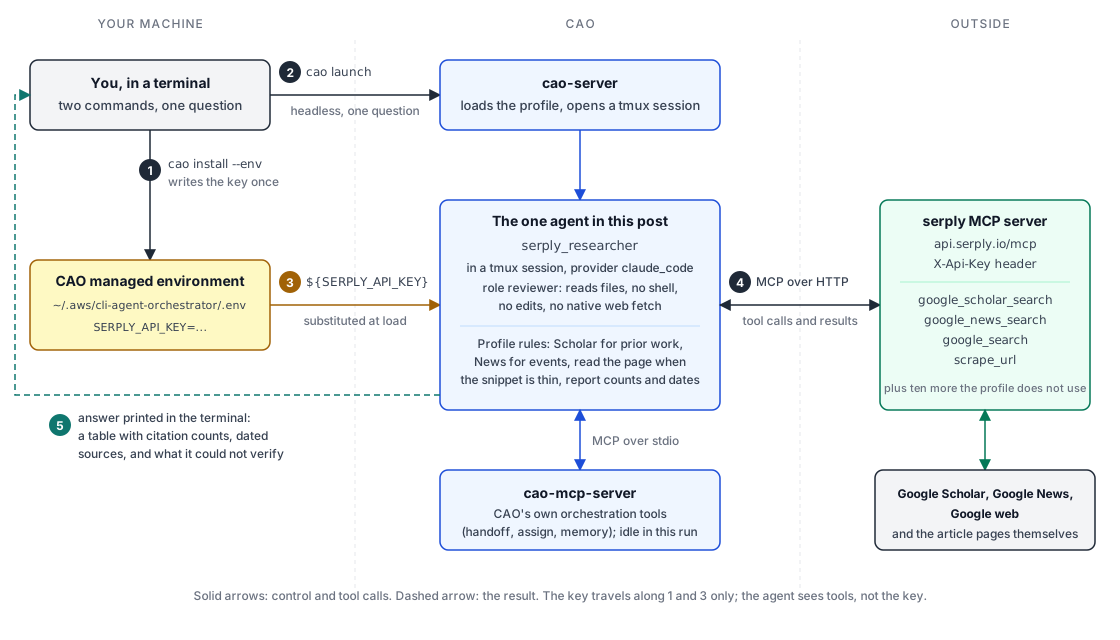
The numbered steps in the diagram, in the order they happen:
cao install --envcopies the profile into CAO's profile directory and writesSERPLY_API_KEYinto the managed environment file. This happens once.cao launch --agents serply_researcher --headlesswith the question as an argument askscao-serverto start a session. The server opens a tmux session and starts the provider inside it.- While loading the profile, CAO substitutes
${SERPLY_API_KEY}with the stored value, then hands the provider an MCP config with two servers:cao-mcp-server(CAO's own orchestration tools, local, over stdio) andserply(remote, over HTTP, with the key in a header). - The agent reads the question, picks the tool the profile's rules point at, and calls it. Scholar results arrive with citation counts, News results with publishers and dates. When a snippet is too thin to support a claim, the agent calls
scrape_urlon the page. - The agent prints its answer in the shape the profile demands and the terminal shows it. The tmux session stays open, so the tool calls behind each number are there to read.
The agent runs under the reviewer role, which lets it read files but not run shell commands, edit, or use the provider's native web fetch. The two MCP servers are the only tools it has beyond that, and only one of them reaches the network.
Setup
You need CAO installed (see the installation guide) and a Serply API key from serply.io. Then:
-
Install the profile and write the key into CAO's managed environment file in one step:
cao install examples/serply-research/serply_researcher.md \--env SERPLY_API_KEY=your-serply-api-keycao env listshows the variable afterwards. To rotate the key later,cao env set SERPLY_API_KEY new-valueis enough; the profile does not change. -
Launch it:
cao launch --agents serply_researcherThe launch summary shows what the agent may do. On the
reviewerrole this readsAllowed: @builtin, fs_read, fs_list, @cao-mcp-server, @serply, withBash,Edit,Write,WebFetchandWebSearchblocked. The@serplyentry is the remote server; everything the agent learns about the outside world goes through it. -
Ask a question that needs evidence. Anything about prior work goes to Scholar, anything about events goes to News, and the profile tells the agent which is which.
How the wiring works
The whole integration is this block in the profile's frontmatter:
mcpServers:
  cao-mcp-server:
    type: stdio
    command: cao-mcp-server
    args: []
  serply:
    type: http
    url: https://api.serply.io/mcp
    headers:
      X-Api-Key: ${SERPLY_API_KEY}
Three things happen between that text and a working tool call.
Substitution before parsing. When CAO loads a profile it runs the raw text through Template.safe_substitute with the managed environment, so ${SERPLY_API_KEY} becomes the key before the YAML is parsed. The committed file carries a placeholder; the running agent carries the value. You can see the result in the per-terminal MCP config CAO writes for the provider, which contains the resolved header. That file lives under CAO's own directory, not in the repository, which is what makes the profile safe to commit and share.
Passthrough of URL servers. A type: http server with a url is handed to the provider as-is, including headers. The profiles reference lists mcpServers as the field for additional tools; the remote shape is the same field with a URL instead of a command. The profile pins provider: claude_code because that provider connects to remote HTTP servers with headers. grok_cli and minimax_code read the headers field too. The default kiro_cli provider's support for remote type: http servers is not documented, so launching on the default could produce an agent with no search tools and no error, which is why the pin is there.
Tool discovery at connect time. The provider connects to https://api.serply.io/mcp, initializes a session, and lists tools. On the day of writing the server reported version 1.30.0 and fourteen tools: google_search, google_scholar_search, google_news_search, scrape_url, plus Bing, Maps, Jobs, video, Amazon product and five Reddit tools. The profile's prompt steers the agent to the first four and names the others as available. The agent does not see the key at all; it sees tools.
Here is what google_scholar_search returns for the same query with num: 3, taken from a direct call to the server rather than through the agent, so you can see the fields the agent is working with:
3 academic results for "retrieval augmented generation"

1. Retrieval-augmented generation for natural language processing: A survey
   https://link.springer.com/article/10.1007/s10462-026-11605-7
   S Wu, Y Xiong, Y Cui, H Wu, C Chen, Y Yuan... - Artificial Intelligence ..., 2026 - Springer
   Cited by 294

2. Parametric retrieval augmented generation
   https://dl.acm.org/doi/abs/10.1145/3726302.3729957
   W Su, Y Tang, Q Ai, J Yan, C Wang, H Wang... - ... in Information Retrieval, 2025 - dl.acm.org
   Cited by 106
Notice that the top three by relevance are not the top three by citations. The agent's answer above ranked by count because the profile told it that citation counts are the reason to prefer Scholar over web search, so it asked for more results and sorted. The tool gives fields; the profile gives the policy for using them.
The run that strained
The second question I asked was the kind News is for:
What has AWS announced about open source in the last month? Use google_news_search, date every claim, and name the publisher.
The agent found four in-window items on the first pass (the DuckLabs acquisition, HyperPod InstantStart, the Nx Plugin for AWS 1.0 release and Pizza Bot), each with a publisher and a date. Then it did what the profile says to do when a snippet is thin: it tried to read the pages. That is where it hit a wall.
The link field on a Google News result is a news.google.com redirect, and scrape_url returned nothing useful for those URLs. The agent said so in its running commentary, then recovered on its own: it ran site-restricted google_search queries such as site:aws.amazon.com/blogs/machine-learning "HyperPod InstantStart" to find the direct article URLs, and read those. The final answer dated all four items to the day and named the author of each AWS blog post. It also flagged, without being asked, that third-party publisher dates came from News metadata and were not verified on the publishers' pages, that the HyperPod repository sits under a personal GitHub account rather than an AWS org, and that three widely covered items fell just outside the window and were excluded.
That run took three and a half minutes and roughly seventeen tool calls, against a minute and a half for the Scholar question. Two lessons:
- The News tool is good for the date and the publisher, which is what the profile uses it for. It is not a good source of scrapeable URLs. If your use case needs article text, expect the agent to spend a second round on
google_searchwith asite:operator, or steer it there in the prompt. - The recovery worked because the profile's instructions describe a decision ("read the page when the snippet is thin") rather than a procedure. The agent had room to pick a different route to the same evidence.
What the profile does not protect you from
The reviewer role's native tool defaults are read-only, and the launch summary makes that look like a sandbox. It is not one. Adding the serply server gives the agent network egress that the role's defaults exclude: every search query and every URL passed to scrape_url goes to api.serply.io, a third-party service, authenticated with your key. The profile's security constraints, which tell the agent to treat fetched content as untrusted and to keep local file contents out of queries, are prompt-level guidance. Instruction following is the only barrier, and the profile says so in its own text.
Two smaller things worth knowing before you rely on it:
- If
SERPLY_API_KEYis unset,safe_substituteleaves the placeholder text in place rather than failing. The server still registers, and every tool call returns a 401. If the agent reports authentication failures from all search tools, runcao env listbefore anything else. - The launch command in the example's README as merged was
cao launch serply_researcher, which fails because--agentsis a required option. The correct form iscao launch --agents serply_researcher, and this post's pull request corrects the README.
Why this pattern is worth copying
The interesting part of this example is not Serply. It is that a profile can add a whole class of capability to an agent by naming a remote server and a header, with the secret managed by CAO rather than by the file. The same six lines, with a different URL and header name, wire in any header-authenticated remote MCP server. The profile stays a shareable, reviewable markdown document, the key stays in cao env, and the agent's instructions can be written against the tools the server actually exposes.
If you try it with a different server, or your agent finds a different wall than mine did, the discussion board is the place to compare notes.
About the author
This post was written by the team at Serply, who contributed the serply-research example to CLI Agent Orchestrator. Serply provides Google-backed search APIs, including the MCP server used here, and the runs in this post were made with a Serply account. Read the tool output with that in mind; the CAO mechanics described above apply to any remote MCP server.