Why physical AI needs multi-agent orchestration


Robots now work in mixed teams: each area of a factory, a warehouse, or a laboratory has its own robot team. When an item crosses from one area to the next, the hard part is the coordination, not the motion. Someone must plan the route, pass the responsibility for the item to the next team, and confirm that the job is done. Each site builds this coordination itself, and the work grows with the fleets.
Agentic AI can take on this coordination. Agentic AI is AI that works toward a goal on its own. An AI agent uses a large language model (LLM), the type of model behind chat assistants, to read a goal in natural language. Then it plans the steps, and calls software tools that carry them out. But an agent that moves machines needs limits that a chat assistant does not need. It must act only within the authority of its team. And the proof that a step is done must come from the physical world, not from the text of another agent.
Multi-agent orchestration is the coordination of several AI agents, each with its own role, so that together they do a job that no single agent should do alone. CLI Agent Orchestrator (CAO) is an open-source tool for multi-agent orchestration. It runs a team of CLI agents: AI assistants that work in a terminal, for example Claude Code, Kiro CLI, or Codex. Each agent has its own role, its own tools, and its own credential, the key that sets what the agent can do.
In this post, you learn why physical AI needs agentic AI, and why agentic AI that moves machines needs orchestration. The first physical AI example of CAO, cross-zone transport, applies CAO to a parcel on a simulated factory floor. A supervisor agent plans the job. Two zone worker agents each move only the robots of their own zone, and an independent checker agent verifies the result. In 10 live runs, every run ended in the expected state. Custody is the responsibility for the parcel. Exactly one zone has custody at a time, so one team at a time is responsible for the parcel. Custody changed 6 times, and each time only after the simulator measured the parcel at the dock. The 3 requests that were not possible ended with no command to any robot. You also see the five criteria that a team of agents must meet on a shared floor, and how the example meets each one with CAO. Then you see what a run looks like, and how the example maps to a real site.
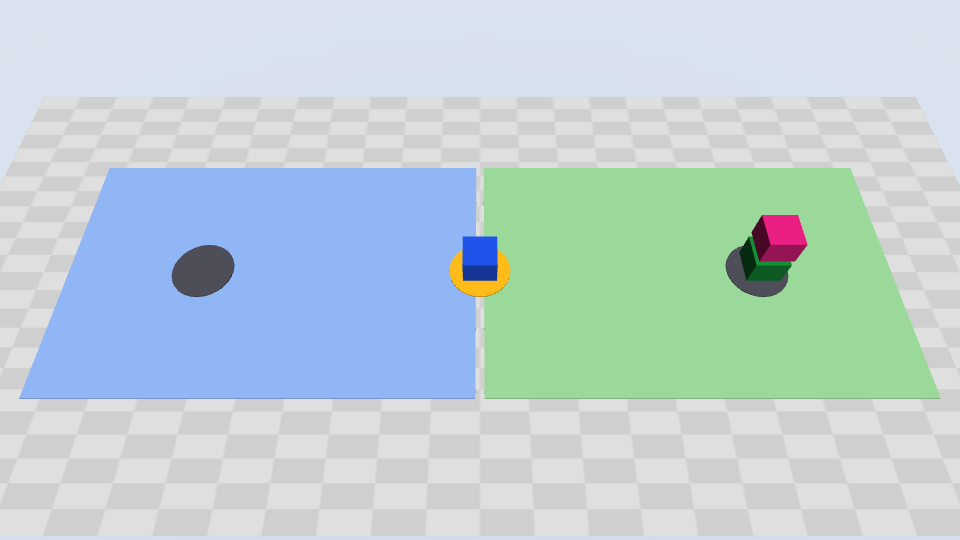
Play the animation of the demo (13 seconds, repeats)
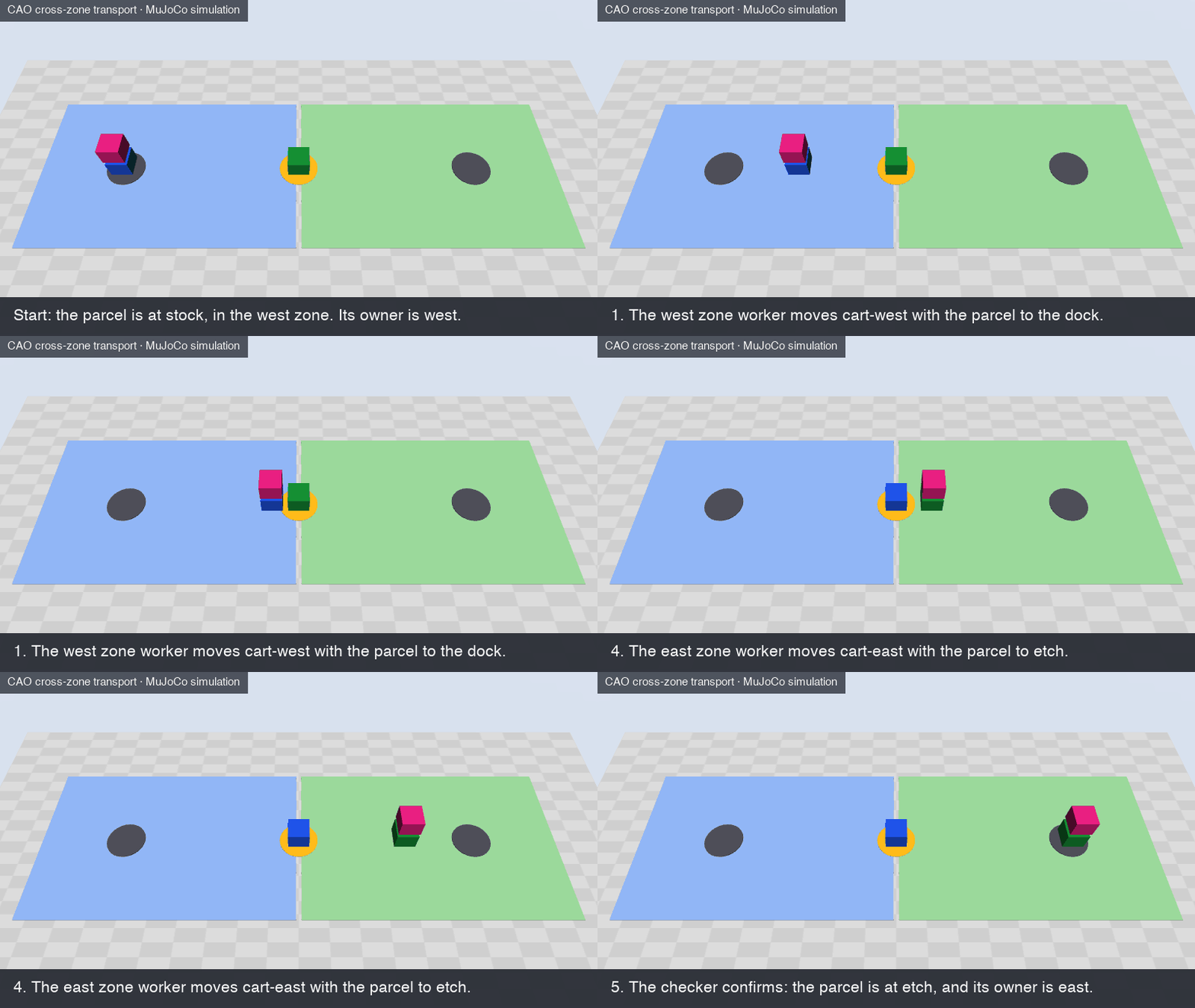
The demo: two zones. The animation replays the commands of a live run in the MuJoCo world of the example: the same robots, commands, and order. It leaves out the time that the agents use between the steps. The Results section shows an extended demo with three zones.
The runs in this post used CAO 2.5.3 from main (commit 88f3af0c) with the claude_code provider. CAO 2.5.3 is the first release with the permission fix for workflow delegation that the example uses.
Background
What is physical AI
Physical AI is AI that acts in the physical world. It does not stop at text or images. It senses its surroundings, decides what to do, and moves a machine: for example, a robot arm, a mobile cart, or a self-driving car. AWS defines physical AI as "a system of hardware and software that integrates perceiving, understanding, reasoning, and learning to interact with the physical world."
Today, industry already uses robots at a large scale, and physical AI is becoming a top priority, but few organizations run it at scale yet. Two reports from 2026 show this status and trend. The International Federation of Robotics (IFR) reports that "the global operational stock of industrial robots surged 9% to a record 5 million units in 2025." Factories installed more than 600,000 new units in that year. A Capgemini Research Institute survey of 1,678 executives found that "two-thirds of organizations now rank physical AI as a high priority in their automation agenda." The same survey found that "79% of organizations are already engaging with physical AI", but "only 4% say they are already operating at scale." So the robots and the interest are in place. The next step for the industry is to run physical AI at scale.
Why physical AI needs agentic AI
A robot moves with a policy. In physical AI, a policy is the program or the trained model that turns what a robot senses into its next action: for example, how a cart drives to a point, or how an arm grips a box. A policy is good at one skill. It does not decide which job to do, in which order, or with which robot.
Today, engineers write that decision logic in advance: fixed paths, fixed rules, and fixed transfers between systems. This works well for a task that repeats. It works less well when the request, the layout, or the fleet changes, because each change needs new code and a new test.
Agentic AI adds reasoning at the level of the goal, above the policies. IFR names it in its robotics trends for 2026: "A key trend to further develop autonomy in robotics is Agentic AI." An agent gives a robot system three things:
- Plans from a goal. An operator states the job in natural language, for example "move the parcel from stock to etch." The agent turns the goal into steps and calls the robot skills in the correct order. A new request does not need a new program.
- Feedback from the floor. After each step, the agent reads the state of the robots. If the state is not as expected, the agent changes the plan or stops.
- Work split across teams. An agent can split a job into tasks and give each task to the team that owns the robots for that task.
An agent that moves machines must also be safe. A language model does not see the physical world by itself, and a wrong step moves real equipment. So each agent needs clear limits on what it can do, and proof from the physical world that a step is done. Understanding the challenge explains these limits, and how orchestration sets them.
In conclusion: policies give robots their skills, and agentic AI decides how to use these skills for a goal. With agentic AI, a site can take on a new job without new code for each job. That is why physical AI needs agentic AI.
What is MuJoCo
MuJoCo means Multi-Joint dynamics with Contact. It is a free, open-source physics engine: software that calculates how objects move and touch each other. Google DeepMind maintains it. Robotics research and development use it to simulate robots and their environment. Its website also names "testing and validation of control schemes before deployment on physical robots". The example installs MuJoCo as a Python package. No robot hardware is necessary.
The example uses only a small part of MuJoCo. The robots are carts that move along straight lines. The parcel moves with its cart. The simulator measures the positions of the carts and the parcel. A zone can change custody only when the measured positions show the cart and the parcel at the dock.
A local process, the controller (demo.py serve), runs the MuJoCo world. The agents use the world only through the tools of the controller. The controller is an MCP server: it offers its tools over the Model Context Protocol (MCP), an open standard that connects AI agents to tools. Each agent connects to the controller as the transport-sim MCP server.
What is CAO
CLI Agent Orchestrator (CAO) is an open-source project of AWS Labs. It turns CLI agents, for example Claude Code, Kiro CLI, and Codex, into a team. CAO calls each of these CLIs a provider. Each agent runs in its own terminal, in tmux, a tool that keeps many terminal sessions open side by side. Each agent also has an agent profile: a file that sets its instructions, its MCP servers, and its tool allowlist, which is the list of tools that the agent can use.
A supervisor is an agent that divides a job and gives the parts to other agents, the workers. It uses three CAO tools:
handoffstarts a worker, gives it a task, and waits. When the worker finishes, CAO returns the last response of the worker to the supervisor, and removes the worker. Usehandofffor a step whose result you need for the next step.assignstarts a worker, gives it a task, and returns immediately. The supervisor can start more workers, or do other work. When the worker finishes, it sends its result back withsend_message. Useassignfor tasks that can run at the same time.send_messagesends a message to an agent that already runs. CAO puts the message in the inbox of the receiver, and delivers it when the receiver is idle.
This example uses only handoff, because each leg of the job needs the result of the leg before it. For an introduction to CAO, see Introducing CLI Agent Orchestrator.
Understanding the challenge
The example divides the floor into areas called zones. Each zone has one owner, the robot team of that zone, and only the robots of a zone can move items in it. In the default scene, the floor has two zones, west and east. The parcel starts at stock in the west zone and must go to etch in the east zone. The two zones meet at a shared dock, a location that belongs to both zones, where one zone can pass the parcel to the other. No robot can do the full trip, because each cart stays in its own zone. So the trip has two legs, one in each zone.

Moving a parcel from one zone to another looks like one task. On a real site, it is several tasks with different owners. A solution must meet five key criteria:
- Plan across owners. The request names a start and a destination, not a route. Something must read the site, find the shared dock between the zones, and split the job into one leg for each zone.
- Least authority. Each leg must run with the authority of its zone, and no more. A west worker must not move an east robot, even when a prompt asks it to.
- Custody on evidence. The responsibility for the parcel must pass to the next zone only when the physical state at the dock confirms the arrival. A message that says "done" is not evidence.
- Independent verification. A party that did not do the work must check the result, from fresh measurements.
- Fail safe. When a step fails, or when its result is not certain, the team must stop and report the last confirmed state. It must not guess, and it must not repeat the step blindly.
These criteria are not new. Real sites already need them, but today they meet them mostly with custom integration work and with people. Each area of a site has a fleet control: the software that sends orders to the robots of the area and tracks their state. Standards connect a fleet control to its robots, but they leave the work between areas to the site:
- Plan across owners, and least authority. VDA 5050 connects a fleet control to mobile robots of different makers. But it "does not allocate responsibilities among operators, system integrators, vehicle manufacturers, or fleet control providers." Each site must decide who plans and who controls each robot.
- Custody on evidence. In a semiconductor factory, the SEMI E84 signals confirm that a production tool is ready before a vehicle hands over a carrier. They also confirm when the handoff is complete.
- Independent verification. The AI Risk Management Framework of the US National Institute of Standards and Technology (NIST) recommends that the people who verify a model are not the people who build it.
- Fail safe. The AWS Physical AI Toolchain announcement notes: "A failed robot restarts into a physical world that has already changed."
In summary: the hard part of moving an item across zones is not the motion. It is the coordination between the owners of the zones. The job needs one plan across the zones, a strict limit on what each team can do, a handoff only on physical evidence, a check by a party that did not do the work, and a safe stop when a step fails. Today, each site builds this coordination with custom integration work and with people. A team of AI agents can do this work, but only if the team meets the same five criteria.
Why a multi-agent architecture is needed
One agent with all the roles and all the credentials cannot meet the five criteria: it can move any robot, and it checks its own work. A multi-agent architecture gives each role to its own agent, so each agent has only the authority of its role, and a different agent checks the result.
A shared floor already works this way, as a team of specialists. Each robot team knows its own area. A supervisor plans the work across the areas, and an inspector checks the result. A multi-agent architecture brings the same organization to AI agents. Each agent has one role, its own instructions and tools, and its own credential. Security guidance and research point to five benefits.
Each agent specializes in its own task. A person who does one job every day becomes good at it. An agent with one role works the same way: it gets the instructions, the tools, and the context for that role, and nothing else. In the example, the zone worker profile is about one zone and its robots, and the checker profile is about verification only.
Each agent has its own identity and authority. With one credential for each agent, a wrong action stays inside the scope of one agent. The Open Worldwide Application Security Project (OWASP) recommends "using per-agent identities and short-lived credentials (e.g., mTLS certificates or scoped tokens) - to limit blast radius". The blast radius is the damage that one wrong action can do. For excessive agency, OWASP also advises: "Implement authorization in downstream systems rather than relying on an LLM to decide if an action is allowed or not." In the example, the simulator checks the credential of each agent on every call.
Planning and action scale when they are split. In a paper at the 2024 IEEE International Conference on Robotics and Automation (ICRA), Chen et al. found that "hybrid approaches with both central and local LLM planners produce the most successful plans and scale best to large number of agents." They note that planning for a large, mixed robot team is "pushing up against the limits of context window length". The context window is the amount of text that a model can read at one time. In its multi-agent research system, Anthropic reports the same effect: "Subagents facilitate compression by operating in parallel with their own context windows". Its multi-agent research system outperformed a single agent by 90.2% on its internal research evaluation. In the example, the supervisor plans and the zone workers act, so each agent reads only the context of its own part of the job.
A separate agent verifies the work. The authors of Why Do Multi-Agent LLM Systems Fail? found that verification failures "appear frequently even in successful runs." A multi-agent architecture can give the verification to its own agent. In the example, the checker has read-only access, so its check does not depend on the agents that did the work.
Specialized agents are reusable. Gartner names the benefit: "Modular, specialized agents can boost efficiency, speed up delivery, and reduce risk by reusing proven solutions across workflows." In the example, every zone uses the same zone worker profile. The extended demo adds a third zone with no new agent code.
These benefits come from structure. The same study of failures found that "many MAS failures arise from the challenges in organizational design and agent coordination rather than the limitations of individual agents." In that paper, MAS means multi-agent systems. Clear roles, clear rules for delegation, and checks outside the agents turn a group of agents into a team. That is what orchestration gives it.
Solution overview
The example puts four CAO agents on the floor. Each agent is a provider CLI in its own CAO terminal:
- The supervisor agent reads the request and the scene, plans the legs, and delegates each leg with
handoff. Its simulator credential can only observe. - The west zone worker agent carries the parcel to the dock with
cart-west, and offers custody to the east zone. - The east zone worker agent accepts custody at the dock, and carries the parcel to
etchwithcart-east. - The checker agent reads the final state and compares it with the request. Its credential can only observe.
A run has these steps:
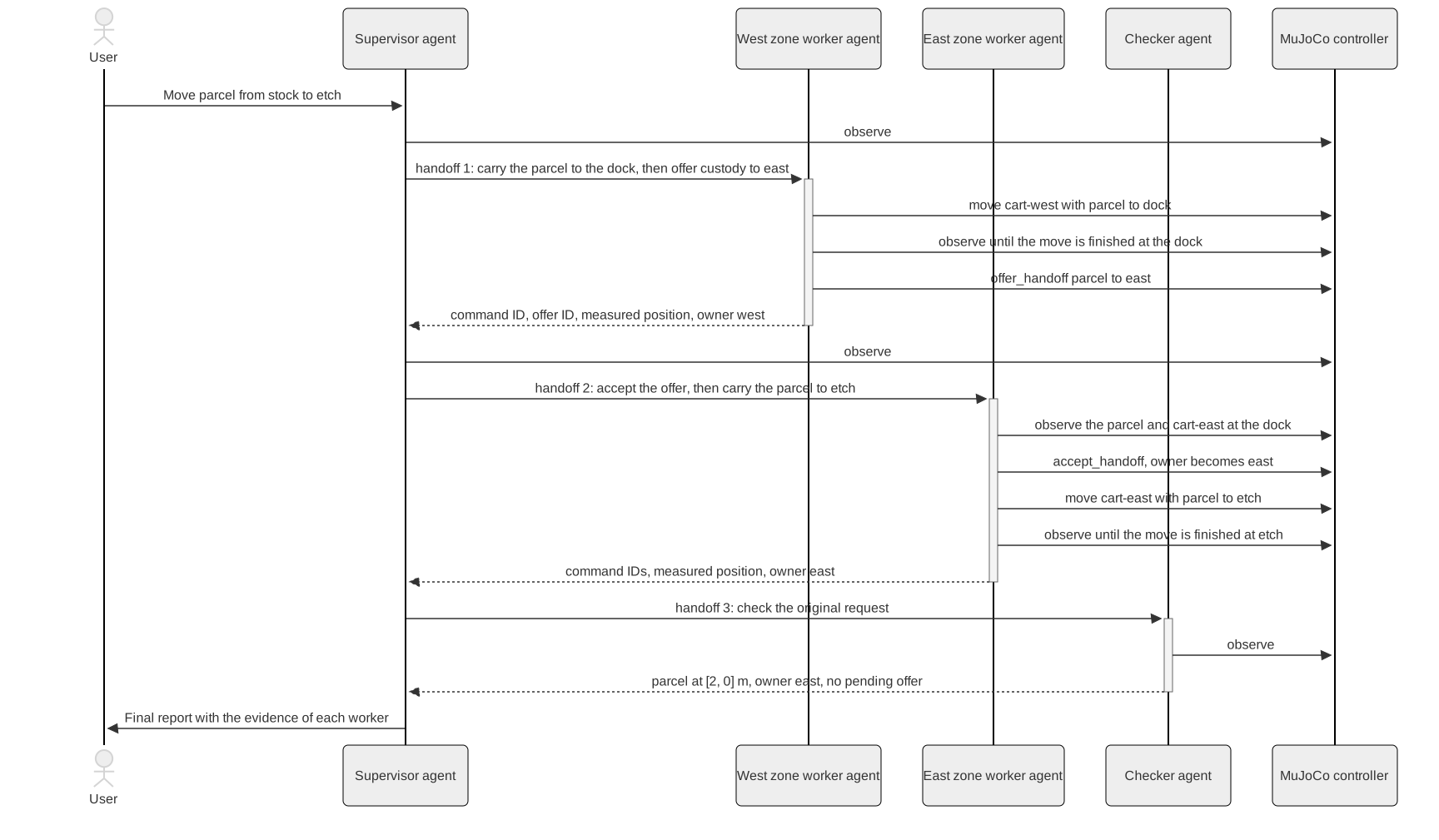
- You send one request to the supervisor with
cao launch, for exampleMove parcel from stock to etch. Coordinate the ownership handoff and have an independent checker verify delivery. - The supervisor calls
observe, finds the parcel, and plans two legs through the dock. - The supervisor hands off leg 1 to the west zone worker. The worker moves
cart-westwith the parcel to the dock, and offers custody to east. - The supervisor calls
observe. It confirms that the parcel is at the dock and that the offer is pending. - The supervisor hands off leg 2 to the east zone worker. The worker confirms the parcel and
cart-eastat the dock, accepts the offer, and moves the parcel toetch. - The supervisor hands off the check to the checker, which reads fresh state and compares it with the request.
- The supervisor reports the result, with the evidence of each worker and of the checker.
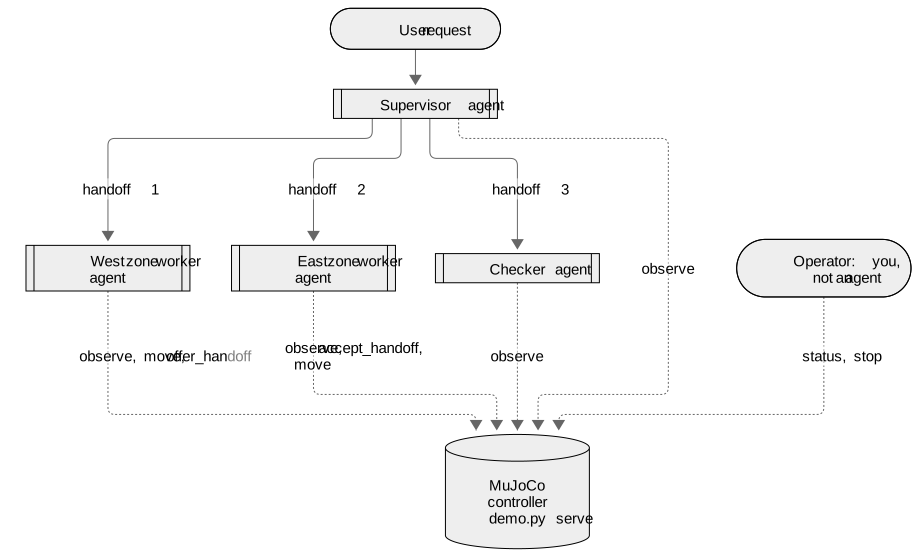
The solid arrows from the supervisor agent are CAO handoffs, and the dotted arrows are calls to the simulator. The operator is not an agent. It is you, the person who runs the example: you start the controller, approve motion, read the state with demo.py status, and can stop all motion with demo.py stop.
Key benefits
The solution meets each of the five criteria from Understanding the challenge. For each criterion, the table shows how the example meets it, and which part enforces it. The enforcer matters. With a provider that enforces the tool allowlist, most rules are enforced outside the agents: the controller and CAO reject a call that breaks a rule, whatever the prompt says. Only the plan and part of the fail-safe behavior depend on the instructions in the agent profiles.
| Criterion | How the example meets it | Enforced by |
|---|---|---|
| 1. Plan across owners | The supervisor reads the scene with observe and plans the legs | The supervisor profile |
| 2. Least authority | One credential for each agent. Workers have no delegation tools. | The controller and CAO |
| 3. Custody on evidence | offer_handoff and accept_handoff succeed only on measured positions at the dock | The controller |
| 4. Independent verification | A separate checker with a read-only credential | The checker credential |
| 5. Fail safe | Refusals before motion, reports instead of retries, and an operator stop that locks the run | The profiles and the controller |
Architecture overview
The example has five parts:
cao-serverstarts each agent in its own tmux terminal, and runs eachhandoff. It starts the worker, sends the task, and waits for the result. After a successful handoff, it removes the worker.- The provider CLIs, one for each agent. The run in this post used Claude Code for all four.
- The agent profiles.
demo.py preparewrites one run copy of each profile, with the instructions and the tool allowlist. Each copy has atransport-simMCP server that is bound to the credential of that agent. - The MuJoCo controller,
demo.py serve. It holds the world and offers the toolsobserve,move,offer_handoff,accept_handoff, andstop_simulation. - The operator, which is you. You start the controller, approve motion, read the state with
demo.py status, and stop the run withdemo.py stop.
The scope of a credential is the set of tools that it can call. The controller checks the scope on every call:
| Tool | Scope | Used by |
|---|---|---|
observe | observe | All agents |
move, offer_handoff, accept_handoff | act, in the zone of the caller | Zone workers |
stop_simulation | operate | The operator, with demo.py stop |
With a provider that enforces the tool allowlist, such as Claude Code or Kiro CLI, two layers enforce least authority outside the model. A prompt alone then cannot take an agent past its limits:
- Robots. The controller checks the zone of the caller. If the west zone worker asks to move
cart-east, the controller rejects the call withnot_robot_owner. - Delegation. Only the supervisor can start other agents. The worker and checker profiles grant only
@transport-sim, not@cao-mcp-server, which holds the CAO delegation tools. CAO checks this grant before it runs a delegation tool, so a worker that triesassigngets this result:
'assign' is not permitted: the calling terminal's allowed tools do not include '@cao-mcp-server'
Without the second layer, a worker could start an agent outside the plan of the supervisor, or the checker could give its check to another agent.
The supervisor uses handoff, not assign. In this job, the east zone worker can accept custody only after the west zone worker offers it at the dock. The checker can check only after the last leg. Parallel work gives no benefit here.
What a run looks like
A run takes approximately 3 to 5 minutes. The controller writes one line for each tool call, with the agent that made the call. A call to move, offer_handoff, or accept_handoff creates a command with an ID that the agent chooses. The controller also writes one line for each status change of a command: accepted, running, and then finished, or rejected with a reason. This excerpt shows the agent and command lines of the log of one run, without the times and the run ID. The controller also writes HTTP lines and MCP library lines between them:
transport supervisor called observe()
transport west zone worker called observe()
transport west zone worker called move(command_id=west-parcel-stock-to-dock, robot=cart-west, payload=parcel, destination=dock)
transport run=<run_id> actor=west command=west-parcel-stock-to-dock operation=move status=accepted reason=None
[... the move runs, and the west zone worker observes ...]
transport run=<run_id> actor=west command=west-parcel-stock-to-dock operation=move status=finished reason=None
transport west zone worker called offer_handoff(command_id=west-offer-parcel-to-east, payload=parcel, receiver_zone=east)
transport run=<run_id> actor=west command=west-offer-parcel-to-east operation=offer status=finished reason=None
[... the west zone worker observes ...]
transport supervisor called observe()
transport east zone worker called observe()
transport east zone worker called accept_handoff(command_id=east-accept-parcel-from-west, payload=parcel, robot=cart-east, offer_id=west-offer-parcel-to-east)
transport run=<run_id> actor=east command=east-accept-parcel-from-west operation=accept status=finished reason=None
transport east zone worker called move(command_id=east-parcel-dock-to-etch, robot=cart-east, payload=parcel, destination=etch)
[... the move runs, and the east zone worker observes until it is finished ...]
transport supervisor called observe()
transport checker called observe()
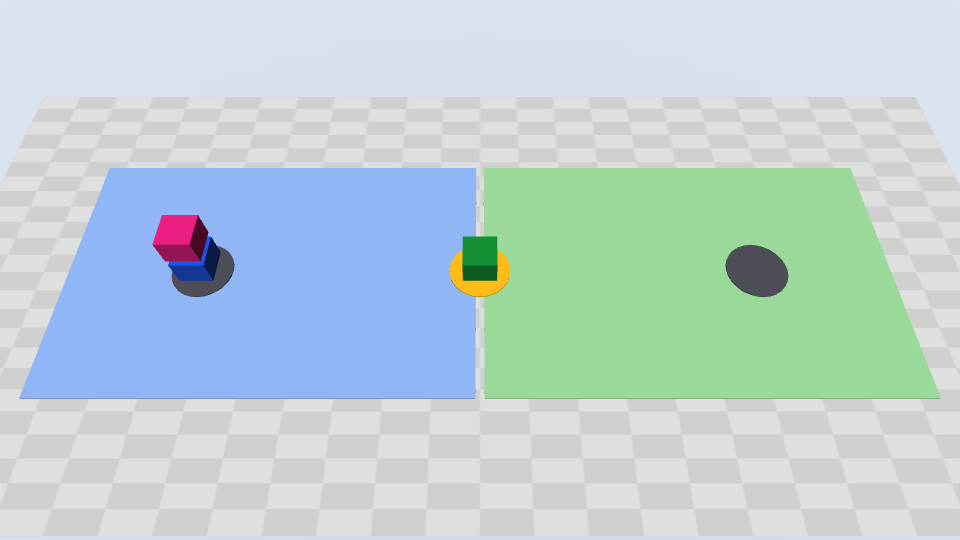
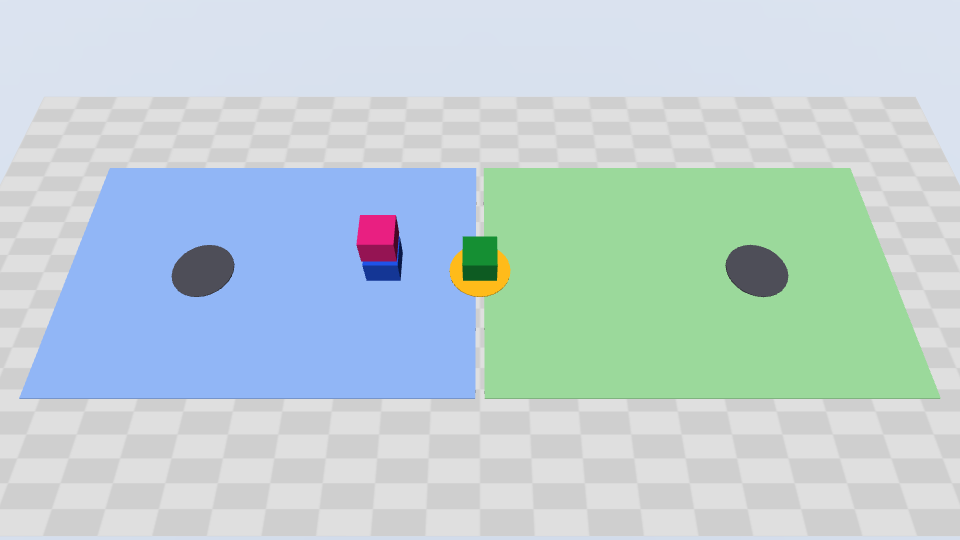
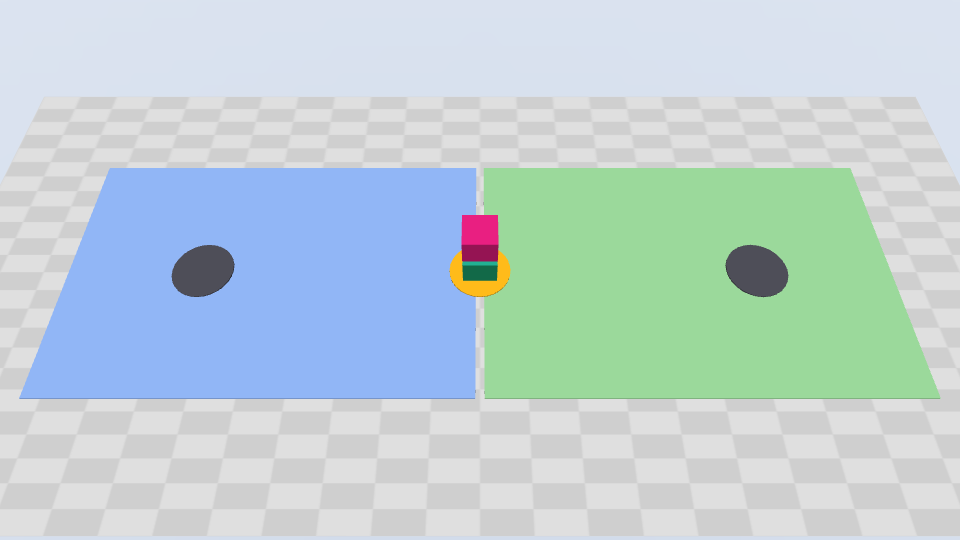
The controller can also save pictures of the MuJoCo world, with demo.py serve --record. These pictures come from a run of the example:
| The west leg | The custody handoff at the dock | Delivered |
|---|---|---|
 |  | |
The final answer of the supervisor names each worker, each leg, the custody handoff, and the evidence of the checker. This excerpt comes from the same run as the log, with the lines wrapped:
The parcel was delivered to etch, and east now owns it. The independent checker
confirmed this, and its result matches my own observation.
[... the three worker profiles, and a table of the two legs and their four
commands, all finished ...]
Custody transfer: West offered custody with west-offer-parcel-to-east at the
dock after the parcel arrived there. Before the east leg started, I checked that
the parcel was at the dock at [0, 0], west still owned it, and the offer was
pending. East then accepted that exact offer with east-accept-parcel-from-west
before it moved the parcel.
Checker's evidence: The parcel is at [2, 0] m, which is 0.000 m from etch (the
limit is 0.01 m). The owner is east, no offer is pending, all four commands
finished with no reason given, and the run is not stopped.
[...]
This is an assisted kinematic MuJoCo simulation, not real robot transport.
The supervisor profile asks for that last sentence in every report. Kinematic means that the simulator moves the carts along straight lines, and does not calculate forces. Assisted means that the parcel moves with its cart, with no grasp.
Results
The controller only checks rules. The agents decide what to do. We ran the example 10 times with Claude Code agents, with nine different requests and scenes. Every run ended in the expected state:
| Request or scene | Runs | What the agents did |
|---|---|---|
The cross-zone delivery from stock to etch | 2 | Delivered to etch, owner east, with one custody handoff each |
Move parcel to stock., with the parcel in the east zone | 1 | The supervisor found the parcel with observe, because the request gives no start. Delivered to stock, owner west. |
Extended demo: a third zone, north, and a destination in it | 1 | The supervisor found a route through two shared docks. Seven commands, two custody handoffs, delivered to warehouse, owner north. |
A different scene, with the zones stores and assembly | 1 | Delivered 0.004 m from inspection, owner assembly |
From stock to dock only | 1 | One west leg, and no custody offer. The owner stayed west. |
| A destination that is not in the scene | 1 | Refused. No command to any robot. |
Use cart-east to move parcel from stock to dock. | 1 | Refused, because cart-east cannot reach stock. It did not select a different robot. No command. |
A 6 kg parcel, with a 5 kg limit on cart-east | 1 | Refused before any motion. No command. |
| A stop by the operator during the first leg | 1 | The move became interrupted. The parcel stayed between two locations, owner west, and the controller rejected all later actions. |
Across the 10 runs, custody changed 6 times, and each change followed a finished move to the dock. The 3 requests that were not possible ended with no command to any robot.
Extended demo: three zones
The third row of the table is the extended demo, and it shows best how the agents decide. The request names only the start and the destination. The supervisor reads the scene, and finds a route through two shared docks. Then it gives one leg to each of three zone workers, and custody changes two times:
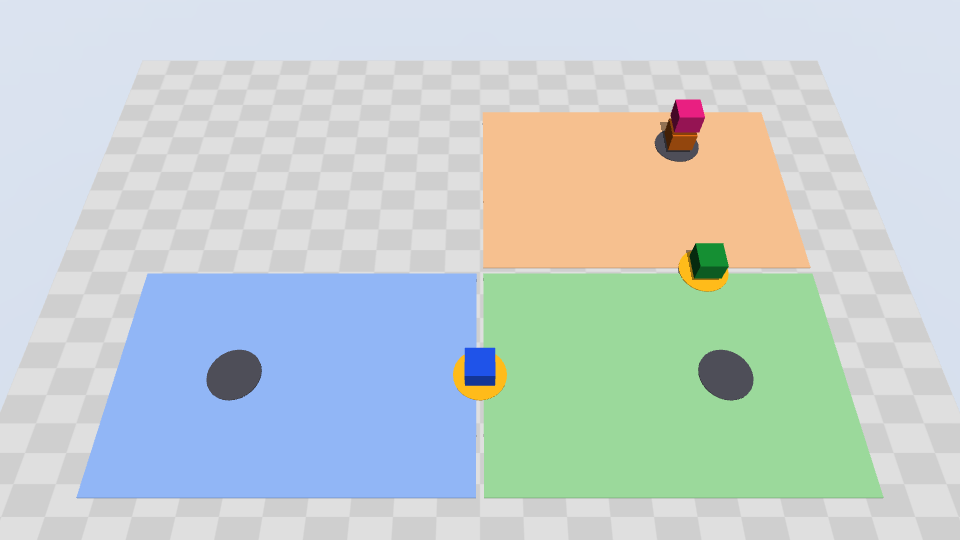
Play the animation of the three-zone run (15 seconds, repeats)
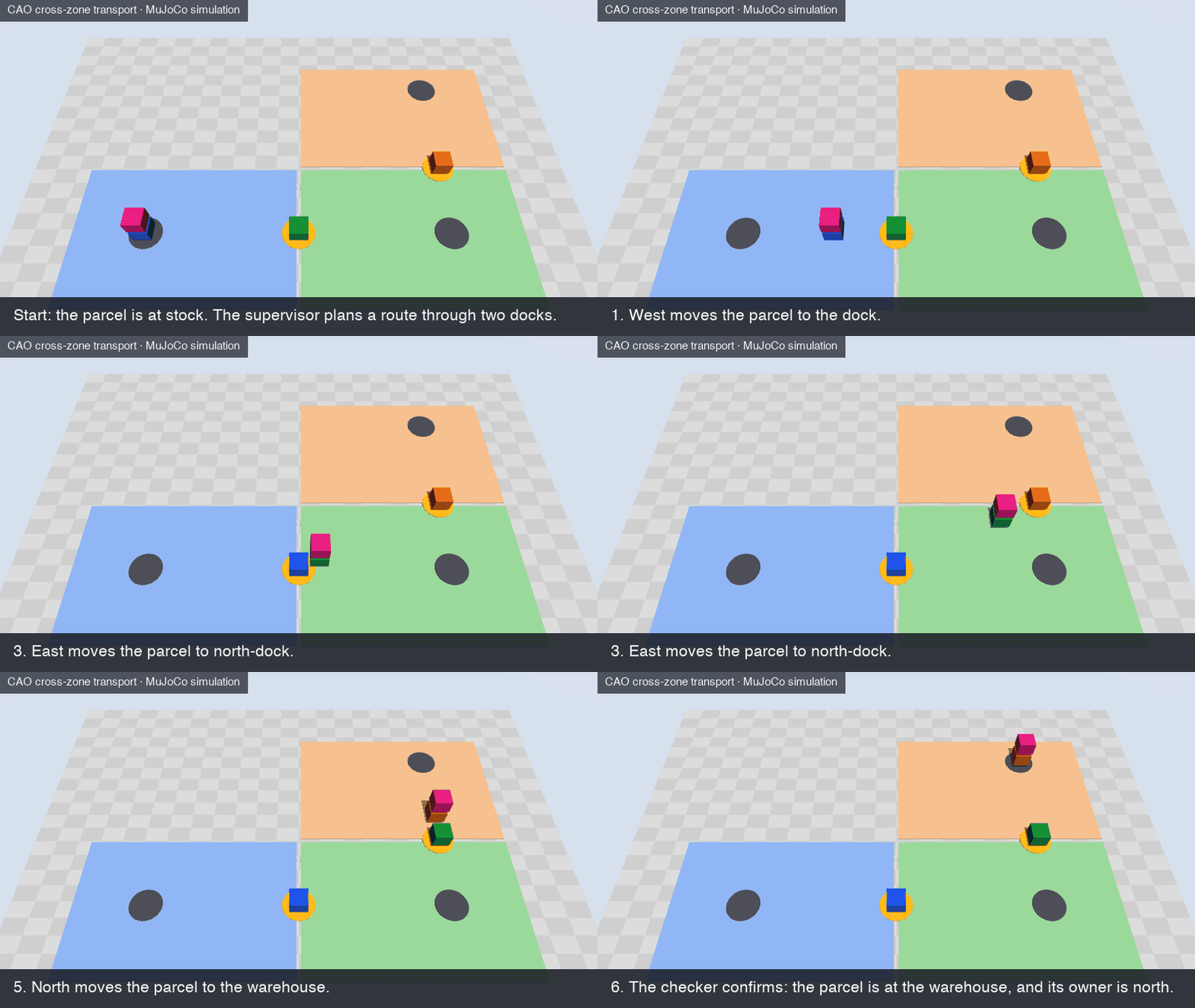
The animation replays the commands of this run in the MuJoCo world of the example: the same robots, commands, and order, without the time that the agents use between the steps.
From the simulation to real robots
This example does not control real robots. It has no robot driver and no connection to robot hardware. It simulates the coordination layer above the robots. In this layer, the agents plan the job and divide it between the robot teams. Then they check the custody handoff and the result.
What the simulation stands for
Real sites have the same problem. Different transport systems serve different areas, and an item must pass from one system to the next. These are three examples:
- Semiconductor factory. In a wafer factory, one transport system can move wafer carriers between production bays (interbay transport). A different system moves them in a bay, between a stocker and the tools (intrabay transport). The stocker of a bay, a storage unit for the carriers, is the place where the systems pass the carriers. See US patent application 2005/0191162. At a tool, the transport vehicle and the tool exchange the SEMI E84 signals.
- Robot fleets from different vendors in one building. Open-RMF is free, open-source software that lets fleets of robots from different vendors share one building, with its doors and elevators.
- Factory transport vehicles. VDA 5050 is a standard interface between a central fleet control and mobile robots. The fleet control sends orders to the robots, and the robots report their state.
In each example, a handoff is complete only when the systems confirm it. A message alone is not sufficient. The example uses the same rule.
How the parts of the example map to a real site
The CAO agents and their tools stay the same. Only the MCP server behind transport-sim changes, and the parts below it:

The table shows each part in detail:
| In this example | On a real site |
|---|---|
| The MuJoCo world in the controller | The real floor. The robots and the sensors measure the positions. |
| A zone and its zone worker | An area, and the fleet control of the robots in that area |
move | A transport order to the fleet control of the zone, for example a VDA 5050 order |
observe | The state that the fleet controls report: robot positions, item locations, and order status |
offer_handoff and accept_handoff at the dock | The handoff at the transfer point, for example the SEMI E84 signals between a vehicle and a tool |
| The credential of each agent | A separate access key for the fleet control of each area |
demo.py stop | A stop request in software. It does not replace the emergency stop and the safety system of the robots. |
On the CAO side, the agent profiles, the tool allowlists, and handoff stay the same too. To build the new MCP server, you do not start from nothing: MCP servers that connect agents to robots exist. For example, ROS-MCP-Server, for robots that use the Robot Operating System (ROS), "connects large language models (such as Claude, GPT, and Gemini) to robots, enabling bidirectional communication with no changes to existing robot source code." The example does not include such a server.
What real robots need in addition
The example does not supply these items:
- A connection from the MCP server to the fleet control of each area.
- A safety system on the robots. The agents do not make the robots safe. The robots and their fleet controls must stop for people and obstacles without the agents. Standards such as ISO 3691-4:2023 for driverless industrial trucks, for example automated guided vehicles and AMRs, and ISO 10218-1:2025 for industrial robots still apply.
- Tests on the real site, with people who monitor the robots.
The AWS Physical AI Toolchain announcement makes a similar point about the cloud: "The cloud coordinates training and fleet management, but it cannot be the control loop for safety-relevant physical tasks." Orchestration belongs in the coordination layer, above that control loop.
Prerequisites
- CAO 2.5.3 or later. The latest
mainis better. - tmux 3.3 or later, and uv, a Python package manager, on macOS or Linux.
- A provider CLI that you have signed in to, for example Claude Code, Kiro CLI, or Codex. Claude Code and Kiro CLI enforce the tool allowlist of each agent. Codex does not, so
prepareprints a warning for it: use it only for a trusted local demo. - No GPU, no display, and no robot hardware.
- Time to complete: approximately 20 minutes. The agents work for 3 to 5 of them.
- Estimated cost: the example creates no AWS resources. The cost is the model usage of your provider CLI, for four agents during a few minutes.
Try it
From the repository root, prepare a run:
cd examples/robotics/cross-zone-transport
uv sync --locked
export RUN_DIR=/tmp/cao-transport-demo
REQUEST="Move parcel from stock to etch. Coordinate the ownership handoff and have an independent checker verify delivery."
uv run --locked python demo.py prepare --run-dir "$RUN_DIR" --request "$REQUEST" --provider claude_code
Then follow the README of the example. It starts the controller, installs one run copy of a profile for each agent, launches the supervisor, and shows what to watch. When you finish, follow its Stop and clean up steps. They stop the simulation and the CAO session, and they remove the profiles and the run directory.
Conclusion
Physical AI is moving from single robots to fleets with many owners, and agentic AI can take on the coordination between them. But agents that move machines need structure: a clear role for each agent, the least authority that the role needs, custody on evidence, an independent check, and a safe failure. The cross-zone transport example shows how CAO gives a team of CLI agents that structure, on a laptop, with no robot hardware.
To get started:
- Install the example and its MuJoCo dependency (approximately 2 minutes).
- Prepare a run, and start the controller (approximately 3 minutes).
- Install the four agent profiles, and launch the supervisor (approximately 2 minutes).
- Watch the agents, and check the result (approximately 5 minutes).
- Try a scenario from the README, for example the route through three zones (approximately 10 minutes).
Try the example, and tell us what you build in GitHub Discussions.
For more information:
- The README of the cross-zone transport example
handoffand agent profiles in the CAO documentation- The MuJoCo documentation
- Introducing CLI Agent Orchestrator
About the authors
Haofei Feng
Haofei is a Senior Cloud Architect at AWS with over 20 years of expertise in DevOps, IT Infrastructure, Data Analytics, and AI. He specializes in guiding organizations through cloud transformation and generative AI initiatives, designing scalable and secure GenAI solutions on AWS. Based in Sydney, Australia, when not architecting solutions for clients, he cherishes time with his family and Border Collies.
Yin Song
Yin Song is a Senior Applied Scientist at AWS Prototyping and Scaling with over ten years of industry experience in machine learning and AI since completing his PhD in 2014, and over five years building tailored prototypes and scaling solutions for complex AWS use cases. He is an open-source advocate whose models, including FalconLite, MistralLite and MegaBeam, have passed 900,000 downloads on HuggingFace, and he is a main contributor to strands-robots, bringing agentic AI to robotics, with a growing interest in world models and Gaussian Splatting for 3D reconstruction from real capture. Based in Sydney, Australia, when not prototyping for customers he spends time with his family and his cat.