A digital team for physical AI: CAO agents run a robot factory floor


A factory line is only as fast as its slowest team. When a fast team runs in front of a slow team, it fills the buffer between them, and then it stands still. On a real site, a planner and the team leads see this and change the plan, every shift. In this post, four AI agents do that job on a simulated line of nine robots. In each of our live runs where the first team blocked, the supervisor agent found the slowest team from the measured state of the floor, and slowed the first team to its pace.
The agents run on CLI Agent Orchestrator (CAO), an open-source tool that runs a team of CLI agents, such as Claude Code or Kiro CLI. CAO gives each agent its own role, its own tools, and its own credential: the key that sets what the agent can do. This is the second post in a series. In the first post, four agents moved one parcel across two zones, one leg after the other. Here, a digital team of agents runs a whole line: three robot teams that work at the same time, and a supervisor that balances them.
This post is for developers who know CLI coding agents. You do not need a background in robotics.
The second physical AI example of CAO, hierarchical factory, runs a simulated line in MuJoCo with nine Open Duck Mini robots. Four agents in two layers run it: one supervisor agent and three team manager agents. The robots are not agents.
We ran the example ten times with live agents. These are the results:
- Each order that the floor could do ended with all its units at the dock. The only exception was the run that the operator stopped.
- In each run where the team that makes the parts blocked, the supervisor found the slowest team from the state of the floor. Then it slowed the first team to the pace of the slowest team.
- Each order that the floor could not do ended with no command to any robot, except in one early run. That run showed a gap in the supervisor profile, and we fixed it. Results has the details.
You also see why the example has one agent for each robot team and not one for each robot, how CAO keeps each manager inside its own team, and how the example maps to a real site.
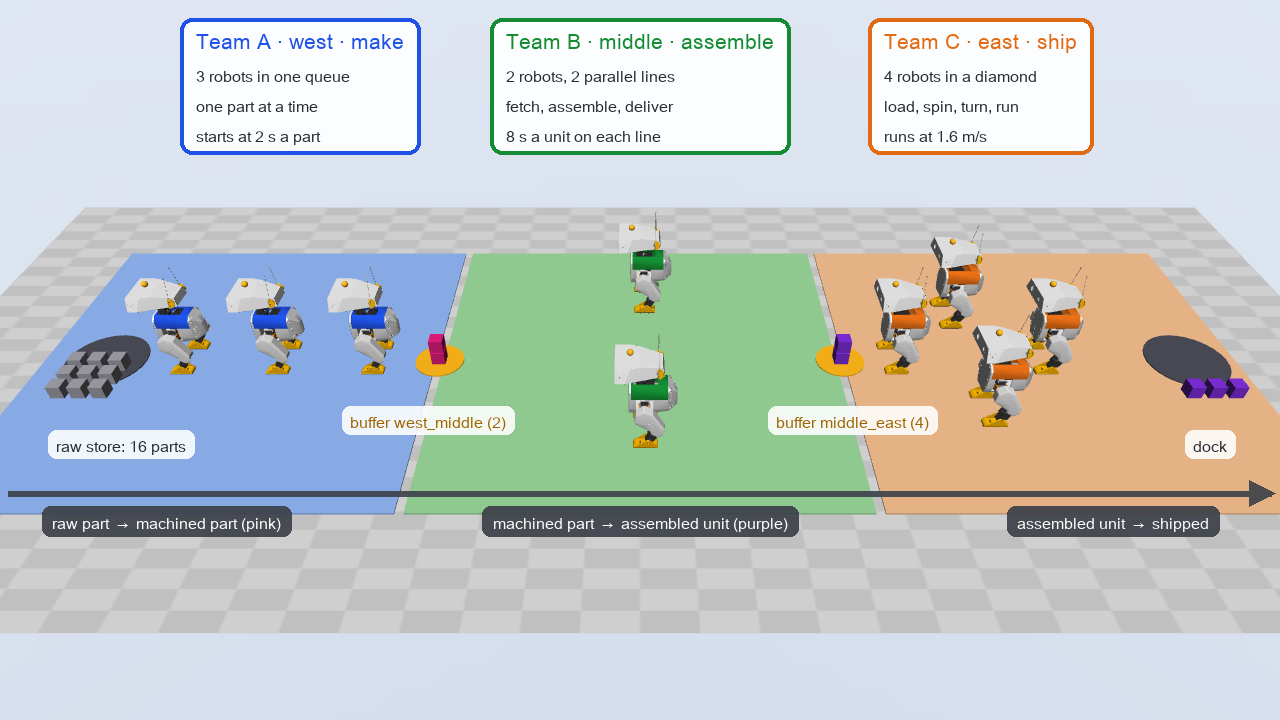
Play the animation of the demo (47 seconds, repeats)
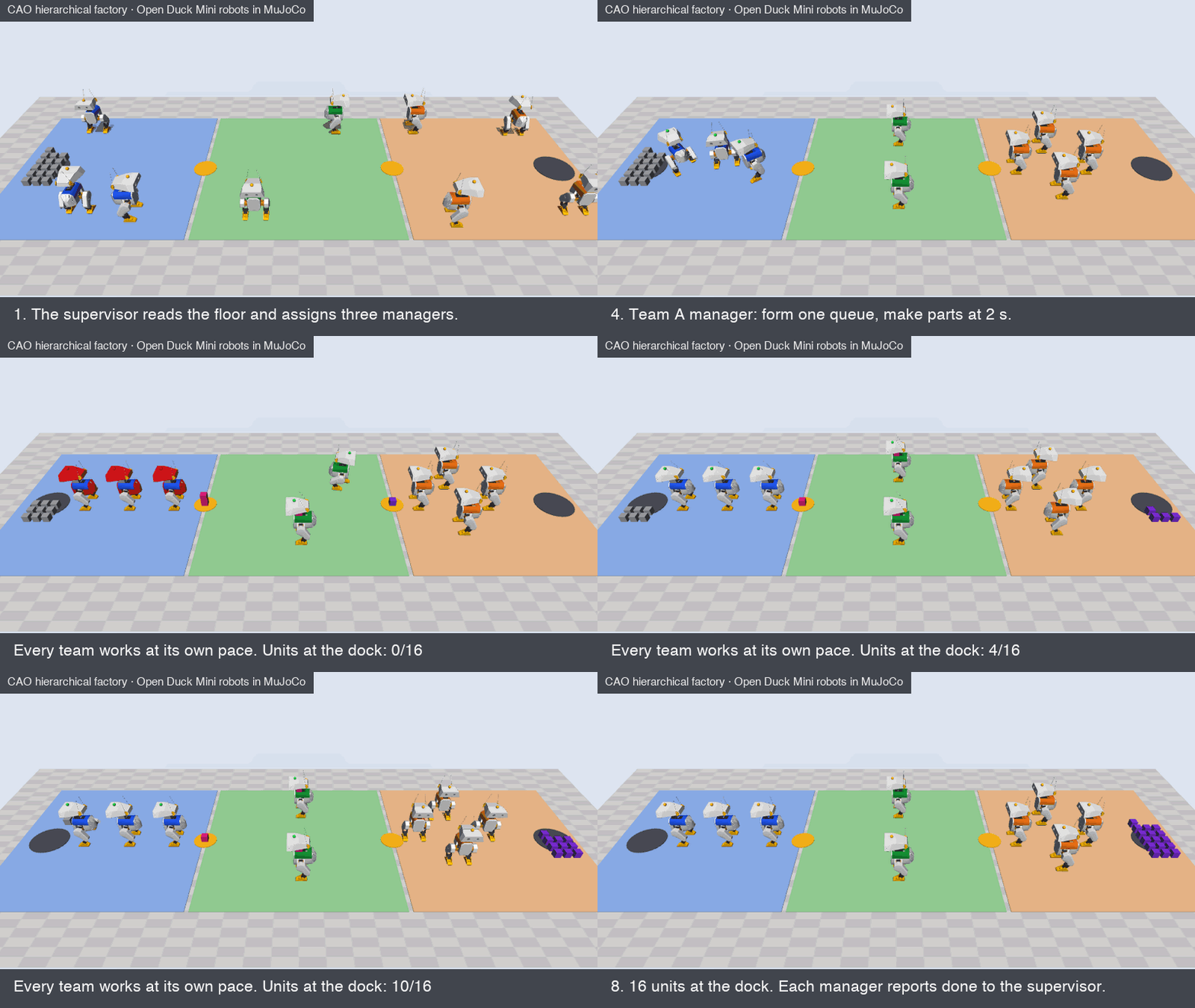
The demo: 16 units through three teams. The animation replays the commands of a live run in the MuJoCo world of the example: the same robots, commands, and order. It leaves out the time that the agents use between the steps.
Background
From one handoff to a line of teams
The first post explains what physical AI is, why it needs agentic AI, and what MuJoCo and CAO are. Here is the short version. A robot moves with a policy, the program or trained model that turns what it senses into its next action. A policy is good at one skill. Agentic AI adds reasoning at the level of the goal: an agent reads a goal in natural language, plans the steps, and calls the robot skills in the correct order.
That post had one job with a fixed order: the west leg, the custody handoff at the dock, the east leg, and a check. Each step needed the result of the step before it, so the supervisor used the CAO tool handoff, which waits for a worker to finish.
A line is different. All the teams work at the same time, and they depend on each other through the buffers between them. So the job is to keep the parts moving at the pace of the slowest team.
What is a digital team
A digital team is a group of AI agents that is organized like a team of people: each agent has one role, a manager gives it work, and it reports back. Real factories already use layers like this. The ISA-95 standard for the integration of enterprise and control systems describes the levels of a plant. Business planning is at the top. Below it are the management of manufacturing operations and the control of each process. The machines are at the bottom.
The example uses the same idea at a small scale:
- The supervisor plans the order and balances the teams, like a plant planner.
- The team managers, one for each robot team, run their own teams, like team leads or cell controllers. A cell controller is the computer that runs the machines of one work area, or cell.
- The robots do the work. They run the program that their manager starts. They are not agents, and they make no decisions.
The supervisor and the managers are the two layers of the digital team. The robots are the physical layer below them.
What is a bottleneck
A line can go only as fast as its slowest step, the bottleneck. A team that works faster than the bottleneck does not make the line faster. It only fills the buffer in front of the bottleneck, and then it is blocked: its parts cannot move on. The team after the bottleneck waits for parts too: it is starved. To balance the line, a planner sets the teams before the bottleneck to the pace of the bottleneck. Balancing does not make the line faster. It shortens the time that the fast team stands blocked. Lean manufacturing calls the pace that a line needs to meet the demand of its customers its takt time. This example has no demand target, so the supervisor balances to the bottleneck.
In this example, the order sets the start pace of each team. When a team blocks, the supervisor sets it to the pace of the bottleneck.
The robots: Open Duck Mini
Open Duck Mini is a small, open-source biped robot, under the Apache-2.0 license. Strands Robots drives it in its demos. The example downloads its MuJoCo model from one pinned commit, and checks the SHA-256 hash of each file. In the example, the battery lid of each robot has the color of its team. A lamp above the head shows the state of the robot: green when it works or moves, amber when it waits, and red when it is blocked. The legs walk on the real hip, knee, and ankle joints of the model.
The example uses only a small part of MuJoCo, as the first example does. Each robot is a mocap body: the controller puts it in place directly, at a set speed, with no physics, and it moves the leg joints to match. Nothing has contact or gravity. The agents still read every position from the simulator, not from the messages of other agents. Without the download, plain bipeds made of basic shapes stand in, and the example works the same.
Understanding the challenge
The example divides the floor into three zones, one for each robot team. Parts flow from west to east:
| Team | Zone | Robots | What the robots do |
|---|---|---|---|
| Team A, make | west | 3, in one queue | A part goes from robot to robot, one part at a time. Each robot works on each part for the same time, the pace of the team. |
| Team B, assemble | middle | 2, in a vertical column | Each robot is its own assembly line. It fetches a part, assembles it, and delivers the unit. |
| Team C, ship | east | 4, in a diamond | The diamond loads a batch of units, spins, turns, runs to the dock, unloads, and runs back. |
A buffer with a small capacity joins two zones: west_middle holds 2 parts, and middle_east holds 4 units. In the order of the demo, Team A starts at a pace of 2 s for each part, and Team B at 8 s for each unit, on each of its two lines. So Team B is the bottleneck, and Team A will block.
Running a line with a team of agents looks like one task. On a real site, it is several tasks with different owners, at the same time. A solution must meet five key criteria:
- Parallel work across owners. The teams must work at the same time, each in its own zone, and report back. A plan that waits for one team before it starts the next one does not run a line.
- Least authority, also between managers. Each manager must run only its own team. It must not move the robots of another team, and it must not start another agent that can, even when a prompt asks it to.
- Decisions at the right time scale. The robots act many times a second. An agent takes seconds, and often tens of seconds, for one turn: one step in which it reads, thinks, and calls its tools. The agents must decide only what changes slowly: the formation, the pace, the batch, and the routine.
- Balance on measured state. A team that blocks must report it, and the supervisor must find the bottleneck from the measured state of the floor, not from the text of a manager.
- Fail safe. A request that is not possible must end with no command to any robot. A stop by the operator must stop all motion, and a lost report must not leave the order in doubt.
These criteria are not new either. On real sites, the cell controller or fleet manager of each area runs its machines, and standards such as VDA 5050 connect a fleet control to its robots. People balance the line between the areas. A team of AI agents can take on that coordination, but only if it meets the same five criteria.
In summary: the hard part of a line is not the motion of each robot. It is the coordination between the teams. The job needs teams that work at the same time, a strict limit on what each manager can do, decisions that can wait some seconds, a balance from the measured state of the floor, and a safe stop.
Solution overview
The example puts four CAO agents on the floor. Each agent is a provider CLI in its own CAO terminal:
- The supervisor agent reads the order and the floor, plans the pace of each team, and assigns one task to each manager with
assign. Its simulator credential can only observe. - The Team A manager agent forms the queue, starts the line at its pace, and watches it.
- The Team B manager agent forms the column, starts the two assembly lines, and watches them.
- The Team C manager agent forms the diamond, starts shipping with the batch and the routine of its task, and watches it.
A run has these steps:
- You send one order to the supervisor with
cao launch, for exampleMake, assemble, and ship 16 units. Start Team A at 2 s and Team B at 8 s. Ship in batches of 2 with the routine spin, turn, run. - The supervisor calls
observe, checks the order against the limits of each team, and assigns the three managers, downstream first: Team C, Team B, then Team A. A downstream team must be ready before parts arrive. - Each manager forms its team, starts the program of its team, and watches it with
wait_team. - Team A blocks: the buffer in front of Team B is full. The Team A manager reports it once with
send_message, and waits. - The supervisor reads the floor, finds that Team B is the bottleneck, and sends the Team A manager a new pace, the pace of Team B.
- The Team A manager sets the pace and watches its team until it is done. Each manager reports done.
- The supervisor checks the floor: all the units are at the dock, and each one is assembled. It writes the final report.

The solid arrows from the supervisor are CAO assigns, and the dotted arrows are the reports of the managers. The thick arrows are the team programs, which the robots run with no agent in the loop. The operator is not an agent. It is you: you start the controller, approve motion, read the state with demo.py status, and can stop all motion with demo.py stop.
Key benefits
The solution meets each of the five criteria from Understanding the challenge. For each criterion, the table shows how the example meets it, and which part enforces it. With a provider that enforces the tool allowlist, the authority rules are enforced outside the agents; the order checks and the balancing are instructions in the supervisor profile.
| Criterion | How the example meets it | Enforced by |
|---|---|---|
| 1. Parallel work across owners | The supervisor starts the three managers with assign, and they report with send_message | CAO and the supervisor profile |
| 2. Least authority, also between managers | One credential for each team, with no team or robot argument in any tool. Managers hold only send_message of the CAO tools, so CAO refuses them assign and handoff. | The controller and CAO |
| 3. Decisions at the right time scale | The agents set the formation, the pace, the batch, and the routine. The team programs move the robots every 20 ms. | The controller |
| 4. Balance on measured state | wait_team reports a block from the measured buffer. The supervisor balances from observe, not from the text of a manager. | The controller and the supervisor profile |
| 5. Fail safe | Refusals before motion, one report for each block, a fallback to observe when a report does not arrive, and an operator stop that locks the run | The supervisor profile (checks before any assign) and the controller (refuses each bad call) |
How many agents: one for each team, not one for each robot
A digital team can have one agent for each robot, or one agent for each team. The example has one for each team: four agents for nine robots. These are the reasons:
- The time scales are different. Team A passes a part every 2 s, and the controller moves the robots every 20 ms. An agent for each robot could not react in time. So the agents decide what changes slowly, and the team program does the fast work.
- The work is coupled inside a team. The robots of Team A hand each part to the next robot in the queue, and the four robots of Team C must move as one shape. With one manager, one decision changes the whole team. With one agent for each robot, the agents must agree with messages before each move, and a late or lost message breaks the queue or the formation.
- The authority follows the boundary of the area. A zone owns its robots, its side of each buffer, and its safety. One credential for each zone gives each manager exactly the robots of its area.
- One report for each problem. When the buffer in front of Team B is full, the three robots of Team A are blocked for the same reason. One manager sends one report.
- The cost grows with the agents. One agent for each robot would add nine agents, for robots that have no decision of their own to make.
One agent for each robot is the better design when each robot must make its own decisions. Examples are an inspection robot that interprets camera images, or a fleet of different robots with no cell controller. Then a third layer of agents makes sense, with one agent for each robot below its manager.
The benefits of a multi-agent architecture from the first post still apply. Each agent specializes in its own task, and each agent has its own identity. In its Top 10 for Agentic Applications, the Open Worldwide Application Security Project (OWASP) recommends "using per-agent identities and short-lived credentials (e.g., mTLS certificates or scoped tokens) - to limit blast radius". The blast radius is the damage that one wrong action can do. In its multi-agent research system, Anthropic reports that "Subagents facilitate compression by operating in parallel with their own context windows". In the example, each manager works in its own context and can act only on its own team. Every manager still reads the whole floor with observe, and the three managers work in parallel.
Architecture overview
The example has five parts:
cao-serverstarts each agent in its own terminal in tmux, a tool that keeps many terminal sessions open side by side, runs eachassign, and delivers eachsend_messagewhen the receiver is idle.- The provider CLIs, one for each agent. CAO calls each CLI, for example Claude Code, a provider. Most runs in this post used Claude Code for all four agents.
- The agent profiles. The directory has one profile for each role: the supervisor, and one manager profile for each kind of team.
demo.py preparewrites one run copy of each profile, a copy for one run only, with afactory-simMCP server that is bound to the credential of that agent. An MCP server offers tools to agents over the Model Context Protocol (MCP). The tool allowlist of a profile is the list of tools that the agent can use. - The MuJoCo controller,
demo.py serve. It holds the world, runs the team programs, and offers the toolsobserve,form_team,start_line,start_shipping,set_pace,wait_team, andstop_simulation. - The operator, which is you.
The controller checks the scope of the credential on every call. A manager credential also holds its zone, and the controller takes the team of a call from the credential. No tool has a team or a robot argument, so a manager cannot even name the robots of another team:
| Tool | Scope | Used by |
|---|---|---|
observe | observe | All agents |
form_team, wait_team | act, in the zone of the caller | All managers |
start_line, set_pace | act and line | The Team A and Team B managers |
start_shipping | act and ship | The Team C manager |
stop_simulation | operate | The operator, with demo.py stop |
The second layer of least authority is CAO itself. A manager must report to the supervisor, so it needs send_message from the CAO MCP server. But the whole server also holds assign and handoff. With assign, a manager could start a second manager for another team, and that manager would hold the credential of the other team. A review of the example found exactly this path. So the manager profiles grant only one tool of the server:
allowedTools:
  - "@factory-sim"
  - "@cao-mcp-server/send_message"
CAO lets an assigned worker reach send_message whatever its allowlist, so that it can report (#972). It refuses assign, handoff, and the other tools that can start or find another agent, unless the allowlist holds the whole server. A manager that tries assign gets this result:
'assign' is not permitted: the calling terminal's allowed tools do not include '@cao-mcp-server'
The supervisor holds the whole server. It can still start each manager: since #948, CAO accepts a worker whose grant (@cao-mcp-server/send_message) fits inside the grant of the agent that starts it (@cao-mcp-server). A test in the CAO repository checks this rule against the permission check of CAO itself.
The supervisor uses assign, not handoff, because handoff waits until a worker finishes, and the three teams must work at the same time. CAO delivers a message to an agent only when the agent is idle. So the agents work in turns:
- After the three assigns, the supervisor ends its turn. Each report from a manager then starts a new turn of the supervisor.
- A manager watches its team with
wait_team, which waits up to 45 s in one tool call. - When its team blocks, the manager reports once and ends its turn. The manager is then idle, so the answer of the supervisor can reach it.
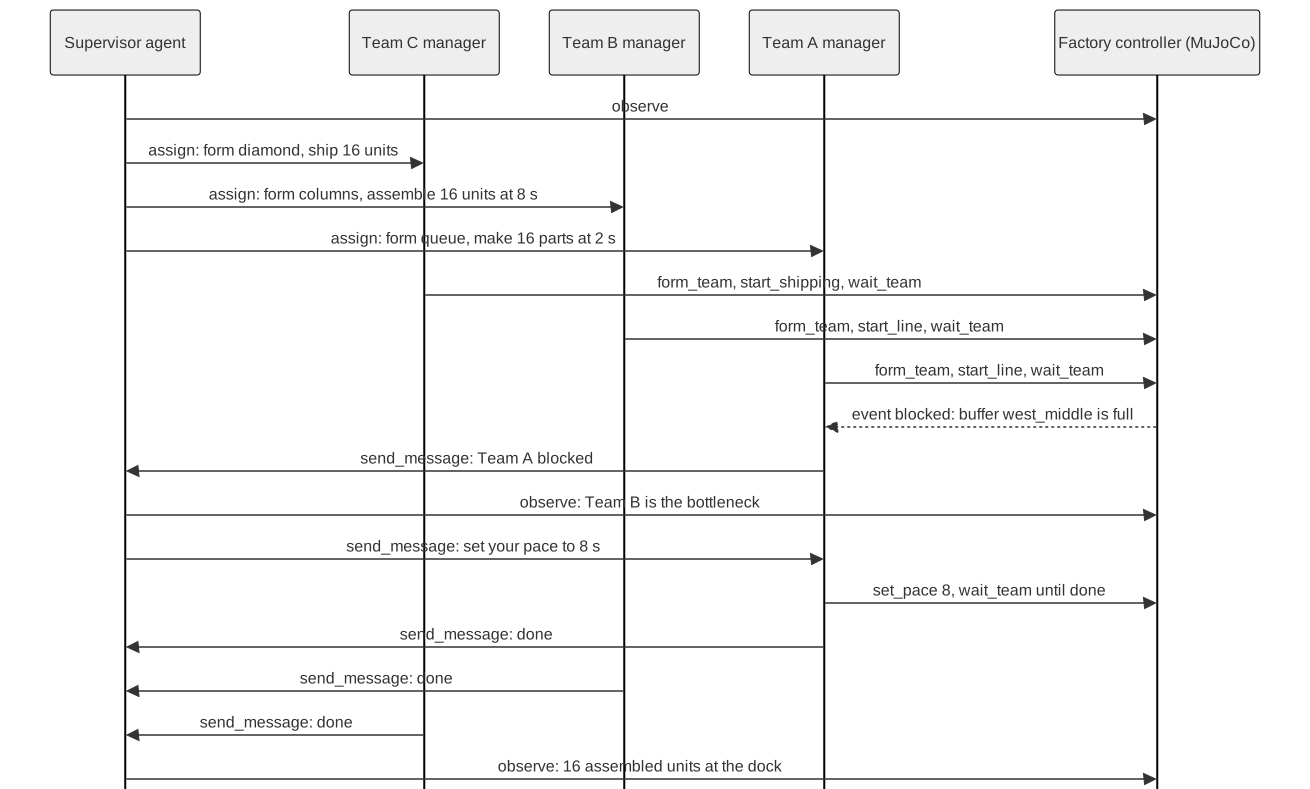
Open the sequence diagram at full size.
What a run looks like
A run takes approximately 4 to 6 minutes. The controller writes one line for each tool call, with the agent that made the call, and one line for each status change of a command. This excerpt shows the action lines of one run, without the times, the run ID, and the observe and wait_team calls:
factory east team manager called form_team(command_id=form-1, formation=diamond)
factory actor=east command=form-1 operation=form_team status=finished reason=None
factory east team manager called start_shipping(command_id=ship-1, units=16, batch=2, routine=['spin', 'turn', 'run'])
factory middle team manager called form_team(command_id=form-1, formation=columns)
factory middle team manager called start_line(command_id=line-1, parts=16, cycle_seconds=8.0)
factory west team manager called form_team(command_id=form-1, formation=queue)
factory west team manager called start_line(command_id=line-1, parts=16, cycle_seconds=2.0)
[... Team A blocks; its manager reports, and the supervisor answers ...]
factory west team manager called set_pace(command_id=pace-1, cycle_seconds=8.0)
factory actor=west command=line-1 operation=start_line status=finished reason=None
factory actor=middle command=line-1 operation=start_line status=finished reason=None
factory actor=east command=ship-1 operation=start_shipping status=finished reason=None
While the controller runs, it serves a read-only live view at http://127.0.0.1:8767/. The map draws the floor and each robot in the color of its team, with its state lamp. The panel shows the supervisor, each manager with the status of its team, and the action log. The page shows only simulation state, and no credential. The controller answers only requests that are addressed to your own computer, such as 127.0.0.1 or localhost. This blocks DNS rebinding, an attack in which a web page points its own domain name at your computer to read local pages such as the live view.
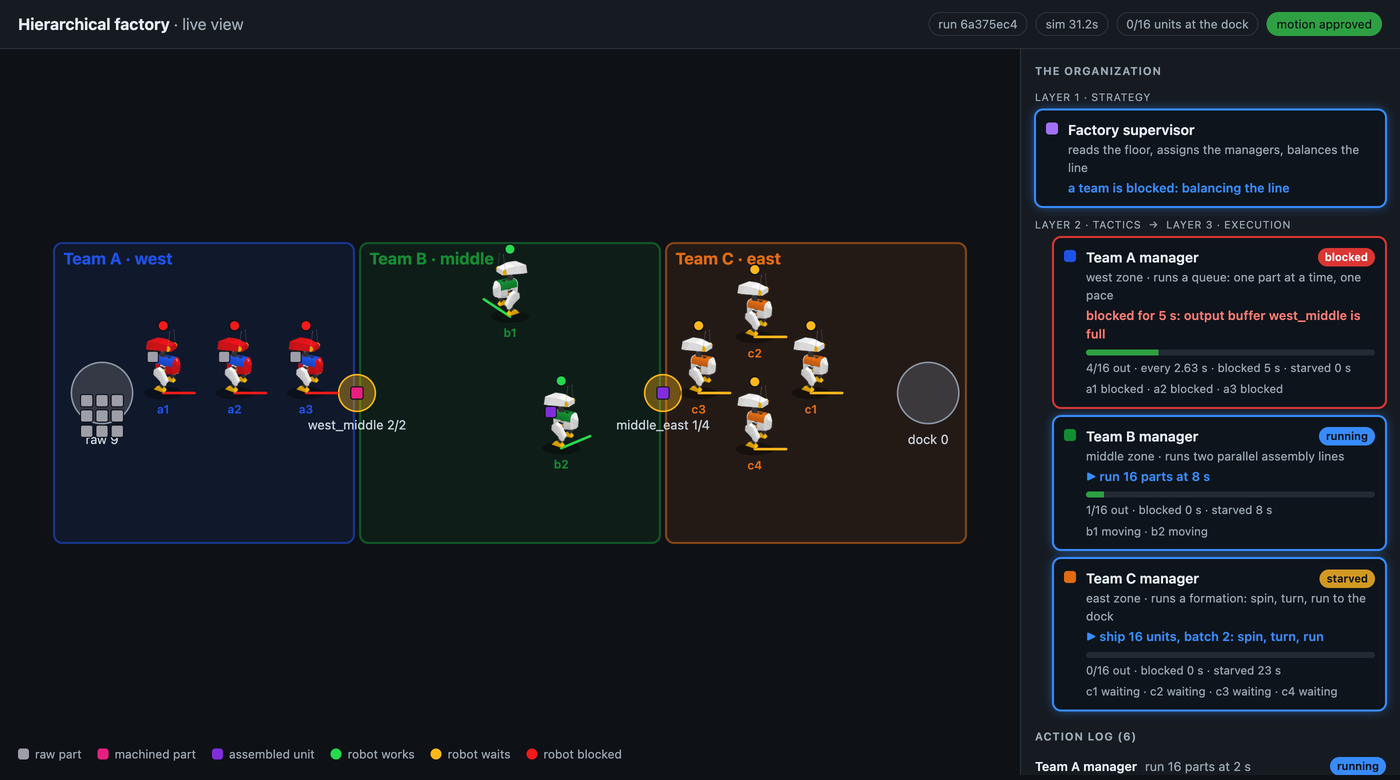
The controller can also save pictures of the MuJoCo world, with demo.py serve --record:
| Team A is blocked | Team C ships | Done |
|---|---|---|
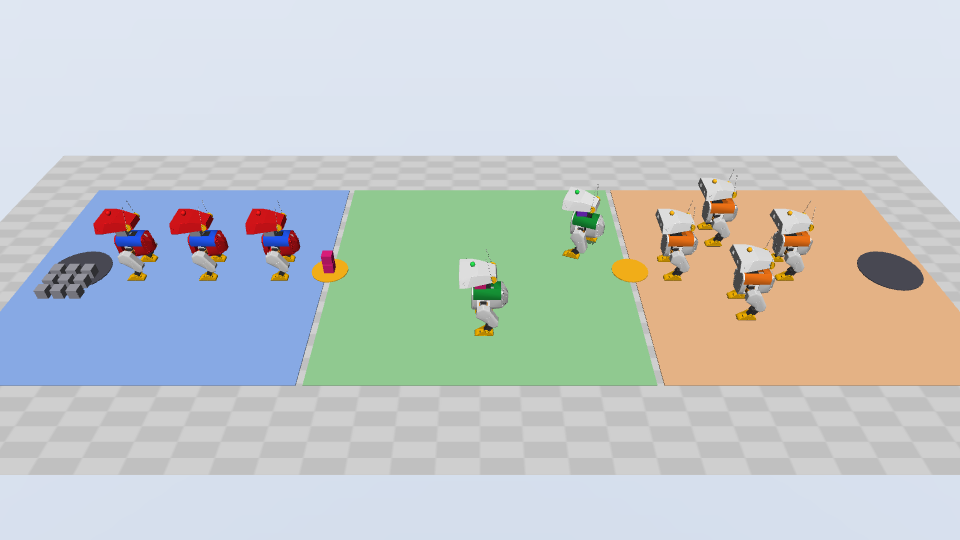 | 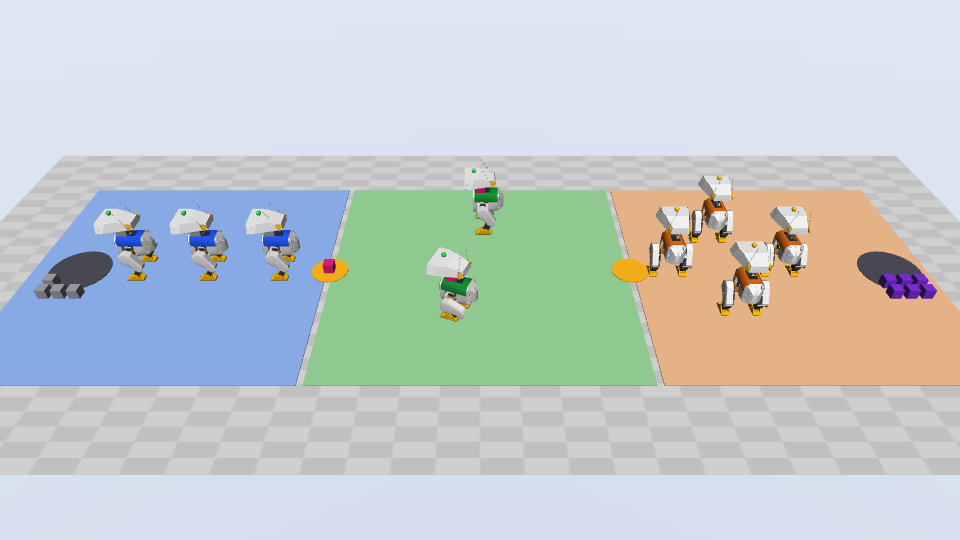 | 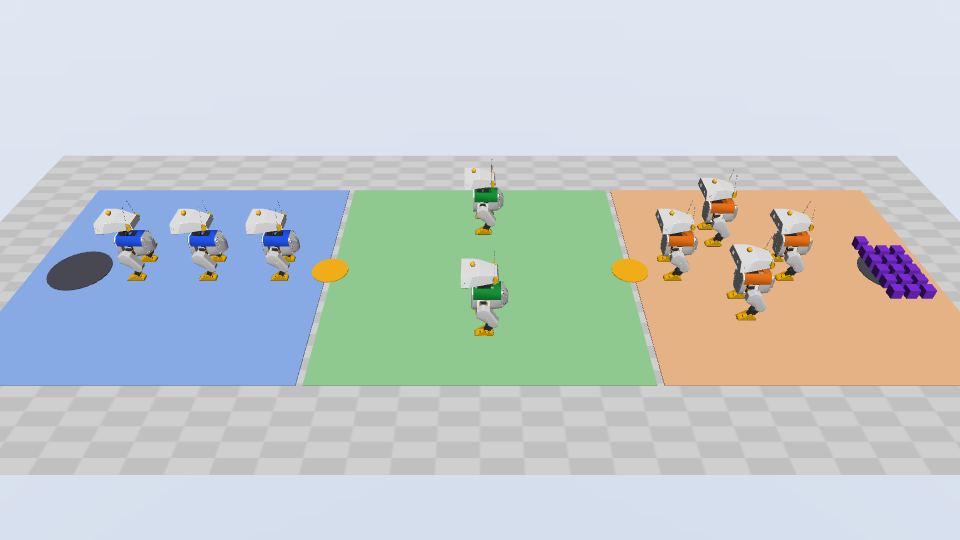 |
The final answer of the supervisor names each manager, the result of each team, the bottleneck, and the pace that it set. This excerpt comes from a run with Claude Code, with the lines wrapped:
The order is complete: 16 assembled units are at the dock, and every team
shows done with output 16 of 16.
[... the organization, and a table of the three teams: formation, pace or
routine, output, average interval, blocked and starved time ...]
Bottleneck and the fix
- Team B, at 8 s, was the slowest step.
- Team A at 2 s filled the 2-part buffer between them and was blocked at 6/16.
- Team B had not yet made enough units for a measured average, so I used its
  8 s cycle time. Team A's pace change to 8 s (set_pace) finished, and Team A
  was never starved afterwards.
- Team C spent most of the run (109 s) waiting for input. Shipping was never
  the limit.
[...]
This is an assisted kinematic MuJoCo simulation, not real robot work.
The supervisor profile asks for that last sentence in every report. Kinematic means that the simulator moves the robots along set paths, and does not calculate forces. Assisted means that a part moves with its robot, with no grasp.
Results
The controller only runs the programs and checks the rules. The agents decide what to do. We ran the example ten times with live agents, with these orders:
| Order | Runs | What the agents did |
|---|---|---|
| 16 units, Team A at 2 s, Team B at 8 s, batches of 2 with spin, turn, run | 3 | Team A blocked in each run. The supervisor found that Team B was the bottleneck, and set Team A to 8 s, the pace of Team B. 16 of 16 assembled units at the dock in each run. |
| 8 units, Team A at 6 s, Team B at 4 s, batches of 4 with turn, run, spin (Copilot CLI) | 1 | Team B was faster than Team A, so no team blocked. 8 of 8 units at the dock. One report of a manager did not arrive, because cao-server stalled. The supervisor checked the floor with observe and reported the gap. |
Make, assemble, and ship 30 units. | 1 | Refused: the raw store has only 16 parts. The supervisor assigned no manager. No command to any robot. |
Make, assemble, and ship all the parts., with no pace in the order | 1 | The supervisor used the defaults of its profile: Team A at 2 s, Team B at 4 s, and batches of 2. Team B measured 5.84 s for each unit, so after the block the supervisor set Team A to 6 s. 16 of 16 units at the dock. |
A routine with no run: spin, turn | 2 | In the first run, the supervisor assigned the managers. The controller rejected start_shipping with routine_needs_one_run, but Teams A and B had started, so units stayed in the buffers, and the supervisor stopped and reported. We added the routine check to the supervisor profile, before any assign. In the second run, the supervisor refused, assigned no manager, and sent no command to any robot. |
A routine of seven moves: spin, turn, spin, turn, spin, turn, run | 1 | Refused: the routine is longer than the max_routine_moves of Team C, 6. The supervisor assigned no manager, and the controller logged no command. The supervisor suggested routines of 5 and 6 moves. |
| A stop by the operator while the teams work | 1 | The three programs became interrupted, reason operator_stop. The robots stopped where they were, and the controller rejected all later actions. The supervisor reported the stop. |
Across the ten runs, the supervisor changed the pace of a team only after a block report. Each order that the floor could not do ended with no command to any robot, except the first run with no run, before the fix below.
The runs also showed four things that we fixed in the example:
- A check after the start. With the routine that had no
run, the controller rejected the shipping program, but the other teams had already started. The supervisor profile now tells the supervisor to check the whole order, the routine and its length too, before it assigns any manager. The scene holds the length limit, so the supervisor reads it withobserve. - An average of two outputs. In an early run, the supervisor balanced on an average of only two outputs, while the two lines of Team B had just delivered their first units close together. The controller now reports the average only after three outputs.
- A status after a stop. After the operator stop, the status of each team still showed its last value, for example
running. Now the command of an interrupted program showsinterrupted, and its team showsstopped. - An order delivered twice. In some runs, CAO delivered the order to the supervisor a second time. The supervisor profile now says to run the order once, and in each of those runs the supervisor said so in its report and did not assign the managers again.
The tests of the example did not find these four problems. Each one came from a live run.
The new pace does not make the line faster. Team B sets the pace of the line, so the order takes the same time with or without the new pace. The new pace reduces the time that Team A waits. We replayed the commands of a live run in the simulator, with no new pace: then the robots of Team A are blocked for 56 s. With the pace of the supervisor, they were blocked for 26 s in one live run. In another run, the new pace took about a minute to arrive, and they were blocked for 50 s. The sooner the supervisor answers, the less Team A waits.
From the simulation to real robots
This example does not control real robots. It has no robot driver and no connection to robot hardware. It simulates the coordination layers above the robots: the plan, the teams, and the balance of the line.
What the simulation stands for
| In this example | On a real site |
|---|---|
| The supervisor agent | A plant or shift planner that sets the order and the targets of each area |
| A manager agent | The team lead or the cell controller of one line or one area |
A team program (start_line, start_shipping) | A job that the cell controller sends to its machines, for example a VDA 5050 order to a fleet of mobile robots |
set_pace after a block | Line balancing: the teams before the bottleneck work at its pace |
| A buffer with a capacity | A conveyor or a staging area between two cells |
observe and wait_team | The state that the cell controllers report |
| The credential of each manager | A separate access key for the cell controller of each area |
demo.py stop | A stop request in software. It does not replace the emergency stop and the safety system of the robots. |
How the parts of the example map to a real site
The structure on the CAO side stays the same: one profile for each role, the tool allowlists, assign, and send_message. The MCP server behind factory-sim and the parts below it change:

The text of each profile changes too: today each profile says that it runs a simulation and must not contact physical robots. MCP servers that connect agents to robots exist, for example ROS-MCP-Server for robots that use the Robot Operating System (ROS). The example does not include such a server.
What real robots need in addition
The example does not supply these items:
- A connection from the MCP server to the cell controller or fleet manager of each area.
- A safety system on the robots. The agents do not make the robots safe. The robots and their controllers must stop for people and obstacles without the agents. Standards such as ISO 10218-1:2025 for industrial robots and ISO 3691-4:2023 for driverless industrial trucks still apply.
- Tests on the real site, with people who monitor the robots.
The agents decide in seconds what to do next. The robots and their controllers keep the fast loop that keeps people and machines safe.
Prerequisites
- CAO from
main, from 2026-10-23 or later, or the first release after 2.5.4. Install it withuv tool install git+https://github.com/awslabs/cli-agent-orchestrator.git@main --upgrade. The managers need two changes that are onmainbut not yet in a release: #972 and #948. Architecture overview explains why. - The versions of our runs. Three of the ten runs in Results used CAO 2.5.3 (commit
88f3af0c): two runs of the demo order, and the run with Copilot CLI. They came before the manager allowlist of this post. The other seven runs usedmainwith that allowlist. The six scenario runs used commitf63fffec(version string 2.5.4). - tmux 3.3 or later, and uv, a Python package manager, on macOS or Linux. Python 3.11 or later.
- A provider CLI that you have signed in to, for example Claude Code, Copilot CLI, or Kiro CLI. These three enforce the tool allowlist of each agent.
- No GPU, no display, and no robot hardware. The robot model is an 18 MB download.
- Time to complete: approximately 25 minutes. The agents work for 4 to 6 of them.
- Estimated cost: the example creates no AWS resources. The cost is the model usage of your provider CLI, for four agents during a few minutes.
Try it
Clone the repository, install the example, download the robot model, and prepare a run:
git clone https://github.com/awslabs/cli-agent-orchestrator.git
cd cli-agent-orchestrator
cd examples/robotics/hierarchical-factory
uv sync --locked
uv run --locked python demo.py fetch-robot
export RUN_DIR=/tmp/cao-factory-demo
REQUEST="Make, assemble, and ship 16 units. Start Team A at 2 s and Team B at 8 s. Ship in batches of 2 with the routine spin, turn, run."
uv run --locked python demo.py prepare --run-dir "$RUN_DIR" --request "$REQUEST" --provider claude_code
Then continue at Step 3 of the README. The README uses three terminals: this one, one for the MuJoCo controller, and one for cao-server. It starts the controller, installs one run copy of a profile for each agent, launches the supervisor, and shows what to watch, with the live view. When you finish, follow its Stop and clean up steps. They stop the simulation and the CAO session, and they remove the profiles and the run directory.
Conclusion
To run a line, a team of agents must let the teams work at the same time, keep each manager inside its own team, decide only what can wait some seconds, balance the line from measured state, and fail safe. The hierarchical factory example shows how CAO sets up such a digital team: one supervisor, and one manager for each robot team. It runs on a laptop, with open-source robots in simulation and no robot hardware.
To get started:
- Install the example, and download the robot model (approximately 3 minutes).
- Prepare a run, and start the controller with the live view (approximately 3 minutes).
- Install the four agent profiles, and launch the supervisor (approximately 2 minutes).
- Watch the agents balance the line, and check the result (approximately 6 minutes).
- Try a scenario from the README, for example another routine for Team C (approximately 10 minutes).
Try the example, and tell us what you build in GitHub Discussions.
For more information:
- The README of the hierarchical factory example
- Why physical AI needs multi-agent orchestration, the first post of this series
assign,send_message, and agent profiles in the CAO documentation- Open Duck Mini and the MuJoCo documentation
About the authors
Haofei Feng
Haofei is a Senior Cloud Architect at AWS with over 20 years of expertise in DevOps, IT Infrastructure, Data Analytics, and AI. He specializes in guiding organizations through cloud transformation and generative AI initiatives, designing scalable and secure GenAI solutions on AWS. Based in Sydney, Australia, when not architecting solutions for clients, he cherishes time with his family and Border Collies.
Yin Song
Yin Song is a Senior Applied Scientist at AWS Prototyping and Scaling with over ten years of industry experience in machine learning and AI since completing his PhD in 2014, and over five years building tailored prototypes and scaling solutions for complex AWS use cases. He is an open-source advocate whose models, including FalconLite, MistralLite and MegaBeam, have passed 900,000 downloads on HuggingFace, and he is a main contributor to strands-robots, bringing agentic AI to robotics, with a growing interest in world models and Gaussian Splatting for 3D reconstruction from real capture. Based in Sydney, Australia, when not prototyping for customers he spends time with his family and his cat.