Apache Celeborn: Best Practices
Apache Celeborn is a Remote Shuffle Service (RSS). It moves Spark shuffle data off executor disks onto dedicated worker nodes, which lets you use true dynamic allocation and removes the local-disk shuffle bottleneck at scale.
Validated with Celeborn 0.6.2 on Amazon EKS 1.30+. TPC-DS 10 TB benchmark ran for 15+ hours including rolling restarts under active shuffle load. Zero job failures. Zero task failures.
TL;DR
| # | Area | Recommendations | Reasons |
|---|---|---|---|
| 1 | Masters | Deploy 3 masters, one per AZ | Raft needs a majority (2/3). One AZ down, control plane keeps running. |
| 2 | Workers | Keep all workers in a single AZ, co-located with executors | Cross-AZ shuffle costs $0.01/GB. When an AZ fails, its executors die too, so spreading workers buys nothing. |
| 3 | Instance Type Selection | r8g.8xlarge for small/medium, r8g.12xlarge or r8g.16xlarge for large, r8gd.16xlarge or i4i.16xlarge for I/O-bound | Start with 6 workers and scale out before scaling up. r8g.8xlarge ran 10 TB TPC-DS at under 20% disk and under 1% CPU. More workers distribute both network and disk load better than fewer larger instances. |
| 4 | Storage | Use EBS for most teams. NVMe only after profiling confirms I/O bottleneck | EBS volumes follow pods across nodes, resize online, and survive node failures without replication. |
| 5 | Replication | Enable spark.celeborn.client.push.replicate.enabled: "true" for jobs that need zero-downtime worker restarts or use NVMe storage | Mandatory for NVMe (data lost on node failure). Strongly recommended for EBS to enable rolling restarts without job failures. Trade off: 2x network and storage cost vs recomputation cost and dynamic allocation benefits. |
| 6 | Ports | Set all 4 worker ports to fixed values (9091 to 9094) | Dynamic port=0 triggers AssertionError on every graceful shutdown. |
| 7 | Graceful shutdown | celeborn.worker.graceful.shutdown.enabled: "true" | Without it, abrupt worker exit causes Spark jobs to hang. |
| 8 | Local shuffle reader | spark.sql.adaptive.localShuffleReader.enabled: "false" on every job | If true, Spark reads from executor local disks where Celeborn data does not exist. Jobs fail with FileNotFoundException. |
| 9 | terminationGracePeriodSeconds | Set to at least 720s (600s graceful shutdown + 120s buffer) | Kubernetes default is 30s. If too short, SIGKILL fires before graceful shutdown completes, corrupting data and causing job failures. Must exceed celeborn.worker.graceful.shutdown.timeout. |
| 10 | DNS registration | celeborn.network.bind.preferIpAddress: "false" | Workers register with pod IPs by default. Pod IPs change on restart, so the master ends up with stale mappings and clients can't reconnect. DNS names are stable. |
| 11 | Rolling restarts | Use decommission API before pod deletion, with appropriate delay between workers | Decommission stops new writes to the worker before shutdown. Delay between workers depends on job characteristics and shuffle volume. See Day 2 Operations section for procedures. |
| 12 | Decommission API | Use decommission API before worker restarts or pod deletions | Recommended by Apache Celeborn for production operations. Stops new writes to the worker and provides explicit coordination with the master before shutdown. See Day 2 Operations for procedures. |
| 13 | Shuffle sizing | Don't provision storage based on dataset size | A 10 TB dataset produced only 4.7 TB of shuffle (19.7% disk utilization). Peak concurrent shuffle is 5 to 15% of total dataset, not 100%. |
Table of Contents
- Architecture Fundamentals
- Decision 1: AZ Topology
- Decision 2: Instance Type by Scale
- Decision 3: EBS vs NVMe Storage
- Configuration
- Day 2 Operations
- Monitoring
- Troubleshooting
Architecture Fundamentals
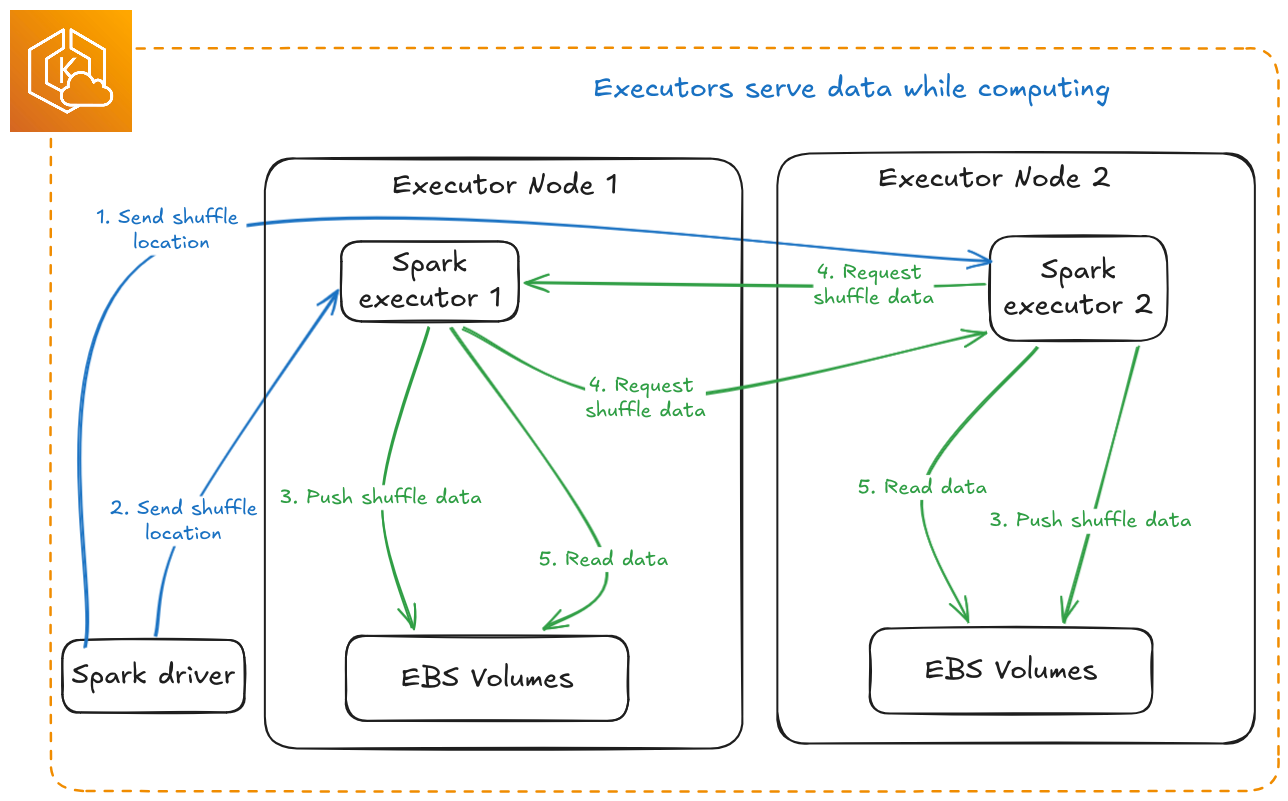
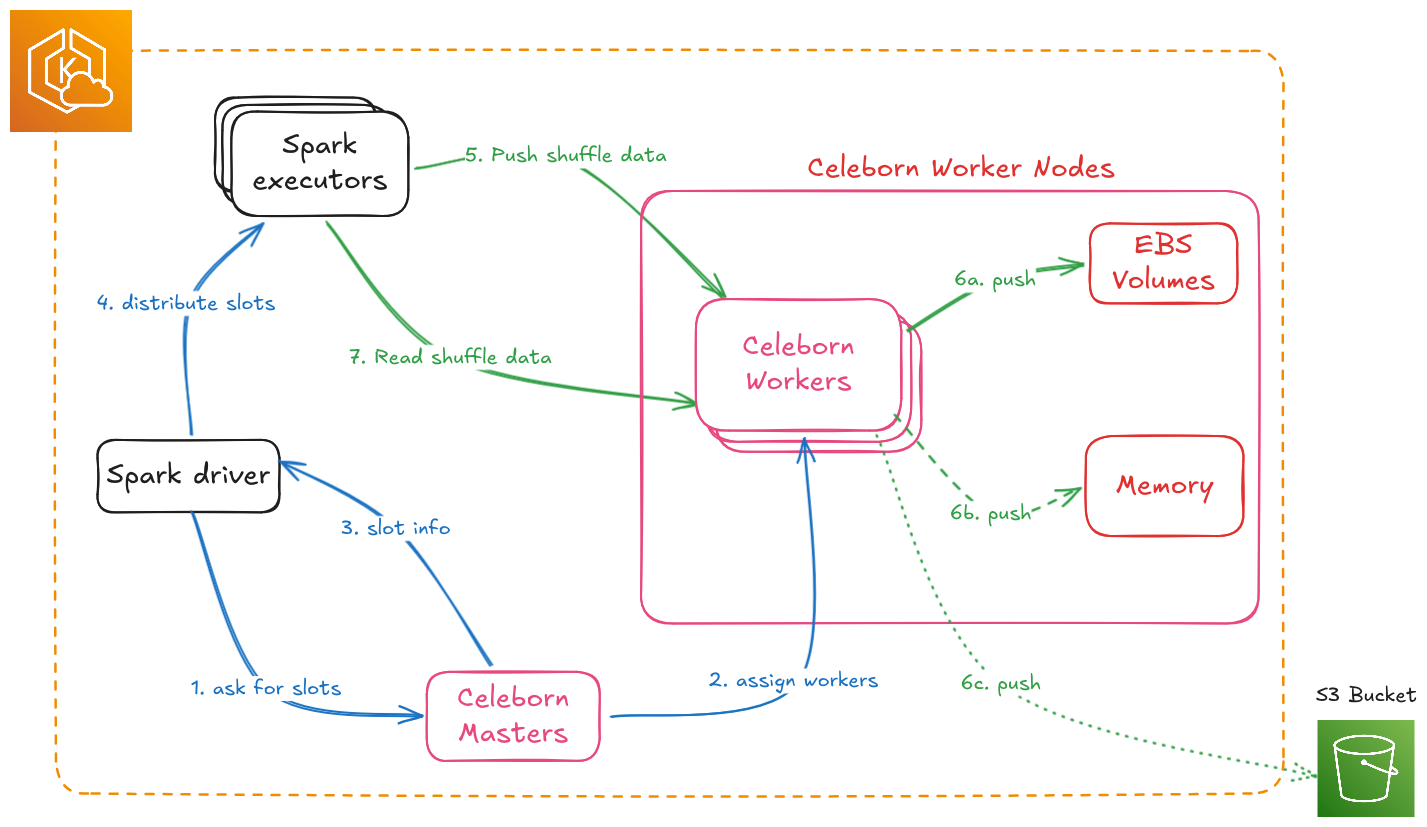
Three components:
- Masters (3+): Slot assignment, worker health tracking, and shuffle metadata. Uses Raft consensus for HA, so deploy as odd numbers: 3, 5, or 7.
- Workers (N): Shuffle data storage and serving. Scale horizontally. One pod per node is enforced by the official Helm chart and is not negotiable for performance.
- Spark Client: Embedded in executors. Handles retries, replica selection, and failover.
Sizing ratio (from official Celeborn planning docs):
vCPU : Memory (GB) : Network (Gbps) : Disk IOPS (K) = 2 : 5 : 2 : 1
A worker with 32 vCPU ideally pairs with 80 GB RAM, 32 Gbps network, and 16K IOPS. Use these ratios to sanity-check your instance choices.
:::tip When to Use Celeborn Not all Spark workloads need Celeborn. Use it when you need:
- Dynamic allocation: scale executors up and down without losing shuffle data
- Large shuffle volumes: more than 100 GB of shuffle data per job
- High concurrency: multiple jobs sharing the same shuffle infrastructure
- Fault tolerance: survive executor failures without recomputing stages
For small jobs under 10 GB shuffle, streaming workloads, or single-executor jobs, standard Spark shuffle is sufficient. :::
Decision 1: AZ Topology
Masters: Spread Across 3 AZs
Deploy one master per AZ, three total. Raft requires a majority, so 2 out of 3. If one AZ goes down, the remaining two masters keep Celeborn's control plane running. Masters hold only metadata, so cross-AZ master traffic is negligible.
Spreading masters across AZs is the main reason multi-AZ matters for Celeborn at all. After an AZ failure you can provision new worker nodes in a surviving AZ right away without touching the master configuration.
Workers: Single AZ, Co-Located with Executors
Keep workers in the same AZ as your Spark executor nodes. Do not spread workers across AZs.
Every shuffle push (executor to worker) and every fetch (worker to executor) that crosses an AZ boundary costs $0.01/GB on AWS. With replication that cost doubles. At terabyte-scale shuffle volumes the bill adds up fast. More importantly, if an AZ fails, the Spark executors in that AZ fail with it. The job is lost regardless of where the workers are. Spreading workers across AZs only adds cost and latency with no practical resilience benefit.
One thing to watch: this only works cleanly if your Spark executor node pools are also AZ-pinned. EKS creates multi-AZ node groups by default. If your executors spread across AZ1, AZ2, and AZ3 but workers are only in AZ1, two-thirds of your executors pay cross-AZ costs on every push and fetch. Pin executor node pools to the same AZ as workers using Karpenter NodePool constraints.
# Karpenter NodePool: pin Celeborn workers to a single AZ
spec:
  template:
    spec:
      requirements:
        - key: topology.kubernetes.io/zone
          operator: In
          values: ["us-east-1a"]   # same AZ as your Spark executor node pool
        - key: karpenter.sh/capacity-type
          operator: In
          values: ["on-demand"]
AZ failure recovery sequence:
- AZ1 fails, workers in AZ1 go down, in-flight jobs fail because executors in AZ1 are also gone
- Masters in AZ2 and AZ3 remain running (Raft majority intact)
- Scale up new Celeborn worker nodes in AZ2. The masters register them automatically.
- New Spark jobs run against workers in AZ2
- Recovery time is roughly the time to provision nodes plus worker startup, around 2 to 3 minutes with Karpenter
The single-AZ worker plus 3-AZ master setup gives you the right tradeoff. Normal operations have zero cross-AZ shuffle costs, and after an AZ failure you can recover quickly without redeploying or reconfiguring the masters.
Decision 2: Instance Type by Scale
Shuffle Volume is Not Dataset Size
The most common sizing mistake is assuming shuffle data scales linearly with dataset size. It doesn't. For analytical workloads like TPC-DS, peak concurrent shuffle is typically 5 to 15% of total dataset size, depending on query mix, parallelism, and concurrency.
Validated with TPC-DS 10 TB benchmark:
| Metric | Value |
|---|---|
| Dataset size | 10 TB |
| Total shuffle written | 4.7 TB (4,736 GB across 6 workers) |
| Shuffle as % of dataset | 47% |
| Disk utilization | 19.7% (4.7 TB / 24 TB capacity) |
| CPU usage | Less than 1% |
| Memory usage | Around 2% |
| Cluster | 6 x r8g.8xlarge, 4 x 1 TB EBS gp3 per worker (24 TB total) |
Per-worker distribution: 937 GB (24%), 878 GB (22%), 993 GB (25%), 817 GB (21%), 637 GB (16%), 474 GB (12%).
The r8g.8xlarge handled 10 TB TPC-DS comfortably with minimal pressure on CPU, memory, disk, and network. When you need more capacity, add workers rather than moving to larger instances. More workers spread both the network and disk load.
Scale Tiers
| Scale Tier | Typical Dataset | Peak Concurrent Shuffle | Workers | Instance | Storage |
|---|---|---|---|---|---|
| Small | Less than 10 TB | Less than 500 GB | 3 to 6 | r8g.8xlarge | EBS gp3 (4 x 1 TB) |
| Medium | 10 to 100 TB | 500 GB to 5 TB | 6 to 20 | r8g.8xlarge | EBS gp3 (4 x 1 TB) |
| Large | 100 to 500 TB | 5 to 20 TB | 20 to 80 | r8g.12xlarge | EBS gp3 (4 x 2 TB) |
| Very Large / I/O-bound | More than 500 TB or confirmed I/O bottleneck | More than 20 TB | 50 to 200+ | r8gd.16xlarge or i4i.16xlarge | NVMe |
For Small and Medium scale, r8g.8xlarge with 4 x 1 TB EBS is the right starting point. Start with 6 workers and add more as shuffle volume grows. Don't move to larger instances without first checking whether you're actually I/O-bound.
Large-Scale Instance Comparison
Once you've scaled out and still need more capacity per worker:
| r8g.12xlarge | r8g.16xlarge | r8gd.16xlarge | i4i.16xlarge | |
|---|---|---|---|---|
| vCPU | 48 | 64 | 64 | 64 |
| RAM | 384 GB | 512 GB | 512 GB | 512 GB |
| Network | 22.5 Gbps | 30 Gbps | 30 Gbps | 37.5 Gbps |
| EBS Bandwidth | 15 Gbps | 20 Gbps | 20 Gbps | 20 Gbps |
| Local NVMe | None | None | 2 x 1.9 TB | 4 x 3.75 TB |
| Architecture | arm64 | arm64 | arm64 | x86-64 |
| Best for | Large-scale EBS, concurrency sweet spot | High-memory EBS | NVMe on Graviton4 | Maximum NVMe density |
Choose r8g.12xlarge or r8g.16xlarge when you've already scaled out to 20 or more r8g.8xlarge workers and still need more capacity per node. If network or memory is your constraint, these instances pair well with EBS and give you persistent storage, online resize, and resilience to node failures.
Choose i4i.16xlarge when profiling confirms disk I/O is the actual bottleneck. You get 15 TB of local NVMe (4 x 3.75 TB) but the operational bar is higher: replication is highly recommended, you rotate one node at a time, and there is no online resize.
The r8g family, including r8g.16xlarge, has no local NVMe and uses EBS only. For NVMe on Graviton4 use the r8gd variant. Do not mix arm64 instances (r8g, r8gd) and x86-64 instances (i4i) in the same StatefulSet.
Decision 3: EBS vs NVMe Storage
Comparison
| EBS gp3 | EBS io2 Block Express | NVMe (i4i / r8gd) | |
|---|---|---|---|
| IOPS | Up to 80K/volume | Up to 256K/volume | 500K to 1M+ per disk |
| Throughput | Up to 2 GB/s/volume | Up to 4 GB/s/volume | 7 to 14 GB/s aggregate |
| Max volume size | 64 TiB | 64 TiB | Instance-dependent |
| Data on node failure | ✅ Survives (volume reattaches) | ✅ Survives | ❌ Permanently lost |
| Pod restart data | ✅ PVC reconnects to same volume | ✅ Same | ⚠️ Only if same node |
| Online resize | ✅ Yes | ✅ Yes | ❌ No |
| Replication required | Recommended | Recommended | Mandatory |
| StatefulSet PVC policy | WhenDeleted: Retain | WhenDeleted: Retain | WhenDeleted: Delete |
| Operational complexity | Low | Low | High |
EBS: The Right Default for Most Teams
EBS gp3 with StatefulSets is the safest and most operationally simple choice for Celeborn on EKS:
- Persistent volumes follow pods: When a pod terminates, the EBS volume detaches and reattaches to the replacement pod, even if it lands on a different node. Shuffle data survives node failures, AMI updates, and EKS upgrades without needing replication.
- Online resize: Grow volumes without restarting pods. See Storage Vertical Scaling.
- Simple rolling updates: Workers restart in around 70 seconds. With replication enabled there is no shuffle data loss.
Use 4 gp3 volumes per worker, configured with provisioned IOPS for medium and large scale:
# Helm values: EBS storage configuration
worker:
  storage:
    - mountPath: /mnt/disk1
      storageClass: gp3
      size: 2000Gi
    - mountPath: /mnt/disk2
      storageClass: gp3
      size: 2000Gi
    - mountPath: /mnt/disk3
      storageClass: gp3
      size: 2000Gi
    - mountPath: /mnt/disk4
      storageClass: gp3
      size: 2000Gi
NVMe: For Large-Scale I/O-Bound Workloads
At large scale (more than 5 to 10 TB concurrent shuffle), once you've confirmed disk I/O is the bottleneck, NVMe instance stores provide dramatically higher IOPS at lower latency than EBS. The tradeoff is strict operational discipline.
NVMe operational requirements:
1. Use Kubernetes Local Static Provisioner
NVMe instance stores are not managed by EBS. Use the Kubernetes Local Static Provisioner to expose NVMe disks as PersistentVolumes.
# Local PV has node affinity, so the pod is pinned to the node with this volume
apiVersion: v1
kind: PersistentVolume
spec:
  capacity:
    storage: 3500Gi
  storageClassName: local-nvme
  local:
    path: /mnt/fast-disk
  nodeAffinity:
    required:
      nodeSelectorTerms:
        - matchExpressions:
            - key: kubernetes.io/hostname
              operator: In
              values: ["node-xyz"]
2. Pod restart must return to the same node
Because local PVs have node affinity, a Celeborn worker pod can only reconnect to its NVMe data if it restarts on the exact same node. If it gets scheduled onto a different node the pod gets stuck in Pending.
Set PVC retention to Delete rather than Retain for NVMe StatefulSets. This lets a new pod on a different node create a fresh local PV. The old NVMe data is permanently lost, which is acceptable because replication on another worker already has the data.
persistentVolumeClaimRetentionPolicy:
  whenDeleted: Delete   # lets a new pod on a different node create a fresh local PV
  whenScaled: Delete
3. Replication is highly recommended
With NVMe, a node failure means permanent data loss. Highly recommended to enable replications for critical jobs:
sparkConf:
  spark.celeborn.client.push.replicate.enabled: "true"
4. Rotate one node(one worker pod per node) at a time, never two at once
With replication enabled, each shuffle partition exists on 2 workers. If you restart 2 workers at the same time, there is a window where some partitions have zero live copies. Always rotate sequentially: decommission, drain, wait for re-registration, then move to the next worker.
5. Set terminationGracePeriodSeconds appropriately
The terminationGracePeriodSeconds must be longer than celeborn.worker.graceful.shutdown.timeout (600s by default) to allow graceful shutdown to complete before Kubernetes sends SIGKILL.
spec:
  template:
    spec:
      terminationGracePeriodSeconds: 720  # Must exceed graceful shutdown timeout (600s) + buffer
      containers:
        - name: celeborn-worker
          lifecycle:
            preStop:
              exec:
                command: ["/bin/sh", "-c", "/opt/celeborn/sbin/decommission-worker.sh"]
Why 720s (12 minutes)?
- Celeborn graceful shutdown timeout: 600s (10 minutes)
- Buffer for decommission API call and cleanup: 120s (2 minutes)
- If
terminationGracePeriodSecondsis too short, Kubernetes sends SIGKILL before graceful shutdown completes, causing data corruption
For NVMe specifically: While decommission typically drains in 0-5 seconds (only waits for in-flight writes), the graceful shutdown process still needs the full 600s to flush buffers and save metadata to RocksDB. The longer grace period ensures this completes even under heavy load.
Configuration
Test-Validated Configuration (TPC-DS 10 TB)
This configuration was validated over 15+ hours with rolling restarts running during active shuffle. Zero job failures, zero executor losses, zero task failures.
Cluster:
- 6 x r8g.8xlarge workers (32 vCPU, 256 GB RAM, 15 Gbps)
- 4 x 1 TB EBS gp3 per worker (24 TB total)
- 3 x r8g.xlarge masters (8 GB heap each)
- 32 Spark executors with dynamic allocation
Server-Side (Helm Values)
celeborn:
  # Fixed ports are required when graceful shutdown is enabled.
  # Setting port=0 (dynamic) causes AssertionError during graceful shutdown restart.
  celeborn.worker.rpc.port: "9091"
  celeborn.worker.fetch.port: "9092"
  celeborn.worker.push.port: "9093"
  celeborn.worker.replicate.port: "9094"

  # Graceful shutdown persists shuffle metadata to RocksDB before the worker restarts,
  # so the worker can serve existing shuffle files after it comes back up.
  celeborn.worker.graceful.shutdown.enabled: "true"
  celeborn.worker.graceful.shutdown.timeout: "600s"
  celeborn.worker.graceful.shutdown.checkSlotsFinished.interval: "1s"
  celeborn.worker.graceful.shutdown.checkSlotsFinished.timeout: "480s"

  # RocksDB metadata is stored on the node root filesystem (/var), not on the EBS PVC.
  # If the pod lands on a different node after restart, this metadata won't be there.
  # The worker starts cleanly without knowledge of prior shuffle partitions.
  # That's fine because replication covers data availability and Spark retries
  # handle the resulting fetch errors transparently.
  celeborn.worker.graceful.shutdown.recoverPath: "/var/celeborn/rocksdb"

  # DNS-based worker registration is required for stable re-registration after restart.
  # Without this, workers register with pod IPs which are ephemeral. After restart the
  # IP changes, clients can't reconnect, and the master has a stale mapping.
  celeborn.network.bind.preferIpAddress: "false"

  # Give extra time for EBS volume reattachment, which can take 60 to 120 seconds on EKS.
  # Without this the master fires false "worker lost" events during node replacements.
  celeborn.master.heartbeat.worker.timeout: "180s"

  # Tiered storage: MEMORY for hot shuffle data, SSD for overflow.
  # Capacity values are set ~10% below physical disk size to leave headroom.
  celeborn.storage.availableTypes: "MEMORY,SSD"
  celeborn.worker.storage.dirs: "/mnt/disk1:disktype=SSD:capacity=900Gi,/mnt/disk2:disktype=SSD:capacity=900Gi,/mnt/disk3:disktype=SSD:capacity=900Gi,/mnt/disk4:disktype=SSD:capacity=900Gi"
  celeborn.worker.storage.storagePolicy.evictPolicy: "LRU"

  celeborn.master.slot.assign.policy: "ROUNDROBIN"
  celeborn.master.slot.assign.maxWorkers: "10000"
Client-Side (Every Spark Job)
sparkConf:
  spark.shuffle.manager: "org.apache.spark.shuffle.celeborn.SparkShuffleManager"
  spark.serializer: "org.apache.spark.serializer.KryoSerializer"
  spark.shuffle.service.enabled: "false"

  # Include all 3 master endpoints so the client can fail over to a healthy master
  spark.celeborn.master.endpoints: "celeborn-master-0.celeborn-master-svc.celeborn.svc.cluster.local:9097,celeborn-master-1.celeborn-master-svc.celeborn.svc.cluster.local:9097,celeborn-master-2.celeborn-master-svc.celeborn.svc.cluster.local:9097"

  # Mandatory for NVMe, strongly recommended for EBS
  spark.celeborn.client.push.replicate.enabled: "true"

  # These retry values are sized for the ~70s EBS restart window.
  # For NVMe clusters where drain takes longer, increase these values.
  spark.celeborn.client.fetch.maxRetriesForEachReplica: "5"
  spark.celeborn.data.io.retryWait: "15s"
  spark.celeborn.client.rpc.maxRetries: "5"

  spark.celeborn.client.spark.shuffle.writer: "sort"
  spark.celeborn.client.shuffle.batchHandleCommitPartition.enabled: "true"

  # This MUST be false. If true, Spark tries to read shuffle data from executor local disks
  # where Celeborn data does not exist, which causes FileNotFoundException and job failure.
  spark.sql.adaptive.enabled: "true"
  spark.sql.adaptive.localShuffleReader.enabled: "false"

  spark.network.timeout: "2000s"
  spark.executor.heartbeatInterval: "300s"
  spark.rpc.askTimeout: "600s"
:::danger These misconfigurations can cause performance degradation. Check these first on any new deployment:
spark.sql.adaptive.localShuffleReader.enabled: "true"— Celeborn is bypassed entirely,FileNotFoundExceptionspark.celeborn.client.push.replicate.enabled: "false"with NVMe storage — node failure causes permanent data loss and job failure- Worker ports set to
0(dynamic) —AssertionErroron every graceful shutdown :::
Large Cluster Tuning (100+ Workers)
Master Sizing
Scale masters vertically as worker count grows:
| Workers | Masters | Instance | Heap |
|---|---|---|---|
| 1–50 | 3 | r8g.xlarge | 8 GB |
| 51–100 | 3 | r8g.2xlarge | 16 GB |
| 101–200 | 5 | r8g.4xlarge | 32 GB |
| 200–500 | 5–7 | r8g.8xlarge | 64 GB |
# JVM tuning for masters
master:
  jvmOptions:
    - "-XX:+UseG1GC"
    - "-XX:MaxGCPauseMillis=200"
    - "-XX:G1HeapRegionSize=32m"
    - "-Xms32g"
    - "-Xmx64g"   # match to the master sizing table above
Worker Tuning
celeborn:
  # Worker thread counts below are a reasonable starting baseline for 100+ concurrent apps.
  # Tune based on actual CPU utilization metrics from your cluster.
  celeborn.worker.fetch.io.threads: "64"
  celeborn.worker.push.io.threads: "64"
  celeborn.worker.flusher.threads: "32"   # NVMe: at least 8 per disk; HDD: no more than 2 per disk
  celeborn.worker.flusher.buffer.size: "256k"
  celeborn.worker.commitFiles.threads: "128"
  celeborn.worker.commitFiles.timeout: "120s"

  # Adjust direct memory ratios based on your worker heap size
  celeborn.worker.directMemoryRatioForReadBuffer: "0.3"
  celeborn.worker.directMemoryRatioForShuffleStorage: "0.3"
  celeborn.worker.directMemoryRatioToResume: "0.5"

  celeborn.master.estimatedPartitionSize.update.interval: "10s"
  celeborn.master.estimatedPartitionSize.initialSize: "64mb"
Day 2 Operations
Common Operations Reference
| Operation | Method | Downtime | Notes |
|---|---|---|---|
| Config or image update | Rolling restart | Zero | Around 70s per worker for EBS |
| EBS volume expansion | Online PVC resize + config update | Zero | No pod restart needed for the resize itself |
| EKS or AMI upgrade | Decommission then drain per node | Zero | See procedure below |
| Instance type change | Blue-green worker pool | Zero | Old and new pools run simultaneously |
| StatefulSet immutable field | Blue-green worker pool | Zero | Required for any template change |
Rolling Restarts
Validated with TPC-DS 10 TB benchmark: 6 workers, 32 executors, active shuffle running throughout the restart. Zero job failures, zero executor losses.
Test Results
| Test | Method | Errors per Worker | Job Impact | Time per Worker | Total Time |
|---|---|---|---|---|---|
| Test 1 | Simple pod delete | 20 to 30 "file not found" | Zero failures | ~70s | ~13 min |
| Test 2 | Decommission API first | 62 errors (worker-5), 0 (worker-4) | Zero failures | ~70s | ~13 min |
Simple Restart with Replication
:::caution Not Recommended for Production While our tests showed that simple pod restarts with replication enabled can work (zero job failures, zero executor losses), we do not recommend this approach for production environments.
Production recommendation: Always use the decommission API when performing rolling restarts or pod updates. The decommission API provides explicit coordination with the master, cleaner shutdown signals, and better observability - all critical for production operations.
The simple restart approach documented below is useful for understanding how Celeborn's replication and retry mechanisms work, but production deployments should use the decommission-based approach described in the next section. :::
# Rolling restart: validated approach (testing/development only)
cd data-stacks/spark-on-eks/benchmarks/celeborn-benchmarks
./rolling-restart-celeborn.sh 120  # 120s pause between workers
Why this works:
- ✅ Graceful shutdown (600s timeout) flushes in-flight data before the pod exits
- ✅ Replication ensures data is available from another worker during the restart
- ✅ Spark retries (5 retries at 15s each) handle all transient fetch errors automatically
- ✅ 120s delay gives the worker time to re-register before the next restart begins
- ✅ Zero job failures, zero executor losses across all tested restarts
What is normal during a restart:
FileNotFoundExceptionerrors in the range of 20 to 30 per worker. Executors automatically fetch from replicas.- Connection timeouts during the ~70s restart window
- Revive events redirecting writes to other workers
These four things must all be in place:
- Replication must be enabled. Without it any worker restart causes job failure.
- Graceful shutdown must be enabled. Skipping it causes data corruption.
- Fixed ports must be configured. Dynamic ports trigger AssertionError on shutdown.
- 120s delay between restarts. Less than this and the next restart can start before the previous worker has re-registered.
Doing a rolling restart without graceful shutdown is not safe. GitHub issue #3539 documents the failure mode: abrupt worker termination causes Spark jobs to hang with "CommitManager: Worker shutdown, commit all its partition locations".
Production Approach: Decommission API
This is the recommended approach for production environments. The decommission API provides explicit coordination with the master and cleaner operational semantics.
# Decommission-based restart: production recommended
cd data-stacks/spark-on-eks/benchmarks/celeborn-benchmarks
./rolling-restart-celeborn-with-decommission.py --namespace celeborn --release celeborn
Why use decommission for production:
- ✅ Explicit coordination with the master before shutdown
- ✅ Cleaner shutdown signals in logs and monitoring
- ✅ Better observability for automated operations
- ✅ Recommended by Apache Celeborn for production deployments
Decommission workflow:
- Send decommission request to worker API
- Worker stops accepting new shuffle writes
- Master redirects new writes to other workers
- Worker drains in-flight operations (typically 0-5 seconds)
- Delete pod, wait for re-registration
- 120s stability wait before next worker
Decommission drain time is typically 0-5 seconds because it only waits for in-flight writes to complete, not for data migration. Existing shuffle files remain on disk and rely on replicas for availability during the restart.
Storage Vertical Scaling
EBS volumes backing Celeborn workers can be resized and have their IOPS and throughput changed online — without pod restarts, without data movement, and without any impact to in-flight Spark shuffle jobs.
Step 1 — Ensure the VolumeAttributesClass is deployed. The celeborn-gp3-high VAC (10,000 IOPS / 1,000 MiB/s) is applied automatically by Terraform as part of the Celeborn stack, alongside the StorageClass:
# infra/terraform/celeborn.tf
resource "kubectl_manifest" "celeborn_volumeattributesclass" {
  count     = var.enable_celeborn ? 1 : 0
  yaml_body = file("${path.module}/manifests/celeborn/volumeattributesclass-celeborn-gp3-high.yaml")
}
Verify it exists on the cluster:
kubectl get volumeattributesclass celeborn-gp3-high
A VAC is a cluster-scoped object that names a performance tier. It does nothing to existing volumes on its own. The next step is what actually changes the volumes.
Step 2 — Patch all worker PVCs. Each worker has 4 PVCs (disk1–disk4). Patch them all in one loop:
kubectl get pvc -n celeborn --no-headers -o custom-columns="NAME:.metadata.name" | while read pvc; do
  kubectl patch pvc "$pvc" -n celeborn \
    --type='merge' \
    -p '{"spec":{"volumeAttributesClassName":"celeborn-gp3-high"}}'
  echo "patched: $pvc"
done
No pod restarts. Celeborn workers keep accepting push and fetch requests from Spark executors while EBS applies the new settings on each volume in the background.
Step 3 — Verify. The VOLUMEATTRIBUTESCLASS column confirms the tier is applied at the Kubernetes layer. Cross-check against the EBS API to confirm the settings are live on the actual volume:
kubectl get pvc -n celeborn -o wide

VOL_ID=$(kubectl get pv \
  "$(kubectl get pvc disk1-celeborn-worker-0 -n celeborn -o jsonpath='{.spec.volumeName}')" \
  -o jsonpath='{.spec.csi.volumeHandle}')
aws ec2 describe-volumes --volume-ids "$VOL_ID" --region us-west-2 \
  --query 'Volumes[0].{Size:Size,Iops:Iops,Throughput:Throughput,State:State}'
Step 4 — Lock in the new tier for future scale-out. The patch above updates existing volumes. But volumeClaimTemplates in a StatefulSet is immutable after creation — new replicas added by scaling out will provision PVCs using the original template, with no VAC set and default gp3 IOPS. To fix this, update the Helm values and recreate the StatefulSet object without deleting pods or PVCs.
Add volumeAttributesClassName to each disk entry in your Helm values:
# infra/terraform/helm-values/celeborn.yaml
worker:
  volumeClaimTemplates:
    - metadata:
        name: disk1
      spec:
        storageClassName: gp3-faster
        volumeAttributesClassName: celeborn-gp3-high
        resources:
          requests:
            storage: 1000Gi
    - metadata:
        name: disk2
      spec:
        storageClassName: gp3-faster
        volumeAttributesClassName: celeborn-gp3-high
        resources:
          requests:
            storage: 1000Gi
    - metadata:
        name: disk3
      spec:
        storageClassName: gp3-faster
        volumeAttributesClassName: celeborn-gp3-high
        resources:
          requests:
            storage: 1000Gi
    - metadata:
        name: disk4
      spec:
        storageClassName: gp3-faster
        volumeAttributesClassName: celeborn-gp3-high
        resources:
          requests:
            storage: 1000Gi
Before deleting the StatefulSet, record the pod UIDs. You will use these to confirm no pods were restarted after the upgrade:
kubectl get pods -n celeborn -o custom-columns="NAME:.metadata.name,UID:.metadata.uid,AGE:.metadata.creationTimestamp"
Then delete the StatefulSet object only — pods and PVCs stay running:
kubectl delete statefulset celeborn-worker -n celeborn --cascade=orphan
:::caution What happens to the pods after helm upgrade?
--cascade=orphan removes only the StatefulSet controller object — pods and PVCs are untouched and keep running.
When helm upgrade recreates the StatefulSet with the same name and selector.matchLabels, Kubernetes re-adopts the orphaned pods into the new StatefulSet. The StatefulSet controller sets their ownerReference back to the new object. The pods are not restarted and no new pods are created — they continue serving shuffle traffic throughout. Only pods that are missing or whose labels no longer match the selector will be created or replaced.
Confirm re-adoption by verifying the UIDs are unchanged and every pod is owned by the StatefulSet:
kubectl get pods -n celeborn -o custom-columns="NAME:.metadata.name,UID:.metadata.uid,AGE:.metadata.creationTimestamp"

kubectl get pods -n celeborn -o jsonpath='{range .items[*]}{.metadata.name}{"\t"}{.metadata.ownerReferences[0].name}{"\n"}{end}'
If the UIDs match what you recorded before the delete, no pods were restarted. If ownerReferences shows the StatefulSet name for every pod, adoption succeeded.
:::
Now apply the updated Helm values. This recreates the StatefulSet with the new volumeClaimTemplates:
helm upgrade celeborn <chart> -n celeborn -f infra/terraform/helm-values/celeborn.yaml
From this point, any new replicas added by scaling out (Karpenter adding nodes, increasing worker.replicas) will automatically provision PVCs with celeborn-gp3-high (10,000 IOPS / 1,000 MiB/s). No manual patching needed for scale-out.
For the full in-place modification reference — including the 4-modification-per-24-hour EBS limit, batching capacity and IOPS changes, scaling across hundreds of clusters, and prerequisites checklist — see In-Place EBS Volume Modification for Stateful Workloads.
Blue-Green Worker Pool Upgrade
Two patterns exist for upgrading Celeborn workers, and the right choice depends on what is changing and how your deployment is managed.
Worker pool replacement against shared masters suits changes to immutable StatefulSet fields — instance type, storage class, node selectors — where only the workers need to change. Deploy a second worker StatefulSet with a new name pointing at the same existing masters, wait for the new workers to register and be confirmed healthy, then gracefully decommission the old workers via the Celeborn REST API so in-flight partitions drain completely before any pods terminate. The masters remain untouched, running Spark jobs never need to update their endpoint configuration, and rollback is as simple as scaling the old StatefulSet back up since EBS PVCs are preserved. Teams using ArgoCD should manage the second worker StatefulSet as a separate ArgoCD Application outside the primary Helm release, and remove it explicitly once migration is confirmed stable to avoid drift.
Full blue-green cluster deployment suits major version upgrades that change master-worker wire compatibility, changes to the master layer itself, or any scenario requiring complete isolation before cutover. A complete second Celeborn cluster — masters and workers — is deployed alongside the existing one, and cutover happens by updating spark.celeborn.master.endpoints in Spark job configurations. This is the natural pattern for teams using GitOps tooling like ArgoCD or Flux, where both clusters are declarative manifests in Git and the cutover is a single config change that can be promoted across environments with approval gates. The tradeoff is managing two complete HA master quorums simultaneously until all in-flight jobs on the old cluster drain. When using ArgoCD, model each cluster as a separate Application or ApplicationSet pointing at versioned Helm values — the green cluster is promoted by updating the master endpoints in your Spark job values files, which ArgoCD then syncs automatically.
Node Rotation with Karpenter
When Karpenter drains a node for consolidation, expiry, or drift, a preStop hook triggers graceful decommission:
spec:
  template:
    spec:
      # Must be longer than celeborn.worker.graceful.shutdown.timeout (600s)
      # to allow graceful shutdown to complete before Kubernetes sends SIGKILL
      terminationGracePeriodSeconds: 720  # 600s graceful shutdown + 120s buffer
      containers:
        - name: celeborn-worker
          lifecycle:
            preStop:
              exec:
                command: ["/bin/sh", "-c", "/opt/celeborn/sbin/decommission-worker.sh"]
Karpenter Disruption Policy
For production Celeborn clusters, disable automatic consolidation and use controlled rolling restarts instead:
# Karpenter NodePool for Celeborn workers
apiVersion: karpenter.sh/v1
kind: NodePool
metadata:
  name: celeborn-workers
spec:
  disruption:
    consolidationPolicy: WhenEmpty   # Only consolidate completely empty nodes
    budgets:
      - nodes: "0"                   # Prevent any automatic disruption
        reasons:
          - Underutilized
          - Drifted
      - nodes: "1"                   # Allow one node at a time for empty node cleanup
        reasons:
          - Empty
Why disable automatic consolidation?
- Celeborn workers hold shuffle data that must be gracefully drained
- Automatic consolidation can disrupt multiple workers simultaneously
- Controlled rolling restarts (documented above) provide safer, predictable maintenance windows
- The decommission API provides explicit coordination that automatic consolidation cannot guarantee
For AMI updates and node rotation:
- Use the manual rolling restart procedures documented above
- Schedule during off-peak hours
- Control the pace (120s between workers)
- Monitor for issues before proceeding
And add a PodDisruptionBudget for additional safety:
apiVersion: policy/v1
kind: PodDisruptionBudget
metadata:
  name: celeborn-worker-pdb
  namespace: celeborn
spec:
  maxUnavailable: 1
  selector:
    matchLabels:
      app.kubernetes.io/name: celeborn
      app.kubernetes.io/component: worker
Monitoring
Celeborn exposes Prometheus metrics at /metrics on each component:
- Masters:
http://<master-pod>:9098/metrics - Workers:
http://<worker-pod>:9096/metrics
Start with the official Grafana dashboards. For clusters with 200 or more workers, use aggregated sum and average panels rather than per-worker time series to keep dashboards usable.
Key metrics to watch:
| Category | What to Monitor |
|---|---|
| Health | Worker availability, registration status |
| Storage | Disk usage per worker and per mount point |
| Shuffle | Active shuffle count, shuffle file count |
| Throughput | Push and fetch success rates, failure rates |
| Coordination | Master slot allocation latency |
| Network | Per-worker throughput, connection count |
For the complete metric list see the official Celeborn monitoring documentation.
Troubleshooting
Workers Not Registering After Restart
| Symptom | Root Cause | Fix |
|---|---|---|
| Pod IP in registration instead of DNS | preferIpAddress not set to false | Set celeborn.network.bind.preferIpAddress: "false" |
port=0 in logs | Dynamic ports in use | Set all 4 fixed ports (9091 to 9094) |
AssertionError on shutdown | Dynamic ports combined with graceful shutdown | Same fix as above |
Pod stuck in Pending (NVMe only) | Local PV node affinity mismatch | Check node affinity; consider WhenDeleted: Delete policy |
Connection refused to master | Network policy or DNS resolution issue | Test from the worker: curl celeborn-master-0.celeborn-master-svc:9097 |
Disk Space Exhaustion
# Check usage across all workers
REPLICAS=$(kubectl get statefulset celeborn-worker -n celeborn -o jsonpath='{.spec.replicas}')
for i in $(seq 0 $((REPLICAS - 1))); do
  echo "Worker $i:"; kubectl exec -n celeborn "celeborn-worker-$i" -- df -h | grep mnt
done

# Check for running applications before taking any cleanup action
kubectl port-forward -n celeborn svc/celeborn-master-svc 9098:9098 &
curl -s http://localhost:9098/api/v1/applications | \
  jq '[.applications[] | select(.status=="RUNNING")] | length'
Celeborn cleanup is application-driven. The master coordinates worker cleanup automatically when applications complete. There is no manual garbage collection API.
Steps to resolve, in order:
- Wait for in-flight applications to complete. The master triggers cleanup once they do.
- Resize EBS volumes online
- Enable graceful shutdown (
celeborn.worker.graceful.shutdown.enabled: "true") to reduce orphaned data accumulation over time
:::danger Manual shuffle data deletion. Only do this when you have confirmed zero running jobs:
kubectl exec -n celeborn celeborn-worker-0 -- rm -rf /mnt/disk1/celeborn-worker/shuffle_data/*
Data loss is permanent. This is a last resort. :::
High Retry Rates (No Restarts in Progress)
| Cause | How to Diagnose | Fix |
|---|---|---|
| Network saturation | Check per-worker network throughput metrics | Scale out workers or move to higher-bandwidth instances |
| Worker overload | High CPU or thread pool queue depth | Increase fetch/push io.threads and scale out |
| Client retry timeout too short | Retries exhausting on slow but healthy responses | Increase maxRetriesForEachReplica and retryWait |
Master Failover Not Working
# Check that all 3 endpoints are configured in the Spark job
kubectl logs <driver-pod> -n <spark-namespace> | grep "master.endpoints"

# Test connectivity to each master from the Spark namespace
for i in {0..2}; do
  kubectl exec -n <spark-namespace> <executor-pod> -- \
    curl -v "celeborn-master-$i.celeborn-master-svc.celeborn.svc.cluster.local:9097"
done