Trino on EKS Infrastructure
Deploy a production-ready Trino cluster on Amazon EKS with KEDA autoscaling, fault tolerance, and cost optimization.
Architecture
This stack deploys Trino on EKS with Karpenter for elastic node provisioning and KEDA for query-based autoscaling. The architecture supports scale-to-zero for cost optimization and fault-tolerant execution for reliability.
Key Components:
- Coordinator - Single coordinator for query planning and worker management
- Workers - Auto-scaling workers (0 to N) based on query demand
- Karpenter - Provisions On-Demand nodes for coordinator, Spot for workers
- KEDA - Scales workers based on queued and running queries
- S3 Exchange Manager - Fault-tolerant execution with intermediate data in S3
Prerequisites
Before deploying, ensure you have the following tools installed:
- AWS CLI - Install Guide
- Terraform (>= 1.0) - Install Guide
- kubectl - Install Guide
- Helm (>= 3.0) - Install Guide
- Trino CLI - Install Guide
- AWS credentials configured - Run
aws configureor use IAM roles
Installing Trino CLI
# Download Trino CLI
wget https://repo1.maven.org/maven2/io/trino/trino-cli/427/trino-cli-427-executable.jar
mv trino-cli-427-executable.jar trino
chmod +x trino

# Verify installation
./trino --version
Step 1: Clone Repository & Navigate
git clone https://github.com/awslabs/data-on-eks.git
cd data-on-eks/data-stacks/trino-on-eks
Step 2: Customize Stack Configuration
Edit the stack configuration file to customize deployment:
vi terraform/data-stack.tfvars
Review and customize the configuration:
name   = "trino-v2"
region = "us-west-2"

# Core Trino components
enable_trino           = true
enable_trino_keda      = true

# Optional: Additional data platform components
enable_spark_operator       = true   # Set false if only Trino needed
enable_spark_history_server = true   # Set false if only Trino needed
enable_yunikorn             = true   # Advanced scheduling
enable_jupyterhub           = true   # Notebooks for data exploration
enable_flink                = true   # Stream processing
enable_kafka                = true   # Event streaming
enable_superset             = true   # BI dashboards
enable_ingress_nginx        = true   # Ingress controller
:::tip Minimal Trino Deployment
For a Trino-only deployment, set all optional components to false:
enable_trino      = true
enable_trino_keda = true

enable_spark_operator       = false
enable_spark_history_server = false
enable_yunikorn             = false
enable_jupyterhub           = false
enable_flink                = false
enable_kafka                = false
enable_superset             = false
This reduces deployment time and costs by ~60%.
:::
What Gets Deployed
When you deploy the stack with Trino enabled, the following components are provisioned:
Trino Components
| Component | Purpose | Instance Type |
|---|---|---|
| Trino Coordinator | Query parsing, planning, worker management | r8g.4xlarge (configurable) |
| Trino Workers | Task execution and data processing | r8g.4xlarge (autoscaling) |
| KEDA ScaledObject | Query-based autoscaling (0 to 10 workers) | N/A |
| S3 Exchange Bucket | Fault-tolerant execution intermediate storage | N/A |
| S3 Data Bucket | Hive/Iceberg table storage | N/A |
KEDA Autoscaling Configuration
Trino workers automatically scale based on query demand:
Scaling Triggers:
- Queued Queries - Scale up when threshold > 5 queued queries
- Running Queries - Scale up when threshold > 10 running queries
- Cooldown Period - 300 seconds (5 minutes) before scaling down
- Min Replicas - 1 (can be changed to 0 for scale-to-zero)
- Max Replicas - 10 (configurable)
Metrics Source: Prometheus (from kube-prometheus-stack)
Connectors Configured
Pre-configured connectors for immediate use:
| Connector | Catalog | Data Source |
|---|---|---|
| Hive | hive | AWS Glue metastore + S3 storage |
| Iceberg | iceberg | AWS Glue catalog + S3 tables |
| TPCDS | tpcds | Built-in benchmark data generator |
| TPCH | tpch | Built-in benchmark data generator |
Step 3: Deploy Infrastructure
Run the deployment script:
./deploy.sh
Expected deployment time: 15-20 minutes
The deployment includes EKS cluster, all platform addons, and Trino components.
Step 4: Verify Deployment
The deployment script automatically configures kubectl. Verify the cluster and Trino components:
# Set kubeconfig (done automatically by deploy.sh)
export KUBECONFIG=kubeconfig.yaml

# Verify Trino pods
kubectl get pods -n trino
Expected Output
NAME                                 READY   STATUS    RESTARTS   AGE
trino-coordinator-5b888ddfd4-sqwcg   2/2     Running   0          5m
trino-worker-0                       2/2     Running   0          5m
:::info Cluster Name
The EKS cluster is named trino-v2 (from data-stack.tfvars).
To verify:
aws eks describe-cluster --name trino-v2 --region us-west-2
:::
Verify KEDA Autoscaling
# Check KEDA ScaledObject
kubectl get scaledobject -n trino
Expected output:
NAME                  MIN   MAX   TRIGGERS     READY   ACTIVE   AGE
trino-worker-scaler   1     10    prometheus   True    False    6m
Check Karpenter Nodes
Verify nodes provisioned by Karpenter for Trino:
kubectl get nodes -L karpenter.sh/capacity-type -L node.kubernetes.io/instance-type -L topology.kubernetes.io/zone
Expected output:
NAME                                        CAPACITY-TYPE   INSTANCE-TYPE   ZONE
ip-100-64-19-118.us-west-2.compute.internal on-demand       r8g.4xlarge     us-west-2a
:::info Single AZ Deployment
For distributed query engines like Trino, deploying in a single AZ avoids high inter-AZ data transfer costs. Karpenter NodePools are configured to launch all Trino nodes in the same availability zone.
:::
Step 5: Access Trino UI
Port-forward the Trino service to access the web UI:
kubectl -n trino port-forward service/trino 8080:8080
Open http://localhost:8080 in your browser and login with username admin (no password required).

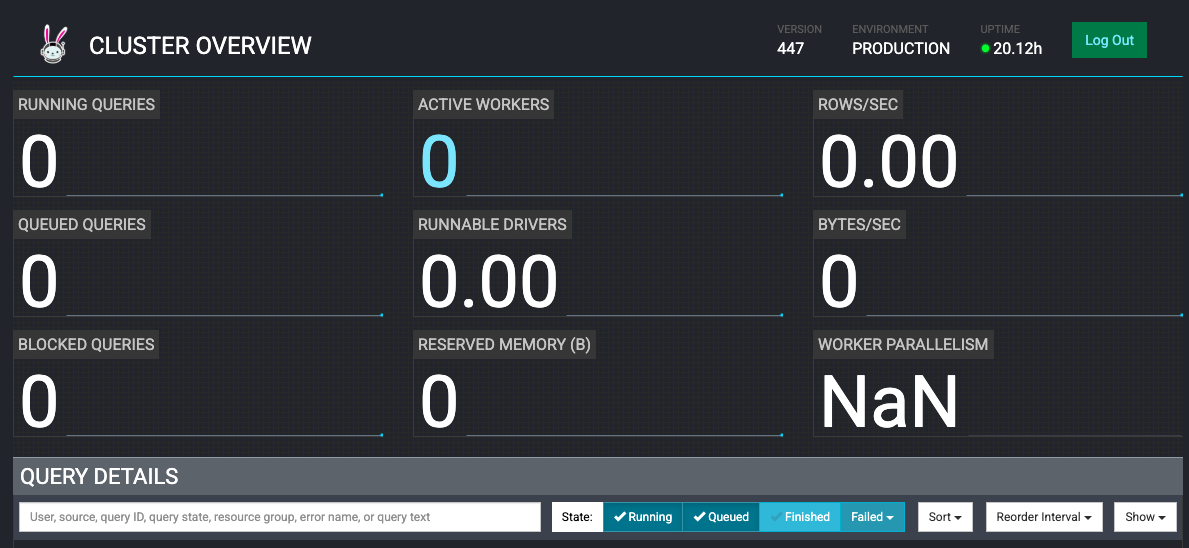
Initially, you'll see 0 active workers (KEDA will scale workers when queries arrive):
Step 6: Test Deployment with Examples
Example 1: Using the Hive Connector
Set up a Hive metastore using AWS Glue with NYC Taxi dataset:
Setup
# Navigate to examples directory
cd examples/

# Run Hive setup script (creates S3 bucket, loads data, creates Glue table)
./hive-setup.sh
You'll see the Glue table name as hive when setup completes successfully.
Run Queries
Open a new terminal and connect with Trino CLI:
# Port-forward Trino service (if not already running)
kubectl -n trino port-forward service/trino 8080:8080
In another terminal, launch Trino CLI:
./trino http://127.0.0.1:8080 --user admin
:::tip First Query Triggers Autoscaling
The first query will trigger KEDA to scale workers from 0 to 1, taking ~60-90 seconds to provision nodes and start pods.
:::
Show catalogs:
SHOW CATALOGS;
Output:
 Catalog
---------
 hive
 iceberg
 system
 tpcds
 tpch
(5 rows)
Show schemas in Hive catalog:
SHOW SCHEMAS FROM hive;
Output:
  Schema
--------------------
 information_schema
 taxi_hive_database
(2 rows)
Query Hive table:
USE hive.taxi_hive_database;
SHOW TABLES;
SELECT * FROM hive LIMIT 5;
Output:
vendorid |  tpep_pickup_datetime   |  tpep_dropoff_datetime  | passenger_count | trip_distance | ...
---------+-------------------------+-------------------------+-----------------+---------------+-----
       1 | 2022-09-01 00:28:12.000 | 2022-09-01 00:36:22.000 |             1.0 |           2.1 | ...
       1 | 2022-11-01 00:24:49.000 | 2022-11-01 00:31:04.000 |             2.0 |           1.0 | ...
Cleanup Hive Resources
# Exit Trino CLI
exit

# Run cleanup script
cd examples/
./hive-cleanup.sh
Example 2: Using the Iceberg Connector
Create Iceberg tables with data from TPCDS benchmark dataset.
Find S3 Data Bucket
cd terraform/_local
export S3_BUCKET=$(terraform output -raw s3_bucket_id_trino_data)
echo $S3_BUCKET
Output:
trino-v2-data-bucket-20240215180855515400000001
Create Iceberg Schema and Tables
The example SQL file creates:
- Iceberg schema named
iceberg_schema - 4 tables:
warehouse,item,inventory,date_dim - Tables populated from TPCDS sf10000 dataset
# Substitute S3 bucket in SQL file
envsubst < examples/trino_sf10000_tpcds_to_iceberg.sql > examples/iceberg.sql

# Execute SQL commands
./trino --file 'examples/iceberg.sql' --server http://localhost:8080 --user admin --ignore-errors
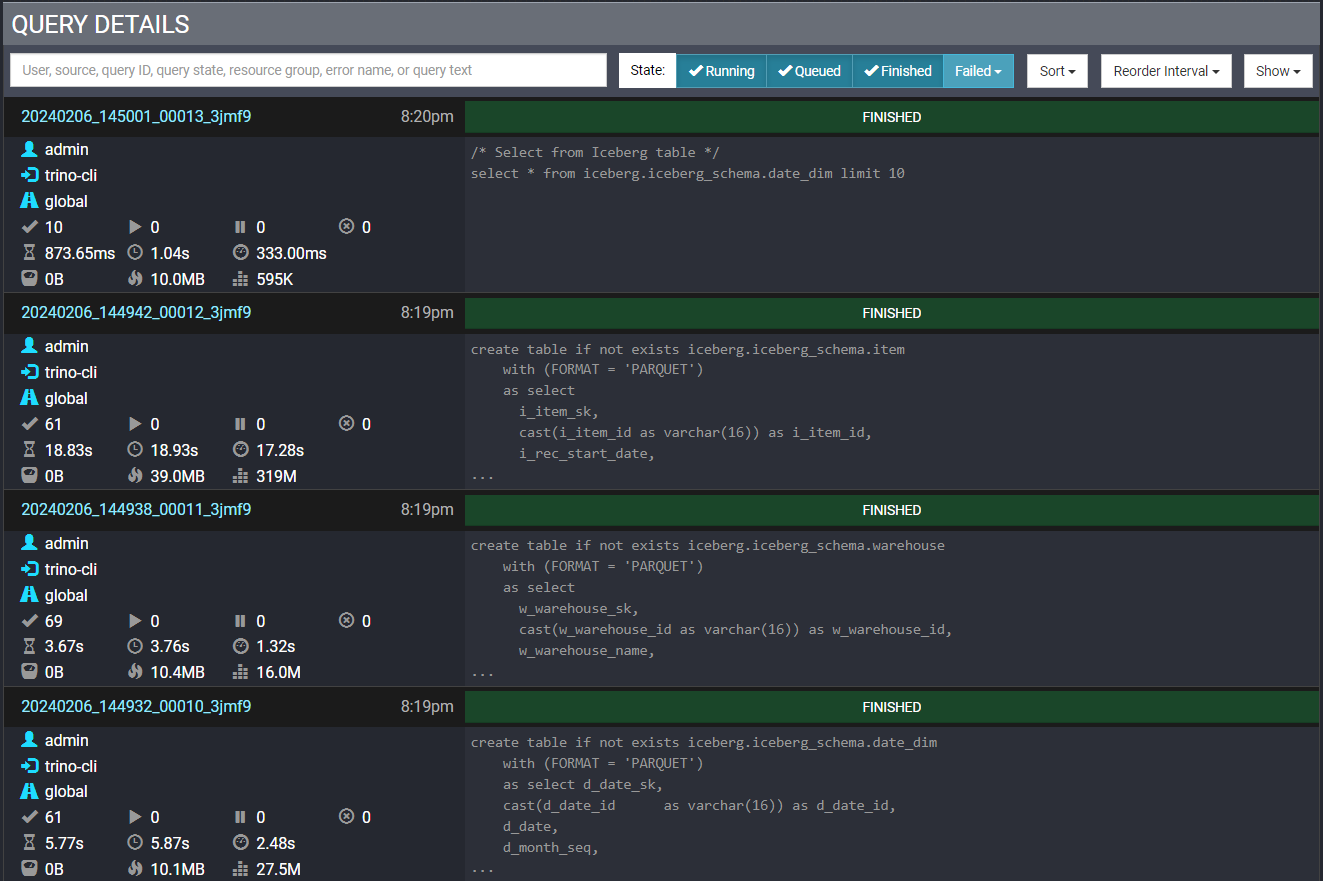
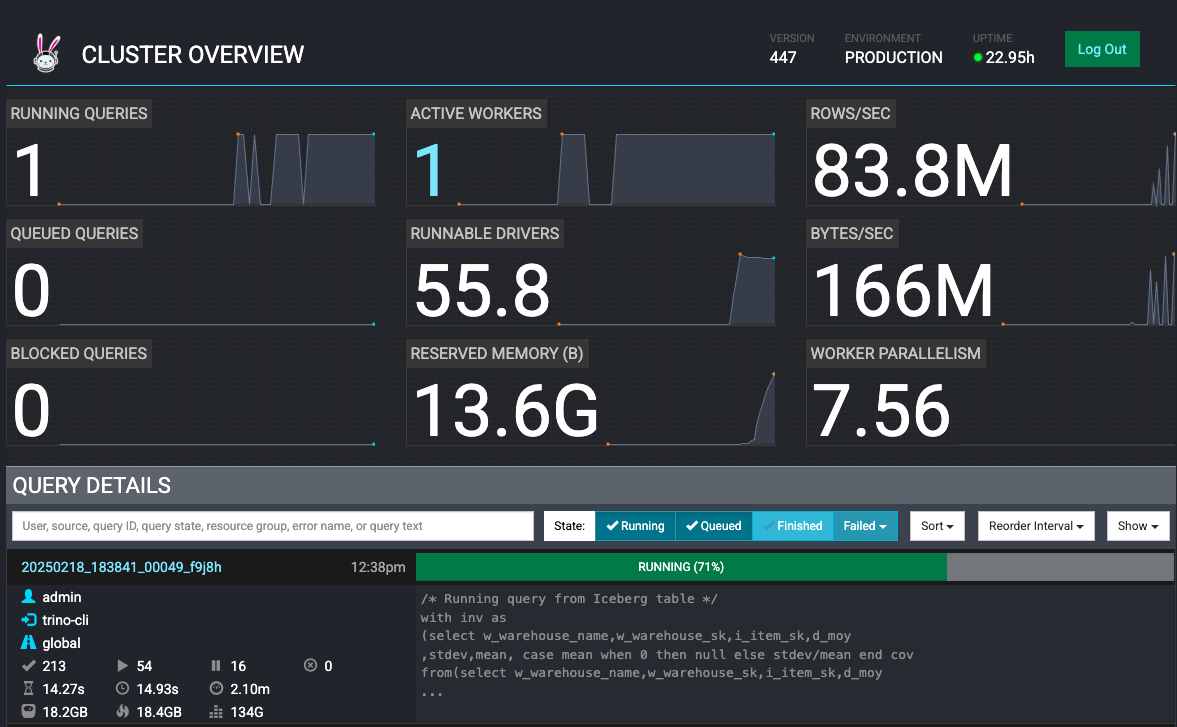
This will create tables with millions of rows, triggering worker autoscaling.
Monitor KEDA Autoscaling
In another terminal, watch KEDA scale workers:
kubectl get hpa -n trino -w
Output:
NAME                                REFERENCE                 TARGETS                MINPODS   MAXPODS   REPLICAS
keda-hpa-keda-scaler-trino-worker   Deployment/trino-worker   0/1, 1/1 + 1 more...   1         15        1
keda-hpa-keda-scaler-trino-worker   Deployment/trino-worker   0/1, 0/1 + 1 more...   1         15        2
View query execution in Trino Web UI:
Watch workers scale based on load:
Cleanup Iceberg Resources
# Connect to Trino CLI
./trino http://127.0.0.1:8080 --user admin
-- Drop tables and schema
DROP TABLE iceberg.iceberg_schema.warehouse;
DROP TABLE iceberg.iceberg_schema.item;
DROP TABLE iceberg.iceberg_schema.inventory;
DROP TABLE iceberg.iceberg_schema.date_dim;
DROP SCHEMA iceberg.iceberg_schema;

-- Exit
exit
Example 3: Fault-Tolerant Execution
Trino on EKS is configured with fault-tolerant execution using S3 as the exchange manager. This allows queries to complete even when worker nodes fail.
Verify Fault-Tolerant Configuration
Check coordinator configuration:
# Get coordinator pod name
COORDINATOR_POD=$(kubectl get pods -l "app.kubernetes.io/instance=trino,app.kubernetes.io/component=coordinator" -o name -n trino)

# View config.properties
kubectl exec --stdin --tty $COORDINATOR_POD -n trino -- /bin/bash
cat /etc/trino/config.properties
Output:
coordinator=true
node-scheduler.include-coordinator=false
http-server.http.port=8080
query.max-memory=280GB
query.max-memory-per-node=22GB
discovery.uri=http://localhost:8080
retry-policy=TASK
exchange.compression-enabled=true
query.low-memory-killer.delay=0s
query.remote-task.max-error-duration=1m
Check exchange manager configuration:
cat /etc/trino/exchange-manager.properties
exit
Output:
exchange-manager.name=filesystem
exchange.base-directories=s3://trino-exchange-bucket-20240215180855570800000004
exchange.s3.region=us-west-2
exchange.s3.iam-role=arn:aws:iam::123456789012:role/trino-sa-role
Test Fault Tolerance
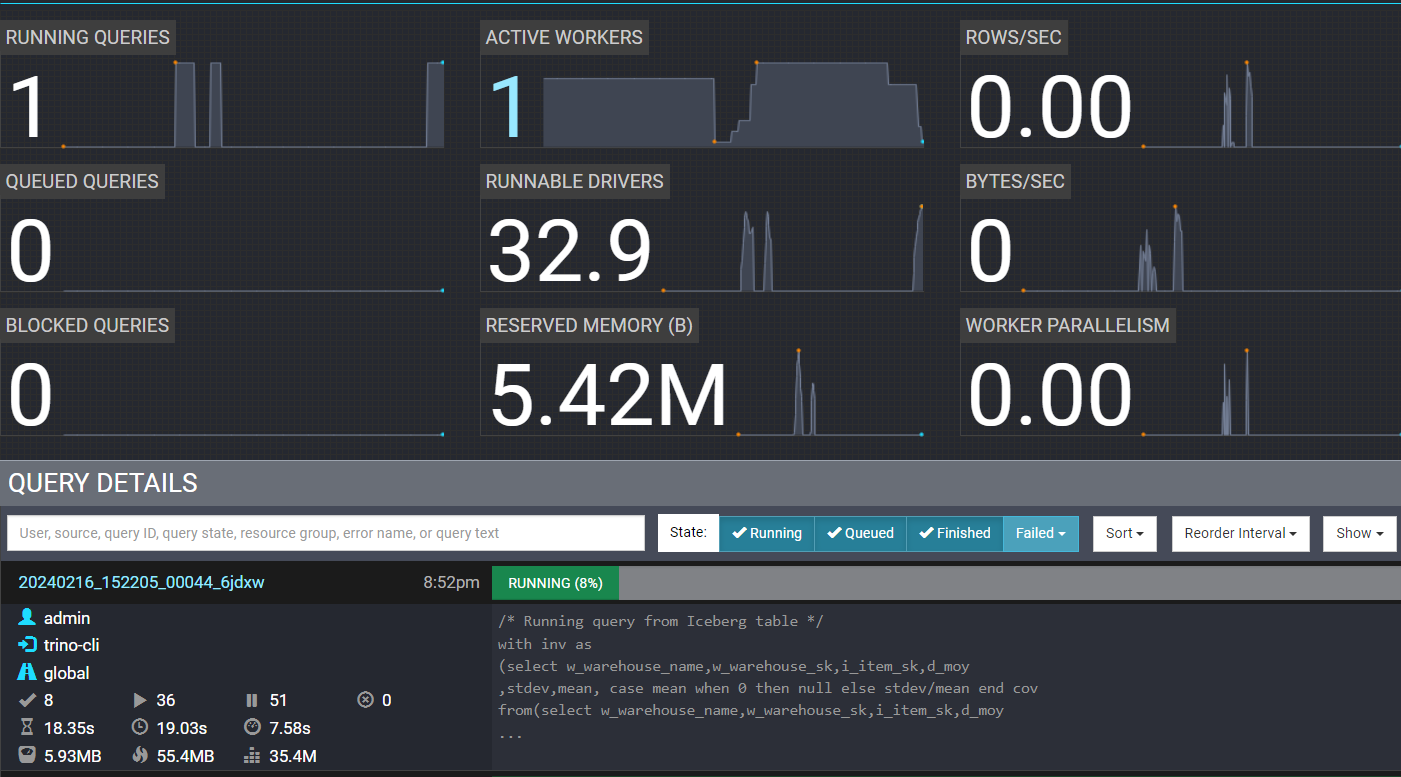
Run a query and terminate workers mid-execution to verify fault tolerance:
# Run query in background
./trino --file 'examples/trino_select_query_iceberg.sql' --server http://localhost:8080 --user admin --ignore-errors
Immediately after starting the query, open another terminal:
# Scale down workers to 1 (simulating node failure)
kubectl scale deployment trino-worker -n trino --replicas=1
Expected behavior:
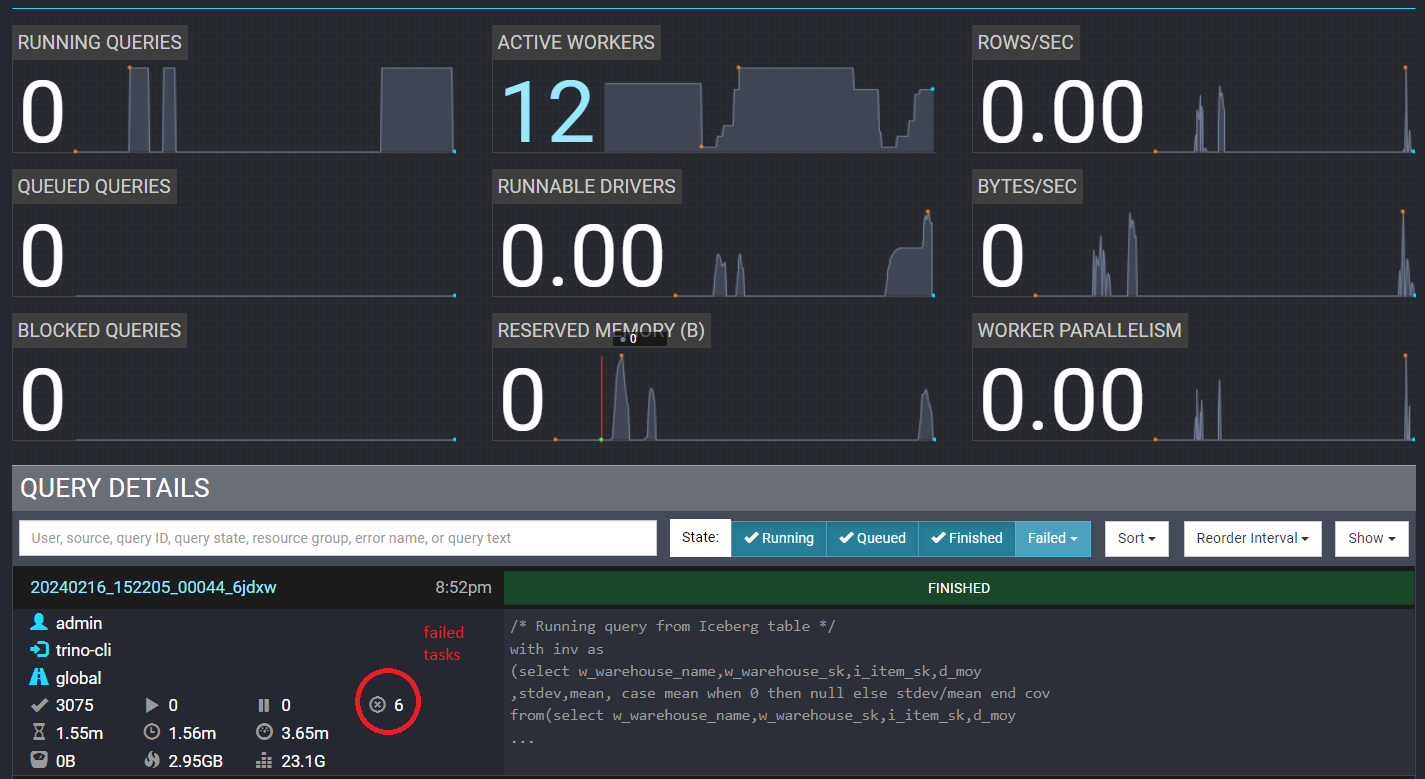
- Some tasks fail due to terminated workers
- Exchange manager saves intermediate data to S3
- Remaining workers retry failed tasks
- Query completes successfully despite failures
View terminated workers in Trino UI:
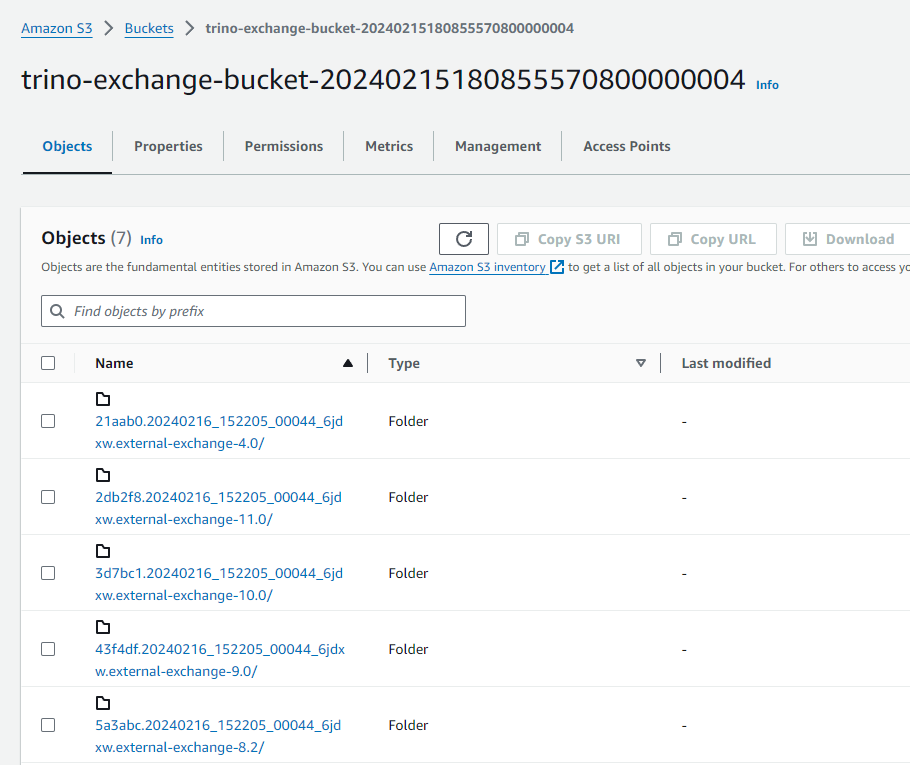
Check S3 exchange manager bucket for spooled data:
View completed query with failed tasks (circled in red):
:::info Retry Policy
- TASK retry policy - Recommended for large batch queries (used in this deployment)
- QUERY retry policy - Better for many small queries
Configure via retry-policy in config.properties.
:::
Best Practices
Running Trino at Scale on EKS
Based on production deployments and open-source community learnings:
:::tip Critical: 1-Pod-Per-Node Pattern
Trino/Starburst Official Recommendation: Deploy exactly one Trino worker pod per Kubernetes node.
This differs significantly from typical Kubernetes horizontal scaling patterns and is essential for optimal Trino performance.
Why This Matters:
- Trino requires exclusive access to node CPU and memory resources
- Resource sharing with other pods causes unpredictable query performance and failures
- Designed for homogeneous resource allocation across all workers
- Autoscaling adds/removes entire nodes, not just pods
Implementation:
- Use dedicated NodePools with taints/tolerations
- Configure pod anti-affinity rules
- Let Karpenter provision one node per worker pod
- Avoid mixing Trino workers with other workloads
Reference: Starburst Kubernetes Best Practices
:::
Coordinator Configuration
Right-Size for Your Workload:
- Coordinator handles query planning and worker orchestration, not data processing
- Small-medium clusters (< 50 workers): 4-8 vCPU, 16-32GB RAM sufficient
- Large clusters (50-100 workers): 8-16 vCPU, 32-64GB RAM recommended
- Very large clusters (100+ workers): 16+ vCPU with proportional memory
- Use core compute instances (m6a, m6i) - memory-optimized instances typically unnecessary
- Always run on On-Demand instances for high availability
Why It Matters: A single coordinator can manage hundreds of workers. Size based on query concurrency and cluster state management needs, not data volume.
Worker Configuration
The 1-Pod-Per-Node Pattern Explained:
Unlike typical Kubernetes deployments that pack multiple pods per node for efficiency, Trino workers require dedicated node resources. This is a fundamental architectural requirement, not an optimization.
Memory Guidelines:
- Allocate 70-85% of node memory to JVM heap
- Keep JVM heap under 256GB per worker (JVM garbage collection limitation)
- Configure
query.max-memory-per-nodeto ~80% of JVM heap - Leave 10-15% memory headroom for OS and non-query operations
Instance Selection:
- Memory-optimized instances (r6i, r8g) for data-intensive analytics
- Graviton instances (ARM64) provide superior price-performance
- Prefer larger instances (fewer, bigger workers vs many small ones) to reduce per-worker overhead
Autoscaling Strategy
Scale-to-Zero with KEDA:
- Configure
minReplicaCount: 0to eliminate idle worker costs - Workers provision in 60-90 seconds when queries arrive
- Use Prometheus metrics: queued queries and running queries
- Set cooldown period (300s recommended) to prevent rapid scaling oscillations
- Karpenter provisions/terminates entire nodes (not just pods) following 1-pod-per-node pattern
Production Tuning:
- Set query queue thresholds based on coordinator capacity
- Monitor worker utilization patterns to optimize min/max replica counts
- Use separate NodePools for different query workload types if needed
- Remember: Scaling workers = scaling nodes (1:1 relationship)
Network and Data Locality
Single AZ Deployment:
- Deploy all Trino nodes in same availability zone
- Reduces network latency between coordinator and workers
- Eliminates inter-AZ data transfer costs for distributed query processing
- Configure Karpenter NodePools with
topology.kubernetes.io/zoneconstraint
10Gb+ Networking:
- Ensure instance types support sufficient network bandwidth
- Distributed SQL engines are network-intensive during shuffle operations
- Modern instances provide 10-25Gb network by default
Fault-Tolerant Execution
Exchange Manager Configuration:
- Enable S3-based exchange manager for intermediate query data
- Use TASK retry policy for large batch queries
- Use QUERY retry policy for many small, short-running queries
- Combines well with Spot instances - queries survive worker termination
When to Enable:
- Long-running queries (> 5 minutes) that are expensive to restart
- Clusters using Spot instances for cost optimization
- Workloads requiring high reliability guarantees
Resource Management
Query Concurrency:
- Limit concurrent queries on coordinator (40-60 typical)
- Use resource groups to isolate different workload priorities
- Configure memory limits per query and per node
- Monitor coordinator lock contention under high concurrency
Storage Considerations:
- Trino is primarily in-memory - minimal disk usage
- 50-100GB EBS per node sufficient for OS and logs
- Enable spilling to disk only if queries exceed memory limits
- Consider NVMe instance storage for high-performance spilling
Connector Best Practices
Hive/Iceberg on S3:
- Use AWS Glue as metastore for serverless metadata management
- Enable S3 request rate optimizations for high-throughput queries
- Partition large tables appropriately for query pruning
- Use columnar formats (Parquet, ORC) with predicate pushdown
Multi-Source Queries:
- Understand data movement patterns between connectors
- Use
EXPLAINto identify expensive cross-connector joins - Consider data locality when joining federated sources
- Cache frequently accessed metadata to reduce overhead
Monitoring and Observability
Key Metrics to Track:
- Coordinator memory and CPU utilization
- Worker count and resource utilization
- Query queue depth and execution time
- Failed queries and task retry counts
- Network throughput between workers
- S3 API request rates and errors
Integration:
- Use Prometheus ServiceMonitor for native metrics collection
- Deploy Grafana dashboards for Trino-specific visualizations
- Monitor KEDA ScaledObject for autoscaling behavior
- Track Karpenter node provisioning time and efficiency
Troubleshooting
Workers Not Scaling
Problem: KEDA not scaling workers when queries arrive
# Check KEDA ScaledObject status
kubectl describe scaledobject trino-worker-scaler -n trino

# Check KEDA operator logs
kubectl logs -n keda -l app.kubernetes.io/name=keda-operator

# Verify Prometheus metrics
kubectl port-forward -n kube-prometheus svc/kube-prometheus-kube-prome-prometheus 9090:9090
# Open http://localhost:9090 and query: trino_execution_QueryManager_QueuedQueries
Solution:
- Ensure Prometheus is running and scraping Trino metrics
- Verify
serverAddressin KEDA ScaledObject matches Prometheus service - Check metric queries return data
Queries Failing with Out of Memory
Problem: Queries fail with "Query exceeded per-node memory limit"
# Check query.max-memory-per-node setting
kubectl exec -it $COORDINATOR_POD -n trino -- cat /etc/trino/config.properties | grep memory
Solution:
- Increase
query.max-memory-per-nodein coordinator config - Use larger worker instances (r8g.8xlarge, r8g.12xlarge)
- Enable spilling to disk (trades performance for reliability)
Coordinator Unreachable
Problem: Cannot connect to Trino coordinator
# Check coordinator pod status
kubectl get pods -n trino -l app.kubernetes.io/component=coordinator

# View coordinator logs
kubectl logs -n trino -l app.kubernetes.io/component=coordinator
Solution:
- Verify pod is Running and Ready (2/2)
- Check service exists:
kubectl get svc -n trino - Verify port-forward command is correct
Cleanup
To remove all resources:
cd data-on-eks/data-stacks/trino-on-eks
./cleanup.sh
This will delete all resources including:
- EKS cluster and all workloads
- S3 buckets (data, exchange manager, logs)
- Glue databases and tables
- VPC and networking resources
Ensure you've backed up any important data before cleanup.
:::caution Additional Manual Cleanup
After running cleanup.sh, verify these resources are deleted:
- S3 buckets with prefix
trino-* - Glue databases in your region
- CloudWatch log groups
:::
Next Steps
With Trino deployed, explore additional use cases:
- Multi-Source Queries - Join S3 data with RDS PostgreSQL
- Streaming Analytics - Query Kafka topics alongside S3 data lakes
- Machine Learning - Use Trino with JupyterHub for data preparation
- BI Integration - Connect Superset or Tableau to Trino