Apache Beam Pipelines on Spark/EKS
Overview
Apache Beam provides a unified programming model for building portable batch and streaming data pipelines. Beam's key advantage is write-once, run-anywhere portability across multiple execution engines (runners) including Apache Spark, Apache Flink, Google Cloud Dataflow, and Direct Runner.
Why Beam on Spark/EKS:
- Portability: Write pipelines once, run on Spark today, switch to Flink tomorrow
- Unified Model: Same API for batch and streaming (Beam's windowing model)
- Ecosystem Integration: Leverage Spark's mature ecosystem on Kubernetes
- Kubernetes Native: Auto-scaling, fault tolerance, and resource management via EKS
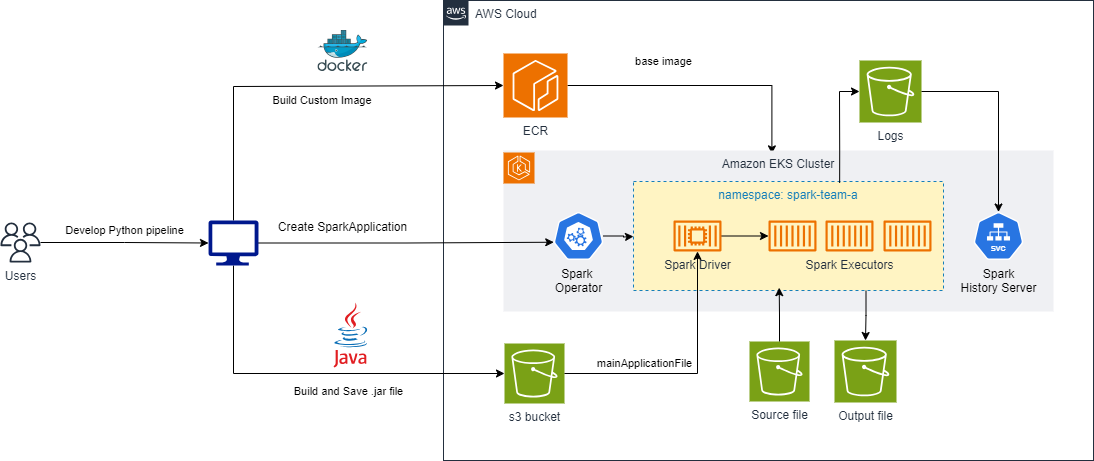
Apache Beam Fundamentals
Programming Model
Beam pipelines consist of:
- PCollection: Immutable distributed datasets (similar to Spark RDD/DataFrame)
- PTransform: Data transformations (ParDo, GroupByKey, CoGroupByKey)
- Pipeline: DAG of PCollections and PTransforms
- Runner: Execution engine (SparkRunner in this case)
Beam vs Native Spark
| Feature | Apache Beam | Native Spark |
|---|---|---|
| Portability | Run on Spark/Flink/Dataflow | Spark-specific |
| Streaming Model | Event-time windowing | Micro-batch/structured streaming |
| API | Beam SDK (Java/Python/Go) | Spark API (Scala/Java/Python/R) |
| Performance | Translation overhead | Native optimizations |
| Use Case | Multi-cloud/portable pipelines | Spark-optimized workloads |
Prerequisites
Before proceeding, ensure you have deployed the Spark on EKS infrastructure following the Infrastructure Setup Guide.
Required:
- ✅ Spark on EKS infrastructure deployed
- ✅ Spark History Server enabled (for monitoring)
- ✅ S3 bucket for artifacts and event logs
- ✅ Python 3.11+ for pipeline development
- ✅ Docker for building custom Spark images with Beam SDK
Deploy Beam Pipeline on Spark/EKS
Step 1: Build Custom Docker Image with Beam SDK
Beam pipelines require a Spark runtime with Beam SDK pre-installed. The Beam SparkRunner uses a PROCESS environment where the SDK runs within the Spark executor JVM.
Review Dockerfile:
# Base Spark image from Data on EKS
FROM public.ecr.aws/data-on-eks/spark:3.5.3-scala2.12-java17-python3-ubuntu

USER root

# Install Python 3.11 and create virtual environment
RUN apt-get update && apt-get install -y python3.11 python3.11-venv && \
    python3.11 -m venv /opt/apache/beam && \
    /opt/apache/beam/bin/pip install --upgrade pip

# Install Apache Beam SDK with Spark extras
RUN /opt/apache/beam/bin/pip install apache-beam[gcp,aws]==2.58.0 && \
    /opt/apache/beam/bin/pip install s3fs boto3

# Create boot script for Beam PROCESS environment
RUN echo '#!/opt/apache/beam/bin/python' > /opt/apache/beam/boot && \
    chmod +x /opt/apache/beam/boot

USER 185
Build and Push Image:
cd data-stacks/spark-on-eks/examples/beam

# Set your AWS account and region
export ACCOUNT_ID=$(aws sts get-caller-identity --query Account --output text)
export REGION=us-west-2

# Create ECR repository
aws ecr create-repository \
  --repository-name beam-spark \
  --region ${REGION}

# Build multi-architecture image
docker buildx build --platform linux/amd64,linux/arm64 \
  -t ${ACCOUNT_ID}.dkr.ecr.${REGION}.amazonaws.com/beam-spark:2.58.0 \
  -f Dockerfile \
  --push .
Key Configuration:
apache-beam[gcp,aws]: Beam SDK with cloud I/O connectors/opt/apache/beam/boot: Entry point for Beam's PROCESS environment- Multi-arch build: Supports both x86 (c5) and ARM (Graviton) instances
Step 2: Develop and Package Beam Pipeline
Create Python Virtual Environment:
python3.11 -m venv beam-dev
source beam-dev/bin/activate
pip install --upgrade pip
pip install apache-beam[aws]==2.58.0 s3fs boto3
Download WordCount Example Pipeline:
# Classic Beam example: word frequency count
curl -O https://raw.githubusercontent.com/apache/beam/master/sdks/python/apache_beam/examples/wordcount.py

# Sample input text (Shakespeare's King Lear)
curl -O https://raw.githubusercontent.com/cs109/2015/master/Lectures/Lecture15b/sparklect/shakes/kinglear.txt
Inspect Pipeline Code:
# wordcount.py key components:

# 1. Read lines from text file
lines = pipeline | 'Read' >> ReadFromText(input_file)

# 2. Split lines into words (ParDo transform)
words = lines | 'Split' >> beam.FlatMap(lambda line: line.split())

# 3. Count word occurrences (GroupByKey + CombinePerKey)
word_counts = (words
  | 'PairWithOne' >> beam.Map(lambda word: (word, 1))
  | 'GroupAndSum' >> beam.CombinePerKey(sum))

# 4. Write results to output files
output = word_counts | 'Format' >> beam.Map(format_result)
output | 'Write' >> WriteToText(output_file)
Upload Input Data:
# Get S3 bucket from infrastructure
export S3_BUCKET=$(kubectl get cm -n spark-team-a spark-config \
  -o jsonpath='{.data.s3_bucket}' 2>/dev/null || echo "your-bucket-name")

aws s3 cp kinglear.txt s3://${S3_BUCKET}/beam/input/
Step 3: Create Portable Beam JAR
Beam on Spark requires packaging the pipeline as a self-contained JAR with all dependencies:
python3 wordcount.py \
  --output_executable_path=./wordcount-beam.jar \
  --runner=SparkRunner \
  --environment_type=PROCESS \
  --environment_config='{"command":"/opt/apache/beam/boot"}' \
  --input=s3://${S3_BUCKET}/beam/input/kinglear.txt \
  --output=s3://${S3_BUCKET}/beam/output/wordcount \
  --spark_submit_uber_jar
Key Parameters:
--runner=SparkRunner: Execute on Spark (vs DirectRunner/FlinkRunner)--environment_type=PROCESS: Run Beam SDK in Spark executor JVM--environment_config: Path to Beam boot script in container--output_executable_path: Creates portable JAR without executing--spark_submit_uber_jar: Bundle all dependencies (uber JAR)
Upload JAR to S3:
aws s3 cp wordcount-beam.jar s3://${S3_BUCKET}/beam/jars/
Step 4: Create SparkApplication Manifest
Create beam-wordcount.yaml to submit Beam pipeline as Spark application:
apiVersion: sparkoperator.k8s.io/v1beta2
kind: SparkApplication
metadata:
  name: beam-wordcount
  namespace: spark-team-a
spec:
  type: Java
  mode: cluster
  image: "${ACCOUNT_ID}.dkr.ecr.${REGION}.amazonaws.com/beam-spark:2.58.0"
  imagePullPolicy: IfNotPresent

  # Beam uber JAR location
  mainApplicationFile: "s3a://${S3_BUCKET}/beam/jars/wordcount-beam.jar"
  mainClass: "org.apache.beam.runners.spark.SparkPipelineRunner"

  sparkVersion: "3.5.3"
  restartPolicy:
    type: Never

  sparkConf:
    # Beam-specific configurations
    "spark.beam.version": "2.58.0"
    "spark.executor.instances": "2"

    # Event logging for History Server
    "spark.eventLog.enabled": "true"
    "spark.eventLog.dir": "s3a://${S3_BUCKET}/spark-event-logs"

    # S3 access with Pod Identity (AWS SDK V2)
    "spark.hadoop.fs.s3a.aws.credentials.provider.mapping": "com.amazonaws.auth.WebIdentityTokenCredentialsProvider=software.amazon.awssdk.auth.credentials.ContainerCredentialsProvider"
    "spark.hadoop.fs.s3a.aws.credentials.provider": "software.amazon.awssdk.auth.credentials.ContainerCredentialsProvider"
    "spark.hadoop.fs.s3.impl": "org.apache.hadoop.fs.s3a.S3AFileSystem"

  driver:
    cores: 1
    memory: "2g"
    serviceAccount: spark-team-a
    labels:
      version: "3.5.3"
      app: "beam-wordcount"
    nodeSelector:
      NodeGroupType: "SparkComputeOptimized"
      karpenter.sh/capacity-type: "on-demand"
    tolerations:
      - key: "spark-compute-optimized"
        operator: "Exists"
        effect: "NoSchedule"

  executor:
    cores: 2
    instances: 2
    memory: "4g"
    serviceAccount: spark-team-a
    labels:
      version: "3.5.3"
      app: "beam-wordcount"
    nodeSelector:
      NodeGroupType: "SparkComputeOptimized"
    tolerations:
      - key: "spark-compute-optimized"
        operator: "Exists"
        effect: "NoSchedule"
Apply Manifest:
# Substitute environment variables
envsubst < beam-wordcount.yaml > beam-wordcount-final.yaml

# Submit Beam pipeline
kubectl apply -f beam-wordcount-final.yaml
Step 5: Monitor Pipeline Execution
Check Spark Application Status:
# Watch SparkApplication resource
kubectl get sparkapplication -n spark-team-a -w

# Check driver pod logs
kubectl logs -n spark-team-a beam-wordcount-driver -f
Access Spark History Server:
# Port-forward to History Server
kubectl port-forward -n spark-history-server \
  svc/spark-history-server 18080:80

# Open http://localhost:18080
Expected Execution Flow:
- Beam pipeline JAR loaded by Spark driver
- Beam's SparkRunner translates Beam transforms to Spark RDDs
- Spark executors process data transformations
- Results written to S3 output path
Step 6: Verify Pipeline Results
Download Output Files:
# Beam writes output as sharded files
mkdir -p beam-output
aws s3 sync s3://${S3_BUCKET}/beam/output/ beam-output/ \
  --exclude "*" --include "wordcount-*"
Inspect Word Counts:
# Combine all output shards
cat beam-output/wordcount-* | head -20
Expected Output:
particular: 3
wish: 2
Either: 3
benison: 2
Duke: 30
Contending: 1
...
Advanced Beam Patterns on Spark
Windowed Aggregations (Streaming)
Beam's windowing model works seamlessly on Spark Structured Streaming:
windowed_counts = (
  events
  | 'Window' >> beam.WindowInto(
      beam.window.FixedWindows(60)  # 1-minute windows
    )
  | 'Count' >> beam.CombinePerKey(sum)
)
SparkRunner Translation:
- Beam windows → Spark's
window()function - Event-time processing → Watermarks in Structured Streaming
Side Inputs (Broadcast Variables)
# Beam side input pattern
lookup_data = pipeline | 'Read Lookup' >> ReadFromText('s3://...')
side_input = beam.pvalue.AsList(lookup_data)

enriched = main_data | 'Enrich' >> beam.ParDo(
  EnrichFn(), lookup=side_input
)
Spark Equivalent:
- Beam side inputs → Spark broadcast variables
- Efficient for small reference data
State and Timers
# Stateful processing with Beam
class StatefulDoFn(beam.DoFn):
  STATE = beam.DoFn.StateParam(beam.transforms.userstate.CombiningValueStateSpec(
    'count', beam.coders.VarIntCoder(), sum
  ))

  def process(self, element, state=STATE):
    current = state.read()
    state.add(1)
    yield (element, current + 1)
Performance Note: Stateful Beam transforms may have overhead on SparkRunner compared to native Spark mapGroupsWithState.
Production Best Practices
Resource Tuning
sparkConf:
  # Increase parallelism for large Beam pipelines
  "spark.default.parallelism": "200"
  "spark.sql.shuffle.partitions": "200"

  # Memory overhead for Beam SDK
  "spark.executor.memoryOverhead": "1g"

  # Dynamic allocation for variable workloads
  "spark.dynamicAllocation.enabled": "true"
  "spark.dynamicAllocation.minExecutors": "2"
  "spark.dynamicAllocation.maxExecutors": "20"
Optimizing Beam on Spark
1. Avoid Excessive Shuffles:
# BAD: Multiple GroupByKeys create shuffles
data | beam.GroupByKey() | beam.GroupByKey()

# GOOD: Single GroupByKey with composite key
data | beam.Map(lambda x: ((key1, key2), x)) | beam.GroupByKey()
2. Use CombineFn for Aggregations:
# More efficient than GroupByKey + reduce
data | beam.CombinePerKey(sum)  # vs GroupByKey + Map
3. Leverage Beam SQL (Calcite):
# SQL optimization via Apache Calcite
result = data | beam.SqlTransform("""
  SELECT product, SUM(revenue) as total
  FROM PCOLLECTION
  GROUP BY product
""")
Monitoring and Debugging
Enable Beam Metrics:
from apache_beam.metrics import Metrics

class CountMetrics(beam.DoFn):
  def __init__(self):
    self.counter = Metrics.counter('beam', 'processed_records')

  def process(self, element):
    self.counter.inc()
    yield element
Metrics appear in Spark UI under custom accumulators.
Troubleshooting
Pipeline Fails with ClassNotFoundException
Cause: Beam dependencies not in executor classpath
Solution: Ensure --spark_submit_uber_jar was used during JAR creation
Slow Performance vs Native Spark
Cause: Beam translation overhead and PCollection materialization
Solution:
- Use Beam for portability; use native Spark for performance-critical pipelines
- Profile with Spark UI to identify bottlenecks
- Consider Beam's experimental
use_fast_avroflag
PROCESS Environment Boot Errors
Cause: Incorrect environment_config path
Solution: Verify /opt/apache/beam/boot exists in Docker image
kubectl exec -it beam-wordcount-driver -- ls -la /opt/apache/beam/boot
When to Use Beam on Spark vs Native Spark
Use Apache Beam when:
- ✅ Need portability across Spark/Flink/Dataflow
- ✅ Migrating from Google Cloud Dataflow to EKS
- ✅ Unified batch + streaming with consistent API
- ✅ Heavy use of Beam I/O connectors (Kafka, BigQuery, etc.)
Use Native Spark when:
- ✅ Spark-only deployment (no multi-runner requirement)
- ✅ Performance is critical (avoid translation overhead)
- ✅ Leveraging Spark-specific features (MLlib, GraphX)
- ✅ Large-scale SQL workloads (Catalyst optimizer)