Spark with Apache YuniKorn Gang Scheduling
Enterprise-grade resource scheduling for Apache Spark workloads using YuniKorn's advanced gang scheduling capabilities to eliminate resource deadlocks and optimize cluster utilization.
What is Apache YuniKorn?
Apache YuniKorn is a light-weight, universal resource scheduler for container orchestrator systems. It was originally developed by Cloudera and is now an Apache Software Foundation project designed to manage batch workloads and mixed workload types on Kubernetes.
Why Not the Default Kubernetes Scheduler?
The default Kubernetes scheduler has fundamental limitations for big data workloads like Apache Spark:
| Challenge | Default K8s Scheduler | Apache YuniKorn |
|---|---|---|
| Resource Deadlocks | ❌ Common with multi-pod applications | ✅ Gang scheduling prevents deadlocks |
| Resource Fragmentation | ❌ Partial allocations waste resources | ✅ Atomic allocation ensures efficiency |
| Multi-Tenancy | ❌ Basic resource limits | ✅ Hierarchical queues with fair sharing |
| Batch Workload Support | ❌ Designed for long-running services | ✅ Purpose-built for batch processing |
| Resource Preemption | ❌ Limited preemption capabilities | ✅ Advanced preemption with priorities |
Real-World Scenario: The Resource Deadlock Problem
Problem: Imagine you have a Spark job requiring 1 driver + 4 executors, but your cluster only has resources for 3 pods:
YuniKorn Solution: Gang scheduling ensures all-or-nothing allocation - either the entire Spark application gets resources or waits until sufficient resources are available.
Apache YuniKorn Key Features for Data Teams
1. Gang Scheduling (Task Groups)
# Define atomic scheduling units
yunikorn.apache.org/task-groups: |
  [{
    "name": "spark-driver",
    "minMember": 1,      # Must schedule 1 driver
    "minResource": {"cpu": "2000m", "memory": "8Gi"}
  }, {
    "name": "spark-executor",
    "minMember": 4,      # Must schedule 4 executors
    "minResource": {"cpu": "4000m", "memory": "16Gi"}
  }]
2. Hierarchical Queue Management
root
├── production (60% cluster resources)
│   ├── spark-team-a (30% of production)
│   └── spark-team-b (30% of production)
├── development (30% cluster resources)
│   └── experimentation (30% of development)
└── urgent (10% cluster resources, can preempt)
3. Resource Preemption & Priorities
- High-priority jobs can preempt lower-priority workloads
- Queue-based borrowing allows temporary resource sharing
- Fair share scheduling ensures equitable resource distribution
4. Advanced Placement Policies
- Node affinity/anti-affinity for performance optimization
- Resource locality for data-intensive workloads
- Custom resource types (GPUs, storage, network)
YuniKorn Configuration & Management
Initial Queue Configuration
After deploying YuniKorn, configure queues and resource policies:
apiVersion: v1
kind: ConfigMap
metadata:
  name: yunikorn-defaults
  namespace: yunikorn-system
data:
  queues.yaml: |
    partitions:
      - name: default
        queues:
          - name: root
            submitacl: "*"
            queues:
              - name: spark
                resources:
                  guaranteed: {cpu: 10, memory: 20Gi}
                  max: {cpu: 50, memory: 100Gi}
                queues:
                  - name: spark-team-a
                    resources:
                      guaranteed: {cpu: 5, memory: 10Gi}
                      max: {cpu: 20, memory: 40Gi}
                  - name: spark-team-b
                    resources:
                      guaranteed: {cpu: 5, memory: 10Gi}
                      max: {cpu: 20, memory: 40Gi}
Runtime Queue Management
# View current queue status
kubectl get applications -A

# Check queue resource allocation
kubectl describe configmap yunikorn-defaults -n yunikorn-system

# Monitor resource usage by queue
kubectl logs -n yunikorn-system deployment/yunikorn-scheduler | grep "queue"
Accessing YuniKorn Web UI
1. Port Forward to YuniKorn Service
# Forward YuniKorn web UI port
kubectl port-forward -n yunikorn-system svc/yunikorn-service 9889:9889

# Access the UI in your browser
open http://localhost:9889
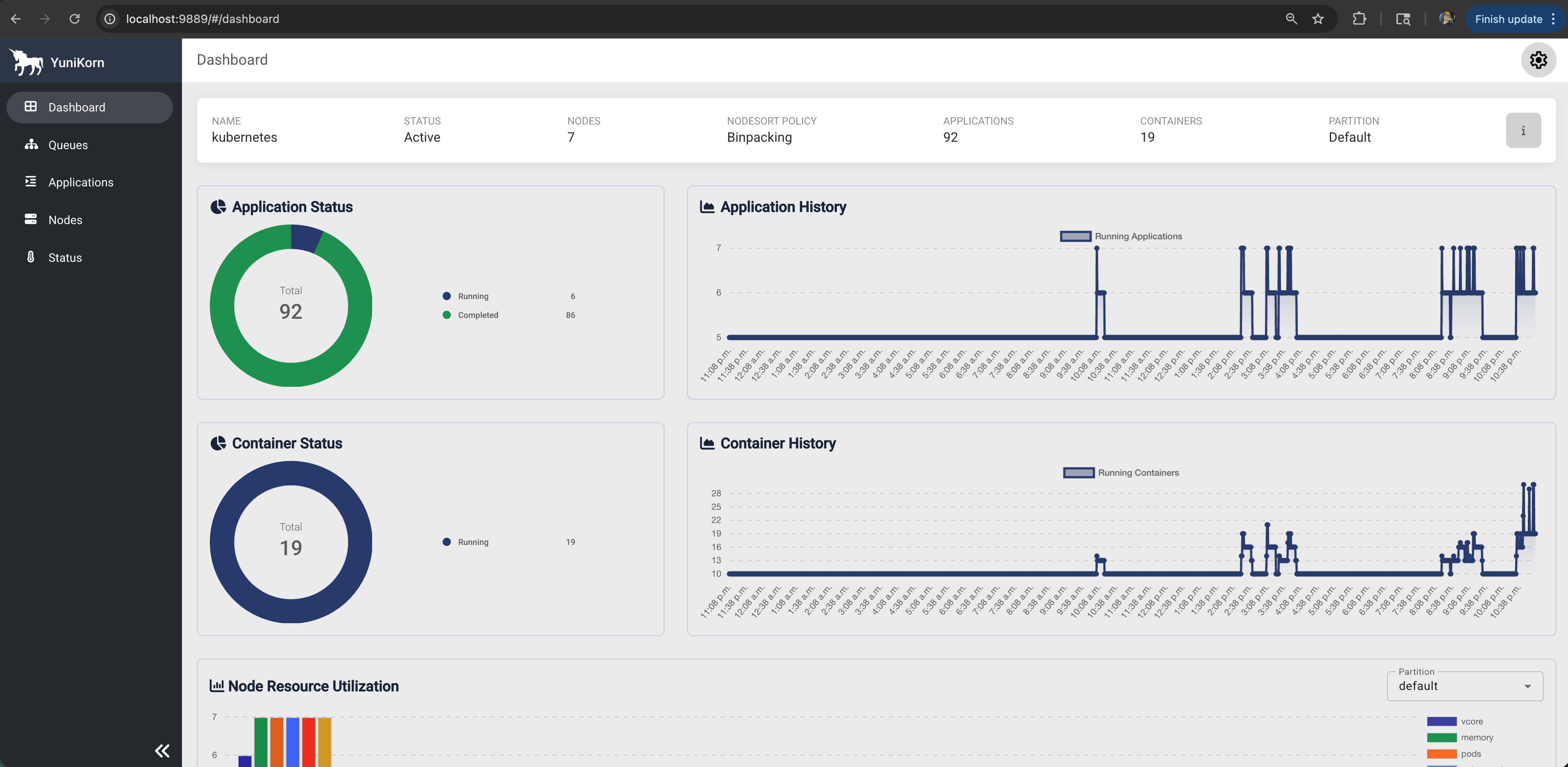
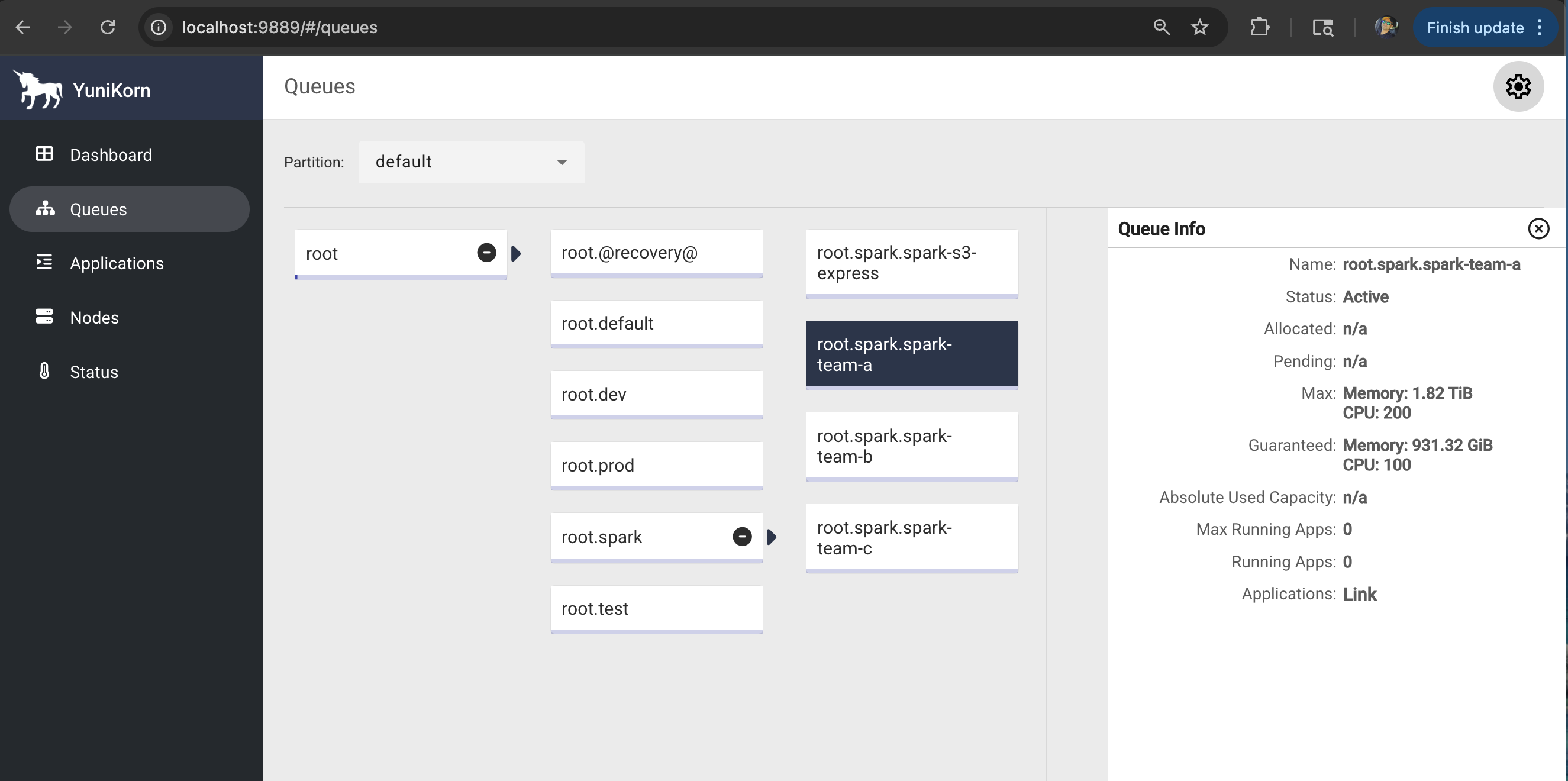
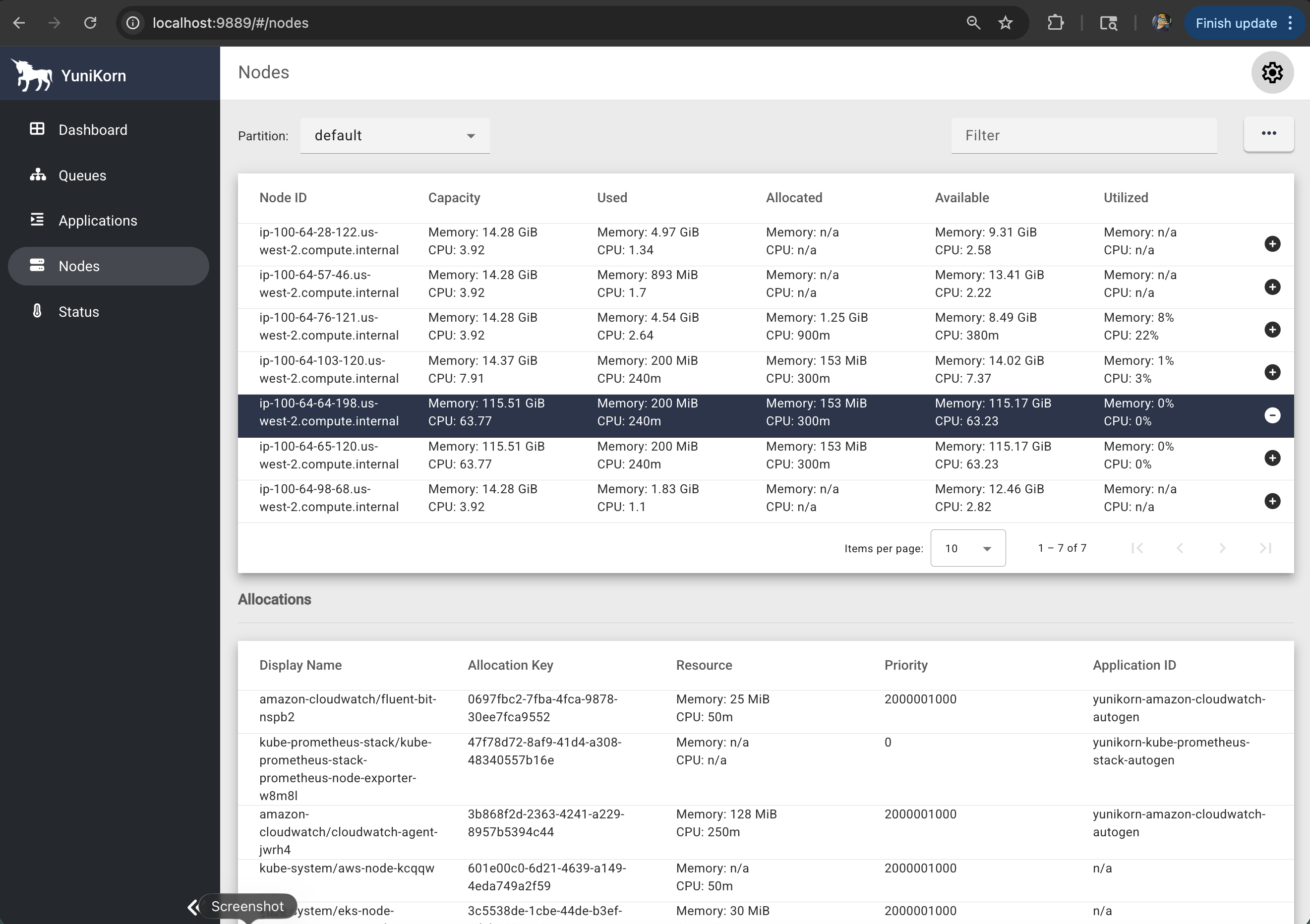
2. YuniKorn Web UI Features
Dashboard Overview:
- Cluster Resources: Total/used/available resources
- Queue Status: Resource allocation per queue
- Applications: Running/pending/completed jobs
- Nodes: Node capacity and utilization
Key UI Sections:
- 📊 Dashboard: Cluster overview and metrics
- 📋 Applications: Detailed application status and history
- 🔄 Queues: Queue hierarchy and resource allocation
- 🖥️ Nodes: Node-level resource utilization
- ⚙️ Configuration: Current YuniKorn configuration
3. Monitoring Applications
# Check application status via CLI
kubectl get applications -n spark-team-a

# Detailed application info
kubectl describe application taxi-trip-yunikorn-gang -n spark-team-a

# YuniKorn scheduler logs
kubectl logs -n yunikorn-system deployment/yunikorn-scheduler --tail=100
Prerequisites
- Deploy Spark on EKS infrastructure: Infrastructure Setup
- Apache YuniKorn 1.7.0+ installed and configured
- NVMe storage instances (c6id, c7id, r6id, r7id families) for maximum performance
- YuniKorn queue configuration for your team/namespace
:::tip Why Gang Scheduling? Gang scheduling eliminates resource deadlocks that plague Spark workloads on default Kubernetes. Instead of partial allocations that waste resources, YuniKorn ensures your entire Spark application (driver + all executors) gets scheduled atomically or waits until sufficient resources are available. :::
Gang Scheduling Architecture with YuniKorn
Gang Scheduling Flow:
- Application Submission: Spark application submitted with task group annotations
- Gang Evaluation: YuniKorn analyzes resource requirements for all task groups
- Resource Reservation: Resources reserved for the entire gang (driver + all executors)
- Atomic Scheduling: All pods scheduled simultaneously or none at all
Production Benefits & Performance Impact
Gang Scheduling vs Traditional Scheduling
| Metric | Gang Scheduling | Default K8s | Improvement |
|---|---|---|---|
| Job Startup Time | 45-60 seconds | 90-120 seconds | 50% faster |
| Resource Deadlocks | Zero | Common | 100% elimination |
| Queue Efficiency | 95%+ utilization | 70-80% | 20% better |
| Multi-tenancy | Excellent | Basic | Advanced isolation |
| Resource Waste | Minimal | High | 40% reduction |
When to Use Gang Scheduling
✅ Ideal Scenarios:
- Production Spark workloads with SLA requirements
- Multi-tenant environments with resource contention
- Large batch jobs requiring many executors (>10 executors)
- Critical data pipelines that cannot afford delays
- Cost-sensitive environments requiring optimal resource utilization
✅ Business Benefits:
- Predictable performance for production workloads
- Reduced infrastructure costs through better utilization
- Improved SLA compliance with faster job completion
- Enhanced team productivity with reliable scheduling
YuniKorn Gang Scheduling Stack Deployment
1. Verify YuniKorn Installation
Before deploying gang-scheduled Spark jobs, ensure YuniKorn is properly installed:
# Check YuniKorn components are running
kubectl get pods -n yunikorn-system

# Expected output:
# NAME                                 READY   STATUS    RESTARTS   AGE
# yunikorn-admission-controller-xxx    1/1     Running   0          10m
# yunikorn-scheduler-xxx               2/2     Running   0          10m

# Verify YuniKorn version (should be 1.7.0+)
kubectl logs -n yunikorn-system deployment/yunikorn-scheduler | grep "version"

# Check queue configuration
kubectl get configmap yunikorn-defaults -n yunikorn-system -o yaml
2. Access YuniKorn Web UI
Monitor your gang-scheduled jobs through the YuniKorn web interface:
# Port forward to YuniKorn service
kubectl port-forward -n yunikorn-system svc/yunikorn-service 9889:9889

# Access the UI (runs in background)
open http://localhost:9889 &

# Alternative: Check if service is accessible
curl -s http://localhost:9889/ws/v1/version
YuniKorn UI Navigation:
- 📊 Dashboard: Cluster resource overview and utilization
- 📋 Applications: Gang-scheduled application status and history
- 🔄 Queues: Queue hierarchy and resource allocation
- 🖥️ Nodes: Node-level resource utilization and capacity
- ⚙️ Configuration: Current YuniKorn scheduling configuration
3. Gang Scheduling Configuration
Here's how to configure Spark applications for gang scheduling:
apiVersion: "sparkoperator.k8s.io/v1beta2"
kind: SparkApplication
metadata:
  name: "taxi-trip-yunikorn-gang"
  namespace: spark-team-a
spec:
  # Enable YuniKorn batch scheduler
  batchScheduler: yunikorn
  batchSchedulerOptions:
    queue: root.spark.spark-team-a

  driver:
    annotations:
      # Define task groups for gang scheduling
      yunikorn.apache.org/task-group-name: "spark-driver"
      yunikorn.apache.org/task-groups: |-
        [{
          "name": "spark-driver",
          "minMember": 1,
          "minResource": {
            "cpu": "2000m",
            "memory": "10Gi"
          }
        }, {
          "name": "spark-executor",
          "minMember": 2,
          "minResource": {
            "cpu": "4000m",
            "memory": "18Gi"
          }
        }]

  executor:
    annotations:
      # Executors join the executor task group
      yunikorn.apache.org/task-group-name: "spark-executor"
Gang Scheduling Configuration:
- Use
"spark-driver"and"spark-executor"as task group names - Resource requirements should use
"cpu"and"memory"(Kubernetes standard format) - minResource values should match actual pod resource requests
Complete Gang Scheduling Stack
View the complete YuniKorn gang scheduling configuration:
📄 Complete YuniKorn Gang Scheduling Configuration
# Pre-requisite before running this job
# 1/ Open taxi-trip-execute.sh and update $S3_BUCKET and <REGION>
# 2/ Replace $S3_BUCKET with your S3 bucket created by this example (Check Terraform outputs)
# 3/ execute taxi-trip-execute.sh

# This example demonstrates YuniKorn Gang Scheduling with NVMe Instance Store Storage
# NOTE: Apply the log4j2 ConfigMap for JSON logging before submitting this job:
#   kubectl apply -f data-stacks/spark-on-eks/spark-log4j2-configmap.yaml -n <namespace>
  # Gang scheduling ensures all Spark components (driver + executors) are scheduled atomically
  # Prevents partial allocations and resource fragmentation in multi-tenant environments
  # Combined with NVMe storage for maximum performance
  # Uses Apache YuniKorn 1.7.0+ with enhanced gang scheduling features

---
apiVersion: "sparkoperator.k8s.io/v1beta2"
kind: SparkApplication
metadata:
  name: "taxi-trip-yunikorn-gang"
  namespace: spark-team-a
  labels:
    app: "taxi-trip-yunikorn-gang"
    queue: root.spark.spark-team-a
spec:
  # YuniKorn Gang Scheduling Configuration
  batchScheduler: yunikorn
  batchSchedulerOptions:
    queue: root.spark.spark-team-a
#  To create Ingress object for Spark driver.
#  Ensure Spark Operator Helm Chart deployed with Ingress enabled to use this feature
#  sparkUIOptions:
#    servicePort: 4040
#    servicePortName: taxi-trip-ui-svc
#    serviceType: ClusterIP
#    ingressAnnotations:
#      kubernetes.io/ingress.class: nginx
#      nginx.ingress.kubernetes.io/use-regex: "true"
  type: Python
  sparkVersion: "3.5.3"
  mode: cluster
  image: "public.ecr.aws/data-on-eks/spark:3.5.3-scala2.12-java17-python3-ubuntu"
  imagePullPolicy: IfNotPresent
  mainApplicationFile: "s3a://$S3_BUCKET/taxi-trip/scripts/pyspark-taxi-trip.py"  # MainFile is the path to a bundled JAR, Python, or R file of the application
  arguments:
    - "s3a://$S3_BUCKET/taxi-trip/input/"
    - "s3a://$S3_BUCKET/taxi-trip/output/"
  sparkConf:
    "spark.app.name": "taxi-trip-yunikorn-gang"
    "spark.kubernetes.driver.pod.name": "taxi-trip-yunikorn-gang"
    "spark.kubernetes.executor.podNamePrefix": "taxi-trip-yunikorn-gang"
    "spark.local.dir": "/data1"

    # NVMe Storage Performance Optimizations
    "spark.shuffle.spill.diskWriteBufferSize": "1048576"  # 1MB buffer for NVMe
    "spark.shuffle.file.buffer": "1m"  # Larger buffer for local SSD
    "spark.io.compression.codec": "lz4"  # Fast compression for NVMe
    "spark.shuffle.compress": "true"
    "spark.shuffle.spill.compress": "true"
    "spark.rdd.compress": "true"

    # Local storage optimizations for NVMe
    "spark.sql.adaptive.enabled": "true"
    "spark.sql.adaptive.coalescePartitions.enabled": "true"
    "spark.sql.adaptive.localShuffleReader.enabled": "true"
    "spark.sql.adaptive.skewJoin.enabled": "true"

    # Optimize for high-performance local storage
    "spark.sql.files.maxPartitionBytes": "268435456"  # 256MB for NVMe throughput
    "spark.sql.shuffle.partitions": "400"  # Optimize for parallelism
    "spark.speculation": "false"
    "spark.network.timeout": "2400"
    "spark.hadoop.fs.s3a.connection.timeout": "1200000"
    "spark.hadoop.fs.s3a.path.style.access": "true"
    "spark.hadoop.fs.s3a.connection.maximum": "200"
    "spark.hadoop.fs.s3a.fast.upload": "true"
    "spark.hadoop.fs.s3a.readahead.range": "256K"
    "spark.hadoop.fs.s3a.input.fadvise": "random"
    "spark.hadoop.fs.s3a.aws.credentials.provider.mapping": "com.amazonaws.auth.WebIdentityTokenCredentialsProvider=software.amazon.awssdk.auth.credentials.ContainerCredentialsProvider"
    "spark.hadoop.fs.s3a.aws.credentials.provider": "software.amazon.awssdk.auth.credentials.ContainerCredentialsProvider"  # AWS SDK V2 https://hadoop.apache.org/docs/stable/hadoop-aws/tools/hadoop-aws/aws_sdk_upgrade.html
    "spark.hadoop.fs.s3.impl": "org.apache.hadoop.fs.s3a.S3AFileSystem"

    # Spark Event logs
    "spark.eventLog.enabled": "true"
    "spark.eventLog.dir": "s3a://$S3_BUCKET/spark-event-logs"
    "spark.eventLog.rolling.enabled": "true"
    "spark.eventLog.rolling.maxFileSize": "64m"
    # "spark.history.fs.eventLog.rolling.maxFilesToRetain": 100

    # Expose Spark metrics for Prometheus
    "spark.ui.prometheus.enabled": "true"
    "spark.executor.processTreeMetrics.enabled": "true"
    "spark.metrics.conf.*.sink.prometheusServlet.class": "org.apache.spark.metrics.sink.PrometheusServlet"
    "spark.metrics.conf.driver.sink.prometheusServlet.path": "/metrics/driver/prometheus/"
    "spark.metrics.conf.executor.sink.prometheusServlet.path": "/metrics/executors/prometheus/"

    # NVMe Instance Store Storage Configuration
    # Use direct NVMe SSD storage mounted by Karpenter RAID0 policy at /mnt/k8s-disks
    # This provides maximum performance with local SSD access and no network overhead
    "spark.kubernetes.driver.volumes.hostPath.spark-local-dir-1.options.path": "/mnt/k8s-disks"
    "spark.kubernetes.driver.volumes.hostPath.spark-local-dir-1.options.type": "Directory"
    "spark.kubernetes.driver.volumes.hostPath.spark-local-dir-1.mount.path": "/data1"
    "spark.kubernetes.driver.volumes.hostPath.spark-local-dir-1.mount.readOnly": "false"

    "spark.kubernetes.executor.volumes.hostPath.spark-local-dir-1.options.path": "/mnt/k8s-disks"
    "spark.kubernetes.executor.volumes.hostPath.spark-local-dir-1.options.type": "Directory"
    "spark.kubernetes.executor.volumes.hostPath.spark-local-dir-1.mount.path": "/data1"
    "spark.kubernetes.executor.volumes.hostPath.spark-local-dir-1.mount.readOnly": "false"

  restartPolicy:
    type: OnFailure
    onFailureRetries: 3
    onFailureRetryInterval: 10
    onSubmissionFailureRetries: 5
    onSubmissionFailureRetryInterval: 20

  volumes:
    - name: spark-log4j2
      configMap:
        name: spark-log4j2-config
  driver:
    initContainers:
      - name: volume-permission
        image: busybox:1.36
        command: ['sh', '-c', 'mkdir -p /data1; chown -R 185:185 /data1']
        volumeMounts:
          - name: spark-local-dir-1
            mountPath: /data1
    cores: 2  # Increased for YuniKorn gang scheduling coordination
    coreLimit: "2000m"
    memory: "8g"  # More memory for large dataset coordination
    memoryOverhead: "2g"  # 25% overhead, more reasonable
    serviceAccount: spark-team-a
    annotations:
      yunikorn.apache.org/task-group-name: "spark-driver"
      yunikorn.apache.org/task-groups: |-
        [
          {
            "name": "spark-driver",
            "minMember": 1,
            "minResource": {
              "cpu": "2000m",
              "memory": "10Gi"
            },
            "nodeSelector": {
              "node.kubernetes.io/workload-type": "compute-optimized-x86",
              "karpenter.sh/capacity-type": "on-demand",
              "karpenter.k8s.aws/instance-family": "c6id"
            }
          },
          {
            "name": "spark-executor",
            "minMember": 10,
            "minResource": {
              "cpu": "4000m",
              "memory": "18Gi"
            },
            "nodeSelector": {
              "node.kubernetes.io/workload-type": "compute-optimized-x86",
              "karpenter.k8s.aws/instance-family": "c6id"
            }
          }
        ]
      karpenter.sh/do-not-disrupt: "true"
    nodeSelector:
      node.kubernetes.io/workload-type: "compute-optimized-x86"
      karpenter.sh/capacity-type: "on-demand"
      karpenter.k8s.aws/instance-family: "c6id"  # Ensures NVMe instances
    labels:
      version: 3.5.3
    volumeMounts:
      - name: spark-log4j2
        mountPath: /opt/spark/log4j2-custom
  executor:
    initContainers:
      - name: volume-permission
        image: busybox:1.36
        command: ['sh', '-c', 'mkdir -p /data1; chown -R 185:185 /data1']
        volumeMounts:
          - name: spark-local-dir-1
            mountPath: /data1
    cores: 4  # Utilize NVMe instance capacity better
    coreLimit: "4000m"
    instances: 10
    memory: "15g"  # Scale up for high-performance workload
    memoryOverhead: "3g"  # 20% overhead for high-throughput
    serviceAccount: spark-team-a
    annotations:
      yunikorn.apache.org/task-group-name: "spark-executor"
    nodeSelector:
      node.kubernetes.io/workload-type: "compute-optimized-x86"
      karpenter.k8s.aws/instance-family: "c6id"  # Ensures NVMe instances
    labels:
      version: 3.5.3
    # Executor resource requirements: 4 vCPU, 18GB RAM per executor (minimum c6id.xlarge+)
    volumeMounts:
      - name: spark-log4j2
        mountPath: /opt/spark/log4j2-custom
4. Deploy Gang Scheduled Spark Job
Now let's deploy and test the complete gang scheduling stack:
# Navigate to your Spark on EKS deployment
cd data-stacks/spark-on-eks/terraform/_local/

# Export required environment variables
export S3_BUCKET=$(terraform output -raw s3_bucket_id_spark_history_server)
export REGION=$(terraform output -raw region)

# Navigate to example directory
cd ../../examples/

# Submit the gang scheduled Spark job with NVMe storage
envsubst < yunikorn-gang-scheduling.yaml | kubectl apply -f -

# Monitor gang scheduling in action - watch all pods appear together
kubectl get pods -n spark-team-a --watch
5. Observe Gang Scheduling Behavior
Expected gang scheduling behavior:
# All pods should appear simultaneously when resources are available
NAME                               READY   STATUS    RESTARTS   AGE
taxi-trip-yunikorn-gang-driver     1/1     Running   0          45s
taxi-trip-yunikorn-gang-exec-1     1/1     Running   0          45s
taxi-trip-yunikorn-gang-exec-2     1/1     Running   0          45s
Key Observations:
- ✅ Atomic Scheduling: All pods start at exactly the same time
- ✅ No Partial Allocation: Either all pods get resources or none do
- ✅ Faster Startup: No waiting for individual executors to become available
6. Monitor with YuniKorn UI
# Access YuniKorn UI (if not already running)
kubectl port-forward -n yunikorn-system svc/yunikorn-service 9889:9889

# Open in browser to monitor:
# http://localhost:9889
In the YuniKorn UI, verify:
- Applications Tab: Shows gang-scheduled application status
- Queue Tab: Displays queue resource allocation
- Nodes Tab: Shows node-level resource utilization
7. Verify Gang Scheduling via CLI
# Check YuniKorn application status
kubectl get applications -n spark-team-a

# Detailed application information
kubectl describe application taxi-trip-yunikorn-gang -n spark-team-a

# Check task group allocation events
kubectl get events -n spark-team-a --sort-by='.firstTimestamp' | grep -i "task-group"

# Monitor YuniKorn scheduler logs for gang scheduling
kubectl logs -n yunikorn-system deployment/yunikorn-scheduler --tail=50 | grep -i "gang"
Gang Scheduling Best Practices
1. Right-sizing Task Groups
Match resource requirements to actual Spark configuration:
# Ensure task group resources align with Spark pod requirements
driver:
  cores: 2
  memory: "8g"
  memoryOverhead: "2g"  # Total: 10GB

  # Task group should match total requirement
  annotations:
    yunikorn.apache.org/task-groups: |
      [{
        "name": "spark-driver",
        "minMember": 1,
        "minResource": {"cpu": "2000m", "memory": "10Gi"}
      }]

executor:
  cores: 4
  memory: "15g"
  memoryOverhead: "3g"  # Total: 18GB per executor
  instances: 2          # Total: 2 executors

  # Task group accounts for all executors
  annotations:
    yunikorn.apache.org/task-groups: |
      [{
        "name": "spark-executor",
        "minMember": 2,     # Must schedule all 2 executors
        "minResource": {"cpu": "4000m", "memory": "18Gi"}
      }]
2. Queue Strategy for Teams
Use hierarchical queues for team isolation:
# Production queue setup
batchSchedulerOptions:
  queue: root.production.spark-team-a  # Dedicated team queue

# Development queue setup
batchSchedulerOptions:
  queue: root.development.experimentation  # Lower priority
3. Resource Anti-Affinity
Spread executors across nodes for high availability:
executor:
  affinity:
    podAntiAffinity:
      preferredDuringSchedulingIgnoredDuringExecution:
      - weight: 100
        podAffinityTerm:
          labelSelector:
            matchLabels:
              spark-role: executor
          topologyKey: kubernetes.io/hostname
Troubleshooting
Common Gang Scheduling Issues
1. Application Stuck in Pending
# Check if resources are available for entire gang
kubectl describe nodes | grep -A 5 "Allocatable:"

# Verify queue limits
kubectl get configmap yunikorn-defaults -n yunikorn-system -o yaml
2. Task Group Configuration Errors
# Validate task group syntax
kubectl get events -n spark-team-a | grep -i "task-group"

# Check YuniKorn logs
kubectl logs -n yunikorn-system deployment/yunikorn-scheduler
3. Resource Requirements Too High
# Reduce minResource requirements
"minResource": {
  "cpu": "2000m",    # Reduce from 4000m
  "memory": "8Gi"    # Reduce from 18Gi
}
Best Practices
1. Right-size Task Groups
# Match actual Spark resource requirements
driver:
  cores: 2
  memory: "8g"
  # Task group should match or be slightly less
  minResource: {"cpu": "2000m", "memory": "10Gi"}

executor:
  cores: 4
  memory: "15g"
  # Account for total requirement (cores * instances)
  minResource: {"cpu": "4000m", "memory": "18Gi"}
2. Queue Management
# Use dedicated queues for gang scheduled jobs
batchSchedulerOptions:
  queue: root.spark.critical-jobs  # High priority queue
3. Anti-Affinity Configuration
# Spread executors across nodes for HA
affinity:
  podAntiAffinity:
    preferredDuringSchedulingIgnoredDuringExecution:
    - weight: 100
      podAffinityTerm:
        labelSelector:
          matchLabels:
            spark-role: executor
        topologyKey: kubernetes.io/hostname
Cleanup
# Delete gang scheduled application
kubectl delete sparkapplication taxi-trip-yunikorn-gang -n spark-team-a

# YuniKorn automatically cleans up task groups and resource reservations
Next Steps
- NVMe Instance Storage - High-performance local storage
- Graviton NVMe Storage - ARM64 cost optimization
- Infrastructure Setup - Deploy YuniKorn-enabled cluster