Cloud Imagery Access via Zarr¶
The Challenge of Working with Large Geospatial Datasets¶
Geospatial imagery archives are massive. Government and commercial satellite programs produce hundreds of petabytes of imagery, growing at tens to hundreds of terabytes per day. The traditional workflow of downloading entire multi-GB files before accessing any pixels is giving way to distributed access patterns. Machine Learning inference, tile-level analytics pulling from global data lakehouses, and interactive visualizations, all benefit from services that can quickly fetch only the compressed bytes for the tiles they care about, decode them, and move on.
The challenge is that some well established geospatial formats were designed before cloud object stores existed. Their internal structure — headers, offset tables, interleaved bands, shared compression state — was built for fast local disk access, not HTTP range requests with network delays. At best consumers of these images execute multiple reads to gather header and pixel information from different parts of a file. In some cases entire files must be scanned sequentially to locate the region of interst.
Where Zarr Fits In¶
Zarr is a modern array storage format designed from the ground up for chunked, compressed, cloud-native data. Each chunk in a Zarr array is independently addressable and independently decodable. Zarr enjoys integration with a wide ecosystem: xarray for labeled array access, Dask for parallel and distributed computation, and fsspec for transparent cloud IO.
If we were starting from scratch, we might store our imagery as Zarr arrays and be done. The reality is we have petabytes of imagery governed by well-defined standards and strong communities already stored in the cloud S3. Converting it all to Zarr or something like cloud-optimized GeoTIFFs is expensive, slow, and will increase storage costs. What we need is a way to make the existing data behave like Zarr without actually transcoding it.
VirtualiZarr: Making Old Data Behave Like New¶
VirtualiZarr is a community project
under the zarr-developers organization that creates virtual Zarr stores from archival
data formats. Instead of converting files, it builds lightweight reference layers that
describe where each chunk lives inside an existing file. These references map Zarr chunk
coordinates to byte ranges in the original data, making archival files appear as native
Zarr stores without copying or modifying a single byte.
VirtualiZarr provides a pluggable parser system and a ManifestStore abstraction that
represents a virtual Zarr store backed by chunk references. The references can be
serialized to several formats including Kerchunk
JSON, Kerchunk Parquet, or committed to an Icechunk transactional
store. On the consumer side, fsspec’s ReferenceFileSystem reads Kerchunk references
directly, while Icechunk provides its own zarr-compatible store.
Zarr is a great general abstraction for raster data, and VirtualiZarr is the bridge that makes existing data behave like Zarr — without the cost of conversion. We keep our geospatial imagery files exactly where they are in S3. A small reference index (kilobytes to low megabytes) sits alongside each one, and the Zarr ecosystem treats them as native chunked arrays.
What We Built¶
Bridging archival imagery formats into the Zarr ecosystem required solving three problems that the existing tooling does not handle. Each problem led to a component:
Multi-Resolution Tile Indexing for Geospatial Formats — Zarr needs to know where each tile lives in the source file. Archival formats store this information in format-specific structures (SOT markers, IFD tags, length-prefixed headers) that VirtualiZarr cannot parse out of the box.
New Support for Non-contiguous Chunk Data — The Kerchunk reference spec assumes each chunk maps to a single contiguous byte range. JPEG 2000 codestreams with resolution-first progression orders (RLCP, RPCL) interleave tile-parts from different tiles, scattering a single tile’s data across multiple non-contiguous locations in the file. Neither Kerchunk nor fsspec’s
ReferenceFileSystemcan express or fetch this.Decoders for Geospatial Formats — The fetched bytes are still in the source format’s native encoding. NITF pixel data uses big-endian byte order and format-specific interleave modes. JPEG 2000 tile-parts are not self-contained codestreams. Compressed TIFF tiles depend on shared IFD tag metadata (predictor settings, JPEG tables) that lives outside the tile data. Standard Zarr codecs cannot decode any of these.
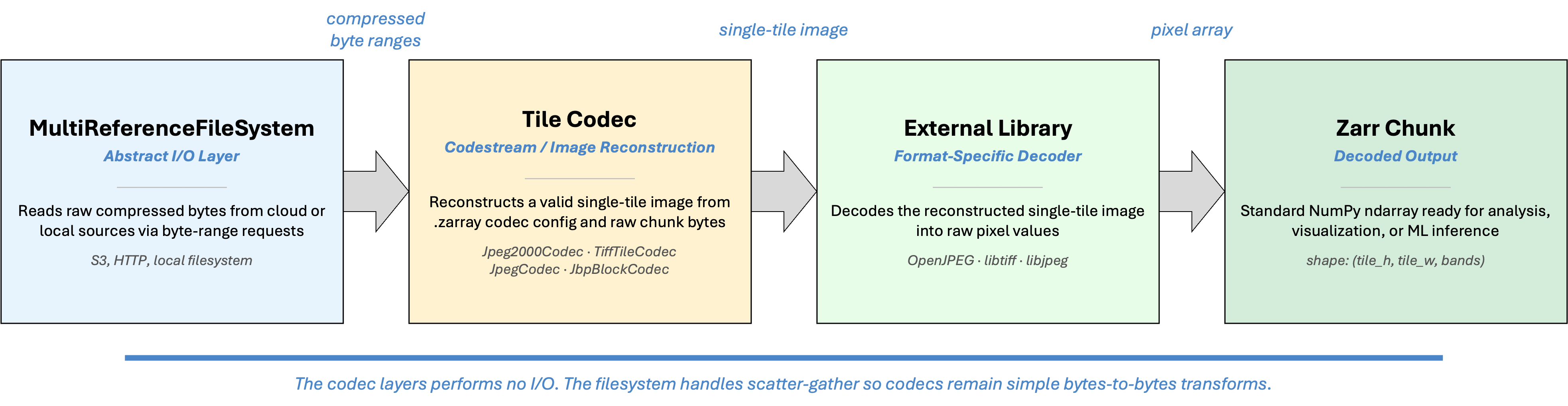
The following sections describe each component in pipeline order: the parser produces the tile index, the filesystem fetches the bytes, and the codec decodes them into pixels.
Tile Indexing with VirtualiZarr Parsers¶
The library provides OversightMLParser, a single VirtualiZarr parser that makes
it possible to access any imagery format supported by this library as a virtual
dataset. The parser scans a file using the library’s native reader and walks each
image segment, determining the byte offset and length of every tile relative to
the start of the file.
How tile boundaries are calculated depends on the format and compression:
Uncompressed tiles have fixed sizes. Offsets are computed arithmetically from the image dimensions, pixel type, and interleave mode. Formats that support sparse tile arrays (ex: NITF masked images) may have existing metadata that contains these boundaries.
JPEG tiles are length-prefixed. The parser scans the length headers sequentially to locate each tile boundary.
JPEG 2000 codestreams use SOT (Start of Tile-part) markers that record the byte offset and length of each tile-part. If the codestream contains a TLM (Tile-part Length Marker) in its main header, the full tile index is available immediately without scanning. If no TLM is present, the parser performs a sequential SOT scan.
TIFF files store tile offsets and byte counts in IFD tags (
TileOffsetsandTileByteCounts). The parser reads these directly.
When a tile’s data spans multiple non-contiguous byte ranges (as with interleaved JPEG 2000 tile-parts), the parser detects this and emits a multi-range reference entry instead of a single-range entry. Contiguous multi-part tiles are merged into a single range automatically.
The parsers produce the ManifestStore — a virtual Zarr store backed by chunk
references into the source file. This can be serialized to create a
format-agnostic tile index.
MultiReferenceFileSystem: Scatter-Gather I/O for Non-Contiguous Chunks¶
The standard Kerchunk reference spec supports three forms per chunk key: inline data, whole-file references, and single byte-range references. This covers most formats, but breaks down for JPEG 2000 codestreams with interleaved tile-parts.
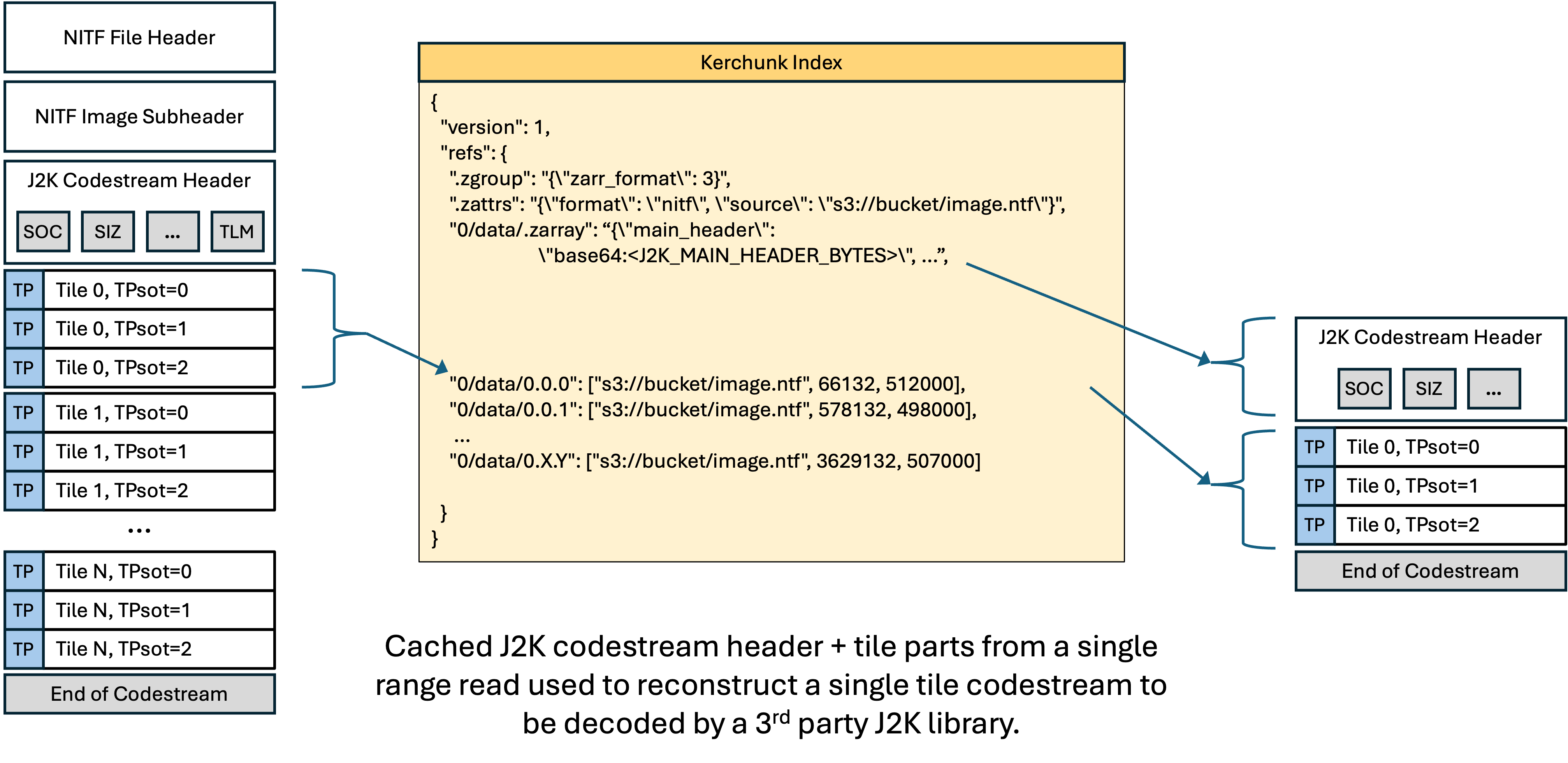
JPEG 2000 supports several progression orders that control how compressed data is organized in the codestream. Two of these — RLCP (Resolution-Layer-Component- Position) and RPCL (Resolution-Position-Component-Layer) — interleave tile-parts from different tiles. Instead of writing all of tile 0’s data, then all of tile 1’s data, the encoder writes resolution level 0 for every tile, then resolution level 1 for every tile, and so on. A single tile’s compressed bytes end up scattered across multiple non-contiguous locations in the file.
The standard ReferenceFileSystem has no way to express “fetch these six byte
ranges and concatenate them” for a single chunk. This is not a theoretical edge
case. Satellite imagery from several commercial providers uses RPCL progression
order, and the interleaved tile-part layout is common in large multi-resolution
JPEG 2000 files.
MultiReferenceFileSystem is a drop-in subclass of fsspec’s
ReferenceFileSystem that extends the Kerchunk reference model with a fourth
form.
The four reference forms¶
A reference says where a chunk’s bytes are. There are four kinds, independent of how any container writes them down:
Form |
Meaning |
|---|---|
Inline |
The bytes are in the index itself, not in a separate file. |
Whole file |
The chunk is the entire contents of one file. |
Single range |
The chunk is one contiguous byte range within a file. |
Multi-range |
The chunk is several non-contiguous byte ranges within one file, concatenated in the order given. |
Only the last is unusual. It exists because a JPEG 2000 tile with interleaved tile-parts has no single contiguous extent — each pair identifies one tile-part’s location, and the filesystem fetches them all and joins them before handing the bytes to the codec. The order is significant: it is decode order, not file order.
How each container encodes them¶
The forms above are the model. The two output containers write_tile_index
produces encode that model differently, and both carry all four forms:
Form |
Kerchunk JSON value |
Kerchunk Parquet columns |
|---|---|---|
Inline |
|
|
Whole file |
|
|
Single range |
|
|
Multi-range |
|
|
In JSON a refs value is a free-form list, so multi-range is expressible as a new
value shape: a 2-element list whose second element is a list of
[offset, length] pairs.
{
  "0/data/0.0.0": [
    "s3://bucket/image.ntf",
    [[66132, 1518], [2534029, 3385], [7216065, 11460],
     [22566527, 38566], [74210429, 116812], [242293202, 339534]]
  ]
}
Parquet has no free-form value. Each chunk is one row of a fixed schema, so
multi-range is expressed as extra columns instead: range_path holds the URL,
and offsets and sizes are list<int64> columns that pair up positionally.
Parquet carries list columns natively, so a chunk may have any number of
fragments with no padding and no per-store maximum. Those three columns are
written only in record files that actually contain a multi-range chunk, so an
index of ordinary imagery is unchanged.
path is deliberately left null on a multi-range row. A reader that does not
understand the range columns therefore fails on that chunk instead of quietly
decoding one fragment of six as though it were the whole thing. This is why a
Parquet index must be read with MultiReferenceFileSystem rather than a stock
ReferenceFileSystem — see
Reading a Parquet index.
Either way the URL is stored once per chunk rather than once per fragment. For a file with 1,722 tiles and six tile-parts each, that saves roughly 775 KB of redundant URL strings compared to a flat list of single-range entries.
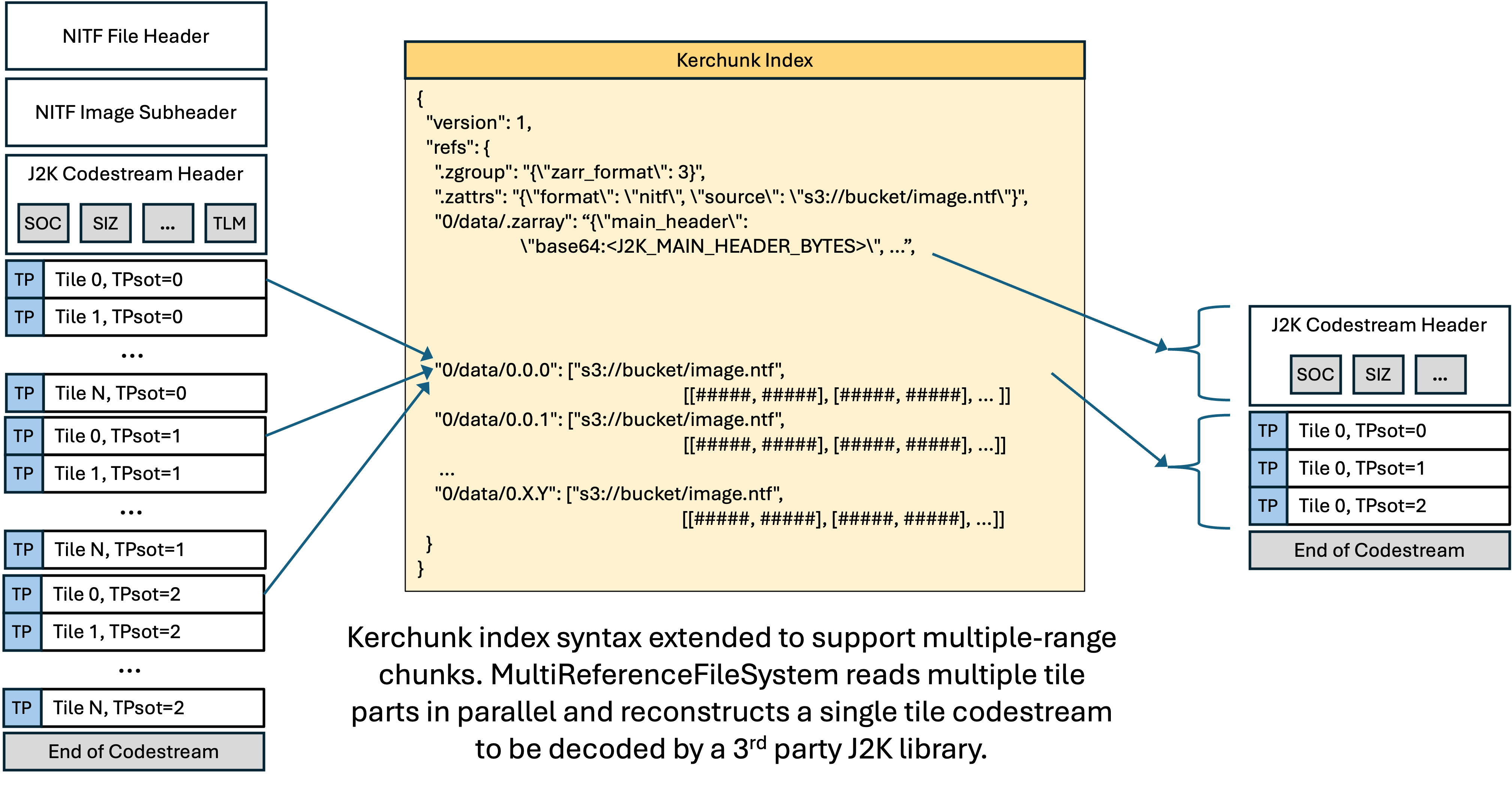
MultiReferenceFileSystem handles all standard reference types by delegating to
the parent ReferenceFileSystem. When it encounters a multi-range entry, it
performs scatter-gather I/O:
Sync path (
_cat_common): fetches each byte range sequentially and concatenates the results. Adequate for local files and testing.Async path (
_cat_file): issues all byte-range fetches concurrently viaasyncio.gatherand concatenates in the original entry order. This is the path used by Zarr’s async store and is critical for minimizing latency when reading from S3.
Use MultiReferenceFileSystem instead of ReferenceFileSystem when your tile
index may contain multi-range entries. It is fully backward-compatible — tile
indexes with only standard single-range entries work identically. The index
generator in this library automatically emits multi-range entries for tiles
with interleaved tile-parts and single-range entries for everything else, so
using MultiReferenceFileSystem as the default is the simplest approach.
from aws.osml.io.multi_reference_fs import MultiReferenceFileSystem

fs = MultiReferenceFileSystem(
    fo="s3://bucket/image.tile_index.json",
    asynchronous=True,
    remote_options={"asynchronous": True},
    skip_instance_cache=True,
)
The constructor accepts the same arguments as ReferenceFileSystem. Existing
code that uses fsspec.filesystem("reference", ...) can switch by replacing
the filesystem instantiation.
Note
The multi-range reference form is a novel extension to the Kerchunk reference
spec introduced by this project. The standard Kerchunk and Zarr ecosystem does
not handle the case of non-contiguous byte ranges for a single chunk. If you
encounter JPEG 2000 imagery with interleaved tile-parts elsewhere,
MultiReferenceFileSystem is the component that makes it work.
The extension takes a different shape in each container, which is why the two
tables above are separate. In JSON — which has a versioned spec, Kerchunk
reference specification version 1 — it adds a form: a new value shape in a
field that was already free-form. In Parquet — which has no spec, only fsspec’s
LazyReferenceMapper implementation and the preffs layout it descends from —
it adds columns, because a row of a fixed schema has no free-form field to
extend. Reading a Parquet index of interleaved imagery needs a reader that knows
those columns; reading a JSON one needs a reader that knows the fourth form. In
both cases that reader is MultiReferenceFileSystem.
Custom Codecs¶
Once the filesystem delivers the raw bytes for a chunk, those bytes are still in the source format’s native encoding. Standard Zarr codecs cannot decode them. This library registers four Zarr v3 codecs that handle the format-specific decoding:
JbpBlockCodec handles uncompressed NITF tiles. NITF raw pixel data uses
big-endian byte order and one of four interleave modes (band-interleaved by
pixel, band-interleaved by line, band-interleaved by block, or
band-sequential). The codec performs the endian swap and interleave conversion
to produce standard NumPy arrays.
JpegCodec decodes JPEG tiles. It carries format-specific parameters (color
space, interleave mode, bits per pixel) in its configuration and passes them to
the underlying Rust decoder.
Jpeg2000Codec decodes JPEG 2000 tile data. JPEG 2000 codestreams support
internal tiling, but the tiles are not self-contained. Each tile’s compressed
data (the “tile-part”) contains only the wavelet coefficients. The decoding
parameters — tile dimensions, quantization tables, wavelet decomposition levels,
component counts — live in the codestream’s main header (the SIZ, COD, and QCD
markers). A decoder cannot reconstruct pixels from a tile-part alone. Existing
Zarr JPEG 2000 codecs assume each chunk is a complete, self-contained
codestream. They cannot decode a bare tile-part without the header.
We solve this by inlining the shared main header (base64-encoded, typically
100–500 bytes) in the codec configuration stored in .zarray. At decode time
the codec reconstructs a minimal single-tile codestream on the fly:
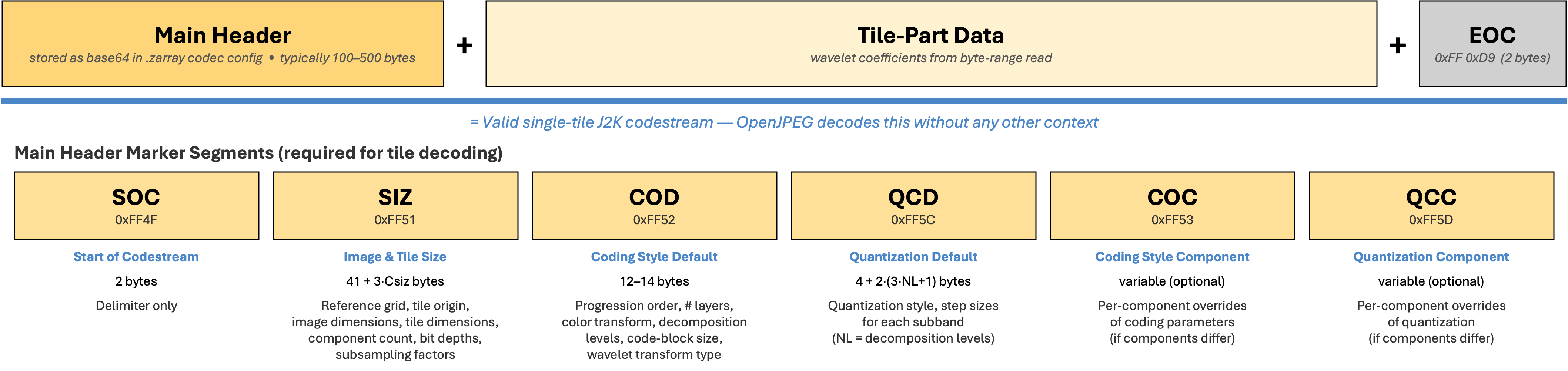
OpenJPEG receives what looks like a normal single-tile codestream and decodes
it. This approach has precedent in the JPEG 2000 ecosystem. JPIP (the JPEG 2000
Interactive Protocol) streams individual tile-parts to clients that already hold
the main header. Because the codec operates on the J2K codestream directly, it
works for standalone .j2k/.jp2 files and for J2K codestreams embedded in
container formats like NITF.
Note that the codec layer performs no I/O. When MultiReferenceFileSystem
fetches and concatenates multiple tile-parts for an interleaved codestream,
the codec receives the complete concatenated bytes and reconstructs the
codestream exactly the same way. The filesystem handles the scatter-gather
complexity so codecs remain simple bytes-to-bytes transforms.
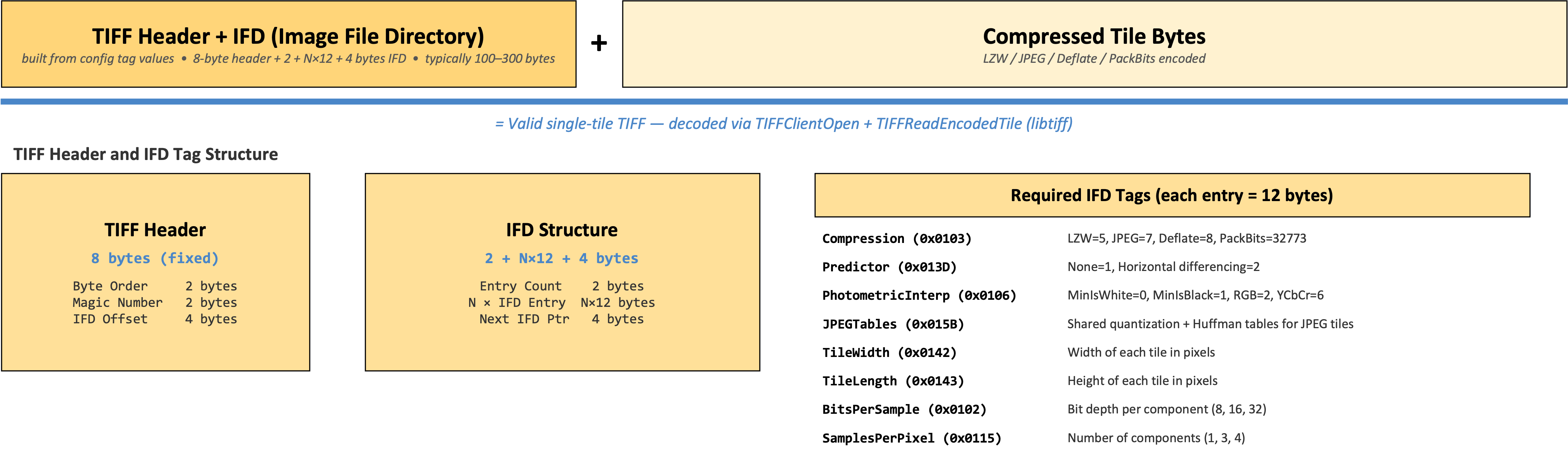
TiffTileCodec decodes TIFF tiles. Individual compressed tiles
extracted from a TIFF file cannot be decoded in isolation — the decoder needs
IFD tag metadata (compression type, predictor, photometric interpretation,
JPEG tables, etc.) that lives in the file header, not in the tile data itself.
The codec stores the required IFD tag values in its configuration. At decode
time it constructs a minimal single-tile TIFF in memory from the configuration
and the compressed tile bytes, then hands it to libtiff via TIFFClientOpen +
TIFFReadEncodedTile. This approach supports LZW, JPEG, Deflate, Adobe
Deflate, and PackBits compression, including horizontal differencing predictors
and YCbCr-to-RGB conversion for JPEG tiles.
Uncompressed TIFF tiles (Compression=1) still need the codec whenever the image
has more than one band, because compression is not the only thing standing
between the stored bytes and a (bands, rows, columns) array — sample order is
too. A chunky tile (PlanarConfiguration=1) is pixel-interleaved on disk
(RGBRGBRGB…), so reshaping its bytes straight into (bands, height, width)
would scramble the bands; the codec de-interleaves them. A planar tile
(PlanarConfiguration=2) holds one band’s samples per tile, and the index gives
each plane its own chunk so Zarr stacks the bands (see below). Only single-band
uncompressed tiles need no codec — per TIFF 6.0, PlanarConfiguration is
irrelevant when SamplesPerPixel is 1, so the raw tile bytes already are the
pixel data and Zarr reads them directly with no copy.
Planar TIFF is where the chunk grid itself changes shape. Because each tile on
disk carries a single band, the parser advertises a band-granular chunk grid:
chunk_shape is (1, block_height, block_width) with chunk keys
{band}.{row}.{col}, one chunk per plane, and the codec instance for that array
is overridden to samples_per_pixel=1, planar_config=1 — each chunk is
presented as a standalone single-band chunky tile. Chunky TIFF keeps the
(bands, block_height, block_width) chunk shape and 0.{row}.{col} keys, where
one chunk holds every band.
This is invisible to readers. Chunk shape is a storage property in Zarr, not
a shape property: both layouts advertise the same array shape of
(bands, rows, columns) and the same dimension_names of ("bands", "y", "x"),
so indexing behaves identically. Any selection returns a band-first (CHW) array,
including windows that cross tile and band boundaries — Zarr gathers whichever
chunks intersect the selection, and three per-band chunks are no different to it
than the four spatial chunks it already gathers for a window straddling tile
edges. On a 3-band 100×100 planar image with 64×64 tiles:
arr.shape                  # (3, 100, 100)  — same for planar and chunky
arr.chunks                 # (1, 64, 64) planar vs (3, 64, 64) chunky

arr[:]                     # (3, 100, 100)  full image, bands stacked in order
arr[:, 30:90, 40:100]      # (3, 60, 60)    crosses 4 spatial chunks x 3 bands
arr[1, 10:50, 10:50]       # (40, 40)       one band
arr[:, 77, 88]             # (3,)           one pixel, all bands
Every one of those is pixel-identical to the same read through IO.open(), which
does not consult the chunk grid at all and is unaffected either way.
The difference is in request count, and it cuts both ways. Reading all bands of one tile from a planar image fetches three byte ranges instead of one, which is read amplification on a high-latency store such as S3 — though the ranges cover disjoint regions, so no bytes are wasted, and Zarr issues chunk fetches concurrently, making the cost latency-parallel rather than serial. Conversely, a single-band read fetches only that band’s chunk, which is strictly less I/O than the chunky layout, where one band’s samples are interleaved with the others and cannot be fetched apart from them. This asymmetry reflects the file, not the index: a planar TIFF genuinely stores each band in its own tile, so a multiband read was always going to touch multiple disjoint file regions.
DtedTileCodec decodes DTED elevation data sections. DTED stores elevations
as column-major signed-magnitude big-endian 16-bit integers with per-record
headers and checksums interleaved in the data stream. The codec strips the
record framing, converts signed-magnitude to native two’s complement, and
transposes column-major to row-major — producing a standard (1, rows, cols)
Int16 array.
The codec introduces a capability not found in existing Zarr codecs:
overlap-aware edge trimming. DTED cells share boundary posts with their
neighbors (the easternmost column of one cell duplicates the westernmost column
of the next). The trim_* parameters discard these shared edges during decode,
so the output chunks tile seamlessly without data duplication. This makes it
possible to represent an entire DTED archive as a single contiguous Zarr array —
each file becomes one chunk, edges are trimmed at decode time, and consumers see
a seamless elevation surface with no preprocessing required.
Note
The codec supports multi-cell archives, but this library does not build them for
you. OversightMLParser indexes one file at a time (plus its .rN R-set
companions), producing a single-cell, one-chunk array — so iminfo, tiles, and
write_tile_index all operate per file.
To build an archive mosaic, write a store yourself with one chunk reference per
cell and trim_* set from each cell’s grid position. Cells you omit resolve to
the array’s fill_value, so a sparse global array does not need a file for every
1° cell.
One array covers one DTED latitude zone. Zarr declares codecs per array
rather than per chunk, so all chunks share one num_lon_lines; per
MIL-PRF-89020B §3.9.2 and Table II, DTED’s longitude spacing widens with
latitude (3″ below 50°, 6″ from 50°–70°, and so on). A single array spans
0°–50° cleanly; a pole-to-pole mosaic needs one array per zone or a resampling
step. See the DTED codec reference for the zone table.
{
    "name": "https://awslabs.github.io/osml-imagery-io/codecs/dted",
    "configuration": {
        "num_lat_points": 1201,
        "num_lon_lines": 1201,
        "record_size": 2414,
        "trim_bottom": 1,
        "trim_right": 1
    }
}
All five codecs are registered via Python entry points. They use URI-based names per the Zarr v3 specification to avoid conflicts with existing codecs:
https://awslabs.github.io/osml-imagery-io/codecs/jpeg2000https://awslabs.github.io/osml-imagery-io/codecs/jpeghttps://awslabs.github.io/osml-imagery-io/codecs/jbp-blockhttps://awslabs.github.io/osml-imagery-io/codecs/tiff-tilehttps://awslabs.github.io/osml-imagery-io/codecs/dted
The URIs resolve to human-readable documentation. Implementations do not fetch them at runtime.
Two consumer paths¶
The Zarr ecosystem is mid-migration between two array-storage generations, and
this library supports both. Which one you get is decided by the tile index, not
by the reader: write_tile_index(..., zarr_format=2) (the default) emits a
Kerchunk/Zarr-v2 index, zarr_format=3 emits a native Zarr v3 index. The
codecs, byte ranges, and pixels are identical either way — what differs is how
the store describes itself and, consequently, how the codec gets called:
Kerchunk / Zarr v2 (default) |
Native Zarr v3 |
|
|---|---|---|
Metadata keys |
|
|
Chunk keys |
|
|
Codec named by |
the |
the URI in the |
Resolved through |
the numcodecs registry |
the |
Codec called |
synchronously, one buffer at a time |
asynchronously, in batches |
Output containers |
|
|
Each registry is fed by its own entry-point group (numcodecs.codecs and
zarr.codecs), both declared by this package. That is what makes discovery
automatic on either path — a group covers only its own registry.
Note
Because both entry-point groups are declared, codec registration needs no
explicit import on either path: installing the package with the zarr extras
(pip install osml-imagery-io[zarr]) is sufficient. Importing
aws.osml.io.zarr_codecs still works and is the only way to register the codecs
when running from a source tree with no distribution metadata, where entry
points are unavailable.
The v2 path is the more heavily exercised of the two and remains the default:
it is what the wider reference-file ecosystem (Kerchunk, fsspec’s
ReferenceFileSystem) reads, and it is the only path that supports Parquet
output. The v3 path is the strategically forward-looking one — the numcodecs
plumbing the v2 path rides is being superseded in zarr-python 3.x — and is the
one to use if you want zarr’s native codec pipeline with no v2 translation
layer. Reading each is shown in
Step 2 and
the native Zarr v3 read below.
Zarr Access to Image Pyramids¶
The GeoZarr multiscales convention¶
The GeoZarr multiscales convention
defines how multi-resolution image pyramids are stored in Zarr groups. Each
resolution level is identified by an asset path in the layout array. The
asset field uses Zarr path nomenclature: it can be a simple name referencing
a direct child group or array (e.g., "0", "level1", "full"), or a path
with / separators for nested resources (e.g., "0/data"). All paths are
relative to the group containing the multiscales metadata. In our
implementation, each asset path points to a numbered subgroup ("0", "1",
"2", …) where level "0" is the highest resolution and each subgroup
contains a single array named "data". This structure is used consistently
for all tile indexes — including single-resolution images, which are
represented as a one-level pyramid. This means the access path
root["0/data"] works the same way regardless of whether overviews are
present. The root group’s .zattrs carries metadata that describes the
relationship between levels.
The convention has three key parts:
Convention identity via zarr_conventions. The root group attributes
include a zarr_conventions array that declares which conventions the store
conforms to. Each entry has a UUID, schema URL, spec URL, name, and
description. This makes convention detection unambiguous — a consumer can check
for UUID d35379db-88df-4056-af3a-620245f8e347 to confirm the store uses the
multiscales convention.
Layout via multiscales. The multiscales attribute is an object (not an
array) containing a layout array. Each entry in the layout describes one
resolution level with an asset field (the path to the Zarr subgroup), an
optional derived_from field (the parent level it was downsampled from), and a
transform object with scale and translation arrays.
Relative transforms. Scale factors are relative between adjacent levels,
not absolute from level 0. If level 1 is derived from level 0 at 2× downsample,
its transform.scale is [2.0, 2.0] (Y, X). If level 2 is also 2× from
level 1, its scale is also [2.0, 2.0]. The scale and translation arrays have
exactly two elements — the spatial Y and X axes. The bands axis is not included.
Note
The GeoZarr effort also defines proj: (CRS information) and spatial:
(affine transforms, bounding boxes) conventions. These are not yet implemented
in this library but are planned. When added, their entries
will appear in the zarr_conventions array alongside the multiscales entry.
How pyramids map to the chunk index¶
The tile index is always a Zarr group hierarchy with GeoZarr multiscales metadata, regardless of how many resolution levels exist. A single-resolution image is a one-level pyramid; adding overviews adds levels without changing how the base image is addressed:
image.tile_index.json
├── .zattrs              ← GeoZarr multiscales metadata (zarr_conventions, layout)
├── .zgroup
├── 0/                   ← Level 0 (full resolution)
│   └── data/
│       ├── .zarray      ← array metadata (shape, chunks, codecs)
│       ├── 0.0.0        ← ["s3://bucket/image.tif", offset, length]
│       ├── 0.0.1
│       ├── 0.1.0
│       └── 0.1.1
├── 1/                   ← Level 1 (2× downsampled)
│   └── data/
│       ├── .zarray
│       └── 0.0.0
└── 2/                   ← Level 2 (4× downsampled)
    └── data/
        ├── .zarray
        └── 0.0.0
Each level has its own .zarray with the correct shape and chunk dimensions
for that resolution. Chunk keys within a level follow the standard Zarr
bands.row.col convention. The path prefix (0/data/, 1/data/, 2/data/)
is what distinguishes chunks at different resolution levels.
The root .zattrs carries the GeoZarr multiscales metadata that records the
relationship between levels:
{
  "source": "s3://bucket/image.tif",
  "zarr_conventions": [
    {
      "uuid": "d35379db-88df-4056-af3a-620245f8e347",
      "schema_url": "https://raw.githubusercontent.com/zarr-conventions/multiscales/refs/tags/v1/schema.json",
      "spec_url": "https://github.com/zarr-conventions/multiscales/blob/v1/README.md",
      "name": "multiscales",
      "description": "Multiscale layout of zarr datasets"
    }
  ],
  "multiscales": {
    "layout": [
      {
        "asset": "0",
        "transform": {"scale": [1.0, 1.0], "translation": [0.0, 0.0]}
      },
      {
        "asset": "1",
        "derived_from": "0",
        "transform": {"scale": [2.0, 2.0], "translation": [0.0, 0.0]}
      },
      {
        "asset": "2",
        "derived_from": "1",
        "transform": {"scale": [2.0, 2.0], "translation": [0.0, 0.0]}
      }
    ],
    "resampling_method": "average"
  }
}
The zarr_conventions array identifies the store as conforming to the GeoZarr
multiscales convention. The multiscales object describes the pyramid: each
entry in the layout array corresponds to one resolution level. Level 0 has no
derived_from — it is the full-resolution original. Levels 1 and 2 each
declare their parent and a relative transform. A scale of [2.0, 2.0] means
each pixel in that level covers 2×2 pixels in the derived_from level. For a
power-of-2 pyramid, every non-base level has the same relative scale. The
optional resampling_method records how the overviews were generated.
Consumers like xarray.open_datatree() read this metadata and present the
pyramid as a DataTree with one node per level, each containing a lazily-loaded
Dataset.
Format-specific sources of resolution levels¶
The parser produces the same hierarchical Zarr structure regardless of where the resolution levels come from. What differs is how the source format stores them.
Cloud Optimized GeoTIFF (COG): A single file contains the full-resolution
image and its overviews as separate IFDs. The TIFF reader exposes these as
image:0 (full resolution), image:0:overview:1 (first overview),
image:0:overview:2 (second overview), etc. The parser detects the overview
keys and builds the hierarchy automatically. All chunk references point to byte
ranges within the same file, so a single URL suffices.
NITF R-sets: Each resolution level is a separate file. The caller passes
all files to the parser, and IO.open() detects the .rN filename pattern to
key the assets correctly (image:0 for the base, image:0:overview:N for each
R-set file). Each level’s chunk references point to its own file, so the caller
provides one URL per file.
JPEG 2000 native resolution levels: A single J2K codestream supports
decoding at multiple resolution levels through wavelet decomposition. In the
current implementation, the parser does not auto-expand these into pyramid
levels — only explicitly provided assets (COG overview IFDs or R-set files)
produce a hierarchy. Auto-expansion of J2K resolution levels is planned,
where each level would use the same codec with a different
resolution_level parameter and reference only the tile-part byte ranges needed
for that level.
In all cases, the parser is a metadata-only operation. It does not decode pixels, generate new overview levels, or resample imagery. It describes how to address tiles that already exist in the source data.
End-to-End Example: Single-Resolution NITF in S3¶
The following example shows the complete workflow for indexing a single NITF file and accessing its tiles through Zarr.
Step 1: Generate the tile index¶
Run this once per file, typically as part of an ingest pipeline. The file must be available locally for indexing.
Note
Index generation requires the virtualizarr optional dependency:
pip install osml-imagery-io[virtualizarr]
When the url parameter is omitted, the index stores only filenames with a
{{base}} template placeholder instead of absolute S3 URLs. This makes the
index portable — it can be created before the upload destination is known and
resolved at read time. The serialized JSON uses the Kerchunk v1 templates
feature, which ReferenceFileSystem and MultiReferenceFileSystem both
support natively.
from aws.osml.io.virtualizarr_parsers import OversightMLParser, write_tile_index

# Index a local copy
parser = OversightMLParser()
store = parser("local/image.ntf")

# Serialize a portable index — chunk refs use {{base}}filename, resolved at
# read time via template_overrides (multi-range aware)
write_tile_index(store, "image.ntf.tile_index.json", template_base="{{base}}")
A .parquet output path accepts the same arguments and carries the same four
reference forms, but encodes them differently and has two caveats of its own:
It must be read back with
MultiReferenceFileSystemrather than a stockReferenceFileSystem, and needspyarrow(pip install "osml-imagery-io[zarr]").Because a Parquet store cannot carry the Kerchunk
templatesdict, a portable Parquet index resolves its placeholders fromtemplate_overridesalone.
Multi-range chunks are supported in Parquet, encoded as the range_path /
offsets / sizes columns rather than as a value shape — see
How each container encodes them. Because
path is null on those rows, a reader unaware of the columns fails on them
rather than returning partial data. See
Reading a Parquet index.
This index is a Kerchunk/Zarr-v2 store, read through numcodecs — the default
described in Two consumer paths. Passing
zarr_format=3 instead emits a native Zarr v3 store; everything else on this
page (portability, url_overrides, pyramids, multi-range entries) applies
unchanged. See Reading a native Zarr v3 index.
The same thing from the command line, with --zarr-format selecting the layout:
# Kerchunk / Zarr v2 (default)
python scripts/generate_tile_index.py image.ntf -o image.tile_index.json

# Native Zarr v3
python scripts/generate_tile_index.py image.ntf --zarr-format 3 -o image.v3.json
Upload both the image and the index to S3:
import boto3

s3 = boto3.client("s3")
s3.upload_file("local/image.ntf", "my-bucket", "imagery/image.ntf")
s3.upload_file(
    "image.ntf.tile_index.json",
    "my-bucket",
    "imagery/image.ntf.tile_index.json",
)
If you already know the final S3 location at index time, rewrite the references
to it with url_overrides and skip template_overrides at read time:
import os

write_tile_index(
    store, "image.ntf.tile_index.json",
    url_overrides={os.path.abspath("local/image.ntf"): "s3://my-bucket/imagery/image.ntf"},
)
Or index the remote file directly (range reads, no local copy needed):
store = OversightMLParser()("s3://my-bucket/imagery/image.ntf")
write_tile_index(store, "image.ntf.tile_index.json")
Step 2: Open and access tiles¶
Codec registration happens automatically when the package is installed with the
zarr extras (pip install osml-imagery-io[zarr]). No explicit import is needed
on either consumer path — the numcodecs.codecs entry points serve this v2 read,
and zarr.codecs serves the v3 read below.
Use MultiReferenceFileSystem to open the tile index. It handles both standard
single-range entries and multi-range entries for JPEG 2000 images with
interleaved tile-parts. When you slice into the dataset, the filesystem issues
HTTP range requests for only the bytes backing the requested tiles and the
registered codec decodes them into NumPy arrays.
For portable indexes, pass template_overrides to resolve the {{base}}
placeholder to the S3 directory containing the image (with a trailing slash).
The same index works unchanged if the image moves to a different bucket or
path — just update the override.
import zarr
from aws.osml.io.multi_reference_fs import MultiReferenceFileSystem
from zarr.storage._fsspec import FsspecStore

fs = MultiReferenceFileSystem(
    fo="s3://my-bucket/imagery/image.ntf.tile_index.json",
    template_overrides={"base": "s3://my-bucket/imagery/"},
    asynchronous=True,
    remote_options={"asynchronous": True, "profile": "my-profile"},
    skip_instance_cache=True,
)

store = FsspecStore(fs=fs, read_only=True, path="")
root = zarr.open_group(store, mode="r", zarr_format=2)

# Read a single tile region
import numpy as np

arr = root["0/data"]
tile = np.asarray(arr[0:3, 768:1024, 1024:1280])
print(tile.shape)  # (3, 256, 256)
print(tile.dtype)  # uint8
AWS credentials can also be provided through environment variables
(AWS_ACCESS_KEY_ID, AWS_SECRET_ACCESS_KEY, AWS_PROFILE) or any other
method supported by boto3 and fsspec.
Reading a native Zarr v3 index¶
An index written with zarr_format=3 is still a Kerchunk reference file served
over fsspec, so the filesystem setup is identical — MultiReferenceFileSystem
for the same reasons (multi-range entries, portable templates). What changes is
everything above the store: zarr reads zarr.json documents instead of
.zarray, resolves the codec by its URI through the zarr.codecs entry points,
and drives it with the asynchronous batched codec pipeline. There is no
Kerchunk-to-v2 translation anywhere in the read.
Note the absence of zarr_format=2 on open_group — the store declares
version 3 itself, so nothing has to be told which generation to expect.
import numpy as np
import zarr
from aws.osml.io.multi_reference_fs import MultiReferenceFileSystem
from zarr.storage._fsspec import FsspecStore

fs = MultiReferenceFileSystem(
    fo="s3://my-bucket/imagery/image.v3.json",
    asynchronous=True,
    remote_options={"asynchronous": True},
    skip_instance_cache=True,
)

store = FsspecStore(fs=fs, read_only=True, path="")
root = zarr.open_group(store, mode="r")

arr = root["0/data"]
print(arr.shape)            # (3, 1024, 1024)
print(arr.chunks)           # (3, 256, 256)
tile = np.asarray(arr[0:3, 512:768, 768:1024])
print(tile.shape)           # (3, 256, 256)
The array access path is root["0/data"] here too: the GeoZarr multiscales
layout is the same in both formats, so a v2 index and a v3 index of the same
file are addressed identically and return identical pixels.
xarray reads the store the same way, pointed at a level’s subgroup:
import xarray as xr

ds = xr.open_zarr(FsspecStore(fs=fs, read_only=True, path="0"), consolidated=False)
print(ds["data"].dims)      # ('bands', 'y', 'x')
print(ds["data"].shape)     # (3, 1024, 1024)
Note
Point the store at the level’s path (path="0") rather than passing xarray’s
group="0" argument. A reference filesystem serves only the keys the index
names and does not enumerate nested group members, so xarray’s group lookup
finds no variables. This is a property of ReferenceFileSystem rather than of
the v3 layout — it affects Kerchunk-v2 indexes the same way — and it is also why
xarray.open_datatree works on a v2 index via engine="kerchunk" (shown below)
but not on a reference-backed v3 store. Open each level individually instead.
End-to-End Example: Multi-Resolution COG Pyramid¶
This example shows how to index a Cloud Optimized GeoTIFF that contains embedded overview images and access tiles at different resolution levels through Zarr.
A COG stores its overview images as additional IFDs within the same file. The parser detects these automatically and produces a hierarchical tile index with one subgroup per resolution level.
Step 1: Generate the hierarchical tile index¶
Portable indexes work with multi-file pyramids too. Each file gets its own
{{base}}filename reference, and a single template_overrides resolves all
of them at read time (assuming the files are co-located).
from aws.osml.io.virtualizarr_parsers import OversightMLParser, write_tile_index

# A COG with embedded overviews — single file, portable index
parser = OversightMLParser()
store = parser("local/image.tif")
write_tile_index(store, "image.tif.tile_index.json", template_base="{{base}}")
For a COG with two overview levels, the resulting JSON contains subgroups "0"
(full resolution), "1" (first overview), and "2" (second overview). All
chunk references point to byte ranges within the same file.
The same workflow works for multi-file NITF R-set pyramids. The parser discovers
the .r1/.r2/… companions from the base path automatically, and the index will
contain {{base}}image.ntf, {{base}}image.ntf.r1, etc.:
# Multi-file NITF pyramid (R-set convention) — companions auto-discovered
parser = OversightMLParser()
store = parser("local/image.ntf")  # local/image.ntf.r1, .r2 discovered alongside
write_tile_index(store, "image.ntf.tile_index.json", template_base="{{base}}")
Step 2: Open the pyramid and read tiles at different levels¶
import zarr
from aws.osml.io.multi_reference_fs import MultiReferenceFileSystem
from zarr.storage._fsspec import FsspecStore

fs = MultiReferenceFileSystem(
    fo="s3://my-bucket/imagery/image.tif.tile_index.json",
    template_overrides={"base": "s3://my-bucket/imagery/"},
    asynchronous=True,
    remote_options={"asynchronous": True},
    skip_instance_cache=True,
)

store = FsspecStore(fs=fs, read_only=True, path="")
root = zarr.open_group(store, mode="r", zarr_format=2)

# The root group contains numbered subgroups — one per resolution level
import numpy as np

# Read a tile from the full-resolution level
level_0 = root["0/data"]
print(level_0.shape)       # e.g. (3, 8192, 8192)
tile_full = np.asarray(level_0[0:3, 0:256, 0:256])

# Read the same spatial region from the first overview (2× downsampled)
level_1 = root["1/data"]
print(level_1.shape)       # e.g. (3, 4096, 4096)
tile_ovr1 = np.asarray(level_1[0:3, 0:128, 0:128])

# Read from the second overview (4× downsampled)
level_2 = root["2/data"]
print(level_2.shape)       # e.g. (3, 2048, 2048)
tile_ovr2 = np.asarray(level_2[0:3, 0:64, 0:64])
You can also open the hierarchical index as an xarray.DataTree to get a
structured view of all levels:
import xarray as xr

dt = xr.open_datatree("image.tif.tile_index.json", engine="kerchunk")
print(dt)
# DataTree('None', parent=None)
# ├── DataTree('0')
# │   └── Dataset {'data': (bands: 3, y: 8192, x: 8192)}
# ├── DataTree('1')
# │   └── Dataset {'data': (bands: 3, y: 4096, x: 4096)}
# └── DataTree('2')
#     └── Dataset {'data': (bands: 3, y: 2048, x: 2048)}

# Access a specific level's dataset
level_1_ds = dt["1"].ds
print(level_1_ds["data"].shape)  # (3, 4096, 4096)
For single-file inputs without overviews, the parser produces a one-level
pyramid with a single subgroup "0". The access path root["0/data"] is the
same regardless of whether overviews are present, so adding overviews later
does not change how existing code addresses the full-resolution image.