Building a CB/OD Capacity Monitoring System
This is a guide to building a serverless system that automatically monitors the Capacity Block (CB) availability of AWS GPU instances (P5, P5en, P6-B300, Trn2, and more) and lets you receive instant notifications when an available slot appears.
1. Official AWS APIs
Capacity Blocks query API
DescribeCapacityBlockOfferings — the official API for querying available CB slots.
| Item | Details |
|---|---|
| Purpose | Query reservable CB offerings for a specific instance type/region/period |
| Cost | Free (no API call charges) |
| Constraint | Can query only one InstanceCount/Duration combination at a time |
| Documentation | API Reference |
Key parameters:
| Parameter | Required | Description |
|---|---|---|
InstanceType |
✅ | Instance type (e.g., p5en.48xlarge) |
CapacityDurationHours |
✅ | Reservation period — in 1-day units (24-336h) or 7-day units (168-4368h) |
InstanceCount |
❌ | Number of concurrent reservations (default 1, max 64) |
StartDateRange |
❌ | Start-date filter (returns only offerings after this date) |
Example response:
{
  "CapacityBlockOfferings": [
    {
      "CapacityBlockOfferingId": "cbr-offering-0abc123...",
      "InstanceType": "p5en.48xlarge",
      "AvailabilityZone": "ap-northeast-2a",
      "InstanceCount": 1,
      "StartDate": "2026-07-02T11:30:00+00:00",
      "EndDate": "2026-07-03T11:30:00+00:00",
      "CapacityBlockDurationHours": 24,
      "UpfrontFee": "998.69"
    }
  ]
}
CLI example:
aws ec2 describe-capacity-block-offerings \
  --instance-type p5en.48xlarge \
  --instance-count 1 \
  --capacity-duration-hours 168 \
  --region ap-northeast-2
You can't directly know the exact available quantity
The API only answers "is there a reservable offering for these conditions?" To find the exact available quantity, you have to probe with a binary search approach, raising the InstanceCount step by step.
On-Demand availability estimation API
GetSpotPlacementScores — the official API for indirectly estimating the availability of On-Demand instances.
| Item | Details |
|---|---|
| Purpose | A score (1-10) for the likelihood of securing Spot capacity for a specific instance/region |
| Cost | Free |
| Relationship to OD | Spot and OD share a physical pool, so a high Spot score means OD is also more likely to be secured (correlation, not a guarantee) |
| Documentation | API Reference |
Key parameters:
| Parameter | Description |
|---|---|
InstanceTypes |
List of instance types (at least 3 required) |
TargetCapacity |
Quantity you want to secure |
RegionNames |
List of regions to query (up to 10) |
CLI example:
aws ec2 get-spot-placement-scores \
  --instance-types p5en.48xlarge p5.48xlarge p4d.24xlarge \
  --target-capacity 1 \
  --region-names ap-northeast-2 us-east-1 us-west-2
Interpreting the response:
| Score | Meaning |
|---|---|
| 9-10 | Almost certainly securable |
| 6-8 | High probability |
| 3-5 | Uncertain |
| 1-2 | Almost impossible |
Limitations for GPU instances
GPU instances (p5, p5en, etc.) have small pools, so they almost always score 1-2 → low discriminative power. There is no official API that directly confirms OD available quantity.
2. Monitoring system architecture
Architecture diagram
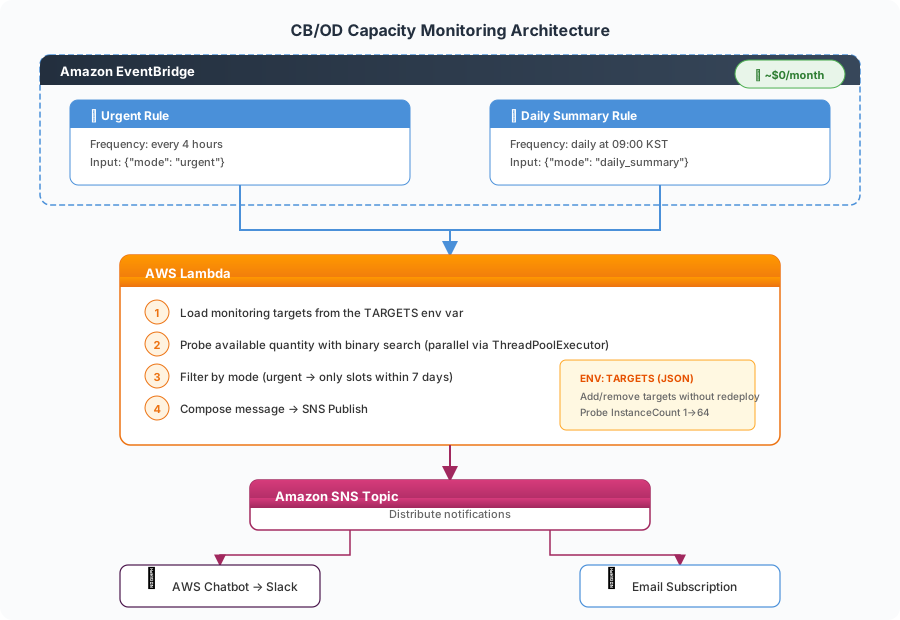
Core logic: Binary Search Probe
To find out "exactly how many instances are available," it performs a binary search on InstanceCount.
def binary_search_max(ec2_client, instance_type, duration_hours):
    lo, hi, best = 1, 64, 0
    now = datetime.now(timezone.utc)
    while lo <= hi:
        mid = (lo + hi) // 2
        resp = ec2_client.describe_capacity_block_offerings(
            InstanceType=instance_type,
            InstanceCount=mid,
            CapacityDurationHours=duration_hours,
            StartDateRange=now,
        )
        if resp.get('CapacityBlockOfferings', []):
            best = mid
            lo = mid + 1
        else:
            hi = mid - 1
    return best
- Search range: 1-64 (CB API maximum)
- API calls: Derives the exact value in up to 6 calls
- Parallel processing: Probes multiple regions/periods concurrently with ThreadPoolExecutor
Notification strategy
| Mode | Frequency | Condition | Content |
|---|---|---|---|
| Urgent | Every 4 hours | Only when there is a slot starting within 7 days | Brief summary (instance count + start date) |
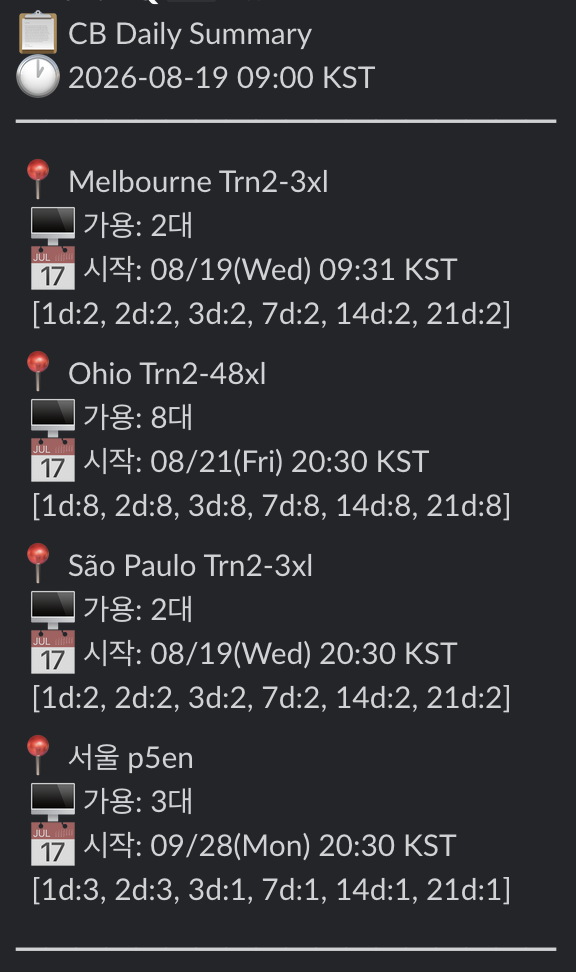
| Daily Summary | Daily at 09:00 | Always | Detailed available quantity by full period |
Example Daily Summary notification:
3. Cost
| Component | Monthly cost |
|---|---|
| Lambda (~180 runs/month, ~3 min each) | ~$0 |
| EventBridge Rules (2) | $0 |
| SNS Publish | $0 |
| AWS Chatbot | $0 |
| Total | ~$0/month |
Effectively zero cost
All components fall within the Free Tier. With Lambda memory at 128 MB and execution time under 3 minutes, you stay comfortably within the 1 million free invocations per month.
4. Configuring the TARGETS environment variable
Monitoring targets are managed through a Lambda environment variable. You can add or remove targets without redeploying.
[
  {
    "instance_type": "p5en.48xlarge",
    "region": "ap-northeast-2",
    "durations": [24, 168, 336]
  },
  {
    "instance_type": "trn2.48xlarge",
    "region": "us-east-1",
    "durations": [168, 336, 672]
  }
]
| Field | Description |
|---|---|
instance_type |
Instance type to monitor |
region |
Target region |
durations |
List of reservation periods (hours) to query |
5. Add-on: CB auto-renewal management
If you need automatic renewal before a CB expires, use the AWS Solutions Library:
| Item | Details |
|---|---|
| GitHub | guidance-for-automated-management-of-aws-capacity-blocks |
| Features | Detect CB expiration → auto-renew → approval workflow → API management |
| Cost | ~$7.40/month |
| Deployment | AWS CDK |
Combining monitoring + renewal
- Monitoring (this system) = "notify when new CB availability is found"
- Renewal management = "automatically renew existing CBs before they expire"
- Running both systems together → fully automates the entire CB lifecycle
6. Limitations
| Item | Details |
|---|---|
| OD availability | No direct API. Only indirect estimation via SPS (score) |
| Per-customer limit | A per-customer concurrent reservation limit exists per instance/region |
| API Rate Limit | No problem, since a binary search is 6 calls per period |
| Supported periods | Supported periods differ by region/instance (InvalidParameterValue if unsupported) |
Related Guides
| Guide | Content |
|---|---|
| Capacity Blocks Practical Guide | Step-by-step walkthrough of CB reservation/billing/console usage |
| GPU/Trainium Purchase Options Comparison | Comparison of OD, RI, SP, CB, and Spot options |
Reference Links
| Resource | URL |
|---|---|
| DescribeCapacityBlockOfferings | API Reference |
| GetSpotPlacementScores | API Reference |
| PurchaseCapacityBlock | API Reference |
| Capacity Blocks User Guide | User Guide |
| Spot Placement Score Guide | User Guide |
| AWS Solutions: CB automated management | GitHub |
| Spot Placement Score Tracker | GitHub |
Author: Suji Lee · Accelerated Compute GTM SSA, AWS Korea