Calibrated Agent Evaluation
Check your LLM judge before you trust its numbers.
Most teams grade their AI agent with another model, an LLM judge, and ship on what it says. This toolkit has people on your team label a sample of runs, measures the judge against those labels, and lets the judge score the runs that gate your CI build only after it passes. Then it tells you how often your agent really fails.
A judge is a new hire on review duty
You would not let a new hire's code reviews gate production on their first day. You would read a few dozen of their calls next to your own first, see where they go easy and where they nitpick, and sign them off once they agree with you often enough. An LLM judge needs the same treatment, and most teams skip it.
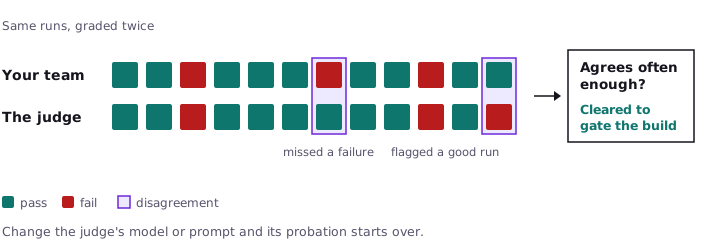
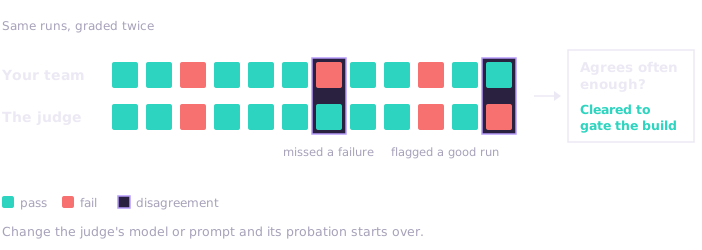
This toolkit runs that probation. Your team labels a sample of the agent's runs, the judge grades the same runs, and the two are compared. A judge that misses too many real failures, or flags too many good runs, cannot score anything, so its verdicts never reach the build's gate. Changing the judge's model or prompt starts its probation over.
What a judge's number hides
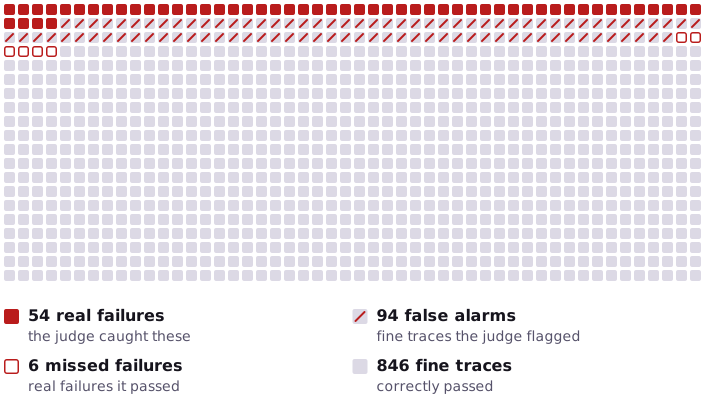
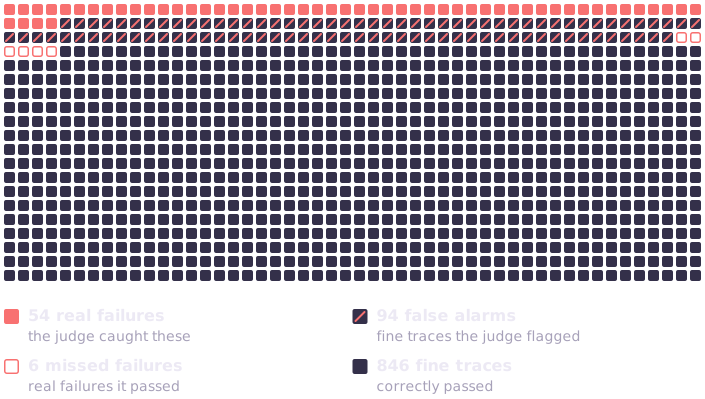
The judge flagged 14.8% of 1,000 traces
Calibrated Agent Evaluation reports 6.0% likely between 0.0% and 12.6%
The true rate is 6.0% known here because the sample is synthetic
The judge is right on 90% of failures and 90% of passes. On a sample where few traces fail, the 10% of passes it gets wrong outnumber the real failures, so its raw rate is more than double the truth. The toolkit measures the judge's mistakes against your labels and takes them back out.
The program behind this picture
Judge certified: it caught 90.0% of the failures and cleared 90.0% of the passes.
It flagged 148 of 1,000 production traces: 14.8%.
Failure rate: 6.0% (likely between 0.0% and 12.6%).
The true rate in this synthetic sample: 6.0%.

On another sample it flagged 50 of 1,000: 5.0%.
That is fewer than the judge's false alarms alone would produce,
so there is no honest single number.
Failure rate: likely between 0.0% and 0.5%.
The sample is synthetic, so the true rate is known. The picture and this output are rebuilt from
docs/site/examples/rate_correction.py on every docs build.
Four ways a judge's number misleads a team
-
It misses a failure
The judge passes runs where the agent issues a refund the policy doesn't allow. The dashboard is green, and the money is gone. Step 4
-
It flags failures that aren't there
The judge wrongly flags a few good replies in every hundred. When real failures are rare, those outnumber them, and the team spends a sprint fixing replies that were fine. Step 4
-
A generic score hides the real problem
"Helpfulness" goes up release after release while the refund-policy mistakes stay where they were, because nobody named them. Step 3
-
A fix only works on the test set
The failure rate drops on the traces the team tuned against. In production, the same failures show up under a different name. Step 6
How it works
1 Read your traces
Bring the recorded runs of your agent from OpenTelemetry, Langfuse, Inspect, Strands or a file, and read them before deciding what to measure.
2 Label and name failures
People on your team mark runs pass or fail in a review UI, and the toolkit groups the failures into named failure modes.
3 Put a judge on probation
The judge grades the labeled runs. It may score new runs only after it agrees with your team often enough and passes a bias check: padding a reply, writing in the judge's own style, or a customer insisting they are right must not change its verdict.
4 Gate and report
A certified judge scores new runs. The CI gate passes or fails each failure mode, and the report gives the failure rate with the judge's mistakes taken out.
The walkthrough follows one support team through every step.
Try it
No API keys and no network. The sample corpus ships with the package:
What it prints
$ calibrated-agent-evaluation quickstart
calibrated-agent-evaluation quickstart: a first error-analysis pass on the bundled sample corpus

Seeded 6 agent traces + 9 gold labels into an offline local store
  ($CALIBRATED_AGENT_EVALUATION_LOCAL_ROOT)

First-pass result: 5 of 6 traces have a labeled failure.
Failure modes found:
    - trusted_broken_policy_tool: 2
    - dropped_material_fact: 1
    - misread_amount: 1
    - vacancy_threshold_margin_mishandled: 1

Those counts come from the gold labels that ship with the corpus: nothing has been
judged yet. Next steps:
  - calibrated-agent-evaluation doctor
    see which optional extras are installed
  - uv sync --inexact --extra ui, then
    calibrated-agent-evaluation --root $CALIBRATED_AGENT_EVALUATION_LOCAL_ROOT label --serve --rater YOUR_ID
    review traces in the UI
  - uv sync --inexact --extra stats
    judge calibration and corrected failure rates
  - calibrated-agent-evaluation --root $CALIBRATED_AGENT_EVALUATION_LOCAL_ROOT cluster
    check failure-mode saturation and coverage
  - calibrated-agent-evaluation --root $CALIBRATED_AGENT_EVALUATION_LOCAL_ROOT run --verdicts human --ci
    the CI gate over the gold labels
  - calibrated-agent-evaluation calibrate, calibrated-agent-evaluation bias, calibrated-agent-evaluation judge
    certify a judge, then score with it
  - calibrated-agent-evaluation quickstart --certify
    a set big enough to certify one, offline
Install lists the optional extras.
Works with what you have
It reads traces from OpenTelemetry GenAI spans, Langfuse, OpenInference, OpenLLMetry, Inspect AI, Strands Agents, Bedrock AgentCore and plain datasets. It can also sample an agent you only reach over HTTP. Connect your agent.
Package and CLI: calibrated-agent-evaluation · import name: calibrated_agent_evaluation ·
License: Apache-2.0 ·
Source: awslabs/calibrated-agent-evaluation