
Versioned Updates
Topics
Section titled “Topics”- Overview
- Document subgraphs
- Using versioned updates
- Example
- Inspecting source metadata
- Deleting documents
- Automatically delete versioned documents
- Upgrading existing graph and vector stores
Overview
Section titled “Overview”The graphrag-toolkit allows you to version source documents along a single timeline based on extraction timestamps. Using this versioned update feature, if you re-ingest a document whose contents and/or metadata have changed since it was last extracted, any old documents will be archived, and the newly ingested document treated as the current version of the source document.
Document subgraphs
Section titled “Document subgraphs”The (source)<--(chunk)<--(topic)<--(statement) part of the lexical graph model represents a bounded document subgraph. The id of a source node is a function of the metadata and textual contents of a source document. The ids of chunks, topics, and statements are in turn a function of the source id. If the metadata and/or contents of a source document change, and the document is reprocessed, the source will be assigned a different id – and so will all the chunks, topics and statements that derive from that source.
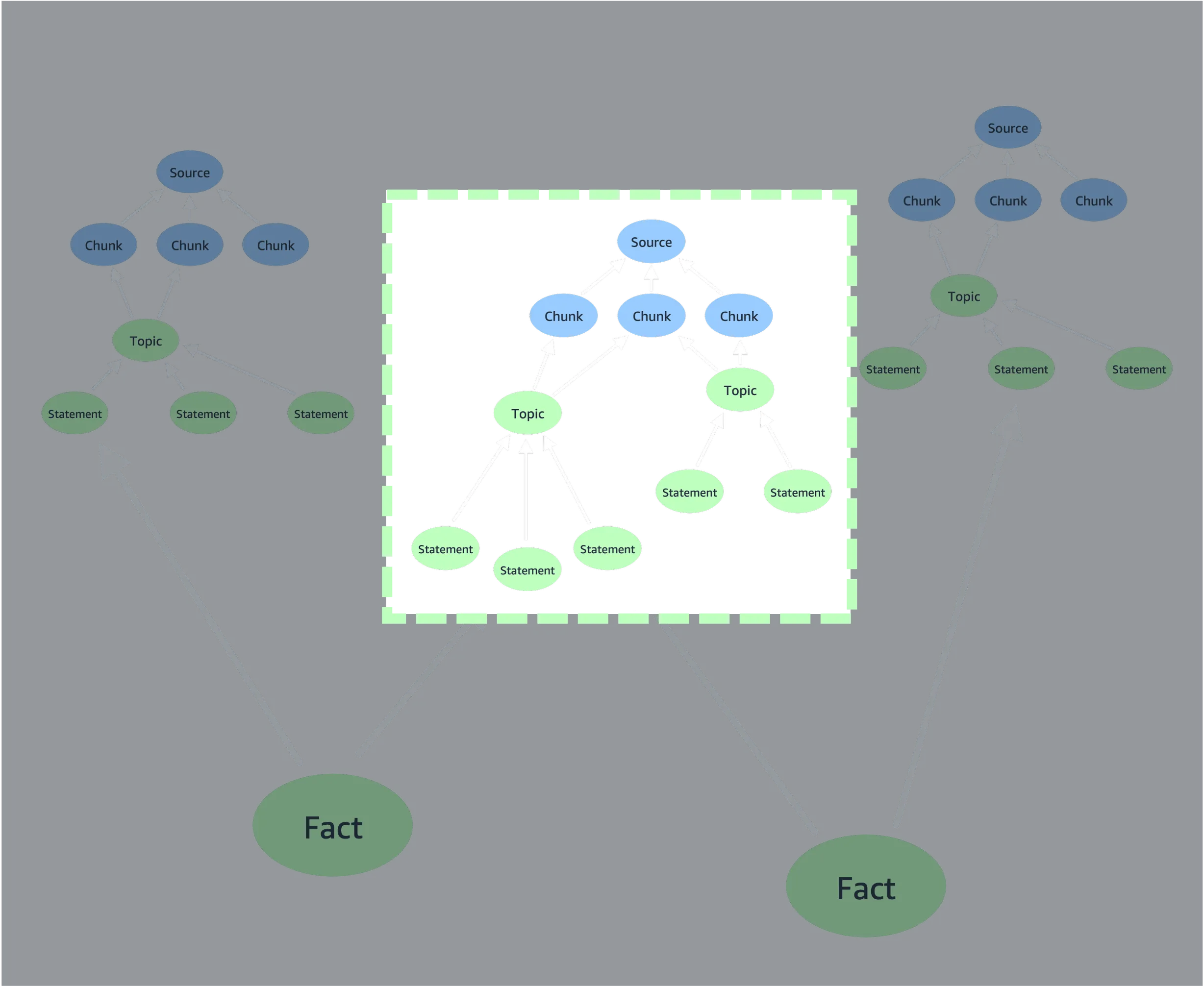
This means that if you extract two different versions of a document (i.e. versions with different contents and/or metadata) at different times, you’ll end up with two different bounded document subgraphs: two source nodes, and then independent (chunk)<--(topic)<--(statement) subgraphs beneath each of those source nodes. If the toolkit’s versioning feature is enabled, the last version of the document to be extracted will be treated as the current version, and all other versions marked as historical, archived versions.
Stable document identities
Section titled “Stable document identities”For a document to be versioned in this manner, there must be some way of specifying that different sets of text and metadata represent different versions of the same document. In other words, the document must have a stable identity, independent of variations in content and/or metadata.
The graphrag-toolkit uses a concept of version-independent metadata fields to represent this stable identify. When you index a document, you can specify which of that document’s metadata fields represent its stable identify. For example, if a document has title, author and last_updated metadata fields, you might specify that a combination of the title and author metadata fields represent that document’s stable identify. When the document is indexed, any previously indexed, non-versioned documents whose title and author field values match those of the newly ingested document will be archived.
Important Which metadata fields you choose to represent different documents’ stable identities will have a big impact on the versioning of documents. A set of specific version-independent field values should match all versions of a specific document, without including any other documents. A URI is often sufficient to uniquely identify a web page, whereas a filename may not always uniquely identify a file – there are lots of files named
readme.md, for example. If a set of version-independent metadat fields is too permissive, you risk versioning – or worse, deleting – the wrong documents. If in doubt, consider adding a synthetic document id metadata field to each document that you index.
Using versioned updates
Section titled “Using versioned updates”If you have an existing graph and vector store built by a version of the graphrag-toolkit prior to version 3.14, you will need to upgrade them first. See Upgrading existing graph and vector stores.
Indexing
Section titled “Indexing”Indexed documents are versioned based on extraction timestamps. A document will be valid_from the timestamp when it was extracted. If a different version of the document is subsequently indexed, the old version will be considered valid_to the extraction timestamp of the new version.
When extracting data (using LexicalGraphIndex.extract() or LexicalGraphIndex.extract_and_build()), you must add the names of version-independent metadata fields to the metadata of each document you want to update and version. Use the add_versioning_info helper to do this (versioning.py:35):
from graphrag_toolkit.lexical_graph import add_versioning_info
metadata = add_versioning_info(    metadata={},    id_fields=['url'],          # metadata fields that together identify this document across versions    valid_from=1761899971000    # optional: unix timestamp (ms) when this version became valid)
Both id_fields and valid_from are optional. id_fields accepts a string or a list of strings.
When building a lexical graph (using LexicalGraphIndex.build() or LexicalGraphIndex.extract_and_build()), you must enable versioning, using either the GraphRAGConfig.enable_versioning=True global configuration parameter, or by passing a BuildConfig(enable_versioning=True) configuration object to the LexicalGraphIndex constructor, or by passing enable_versioning=True to the LexicalGraphIndex.build() or LexicalGraphIndex.extract_and_build() methods.
The presence of enable_versioning=True forces the build process to check for previous versions of each document, as identified by the version-independent metadata fields supplied in the extract stage.
The following example uses LexicalGraphIndex.extract_and_build() to extract data from a local directory and build a lexical graph. The get_file_metadata() function wraps the metadata produced by the default_file_metadata_func() to indicate that the file_name and file_path metadata fields together act as a version-independent identifier:
import os
from graphrag_toolkit.lexical_graph import LexicalGraphIndex, GraphRAGConfigfrom graphrag_toolkit.lexical_graph import add_versioning_infofrom graphrag_toolkit.lexical_graph.storage import GraphStoreFactoryfrom graphrag_toolkit.lexical_graph.storage import VectorStoreFactory
from llama_index.core import SimpleDirectoryReaderfrom llama_index.core.readers.file.base import default_file_metadata_func
GraphRAGConfig.enable_versioning = True
def get_file_metadata(file_path):    metadata = default_file_metadata_func(file_path)    return add_versioning_info(metadata, id_fields=['file_name', 'file_path'])
with(    GraphStoreFactory.for_graph_store(os.environ['GRAPH_STORE']) as graph_store,    VectorStoreFactory.for_vector_store(        os.environ['VECTOR_STORE'],        index_names=['chunk']    ) as vector_store):    graph_index = LexicalGraphIndex(        graph_store,        vector_store    )
    reader = SimpleDirectoryReader(input_dir='./my_docs/', file_metadata=get_file_metadata)
    docs = reader.load_data()    graph_index.extract_and_build(docs)
The example above uses GraphRAGConfig.enable_versioning = True to force versioning checks during the build stage. Alternatively, you can supply a BuildConfig object:
from graphrag_toolkit.lexical_graph import LexicalGraphIndex, BuildConfig
graph_index = LexicalGraphIndex(  graph_store,  vector_store,  indexing_config=BuildConfig(enable_versioning=True))
Or you can pass an enable_versioning=True keyword argument to the build method:
graph_index.extract_and_build( docs, enable_versioning=True)Do I need to specify id fields for every document?
Section titled “Do I need to specify id fields for every document?”No. You only need to specify the names of version-independent metadata fields for documents you wish to update and version. You don’t have to specify these fields the first time you index a document (though you can), only when you re-index a document.
If you anticipate using the versioned updates feature, you should take care to ensure that all documents that might be updated and versioned in the future carry metadata fields that can act as version-independent metadata fields. You cannot add to or modify the metadata attached to a source document once it has been added to the lexical graph. This means you should plan ahead when ingesting data that might be versioned in the future.
Querying
Section titled “Querying”To take advantage of the versioned updates feature when querying a lexical graph, you must use either the GraphRAGConfig.enable_versioning=True global configuration parameter or the versioning keyword argument when creating a LexicalGraphQueryEngine. The versioning keyword argument accepts either a boolean, or a VersioningConfig object. The latter allows you to specify an historical timestamp, so that you can query the state of the graph at a particular point in time.
If you do not specify that versioning is to be used, the query engine will generate a response that ignores all versioning information in the lexical graph.
The following example uses GraphRAGConfig.enable_versioning = True to query against the current state of the lexical graph:
import os
from graphrag_toolkit.lexical_graph import LexicalGraphQueryEngine, GraphRAGConfig
GraphRAGConfig.enable_versioning = True
with(    GraphStoreFactory.for_graph_store(os.environ['GRAPH_STORE']) as graph_store,    VectorStoreFactory.for_vector_store(        os.environ['VECTOR_STORE'],        index_names=['chunk']    ) as vector_store):    query_engine = LexicalGraphQueryEngine.for_traversal_based_search(        graph_store,        vector_store    )
    response = query_engine.query('Which instance families are available for Amazon Neptune?')
The next example uses the versioning=True keyword argument supplied to a LExicalGraphQueryEngine to query against the current state of the lexical graph:
import os
from graphrag_toolkit.lexical_graph import LexicalGraphQueryEngine
with(    GraphStoreFactory.for_graph_store(os.environ['GRAPH_STORE']) as graph_store,    VectorStoreFactory.for_vector_store(        os.environ['VECTOR_STORE'],        index_names=['chunk']    ) as vector_store):    query_engine = LexicalGraphQueryEngine.for_traversal_based_search(        graph_store,        vector_store,        versioning=True    )
    response = query_engine.query('Which instance families are available for Amazon Neptune?')
The following example uses a VersioningConfig object to query against the historical state of the lexical graph at a specific point in time:
import os
from graphrag_toolkit.lexical_graph import LexicalGraphQueryEngine, VersioningConfig
GraphRAGConfig.enable_versioning = True
with(    GraphStoreFactory.for_graph_store(os.environ['GRAPH_STORE']) as graph_store,    VectorStoreFactory.for_vector_store(        os.environ['VECTOR_STORE'],        index_names=['chunk']    ) as vector_store):    query_engine = LexicalGraphQueryEngine.for_traversal_based_search(        graph_store,        vector_store,        versioning=VersioningConfig(at_timestamp=1761899971500)    )
    response = query_engine.query('Which instance families are available for Amazon Neptune?')
Combining versioned updates with metadata filtering
Section titled “Combining versioned updates with metadata filtering”You can combine versioned updates with metadata filtering. Metadata filtering allows you to filter documents based on domain-specific metadata that you control; versioning allows you to filter documents based on their history along the extraction timeline.
import os
from graphrag_toolkit.lexical_graph import LexicalGraphQueryEnginefrom graphrag_toolkit.lexical_graph.metadata import FilterConfigfrom llama_index.core.vector_stores.types import FilterOperator, MetadataFilter
with(    GraphStoreFactory.for_graph_store(os.environ['GRAPH_STORE']) as graph_store,    VectorStoreFactory.for_vector_store(        os.environ['VECTOR_STORE'],        index_names=['chunk']    ) as vector_store):    query_engine = LexicalGraphQueryEngine.for_traversal_based_search(        graph_store,        vector_store,        versioning=True,        filter_config = FilterConfig(            MetadataFilter(                key='url',                value='https://docs.aws.amazon.com/neptune/latest/userguide/intro.html',                operator=FilterOperator.EQ            )        )    )
    response = query_engine.query('What are the differences between Neptune Database and Neptune Analytics?')
Example
Section titled “Example”The following diagram shows four rounds of extraction:
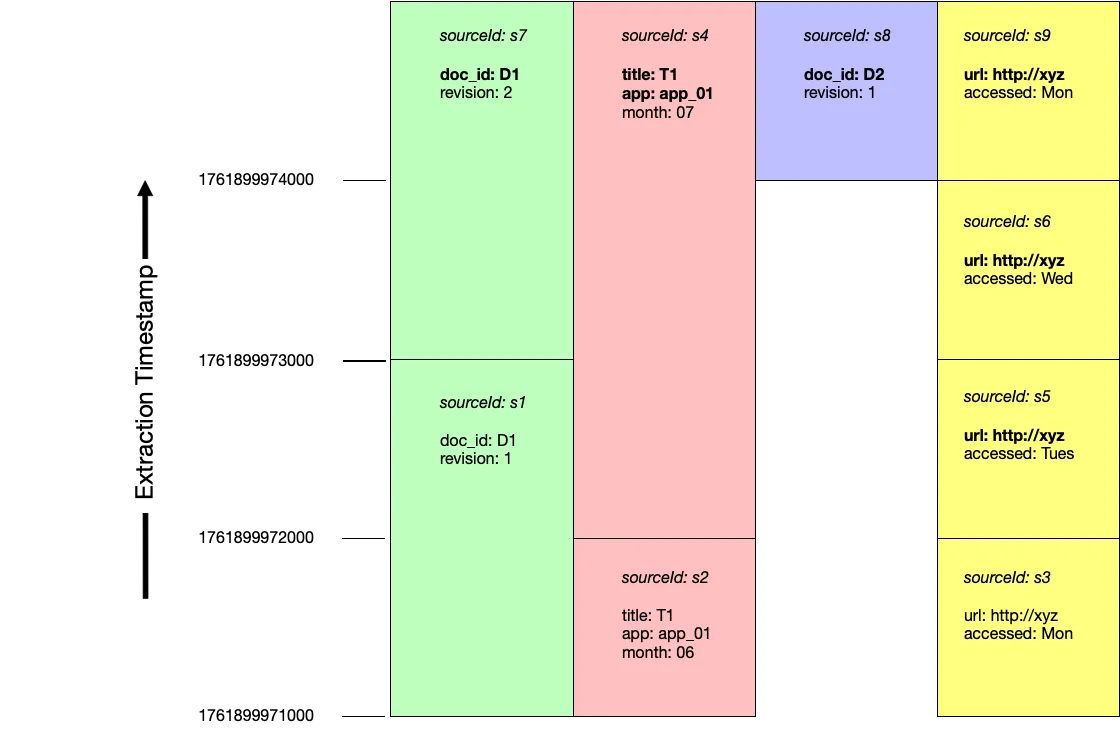
Documents are inserted and versioned in the following order:
| extraction timestamp | source id | metadata | version independent fields | replaces |
|---|---|---|---|---|
| 1761899971000 | s1 | {'doc_id': 'D1', 'revision': 1} |
||
| s2 | {'title': 'T1', 'app': 'app_01', 'month': '06'} |
|||
| s3 | {'url': 'http://xyz', 'accessed': 'Mon'} |
|||
| 1761899972000 | s4 | {'title': 'T1', 'app': 'app_01', 'month': '07'} |
['title', 'app'] |
s2 |
| s5 | {'url': 'http://xyz', 'accessed': 'Tues'} |
['url'] |
s3 | |
| 1761899973000 | s6 | {'url': 'http://xyz', 'accessed': 'Wed'} |
['url'] |
s5 |
| s7 | {'doc_id': 'D1', 'revision': 2} |
['doc_id'] |
s1 | |
| 1761899974000 | s8 | {'doc_id': 'D2', 'revision': 1} |
['doc_id'] |
|
| s9 | {'url': 'http://xyz', 'accessed': 'Mon'} |
['url'] |
s6 |
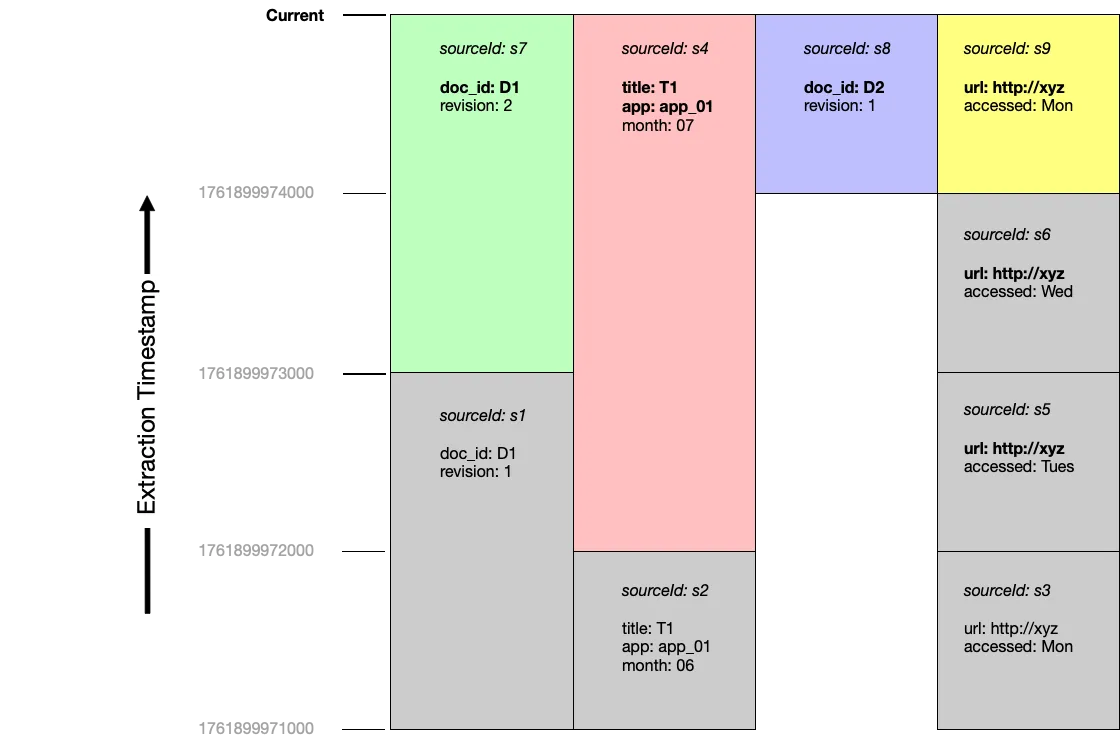
Querying current documents
Section titled “Querying current documents”At the end of these four rounds of extraction, the documents s7, s4, s8 and s9 are considered current:
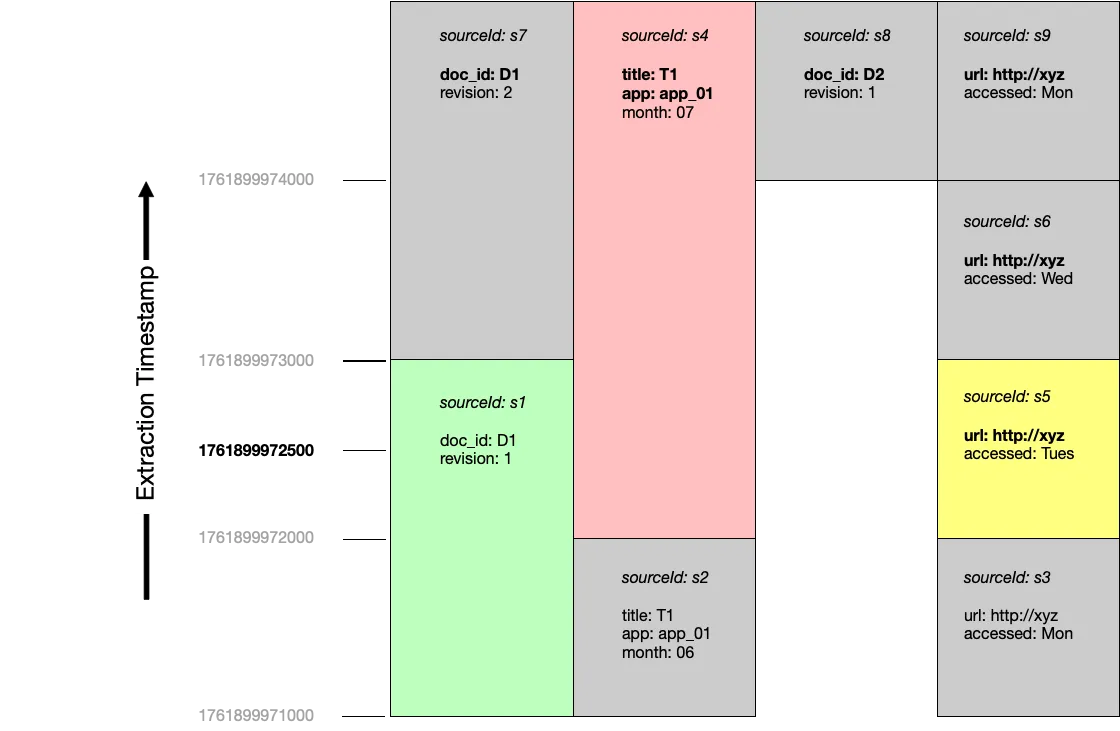
Querying at a point in time
Section titled “Querying at a point in time”If we were to query at timestamp 1761899972500, documents s1, s4 and s5 would be considered current:
Inspecting source metadata
Section titled “Inspecting source metadata”You can inspect the metadata and versioining infomration attached to source nodes using the LexicalGraphIndex.get_sources() method.
Get details of all source nodes
Section titled “Get details of all source nodes”import osimport json
from graphrag_toolkit.lexical_graph import LexicalGraphIndexfrom graphrag_toolkit.lexical_graph.storage import GraphStoreFactoryfrom graphrag_toolkit.lexical_graph.storage import VectorStoreFactory
with ( GraphStoreFactory.for_graph_store(os.environ['GRAPH_STORE']) as graph_store, VectorStoreFactory.for_vector_store( os.environ['VECTOR_STORE'], index_names=['chunk'] ) as vector_store):
graph_index = LexicalGraphIndex( graph_store, vector_store, tenant_id='tenant123' # optional - uses default tenant if not specified )
sources = graph_index.get_sources()
print(json.dumps(sources, indent=2))The results are formatted like this:
[ { "metadata": { "file_path": "/home/myuser/docs/readme.md", "creation_date": "2025-12-16T00:00:00.000Z", "file_name": "readme.md", "title": "How to play", "file_size": 93, "last_modified_date": "2025-12-16T00:00:00.000Z", "file_type": "text/markdown", "version": "v1" }, "versioning": { "build_timestamp": 1765880067513, "id_fields": [ "file_name", "title" ], "valid_from": 1761899971000, "valid_to": 1761899972000, "extract_timestamp": 1765880063557 }, "sourceId": "aws:tenant123:31141440:6de6" }, { "metadata": { "file_path": "/home/myuser/docs/readme.md", "creation_date": "2025-12-16T00:00:00.000Z", "file_name": "readme.md", "title": "How to play", "file_size": 91, "last_modified_date": "2025-12-16T00:00:00.000Z", "file_type": "text/markdown", "version": "v2" }, "versioning": { "build_timestamp": 1765880102994, "id_fields": [ "file_name", "title" ], "valid_from": 1761899972000, "valid_to": 1761899973000, "extract_timestamp": 1765880098515 }, "sourceId": "aws:tenant123:34570f12:0726" }, { "metadata": { "file_path": "/home/myuser/docs/readme.md", "creation_date": "2025-12-16T00:00:00.000Z", "file_name": "readme.md", "title": "How to play", "file_size": 93, "last_modified_date": "2025-12-16T00:00:00.000Z", "file_type": "text/markdown", "version": "v3" }, "versioning": { "build_timestamp": 1765880173432, "id_fields": [ "file_name", "title" ], "valid_from": 1761899973000, "valid_to": 1761899974000, "extract_timestamp": 1765880166001 }, "sourceId": "aws:tenant123:07ca52e6:8960" }, { "metadata": { "file_path": "/home/myuser/docs/readme.md", "creation_date": "2025-12-16T00:00:00.000Z", "file_name": "readme.md", "title": "How to play", "file_size": 83, "last_modified_date": "2025-12-16T00:00:00.000Z", "file_type": "text/markdown", "version": "v4" }, "versioning": { "build_timestamp": 1765880242134, "id_fields": [ "file_name", "title" ], "valid_from": 1761899974000, "valid_to": 10000000000000, "extract_timestamp": 1765880236433 }, "sourceId": "aws:tenant123:7a54612d:57b8" }]Get details of all current source nodes
Section titled “Get details of all current source nodes”import osimport json
from graphrag_toolkit.lexical_graph import LexicalGraphIndexfrom graphrag_toolkit.lexical_graph.storage import GraphStoreFactoryfrom graphrag_toolkit.lexical_graph.storage import VectorStoreFactoryfrom graphrag_toolkit.lexical_graph.versioning import VersioningConfig, VersioningMode
with ( GraphStoreFactory.for_graph_store(os.environ['GRAPH_STORE']) as graph_store, VectorStoreFactory.for_vector_store( os.environ['VECTOR_STORE'], index_names=['chunk'] ) as vector_store):
graph_index = LexicalGraphIndex( graph_store, vector_store, tenant_id='tenant123' # optional - uses default tenant if not specified )
versioning_config = VersioningConfig(versioning_mode=VersioningMode.CURRENT)
sources = graph_index.get_sources(versioning_config=versioning_config)
print(json.dumps(sources, indent=2))Get details of all previous source nodes
Section titled “Get details of all previous source nodes”import osimport json
from graphrag_toolkit.lexical_graph import LexicalGraphIndexfrom graphrag_toolkit.lexical_graph.storage import GraphStoreFactoryfrom graphrag_toolkit.lexical_graph.storage import VectorStoreFactoryfrom graphrag_toolkit.lexical_graph.versioning import VersioningConfig, VersioningMode
with ( GraphStoreFactory.for_graph_store(os.environ['GRAPH_STORE']) as graph_store, VectorStoreFactory.for_vector_store( os.environ['VECTOR_STORE'], index_names=['chunk'] ) as vector_store):
graph_index = LexicalGraphIndex( graph_store, vector_store, tenant_id='tenant123' # optional - uses default tenant if not specified )
versioning_config = VersioningConfig(versioning_mode=VersioningMode.PREVIOUS)
sources = graph_index.get_sources(versioning_config=versioning_config)
print(json.dumps(sources, indent=2))Get details of previous versions of files with specific metadata
Section titled “Get details of previous versions of files with specific metadata”import osimport json
from graphrag_toolkit.lexical_graph import LexicalGraphIndexfrom graphrag_toolkit.lexical_graph.storage import GraphStoreFactoryfrom graphrag_toolkit.lexical_graph.storage import VectorStoreFactoryfrom graphrag_toolkit.lexical_graph.versioning import VersioningConfig, VersioningMode
with ( GraphStoreFactory.for_graph_store(os.environ['GRAPH_STORE']) as graph_store, VectorStoreFactory.for_vector_store( os.environ['VECTOR_STORE'], index_names=['chunk'] ) as vector_store):
graph_index = LexicalGraphIndex( graph_store, vector_store, tenant_id='tenant123' # optional - uses default tenant if not specified )
versioning_config = VersioningConfig(versioning_mode=VersioningMode.PREVIOUS)
sources = graph_index.get_sources( filter={ 'file_name': 'readme.md', 'title': 'How to play' }, versioning_config=versioning_config )
print(json.dumps(sources, indent=2))Deleting documents
Section titled “Deleting documents”You can deleted individual document subgraphs using the LexcialGraphIndex.delete_sources() method.
WARNING Deleting documents is a destructive action: document subgraphs will be physically removed from the graph store and their embeddings from the vector store. You can use the
LexcialGraphIndex.get_sources()method to validate the sources that will be deleted before runningdelete_sources(). As an extra precaution, consider backing up your graph and vector stores prior to initiating a delete. Backup processes for the different graph and vector store backends are out-of-scope for the toolkit.
delete_sources() has the same signature as get_sources(). You can use get_sources() to review which document versions will be deleted before running delete_sources().
When a versioned document is deleted, its source node, together with all its chunk, topic and statement nodes, are deleted from the lexical graph. The delete process will also remove any orphaned facts and entities that are no longer connected to at least one document.
Deleting documents by source id
Section titled “Deleting documents by source id”import osimport json
from graphrag_toolkit.lexical_graph import LexicalGraphIndexfrom graphrag_toolkit.lexical_graph.storage import GraphStoreFactoryfrom graphrag_toolkit.lexical_graph.storage import VectorStoreFactory
with ( GraphStoreFactory.for_graph_store(os.environ['GRAPH_STORE']) as graph_store, VectorStoreFactory.for_vector_store( os.environ['VECTOR_STORE'], index_names=['chunk'] ) as vector_store):
graph_index = LexicalGraphIndex( graph_store, vector_store, tenant_id='tenant123' # optional - uses default tenant if not specified )
deleted = graph_index.delete_sources(source_ids=[ 'aws:tenant123:31141440:6de6', 'aws:tenant123:34570f12:0726' ])
print(json.dumps(deleted, indent=2))Deleting all previous versions of a document
Section titled “Deleting all previous versions of a document”The following example uses version-independent metadata fields (in this case file_name and title) to identify all versions (current and previous) of a specific document, and then versioning config with versioning_mode=VersioningMode.PREVIOUS to further narrow the selection to all those versions of the document that are no longer current. These previous versions of the document are then deleted:
import osimport json
from graphrag_toolkit.lexical_graph import LexicalGraphIndexfrom graphrag_toolkit.lexical_graph.storage import GraphStoreFactoryfrom graphrag_toolkit.lexical_graph.storage import VectorStoreFactoryfrom graphrag_toolkit.lexical_graph.versioning import VersioningConfig, VersioningMode
with (    GraphStoreFactory.for_graph_store(os.environ['GRAPH_STORE']) as graph_store,    VectorStoreFactory.for_vector_store(        os.environ['VECTOR_STORE'],        index_names=['chunk']    ) as vector_store):
    graph_index = LexicalGraphIndex(        graph_store,        vector_store,        tenant_id='tenant123' # optional - uses default tenant if not specified    )
    versioning_config = VersioningConfig(versioning_mode=VersioningMode.PREVIOUS)
    deleted = graph_index.delete_sources(        filter={            'file_name': 'readme.md',            'title': 'How to play'        },        versioning_config=versioning_config    )
    print(json.dumps(deleted, indent=2))
Deleting a document with version-specific metadata
Section titled “Deleting a document with version-specific metadata”The following example assumes that each version of the readme.md file titled ‘How to play’, has a unique version metadata value (version is a domain-specific piece of metadata supplied by the application at indexing time, not a part of the internal versioning metadata used by the versioned update feature). Here, we delete version v2 of the versioned document.
import osimport json
from graphrag_toolkit.lexical_graph import LexicalGraphIndexfrom graphrag_toolkit.lexical_graph.storage import GraphStoreFactoryfrom graphrag_toolkit.lexical_graph.storage import VectorStoreFactory
with (    GraphStoreFactory.for_graph_store(os.environ['GRAPH_STORE']) as graph_store,    VectorStoreFactory.for_vector_store(        os.environ['VECTOR_STORE'],        index_names=['chunk']    ) as vector_store):
    graph_index = LexicalGraphIndex(        graph_store,        vector_store,        tenant_id='tenant123' # optional - uses default tenant if not specified    )
    deleted = graph_index.delete_sources(        filter={            'file_name': 'readme.md',            'title': 'How to play',            'version': 'v2'        }    )
    print(json.dumps(deleted, indent=2))
Automatically delete versioned documents
Section titled “Automatically delete versioned documents”You can configure the build process to automatically delete versioned documents using the DeletePrevVersions node handler:
import os
from graphrag_toolkit.lexical_graph import LexicalGraphIndex, GraphRAGConfigfrom graphrag_toolkit.lexical_graph import add_versioning_infofrom graphrag_toolkit.lexical_graph.storage import GraphStoreFactoryfrom graphrag_toolkit.lexical_graph.storage import VectorStoreFactoryfrom graphrag_toolkit.lexical_graph.indexing.build import DeletePrevVersions
from llama_index.core import SimpleDirectoryReaderfrom llama_index.core.readers.file.base import default_file_metadata_func
GraphRAGConfig.enable_versioning = True
def get_file_metadata(file_path):    metadata = default_file_metadata_func(file_path)    return add_versioning_info(metadata, id_fields=['file_name', 'file_path'])
with(    GraphStoreFactory.for_graph_store(os.environ['GRAPH_STORE']) as graph_store,    VectorStoreFactory.for_vector_store(        os.environ['VECTOR_STORE'],        index_names=['chunk']    ) as vector_store):    graph_index = LexicalGraphIndex(        graph_store,        vector_store    )
    reader = SimpleDirectoryReader(input_dir='./my_docs/', file_metadata=get_file_metadata)    docs = reader.load_data()
    graph_index.extract_and_build(docs, handler=DeletePrevVersions(lexical_graph=graph_index))
Warning Use
DeletePrevVersionswith care. If your version-independent metadata fields are too permissive, you may end up versioning and deleting the wrong documents.
Implementing deletion protection
Section titled “Implementing deletion protection”DeletePrevVersions accepts a custom filter function. This function will be invoked with the metadata of each versioned document that is a candidate for deletion. If the function returns True, the document will be deleted; if it returns False, the document will not be deleted. You can use this custom filter function and a custom metadata field to implement deletion protection. The following example adds a deletionProtection metadata field to each document to be indexed; the custom filter function then checks the value of this field:
import os
from graphrag_toolkit.lexical_graph import LexicalGraphIndex, GraphRAGConfigfrom graphrag_toolkit.lexical_graph import add_versioning_infofrom graphrag_toolkit.lexical_graph.storage import GraphStoreFactoryfrom graphrag_toolkit.lexical_graph.storage import VectorStoreFactoryfrom graphrag_toolkit.lexical_graph.indexing.build import DeletePrevVersions
from llama_index.core import SimpleDirectoryReaderfrom llama_index.core.readers.file.base import default_file_metadata_func
GraphRAGConfig.enable_versioning = True
def get_file_metadata(file_path):    metadata = default_file_metadata_func(file_path)    metadata['deletionProtection'] = True # custom metadata field    return add_versioning_info(metadata, id_fields=['file_name', 'file_path'])
def deletion_protection_filter_fn(metadata):    deletion_protection = metadata.get('deletionProtection', False)    return not deletion_protection
with(    GraphStoreFactory.for_graph_store(os.environ['GRAPH_STORE']) as graph_store,    VectorStoreFactory.for_vector_store(        os.environ['VECTOR_STORE'],        index_names=['chunk']    ) as vector_store):    graph_index = LexicalGraphIndex(        graph_store,        vector_store    )
    reader = SimpleDirectoryReader(input_dir='./my_docs/', file_metadata=get_file_metadata)    docs = reader.load_data()
    graph_index.extract_and_build(      docs,      handler=DeletePrevVersions(        lexical_graph=graph_index,        filter_fn=deletion_protection_filter_fn # do not delete docs with deletionProtection == True      )    )
Upgrading existing graph and vector stores
Section titled “Upgrading existing graph and vector stores”If you have existing graph and vector stores created by a version of the graphrag-toolkit prior to version 3.14.x, you will need to upgrade them before using the versioned updates feature. The graphrag-toolkit includes an upgrade_for_versioning.py script that will upgrade a graph and vector store so that you can use versioned updates.
Do not index any documents while the upgrade script is running.
Download the upgrade_for_versioning.py script to an environment that can access your graph and vector stores. Then run:
python upgrade_for_versioning.py --graph-store <graph_store_info> --vector_store <vector_store_info>Upgrading specific tenants
Section titled “Upgrading specific tenants”By default, the script upgrades all tenants in the graph and vector stores. You can restrict the list of tenants using the --tenant-ids <space_separated_tenant_ids> parameter. For example:
python upgrade_for_versioning.py --graph-store <graph_store_info> --vector_store <vector_store_info> --tenant-ids t1 t2 _defaultNote that _default identifies the default tenant.
Upgrading specific vector indexes
Section titled “Upgrading specific vector indexes”By default, the script only updates the chunk index for each tenant. Your vector store may also contain a statement index, which is used by the semantic-guide search. Semantic-guided search is likely to be removed in future versions of the toolkit – to avoid unnecessary work, we therefore recommend not upgrading this index.
If, however, you do want to upgrade the statement index, supply an --index-names <space_separated_index_names> parameter:
python upgrade_for_versioning.py --graph-store <graph_store_info> --vector_store <vector_store_info> --index_names chunk statement