

Costruire l'interfaccia utente
Task 1: Eseguire tutto localmente
Sezione intitolata “Task 1: Eseguire tutto localmente”Avvia l’intero stack locale — il server di sviluppo game-ui insieme a una Game API locale e un AG-UI Story Agent locale (che a sua volta avvia il server Inventory MCP) — con un solo comando:
pnpm nx dev game-uiyarn nx dev game-uinpx nx dev game-uibunx nx dev game-uiIl target dev su game-ui ha dependsOn su game-api:dev e dungeon_adventure.story:agent-dev, quindi Nx avvia il server locale di ogni progetto in parallelo. Attraverso le connessioni che abbiamo configurato nel Modulo 1, questi a loro volta avviano il server Inventory MCP e DynamoDB Local. Assicurati che il tuo motore di container sia in esecuzione, quindi apri il server di sviluppo su http://localhost:4200/ in un browser.
Task 2: Dove CopilotKit è già configurato
Sezione intitolata “Task 2: Dove CopilotKit è già configurato”Quando hai eseguito il generatore connection per game-ui → story nel Modulo 1, l’integrazione AG-UI del sito web Shadcn è stata generata per te. Vale la pena dare un’occhiata veloce:
Directorypackages/game-ui/src/
Directorycomponents/
- AguiProvider.tsx Singolo
CopilotKitProviderregistrato con ogni agente AG-UI. Directorycopilot/
- index.tsx Ri-esporta
CopilotChat/CopilotSidebar/CopilotPopupcon tema. - ShadcnAssistantMessage.tsx, ShadcnUserMessage.tsx, ShadcnChatInput.tsx, ShadcnCursor.tsx, copilot.css
- index.tsx Ri-esporta
- story-agent-chat.tsx Un
CopilotChatpre-associato all’agentIddello Story Agent.
- AguiProvider.tsx Singolo
Directoryhooks/
- useAguiStoryAgent.tsx Istanzia un
HttpAgent@ag-ui/clientche punta allo Story Agent distribuito e riempiethreadIdal minimo di 33 caratteri per l’id di sessione di AgentCore.
- useAguiStoryAgent.tsx Istanzia un
- main.tsx Avvolge
<App />in<AguiProvider>
Tutto ciò che dobbiamo fare è inserire un <CopilotChat agentId="agent" threadId={...} /> in una route. Per maggiori dettagli su come è strutturata l’integrazione, consulta la guida alla connessione React → AG-UI.
Task 3: Ridisegnare per il dungeon
Sezione intitolata “Task 3: Ridisegnare per il dungeon”Sostituisci packages/game-ui/src/styles.css — questo è l’unico file che modifichiamo per lo stile. Importa i globali Shadcn condivisi, sovrascrive la palette con un tema dungeon illuminato da torce e fa ereditare quei colori a CopilotKit:
@import '../../common/shadcn/src/styles/globals.css';@source './**/*.{ts,tsx}';
/* Dungeon theme — torch-lit parchment on stone. Applied to `:root` for the * page and to `[data-copilotkit][data-copilotkit]` for CopilotKit's chat * surface; CopilotKit ships a same-specificity `[data-copilotkit]` rule that * resets `--background` back to white, so we bump specificity with the * doubled selector. */:root,[data-copilotkit][data-copilotkit] {  --background: oklch(0.18 0.02 60);  --foreground: oklch(0.92 0.04 85);  --card: oklch(0.22 0.03 60);  --card-foreground: oklch(0.92 0.04 85);  --popover: oklch(0.2 0.02 60);  --popover-foreground: oklch(0.92 0.04 85);  --primary: oklch(0.75 0.15 75);  --primary-foreground: oklch(0.15 0.02 60);  --secondary: oklch(0.28 0.04 60);  --secondary-foreground: oklch(0.92 0.04 85);  --muted: oklch(0.25 0.02 60);  --muted-foreground: oklch(0.7 0.04 85);  --accent: oklch(0.4 0.12 30);  --accent-foreground: oklch(0.95 0.04 85);  --destructive: oklch(0.55 0.22 25);  --border: oklch(0.35 0.03 60);  --input: oklch(0.3 0.03 60);  --ring: oklch(0.75 0.15 75);  --sidebar: oklch(0.15 0.02 60);  --sidebar-foreground: oklch(0.88 0.04 85);  --sidebar-primary: oklch(0.75 0.15 75);  --sidebar-primary-foreground: oklch(0.15 0.02 60);  --sidebar-accent: oklch(0.28 0.04 60);  --sidebar-accent-foreground: oklch(0.92 0.04 85);  --sidebar-border: oklch(0.3 0.03 60);  --sidebar-ring: oklch(0.75 0.15 75);}
body {  font-family: 'Georgia', 'Cambria', serif;  background:    radial-gradient(circle at 20% 10%, oklch(0.25 0.05 70 / 0.4), transparent 40%),    radial-gradient(circle at 80% 90%, oklch(0.25 0.1 30 / 0.3), transparent 40%),    var(--background);}
h1, h2, h3 {  letter-spacing: 0.05em;}
Task 4: Creare le route del gioco
Sezione intitolata “Task 4: Creare le route del gioco”Abbiamo bisogno di due route — una per scegliere un eroe, una per giocare. Entrambe usano componenti shadcn e la chat CopilotKit; non c’è un’interfaccia di chat creata manualmente.
import { useInfiniteQuery, useMutation } from '@tanstack/react-query';import { createFileRoute, useNavigate } from '@tanstack/react-router';import { useEffect, useMemo, useRef, useState } from 'react';import { Button } from '@dungeon-adventure/common-shadcn/components/ui/button';import { Input } from '@dungeon-adventure/common-shadcn/components/ui/input';import {  Card,  CardContent,} from '@dungeon-adventure/common-shadcn/components/ui/card';import { Spinner } from '@dungeon-adventure/common-shadcn/components/ui/spinner';import { useGameApi } from '../hooks/useGameApi';import type { IGame } from '@dungeon-adventure/game-api';
const GENRES = ['medieval', 'zombie', 'superhero'] as const;
export const Route = createFileRoute('/')({ component: RouteComponent });
function RouteComponent() {  const [playerName, setPlayerName] = useState('');  const [pending, setPending] = useState<IGame['genre'] | null>(null);  const navigate = useNavigate();  const gameApi = useGameApi();  const saveGame = useMutation(gameApi.games.save.mutationOptions());  const games = useInfiniteQuery(    gameApi.games.query.infiniteQueryOptions(      { limit: 10 },      { getNextPageParam: ({ cursor }) => cursor ?? undefined },    ),  );  const savedGames = useMemo(    () => games.data?.pages.flatMap((p) => p.items) ?? [],    [games.data],  );
  // Auto-fetch subsequent pages when the sentinel at the bottom of the list  // scrolls into view — keeps the homepage a simple infinite scroll without  // a "Load more" button.  const sentinel = useRef<HTMLDivElement | null>(null);  useEffect(() => {    const el = sentinel.current;    if (!el || !games.hasNextPage) return;    const io = new IntersectionObserver(      (entries) => {        if (          entries.some((e) => e.isIntersecting) &&          !games.isFetchingNextPage        ) {          void games.fetchNextPage();        }      },      { rootMargin: '120px' },    );    io.observe(el);    return () => io.disconnect();  }, [games.hasNextPage, games.isFetchingNextPage, games.fetchNextPage]);
  const startGame = async (player: string, genre: IGame['genre']) => {    if (!player.trim()) return;    setPending(genre);    try {      if (!savedGames.find((g) => g.playerName === player)) {        await saveGame.mutateAsync({ playerName: player, genre });      }      await navigate({        to: '/game/$playerName',        params: { playerName: player },        search: { genre },      });    } finally {      setPending(null);    }  };
  const busy = pending !== null;  const firstLoad = games.isLoading;
  return (    <div className="mx-auto flex w-full max-w-2xl flex-col gap-8">      <div className="text-center">        <h1 className="bg-gradient-to-r from-amber-300 to-rose-400 bg-clip-text text-5xl font-bold text-transparent">          AI Dungeon Adventure        </h1>        <p className="text-muted-foreground mt-2">          Pick a hero name, choose a genre, begin.        </p>      </div>
      <Card>        <CardContent className="flex flex-col gap-4 pt-6">          <Input            placeholder="Your hero's name"            value={playerName}            disabled={busy}            onChange={(e) => setPlayerName(e.target.value)}          />          <div className="grid grid-cols-3 gap-3">            {GENRES.map((genre) => (              <Button                key={genre}                variant="secondary"                disabled={!playerName.trim() || busy}                onClick={() => startGame(playerName, genre)}              >                {pending === genre && <Spinner />}                {genre[0].toUpperCase() + genre.slice(1)}              </Button>            ))}          </div>        </CardContent>      </Card>
      <div className="flex flex-col gap-2">        <h2 className="flex items-center gap-2 text-xl font-semibold">          Continue          {(firstLoad || games.isFetching) && <Spinner className="size-4" />}        </h2>        {!firstLoad && savedGames.length === 0 && (          <p className="text-muted-foreground text-sm">            No saved games yet — start a new adventure above.          </p>        )}        {savedGames.map((g) => (          <Button            key={g.playerName}            variant="outline"            className="justify-between"            disabled={busy}            onClick={() => startGame(g.playerName, g.genre)}          >            <span>{g.playerName}</span>            <span className="text-muted-foreground text-sm">              {g.genre[0].toUpperCase() + g.genre.slice(1)}            </span>          </Button>        ))}        <div ref={sentinel} aria-hidden className="h-1" />        {games.isFetchingNextPage && (          <div className="flex justify-center py-2">            <Spinner />          </div>        )}      </div>    </div>  );}
import { createFileRoute } from '@tanstack/react-router';import { useInfiniteQuery, useMutation } from '@tanstack/react-query';import { createFileRoute, useNavigate } from '@tanstack/react-router';import { useEffect, useMemo, useRef, useState } from 'react';import { Button } from '@dungeon-adventure/common-shadcn/components/ui/button';import { Input } from '@dungeon-adventure/common-shadcn/components/ui/input';import { Card, CardContent,} from '@dungeon-adventure/common-shadcn/components/ui/card';import { Spinner } from '@dungeon-adventure/common-shadcn/components/ui/spinner';import { useGameApi } from '../hooks/useGameApi';import type { IGame } from '@dungeon-adventure/game-api';
export const Route = createFileRoute('/')({ component: RouteComponent,});const GENRES = ['medieval', 'zombie', 'superhero'] as const;
export const Route = createFileRoute('/')({ component: RouteComponent });
function RouteComponent() { const [playerName, setPlayerName] = useState(''); const [pending, setPending] = useState<IGame['genre'] | null>(null); const navigate = useNavigate(); const gameApi = useGameApi(); const saveGame = useMutation(gameApi.games.save.mutationOptions()); const games = useInfiniteQuery( gameApi.games.query.infiniteQueryOptions( { limit: 10 }, { getNextPageParam: ({ cursor }) => cursor ?? undefined }, ), ); const savedGames = useMemo( () => games.data?.pages.flatMap((p) => p.items) ?? [], [games.data], );
// Auto-fetch subsequent pages when the sentinel at the bottom of the list // scrolls into view — keeps the homepage a simple infinite scroll without // a "Load more" button. const sentinel = useRef<HTMLDivElement | null>(null); useEffect(() => { const el = sentinel.current; if (!el || !games.hasNextPage) return; const io = new IntersectionObserver( (entries) => { if ( entries.some((e) => e.isIntersecting) && !games.isFetchingNextPage ) { void games.fetchNextPage(); } }, { rootMargin: '120px' }, ); io.observe(el); return () => io.disconnect(); }, [games.hasNextPage, games.isFetchingNextPage, games.fetchNextPage]);
const startGame = async (player: string, genre: IGame['genre']) => { if (!player.trim()) return; setPending(genre); try { if (!savedGames.find((g) => g.playerName === player)) { await saveGame.mutateAsync({ playerName: player, genre }); } await navigate({ to: '/game/$playerName', params: { playerName: player }, search: { genre }, }); } finally { setPending(null); } };
const busy = pending !== null; const firstLoad = games.isLoading;
return ( <div className="text-center"> <header> <h1>Welcome</h1> <p>Welcome to your new React website!</p> </header> <div className="mx-auto flex w-full max-w-2xl flex-col gap-8"> <div className="text-center"> <h1 className="bg-gradient-to-r from-amber-300 to-rose-400 bg-clip-text text-5xl font-bold text-transparent"> AI Dungeon Adventure </h1> <p className="text-muted-foreground mt-2"> Pick a hero name, choose a genre, begin. </p> </div>
<Card> <CardContent className="flex flex-col gap-4 pt-6"> <Input placeholder="Your hero's name" value={playerName} disabled={busy} onChange={(e) => setPlayerName(e.target.value)} /> <div className="grid grid-cols-3 gap-3"> {GENRES.map((genre) => ( <Button key={genre} variant="secondary" disabled={!playerName.trim() || busy} onClick={() => startGame(playerName, genre)} > {pending === genre && <Spinner />} {genre[0].toUpperCase() + genre.slice(1)} </Button> ))} </div> </CardContent> </Card>
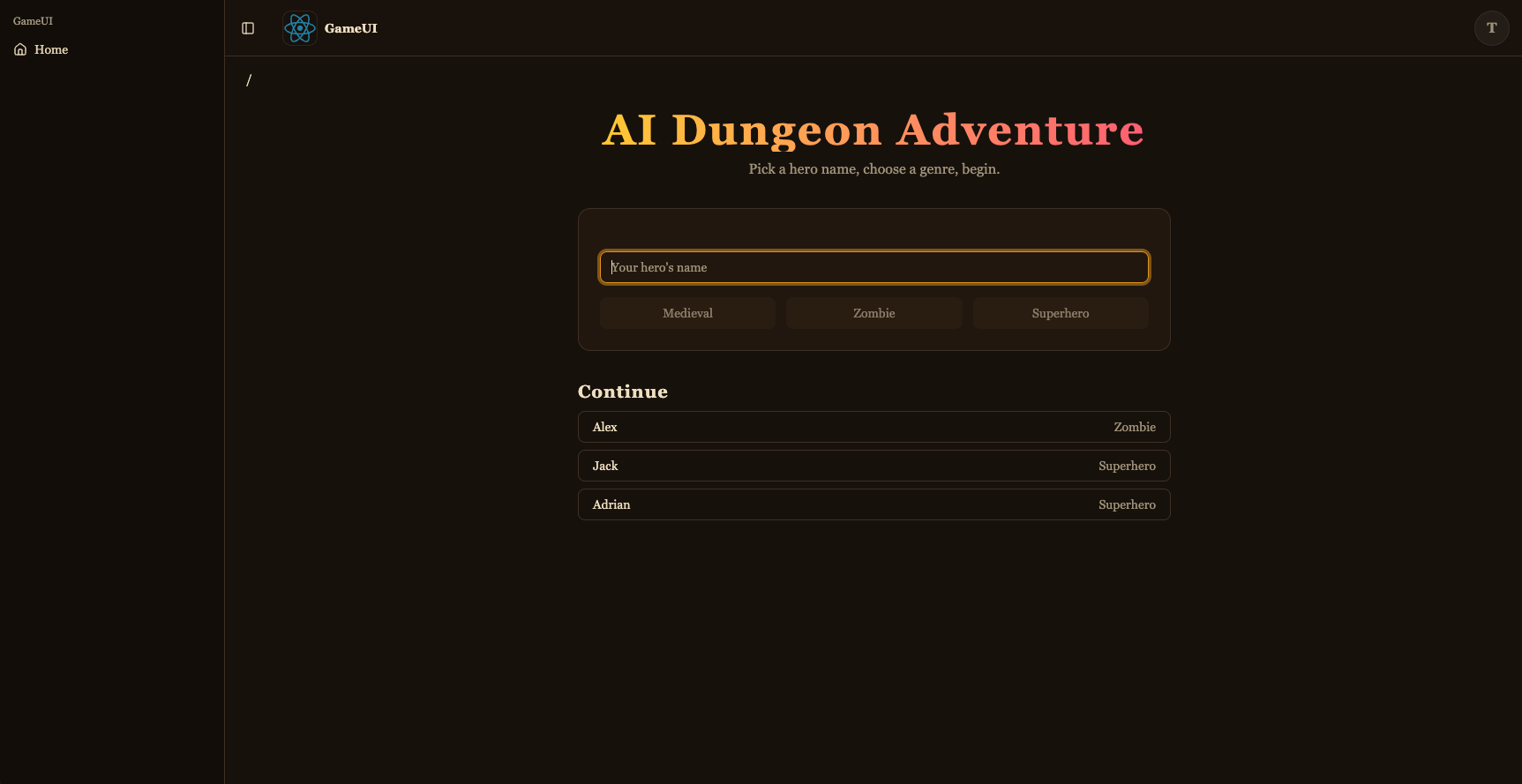
<div className="flex flex-col gap-2"> <h2 className="flex items-center gap-2 text-xl font-semibold"> Continue {(firstLoad || games.isFetching) && <Spinner className="size-4" />} </h2> {!firstLoad && savedGames.length === 0 && ( <p className="text-muted-foreground text-sm"> No saved games yet — start a new adventure above. </p> )} {savedGames.map((g) => ( <Button key={g.playerName} variant="outline" className="justify-between" disabled={busy} onClick={() => startGame(g.playerName, g.genre)} > <span>{g.playerName}</span> <span className="text-muted-foreground text-sm"> {g.genre[0].toUpperCase() + g.genre.slice(1)} </span> </Button> ))} <div ref={sentinel} aria-hidden className="h-1" /> {games.isFetchingNextPage && ( <div className="flex justify-center py-2"> <Spinner /> </div> )} </div> </div> );}Questo è il selettore del gioco: form per nuovo gioco (shadcn Input + Button + Card) più una lista “Continua” alimentata da useGameApi().games.query con useInfiniteQuery — un <div> sentinella in fondo osservato da un IntersectionObserver chiama automaticamente fetchNextPage() quando viene visualizzato nello scroll, e gli spinner accanto al titolo e sotto la lista mostrano lo stato di caricamento. Avviare un gioco esegue saveGame della coppia (playerName, genre) (così appare la prossima volta) e naviga alla route di gioco.
import { UseAgentUpdate, useAgent } from '@copilotkit/react-core/v2';import { useQuery } from '@tanstack/react-query';import { createFileRoute } from '@tanstack/react-router';import { useEffect, useMemo, useRef } from 'react';import { CopilotChat } from '../../components/copilot';import { useGameApi } from '../../hooks/useGameApi';import type { IGame } from '@dungeon-adventure/game-api';
// AgentCore session ids must be at least 33 characters. The AG-UI hook pads// the threadId to this length before sending, so the thread id is stable for// a given (player, genre) pair — revisiting the URL continues the same story.const buildThreadId = (playerName: string, genre: string) =>  `${playerName}-${genre}`.padEnd(33, '0');
export const Route = createFileRoute('/game/$playerName')({  component: RouteComponent,  validateSearch: (search: Record<string, unknown>) => ({    genre: search.genre as IGame['genre'],  }),});
function RouteComponent() {  const { playerName } = Route.useParams();  const { genre } = Route.useSearch();  const threadId = useMemo(    () => buildThreadId(playerName, genre),    [playerName, genre],  );
  const gameApi = useGameApi();  const inventory = useQuery(    gameApi.inventory.query.queryOptions({ playerName, limit: 100 }),  );  // Conversation history persisted by the agent's ``S3SessionManager``. Each  // turn is stored as ``session_<threadId>/agents/agent_default/messages/…``.  //  // `staleTime: 0` + `refetchOnMount: 'always'` together force a fresh read  // on every visit — the cached snapshot from the *first* time we loaded  // this route (before the agent had written any turns back to S3) would  // otherwise look like an empty thread on revisit and trigger re-priming.  const pastActions = useQuery({    ...gameApi.actions.query.queryOptions({ sessionId: threadId }),    staleTime: 0,    refetchOnMount: 'always',  });
  const { agent } = useAgent({    agentId: 'agent',    updates: [UseAgentUpdate.OnMessagesChanged],  });
  // Hydrate the chat once the history query resolves. For a fresh thread  // (no stored messages) the agent's system prompt expects the player's  // name and genre in the first user message, so send that priming line.  //  // We wait for `isFetching` to go false (rather than just `isLoading`) so  // that revisits with a cached empty result from the first visit aren't  // mistaken for a fresh thread — the background refetch is what sees the  // turns the agent wrote since.  const primedRef = useRef(false);  useEffect(() => {    if (!agent || primedRef.current) return;    if (pastActions.isFetching || !pastActions.isSuccess) return;    primedRef.current = true;    const items = pastActions.data.items;    if (items.length > 0) {      agent.setMessages(        items.map((a) => ({          id: `m-${a.messageId}`,          role: a.role,          content: a.content,        })),      );      return;    }    agent.addMessage({      id: crypto.randomUUID(),      role: 'user',      content: `My name is ${playerName}. Start my ${genre} adventure.`,    });    void agent.runAgent();  }, [    agent,    pastActions.data,    pastActions.isFetching,    pastActions.isSuccess,    playerName,    genre,  ]);
  // The agent's ``add-to-inventory`` tool calls mutate DynamoDB directly, so  // the inventory query needs a nudge to refetch as turns complete. The  // ``useAgent({ updates: [OnMessagesChanged] })`` subscription re-renders  // this route on each message event — refetch whenever the message count  // changes, which covers both the initial populate and every subsequent  // turn.  const seenMessages = useRef(0);  useEffect(() => {    if (!agent) return;    if (agent.messages.length !== seenMessages.current) {      seenMessages.current = agent.messages.length;      void inventory.refetch();    }  });
  return (    <div className="relative flex h-[calc(100vh-10rem)] min-h-0 flex-col">      {!!inventory.data?.items.length && (        <aside className="bg-accent text-accent-foreground pointer-events-none absolute right-4 top-4 z-10 w-56 rounded-lg border p-3 shadow-lg">          <div className="mb-1 font-semibold">📦 Inventory</div>          <ul className="flex flex-col gap-0.5 text-sm">            {inventory.data.items.map((item) => (              <li key={item.itemName}>                {item.emoji ?? '•'} {item.itemName}                {item.quantity > 1 ? ` (x${item.quantity})` : ''}              </li>            ))}          </ul>        </aside>      )}      <CopilotChat        agentId="agent"        threadId={threadId}        labels={{          chatInputPlaceholder: 'What do you do?',          welcomeMessageText: `${playerName}'s ${genre} adventure`,        }}      />    </div>  );}
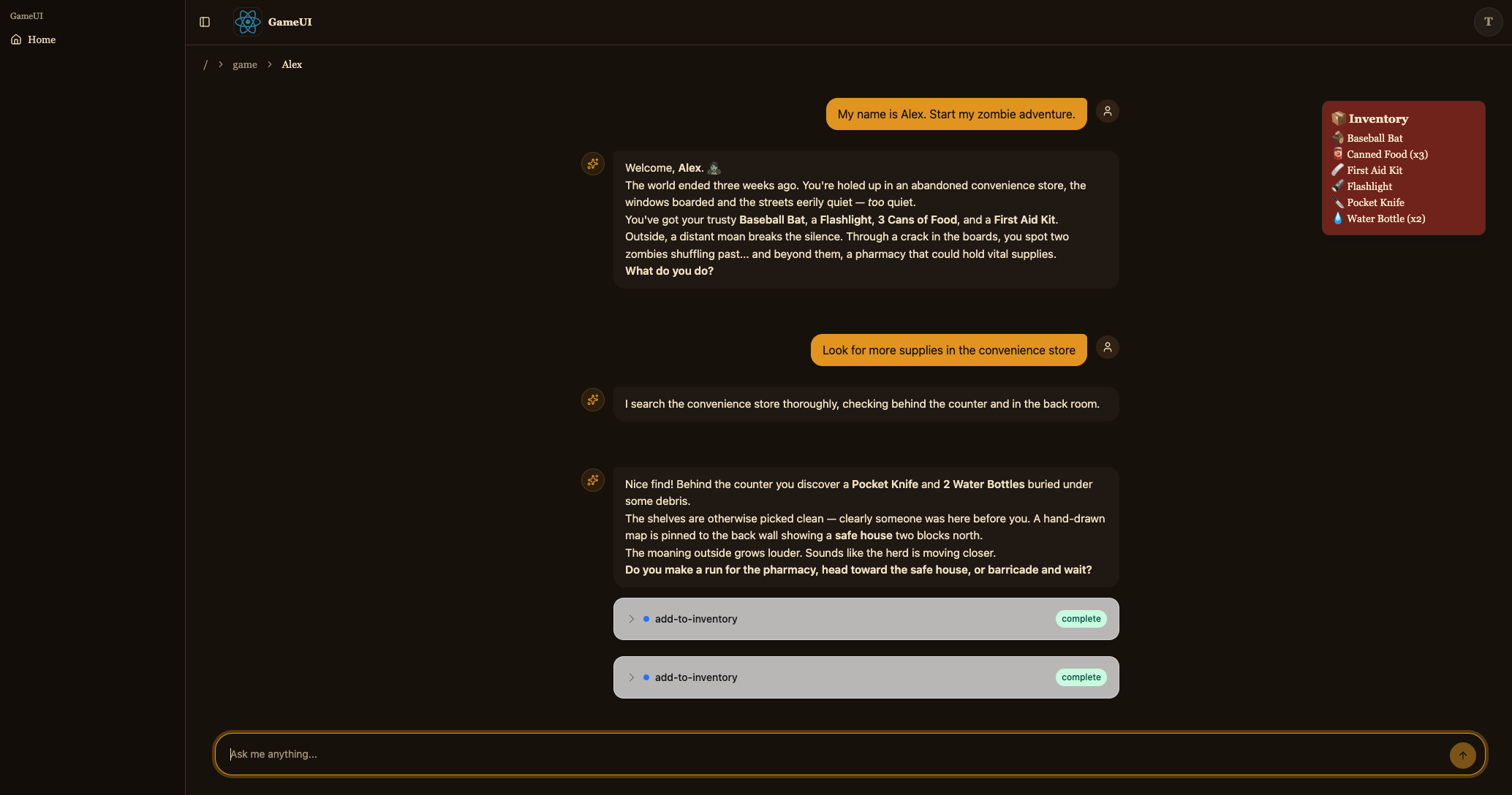
Questa è la route di gioco. Costruisce il threadId deterministico ({player}-{genre} riempito a 33 caratteri — l’hook AG-UI lo invierà testualmente come id di sessione AgentCore), renderizza <CopilotChat agentId="agent" threadId={threadId} />, e sovrappone l’inventario da useGameApi().inventory.query sopra. Al mount, useGameApi().actions.query({ sessionId: threadId }) legge la cronologia della conversazione che l’agente ha memorizzato in S3 e — se ce n’è — chiama agent.setMessages(...) per reidratare la chat; altrimenti invia un messaggio utente di innesco per avviare la storia. agent.messages è sottoscritto tramite useAgent({ updates: [OnMessagesChanged] }) quindi ogni nuovo turno ricarica anche la query dell’inventario (le chiamate agli strumenti MCP mutano direttamente DynamoDB).
Una volta salvato, il server di sviluppo dovrebbe ora permetterti di iniziare un’avventura e chattare con lo Story Agent.
Task 5: Distribuire su AWS
Sezione intitolata “Task 5: Distribuire su AWS”Il tuo gioco è completo e hai testato ogni pezzo localmente. Ora distribuiamolo su AWS così puoi giocarci da qualsiasi luogo.
Costruisci il tuo codice
Sezione intitolata “Costruisci il tuo codice”pnpm buildyarn buildnpm run buildbun buildDistribuisci la tua applicazione
Sezione intitolata “Distribuisci la tua applicazione”pnpm nx deploy-sandbox infrayarn nx deploy-sandbox infranpx nx deploy-sandbox infrabunx nx deploy-sandbox infraIl target deploy-sandbox distribuisce lo stage sandbox definito in packages/infra/src/main.ts.
Il target deploy-sandbox utilizza la modalità express di CloudFormation, che completa ogni operazione di risorsa non appena viene applicata la sua configurazione invece di attendere la stabilizzazione completa. La tua prima distribuzione richiederà circa 4 minuti per completarsi, e alcune risorse (come la distribuzione CloudFront) potrebbero continuare il provisioning in background per un breve periodo successivamente. Le distribuzioni successive sono più veloci.
Poiché la modalità express ritorna prima che le risorse si siano completamente stabilizzate, deploy-sandbox è solo per lo sviluppo. Usa il target deploy-ci per le distribuzioni CI/CD e di produzione, che attende sempre la stabilizzazione completa.
Una volta completata la distribuzione, vedrai output simili ai seguenti:
dungeon-adventure-infra-sandbox-Applicationdungeon-adventure-infra-sandbox-Application: deploying... [2/2]
 ✅  dungeon-adventure-infra-sandbox-Application
✨  Deployment time: 220s
⚠️  Stack deployed using Express Mode. Resources still stabilizing: GameUICloudfrontDistribution, UserIdentityWebAcl, ...and more...
Outputs:dungeon-adventure-infra-sandbox-Application.GameApiEndpointXXX = https://xxx.execute-api.region.amazonaws.com/prod/dungeon-adventure-infra-sandbox-Application.GameUIDistributionDomainNameXXX = xxx.cloudfront.netdungeon-adventure-infra-sandbox-Application.InventoryMcpArn = arn:aws:bedrock-agentcore:region:xxxxxxx:runtime/dungeonadventureventoryMcpServerXXXX-YYYYdungeon-adventure-infra-sandbox-Application.RuntimeConfigApplicationId = xxxxdungeon-adventure-infra-sandbox-Application.StoryAgentArn = arn:aws:bedrock-agentcore:region:xxxxxxx:runtime/dungeonadventurecationStoryAgentXXXX-YYYYdungeon-adventure-infra-sandbox-Application.UserIdentityUserIdentityIdentityPoolIdXXX = region:xxxdungeon-adventure-infra-sandbox-Application.UserIdentityUserIdentityUserPoolClientIdXXX = xxxxxxxxxxdungeon-adventure-infra-sandbox-Application.UserIdentityUserIdentityUserPoolIdXXX = region_xxx
Naviga al tuo URL CloudFront (GameUIDistributionDomainName dagli output CDK), registrati per un nuovo account e gioca al tuo gioco in esecuzione interamente su AWS!
Task 6: Mescolare componenti locali e distribuiti
Sezione intitolata “Task 6: Mescolare componenti locali e distribuiti”Hai visto i due estremi dello spettro: tutto locale (dev) e tutto distribuito. Durante lo sviluppo quotidiano è spesso utile mescolare i due — ad esempio, iterare sul codice del sito web contro l’API e l’agente reali distribuiti, o eseguire l’API localmente contro la tabella DynamoDB reale.
La chiave è la variabile d’ambiente RUNTIME_CONFIG_APP_ID. Quando un progetto viene eseguito senza LOCAL_DEV=true, le ricerche di configurazione runtime recuperano la loro configurazione da AWS AppConfig utilizzando questo id applicazione — il valore RuntimeConfigApplicationId dagli output CDK.
Ogni sito web ha un target load-runtime-config che scarica il runtime-config.json distribuito (pool Cognito, endpoint API, ARN agente) nel server di sviluppo locale. Alcune combinazioni utili:
-
Sito web locale → backend distribuito. Scarica la configurazione distribuita una volta, quindi esegui il target
servesemplice così l’interfaccia utente comunica con l’API e l’agente distribuiti:Terminal window pnpm nx load-runtime-config game-uiTerminal window yarn nx load-runtime-config game-uiTerminal window npx nx load-runtime-config game-uiTerminal window bunx nx load-runtime-config game-uiTerminal window pnpm nx serve game-uiTerminal window yarn nx serve game-uiTerminal window npx nx serve game-uiTerminal window bunx nx serve game-ui -
API locale → tabella DynamoDB reale. Esegui il target
servesemplice conRUNTIME_CONFIG_APP_IDimpostato sull’id applicazione distribuito:Terminal window RUNTIME_CONFIG_APP_ID=<RuntimeConfigApplicationId from CDK outputs> pnpm nx serve game-apiTerminal window RUNTIME_CONFIG_APP_ID=<RuntimeConfigApplicationId from CDK outputs> yarn nx serve game-apiTerminal window RUNTIME_CONFIG_APP_ID=<RuntimeConfigApplicationId from CDK outputs> npx nx serve game-apiTerminal window RUNTIME_CONFIG_APP_ID=<RuntimeConfigApplicationId from CDK outputs> bunx nx serve game-api
Questa flessibilità ti permette di testare esattamente la porzione su cui stai lavorando, contro qualsiasi componente — locale o distribuito — abbia senso.
Congratulazioni. Hai costruito, testato e distribuito il tuo Agentic Dungeon Adventure Game! 🎉🎉🎉