Cross-Region Observability for SageMaker HyperPod
Connect Amazon Managed Grafana (AMG) in one AWS Region to your SageMaker HyperPod cluster's metrics — stored in Amazon Managed Service for Prometheus (AMP) — in a different Region, privately, over Transit Gateway peering + AWS PrivateLink + Route 53 private hosted zones. No traffic traverses the public internet.
The common driver: your HyperPod cluster runs in a Region where AMG is not
offered (for example ap-south-2 / Hyderabad), so the Grafana workspace must
live elsewhere while the metrics stay local to the cluster.
This guide assumes HyperPod-integrated observability — the
amazon-sagemaker-hyperpod-observability EKS add-on provisions the AMP
workspace and all collectors with a single console action, so Part 1 is about
ten minutes with no Helm, kubectl, or IAM plumbing. If that add-on has not
yet rolled out to your metrics Region, you will need to set up AMP collection
manually instead (see the note in Enable Observability).
Architecture
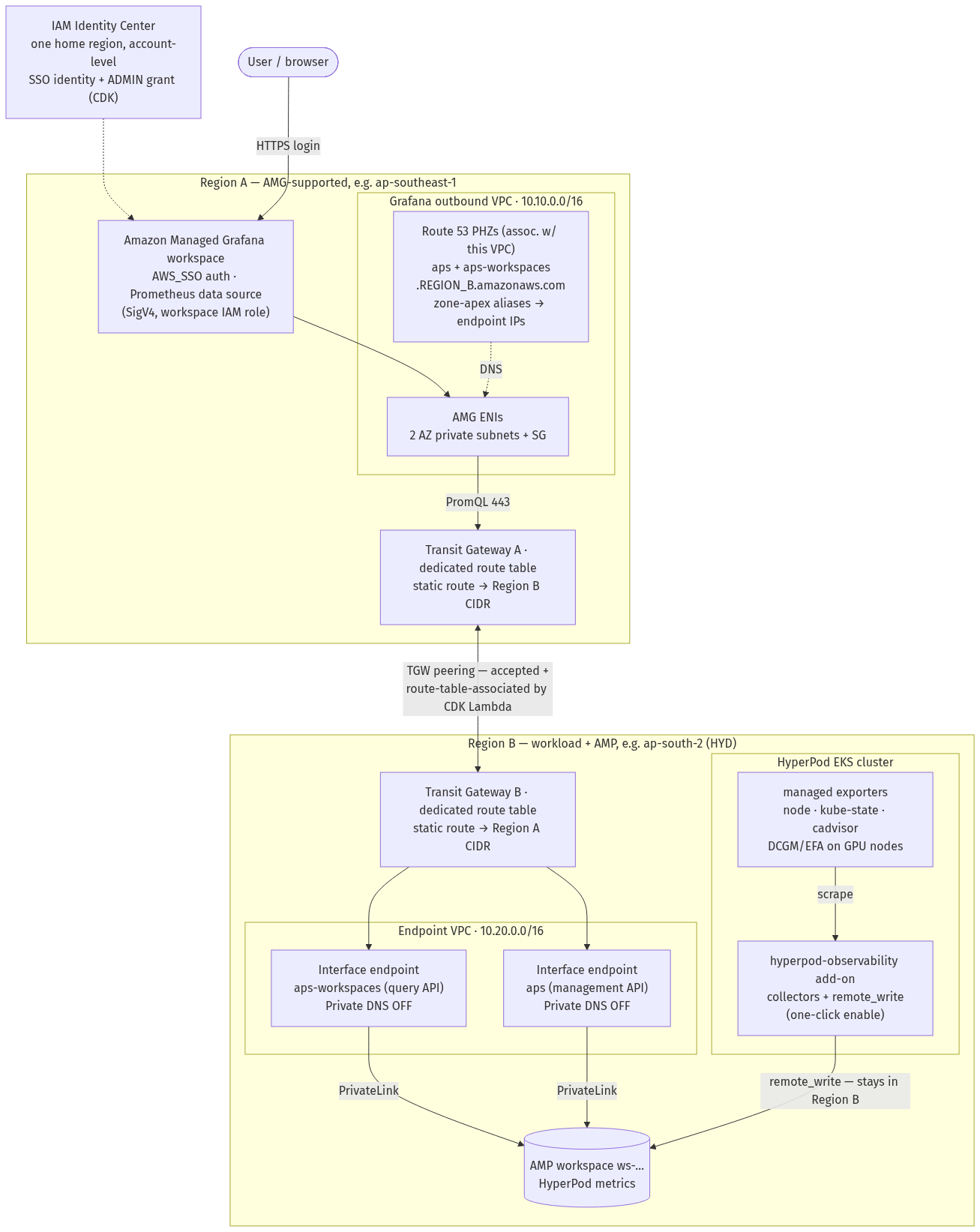
Solid arrows are the query path (Grafana → AMP) and the ingest path (cluster → AMP); dotted arrows are DNS resolution and identity. Two facts worth internalizing:
- Metric ingestion never leaves Region B. The cluster and AMP are in the
same Region, so
remote_writestays local. Only PromQL queries (and their small result sets) cross Regions — which is why the cross-region data transfer cost is negligible. - Nothing touches the public internet. Query traffic rides the Transit Gateway peering (AWS backbone) into PrivateLink interface endpoints.
What you deploy
| Part | What | How | Time |
|---|---|---|---|
| 1 | AMP workspace + metric collection in Region B | HyperPod console (one click) | ~10 min |
| 2 | VPC/TGW/PrivateLink/DNS + AMG workspace + data source | AWS CDK (three stacks) | ~40 min |
| — | Validation + dashboards | script + browser | ~10 min |
Regions in this guide
Throughout, Region A is the AMG Region (must be an
AMG-supported Region)
and Region B is the HyperPod + AMP Region. Examples use
ap-southeast-1 (Singapore) for A and ap-south-2 (Hyderabad) for B.
Set your environment once
Every command in this guide reads these shell variables. Set them in one
terminal and stay in it (or persist them with the env | grep ... > ~/amg-env.sh
line and source them in new terminals).
export REGION_A=ap-southeast-1          # AMG Region (must be AMG-supported)
export REGION_B=ap-south-2              # Region with HyperPod
export HP_CLUSTER=my-hyperpod-cluster   # HyperPod cluster name (as shown in the console)
export ACCOUNT=$(aws sts get-caller-identity --query Account --output text)

# derived: the EKS cluster behind the HyperPod cluster
export EKS_ARN=$(aws sagemaker describe-cluster --cluster-name "$HP_CLUSTER" \
  --region "$REGION_B" --query 'Orchestrator.Eks.ClusterArn' --output text)
export EKS_CLUSTER=${EKS_ARN##*/}

# after Part 1 you will also set:   export WS_ID=ws-...
# after the prerequisites below:    export ADMIN_GUID=...

# optional: persist for new terminals
env | grep -E '^(REGION_|EKS_|HP_|ACCOUNT|WS_ID|ADMIN_|SSO_)' > ~/amg-env.sh
Prerequisites
| Requirement | Why | How to check |
|---|---|---|
| IAM Identity Center enabled in the account | AMG UI login supports only Identity Center or SAML; this cannot be automated (it is an account/org-level bootstrap) | Console → IAM Identity Center. It lives in exactly one home Region — check there, not necessarily your working Region |
| An Identity Center user and its User ID (GUID) | The CDK grants that user workspace ADMIN by GUID | Console: IAM Identity Center → Users → your user → copy the User ID field (e.g. 54c84408-d041-707f-...), then export ADMIN_GUID=<value> |
Region B opted in (if it is an opt-in Region such as ap-south-2) | Nothing deploys there otherwise; TGW peering acceptance also requires opt-in | Console → Account → Regions |
| VPC quota headroom in both Regions (at least one free VPC each) | Each stack creates one VPC per Region | for r in $REGION_A $REGION_B; do echo "$r: $(aws ec2 describe-vpcs --region $r --query 'length(Vpcs)' --output text)"; done vs. quota (default 5). A full Region fails deploy with "maximum number of VPCs has been reached" |
| HyperPod observability add-on available in Region B | Part 1 depends on it; regional rollout is gradual | aws eks describe-addon-versions --region $REGION_B --addon-name amazon-sagemaker-hyperpod-observability --query 'addons[].addonVersions[0].addonVersion' --output text — a version string means supported; empty means use the manual fallback |
Resolving your Identity Center User ID by CLI
If you prefer not to click through the console (and your principal has
sso:ListInstances + identitystore:GetUserId):
export SSO_USERNAME=<your-identity-center-username>
export SSO_HOME=$(for r in $(aws ec2 describe-regions --query 'Regions[].RegionName' --output text); do \
  aws sso-admin list-instances --region "$r" --query 'Instances[0].InstanceArn' --output text 2>/dev/null \
  | grep -q arn && echo "$r" && break; done)
export STORE_ID=$(aws sso-admin list-instances --region "$SSO_HOME" \
  --query 'Instances[0].IdentityStoreId' --output text)
export ADMIN_GUID=$(aws identitystore get-user-id --region "$SSO_HOME" \
  --identity-store-id "$STORE_ID" \
  --alternate-identifier '{"UniqueAttribute":{"AttributePath":"userName","AttributeValue":"'"$SSO_USERNAME"'"}}' \
  --query UserId --output text)
echo "$ADMIN_GUID"
Tools on your workstation
node --version          # >= 18, required by the CDK CLI
python3 --version       # >= 3.9, required by the CDK app
npm install -g aws-cdk  # installs the `cdk` CLI
aws sts get-caller-identity   # AWS CLI v2, configured with the deploying principal
No Helm or
kubectlis required in this edition — the HyperPod add-on handles all in-cluster collection.
Deployer permissions
The deploying principal needs standard CloudFormation/CDK access plus a few
non-obvious permissions documented in
deployer-permissions.json.
The three that most often bite:
ssm:PutParameterandecr:*LifecyclePolicy/DeleteRepository— CDK bootstrap fails without them.- The
sso:*Profile*/sso-directory:*block — the Grafana ADMIN grant fails with "Unable to update users in managed application" without it (this set mirrors theAWSGrafanaWorkspacePermissionManagementV2managed policy). - IAM roles cap at 10 managed policies — if attaching hits
LimitExceeded, inline the JSON withaws iam put-role-policyinstead.
When your environment and prerequisites are set, continue to Enable Observability.