Deploy & Configure
The solution deploys as a single CloudFormation stack. Clone the
awsome-distributed-ai repository,
create a params.json with your cluster name and email settings, and run:
cd awsome-distributed-ai/architectures/sagemaker-hyperpod-slurm/tools/devops-agent

# 1. Set up a Python env with boto3 >= 1.43.25
python3 -m venv .venv && source .venv/bin/activate && pip install 'boto3>=1.43.25'

# 2. Fill in your cluster name and email addresses
cp deploy/params.example.json deploy/params.json
# edit: HyperPodClusterName, EmailSender, EmailRecipients

# 3. Deploy
make deploy
This provisions the Agent Space with read-only EKS access (auto-discovered
from the cluster's Orchestrator.Eks.ClusterArn), the EventBridge rule and
webhook bridge Lambda, the periodic-audit scheduler, and the email notifier.
For Slurm-orchestrated clusters, the EKS access step is skipped automatically.
Before touching any AWS resources, make deploy pre-flights that
boto3 >= 1.43.25 is present (it never installs it for you). It then auto-
discovers the underlying EKS cluster name, pre-flights the EKS auth mode (must
be API or API_AND_CONFIG_MAP, aborting with the corrective command if not),
ensures the S3 assets bucket, syncs the skills, embeds the Lambda code, and
deploys. After deployment:
make stack-outputs # console URL, webhook secret ARN, marker bucket, ...
Minimal params.json
The only three required keys (plus optional Region):
{
  "Region": "us-west-2",                          // optional; falls back to the AWS CLI default region
  "HyperPodClusterName": "my-hyperpod-cluster",   // the cluster this stack monitors
  "EmailSender": "alerts@example.com",            // SES-verified From address (verify it first)
  "EmailRecipients": "oncall@example.com,team@example.com"  // comma-separated; in the SES sandbox each must be verified too
}
That is a complete, deployable file. Everything else has a safe default.
EksClusterName, AssetsBucket, SkillsVersion, SkillsManifest,
SkillUploaderS3Bucket, and SkillUploaderS3Key are filled in
automatically by make deploy - do not set them in params.json.
Optional parameters
To override an optional parameter, add it as a normal key. In
params.example.json the optional keys ship with an __off_ prefix (and keys
starting with __ are ignored) so the example stays at defaults - remove
the __off_ prefix to activate one. For example, to page sooner on
CrashLoopBackOff and only forward events for two named clusters:
{
  "Region": "us-west-2",
  "HyperPodClusterName": "my-hyperpod-cluster",
  "EmailSender": "alerts@example.com",
  "EmailRecipients": "oncall@example.com",

  "CrashLoopMinRestarts": "3",
  "ClusterFilter": "my-hyperpod-cluster,my-other-cluster"
}
| Parameter | Default | What it controls |
|---|---|---|
Region | AWS CLI default | Target region. Read by deploy.sh; not a CloudFormation parameter. |
| Periodic audit | ||
EnablePeriodicAudit | true | Deploy the 15-minute audit Scheduler + Lambda. false = live event bridging only. |
AuditSchedule | rate(15 minutes) | EventBridge Scheduler expression for the periodic audit. |
HeartbeatSchedule | cron(0 12 * * ? *) | Scheduler expression for the daily "all clear" heartbeat. |
K8sChecksEnabled | true | Master switch for the Kubernetes-state checks (CrashLoopBackOff, NotReady). |
CrashLoopMinRestarts | 5 | Fire only when a container's restartCount reaches this. Kubernetes doesn't expose loop-start in a snapshot, so restartCount is the crash-evidence signal. |
CrashLoopRecencyMinutes | 15 | The most recent crash must be within this window to count as an active loop (a pod that looped then recovered stops firing). |
NotReadyNodePercentThreshold | 10 | Escalate if ≥ this percent of nodes are NotReady (after the duration gate). |
NotReadyDurationMinutes | 15 | A node must be NotReady this long to count toward the percent threshold. |
IgnoreNamespaces | kube-public,kube-node-lease | Namespaces skipped entirely. Must not overlap SystemNamespaces. |
SystemNamespaces | kube-system,aws-hyperpod,amazon-cloudwatch | Platform namespaces; CrashLoops here are tagged system-workload. |
| Webhook bridge | ||
ClusterFilter | "" (this stack's cluster) | Comma-separated allowlist of cluster names to forward. Empty = only HyperPodClusterName. |
DropEventLevels | Info | Comma-separated EventLevels to drop (drops noisy Info-level events by default). |
| Email notifier | ||
EmailDetailTypes | Investigation Completed | Comma-separated detail-types to email on (default: one email per incident lifecycle). |
ConsoleUrlTemplate | https://%agent_space_id%.aidevops.global.app.aws/investigation/%task_id% | Per-investigation link in emails. Tokens: %region%, %account%, %agent_space_id%, %task_id%. |
ForceSend | false | Bypass all email filters (dedup, no-findings, suppress). Debugging only. |
MarkerExpirationDays | 30 | Retention (days) for the per-execution email dedup markers. |
| Advanced | ||
AgentSpaceName | auto (hyperpod-<cluster>-devops-agent) | Friendly Agent Space name. |
AgentSpaceDescription | auto-generated | Free-text Agent Space description. |
AgentSpaceRoleName / WebappRoleName | auto-named per stack | Fixed IAM role names (only set if you need them stable). |
LcsBucketArnPattern | arn:aws:s3:::sagemaker-*-bucket | ARN pattern of lifecycle-script buckets the RCA skill may read (on_create.sh). "" to skip. |
The template's inline Description fields and the
AWS::CloudFormation::Interface groups in
deploy/hyperpod_devops_agent.template.yaml remain the authoritative source
for every parameter.
Multiple clusters in one account/region
Every collision-prone name is scoped per cluster, so you can deploy this stack for several HyperPod clusters side by side without conflicts:
- Stack name defaults to
hyperpod-devops-agent-<slug>(override withSTACK_NAME=...). - S3 buckets -
hpda-markers-<slug>-<account>-<region>(created by the stack) andhpda-assets-<slug>-<account>-<region>(created bymake deploy). - IAM roles - the Agent Space + Webapp roles are CloudFormation
auto-named by default (unique per stack). Set
AgentSpaceRoleName/WebappRoleNameonly if you need fixed names. - Webhook secret and Agent Space already include the cluster name.
Use per-cluster params files:
PARAMS_FILE=deploy/params.<cluster>.json make deploy
<cluster> is a lowercased, hyphenated, ≤20-char form of HyperPodClusterName
(e.g. My_Prod-Cluster_01 → my-prod-cluster-01).
The webhook bridge - mapping HyperPod events to DevOps Agent
An EventBridge rule captures HyperPod events and invokes a Lambda function.
The Lambda forwards all Warn and Error level events, normalizing each into
a DevOps Agent investigation payload - extracting the failure message,
instance group, and event metadata - signs it with HMAC using a shared secret
stored in AWS Secrets Manager, and POSTs it to the agent's generic webhook
endpoint. Info-level events are dropped at the bridge to avoid creating
investigations for routine status updates.
A cluster allowlist parameter (ClusterFilter) lets you scope which HyperPod
clusters trigger investigations, useful when multiple clusters share the same
account and region.
How the skills are defined - teaching the agent HyperPod's operational model
AWS DevOps Agent skills are plain-English instructions that teach the agent how to reason about a domain. This solution includes two complementary skills.
Triage skill - LINKED / SKIPPED / PROCEED
The triage skill (view the skill document) runs first on every incoming task. It decides whether to link the event to an existing investigation, skip it, or proceed to a full investigation.
:::info Why triage matters - a concrete example When a single node fails, HyperPod's replacement process emits multiple events in quick succession - "lost orchestration-ready status", "provisioning started", "capacity request initiated". Without triage, each event would spawn a separate investigation. The triage skill recognizes these events belong to the same incident (same instance group + overlapping time window) and links them, so only one investigation runs. This saves investigation compute and avoids duplicate emails.
When to SKIP: when a node is already being replaced and a follow-up "lost orchestration-ready status" event arrives with a generic "Request to service failed" message, the triage skill recognizes that a replacement is already in progress for that instance group and skips the event - no new investigation is created for what is simply a progress update of an existing recovery. :::
RCA skill - timeline reconstruction and verdict
When triage produces PROCEED, the RCA skill
(view the skill document)
takes over. It reads cluster state, events, and logs, reconstructs an
incident timeline, and classifies the situation into one of four verdicts.
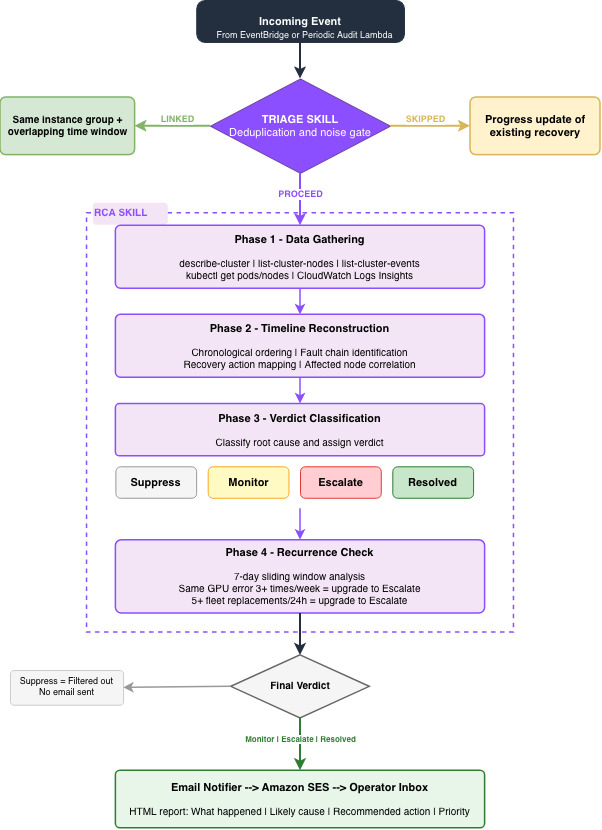
- Phase 1 - Data gathering: the skill reads
describe-cluster,list-cluster-nodes,list-cluster-events, and CloudWatch log streams (HMA health monitoring, lifecycle scripts) to collect the raw facts. - Phase 2 - Timeline reconstruction: it orders events chronologically and identifies the fault chain - what triggered what, which nodes were affected, and what recovery actions HyperPod took.
- Phase 3 - Classification: based on the timeline, recurrence statistics,
and HyperPod's resiliency behavior, it assigns a verdict:
- Suppress - a non-issue (e.g. a transient event that has already resolved).
- Monitor - recovery is in flight; here's the expected resolution window.
- Escalate - you need to act; here's the root cause and recommended action.
- Resolved - auto-recovery closed the loop; no action needed.
- Phase 4 - Recurrence check: the skill computes sliding-window statistics over the 7-day cluster event history. When thresholds are crossed - for example, the same GPU error signature on the same instance group three or more times in a week, or five or more replacements fleet-wide in 24 hours - the verdict escalates to alert the operator of a systemic pattern worth investigating further.
The verdict is written to the agent's investigation journal along with a human-readable report containing what happened, the likely cause, and recommended operator actions.
The periodic-audit Lambda - Kubernetes state monitoring
Division of labor: HyperPod control-plane faults (node health, capacity
errors, lifecycle-script failures, cluster state changes) are handled
event-driven by the webhook bridge - it reads the native EventLevel from
the EventBridge event and forwards the real FailureMessage, for both EKS
and Slurm. The periodic audit covers only what the event stream cannot:
Kubernetes Pod/Node state, which is not in the HyperPod event stream.
The audit runs on a schedule (default every 15 min): the Lambda inspects
Kubernetes state - CrashLoopBackOff pods and NotReady nodes (via read-only
EKS API access) - and POSTs the DevOps Agent webhook only when a real issue
is found. On a healthy cluster nothing is POSTed, so no investigation runs
and no cost is incurred.
Namespace-aware filtering controls which pods are checked:
- Pods in
kube-publicandkube-node-leaseare ignored entirely by default. - Pods in
kube-system,aws-hyperpod, andamazon-cloudwatchare tagged assystem-workloadissues (distinct from user-workload issues in the verdict).
All thresholds and namespace lists are configurable via the CloudFormation stack parameters.
A separate daily HeartbeatSchedule fires one "all clear" investigation per
day so operators can see the pipeline is alive; it is visible in the DevOps
Agent console and make audit-logs but is deliberately never emailed
(don't watch your inbox for it). On Slurm (no kubectl) the audit has
nothing to poll, so it fires only the heartbeat - HyperPod faults on Slurm
still flow through the event-driven bridge.
The audit Lambda has its own read-only AWS::EKS::AccessEntry (distinct
principal from the Agent Space role) carrying AmazonAIOpsAssistantPolicy -
note not AmazonEKSViewPolicy, whose view role excludes cluster-scoped
nodes and can't satisfy the NotReady-node check. The Lambda calls the
K8s API directly (SigV4 token + stdlib urllib) - no kubernetes client or
Lambda layer.
Closing the loop - the email notifier
An EventBridge rule on the aws.aidevops event stream captures investigation
lifecycle events. The email-notifier Lambda processes these events through
the following steps:
- Event filtering - Only
Investigation Completedevents are processed (one email per investigation lifecycle). The event payload contains theagent_space_id,task_id, andexecution_id. - Dedup - The Lambda checks an S3 marker at
s3://<bucket>/emailed/<execution_id>. If present, this investigation has already been emailed and the event is dropped. This prevents duplicate emails when the same completion event is re-emitted. - Fetching the investigation context - The Lambda calls two DevOps
Agent APIs:
get_backlog_task(agentSpaceId, taskId)- retrieves the task metadata (title, priority, timestamps).list_journal_records(agentSpaceId, executionId)- retrieves the investigation's findings, symptoms, and investigation gaps from the agent's journal.
- Suppress-verdict filtering - If the investigation produced a
Suppressverdict or no findings at all, no email is sent. - Email composition - The Lambda composes a single HTML email from the journal records: a short headline followed by a one-paragraph summary covering what happened, the likely cause, and the recommended action.
- Send via SES - The formatted email is sent to the configured recipients. After successful delivery, the S3 dedup marker is written.
The operator also has access to the full investigation in the DevOps Agent web console (see Viewing & Interacting).
Updating
- Parameters / thresholds: edit
deploy/params.json, re-runmake deploy. - Skills or the mental-model doc: edit the file under
skills/(ordocs/hyperpod-mental-model.md), thenmake deploy.sync-skillsrecomputes the content hash (SkillsVersion); the change makes CloudFormation re-runSkillUploader, which re-uploads only what changed.
Operating
make stack-status                                      # show the stack status
make bridge-logs / make audit-logs / make email-logs   # tail a Lambda's logs
make audit-test                                         # invoke the audit Lambda once
make import-upstream-skills                             # stage curated upstream skills, then: make deploy