GitLab CI Pipeline
NOTE: You do not need to follow these instructions to create the image & deploy the knfsd-file-cache solution on AWS.
A .gitlab-ci-aws.yml file is provided in the root of this repository to enable automated, continuous integration of the KNFSD File Cache solution on AWS. This pipeline implements industry best practices for code quality, security scanning, and multi-architecture builds.
This pipeline is designed to run on a self-hosted GitLab deployment. It should be used in conjunction with the pre-commit system to ensure that the code is properly formatted and linted before being committed to the repository.
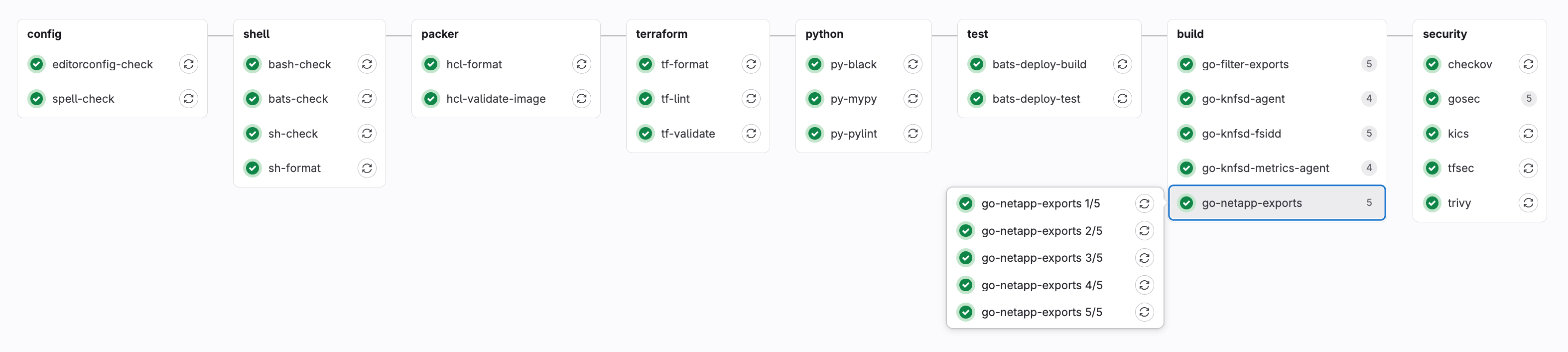
Pipeline Overview
The GitLab CI pipeline is structured into 9(+1 scheduled) distinct stages that execute sequentially, with jobs within each stage running in parallel where possible:
- dependencies - Dependency management and automated updates (scheduled)
- config - Editorconfig, spell-check, and formatting
- shell - Shell script linting and formatting
- packer - Packer configuration validation
- terraform - Terraform configuration validation and linting
- python - Python code quality checks
- test - Integration testing
- build - Go application lint, test, cross-platform build, and vulnerability scanning
- security - Security scanning and vulnerability assessment
- docs - Build and publish the documentation site to GitLab Pages
Configuration
To enable this pipeline, you should:
- Copy the
.gitlab-ci-aws.ymlfile and rename it to.gitlab-ci.yml(already added to the.gitignorefile) -
Create a GitLab Personal Access Token named
RENOVATE_TOKENwith the following scopes: -
Create a GitLab
environmentnamedrenovate. -
Add the following variables to
Settings > CI/CD > Variablesin your GitLab project:Variable Name (Key) Environment Visibility Expanded Description PACKER_GITHUB_API_TOKENAll (default) Masked Yes A GitHub PAT (personal access token) to reduce throttling from GitHub API (can be same value as RENOVATE_GITHUB_COM_TOKEN).RENOVATE_GITHUB_COM_TOKENrenovateMasked Yes A GitHub PAT (personal access token) to reduce throttling from GitHub API (can be same value as PACKER_GITHUB_API_TOKEN).RENOVATE_TOKENrenovateMasked Yes A GitLab PAT (personal access token) with access to the knfsd-file-cacherepository. Insert theRENOVATE_TOKENvalue from step 2 above.URL Links:
-
Schedule the
renovatejob to run daily at 08:00 UTC+1 (or as needed) viaBuild > Pipeline schedulesin your GitLab project.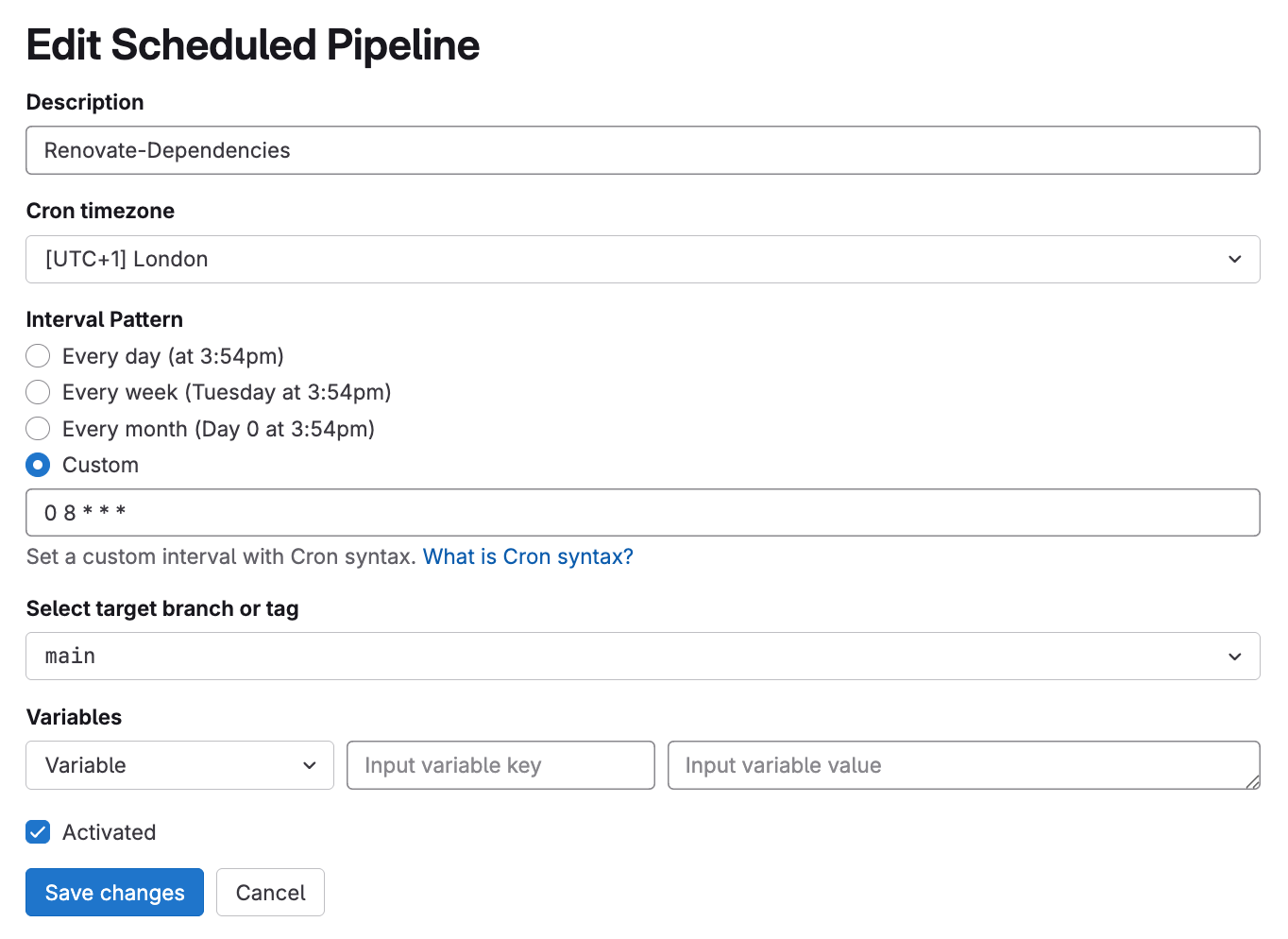
GitLab Runners
The provided .gitlab-ci-aws.yml file assumes the following shared GitLab Runner configuration is available:
| Arch | Size | vCPU | Memory |
|---|---|---|---|
amd64 |
medium |
2 | 8GB |
amd64 |
xlarge |
8 | 32GB |
amd64 |
2xlarge |
16 | 64GB |
Runner tags are in the format of keyword:value. Example of tagging:
Gitlab runner compute specification and architecture used is dictated by tags in our gitlab-ci-aws.yml file. This should be modified to match your GitLab Runner configuration.
The most compute and/or network intensive CI jobs are configured with a 2xlarge runner.
Pipeline Stages and Jobs
Dependencies Stage (scheduled)
renovate-config-validator
- Purpose: Validates Renovate configuration files
- Reference: Renovate Configuration Validator
- Failure Policy: Blocking (pipeline fails if this job fails)
renovate
- Purpose: Automated dependency updates using Renovate
- Schedule: Runs only on scheduled pipelines
- Reference: Renovate Bot Documentation
- Dependencies: Requires
renovate-config-validatorto pass - Failure Policy: Blocking
Config Stage
editorconfig-check
- Purpose: Validates code formatting consistency using EditorConfig
- Tool: editorconfig-checker
- Reference: GitLab CI EditorConfig
- Failure Policy: Blocking
spell-check
- Purpose: Checks for spelling errors in documentation and comments
- Tool: Codespell
- Configuration: Uses
.codespellrcconfiguration file - Failure Policy: Blocking
Shell Stage
bash-check, bats-check, sh-check
- Purpose: Static analysis of shell scripts for common issues
- Tool: ShellCheck
- Reference: ShellCheck Documentation
- Scope: Analyzes
.bash,.bats, and.shfiles respectively - Failure Policy: Warning (allows pipeline to continue)
sh-format
- Purpose: Validates shell script formatting
- Tool: shfmt
- Reference: shfmt Documentation
- Failure Policy: Warning
Packer Stage
hcl-format
- Purpose: Validates HCL file formatting for Packer configurations
- Tool: Packer built-in formatter
- Reference: Packer fmt Command
- Failure Policy: Blocking
hcl-validate-image
- Purpose: Validates Packer template syntax and configuration for knfsd proxy image
- Tool: Packer built-in validator
- Reference: Packer validate Command
- Failure Policy: Blocking
Terraform Stage
tf-format
- Purpose: Validates Terraform file formatting
- Tool: Terraform built-in formatter
- Reference: Terraform fmt Command
- Failure Policy: Blocking
tf-lint
- Purpose: Advanced Terraform linting and best practices validation
- Tool: TFLint
- Configuration: Uses
.tflint.hclconfiguration file - Reference: TFLint Documentation
- Failure Policy: Blocking
tf-validate
- Purpose: Validates Terraform configuration syntax across all modules
- Tool: Terraform built-in validator
- Reference: Terraform validate Command
- Cache: Uses Terraform plugin cache for performance
- Failure Policy: Blocking
Python Stage
py-black
- Purpose: Python code formatting validation
- Tool: Black
- Target: Python 3.14 compatibility
- Reference: Black Documentation
- Failure Policy: Blocking
py-mypy
- Purpose: Static type checking for Python code
- Tool: MyPy
- Reference: MyPy Documentation
- Cache: Uses MyPy cache for performance
- Failure Policy: Blocking
py-pylint
- Purpose: Python code quality and style analysis
- Tool: Pylint
- Reference: Pylint Documentation
- Failure Policy: Blocking
Test Stage
bats-deploy-build
- Purpose: Builds a Docker container for BATS (Bash Automated Testing System) tests
- Tool: Kaniko for container builds
- Registry: Stores built image in GitLab Container Registry
- Reference: GitLab Container Registry
- Failure Policy: Blocking
bats-deploy-test
- Purpose: Executes deployment validation tests using BATS
- Tool: BATS
- Dependencies: Requires
bats-deploy-buildto complete - Reference: BATS Documentation
- Failure Policy: Blocking
Build Stage
The build stage contains multiple Go application builds organized into sequential sub-jobs:
go-filter-exports (5 jobs)
- populate-cache: Downloads and caches Go modules
- lint,format: Code linting and formatting validation
- vulnerability scan: Security vulnerability assessment
- test,vet,race,cover: Comprehensive testing including race condition detection
- build: Multi-architecture binary compilation (AMD64, ARM64)
go-knfsd-agent (4 jobs)
Similar structure to filter-exports but without vulnerability scanning step.
go-knfsd-fsidd (5 jobs)
Includes database integration testing with a DynamoDB Local service container.
go-knfsd-metrics-agent (4 jobs)
Largest Go project requiring 2xlarge runners for performance.
go-netapp-exports (5 jobs)
Includes certificate generation for testing TLS functionality.
go-smoke-tests (4 jobs)
Builds the Terratest-based smoke tests
located in image/smoke-tests/:
- populate-cache: Downloads and caches Go modules
- lint,format: Code linting and formatting validation
- vulnerability scan: Security vulnerability assessment
- build: Compiles the
./cmd/remotetest binary (go test -c)
Common Go Job Features:
- Linting: golangci-lint with comprehensive rule set
- Vulnerability Scanning: govulncheck
- Testing: Race condition detection, code coverage, and static analysis
- Multi-arch Builds: Both AMD64 and ARM64 architectures
- Caching: Separate caches for modules, build artifacts, and lint results
Security Stage
checkov
- Purpose: Infrastructure as Code security scanning
- Tool: Checkov
- Reference: Checkov Documentation
- Configuration: Uses
.checkov.yamlconfiguration file - Failure Policy: Warning
gosec (6 jobs)
- Purpose: Go source code security analysis
- Tool: Gosec
- Reference: Gosec Documentation
- Scope: Analyzes each Go project independently
- Failure Policy: Warning
kics
- Purpose: Infrastructure security scanning
- Tool: KICS
- Reference: KICS Documentation
- Configuration: Uses
.kics.yamlconfiguration file - Failure Policy: Warning
semgrep
- Purpose: Static code analysis using the open source (community) rule set
- Tool: Semgrep
- Reference: Semgrep Documentation
- Configuration: Uses
.semgrepignorefor exclusions - Failure Policy: Warning
trivy
- Purpose: Comprehensive security scanning for secrets, vulnerabilities, misconfigurations, and licenses
- Tool: Trivy
- Reference: Trivy Documentation
- Configuration: Uses
.trivyignore.yamlfor exclusions,.trivy.tfvarsfor Terraform variables - Cache: Maintains vulnerability database cache
- Failure Policy: Warning
Docs Stage
pages
- Purpose: Builds the Material for MkDocs documentation site (AWS Cloudscape-aligned) and publishes it to GitLab Pages
- Tool: MkDocs with the
mkdocs-materialandmkdocs-same-dirplugins - Build:
mkdocs build --strict --site-dir sitefrom the repository root; the output is published from, and stored as an artifact in, thesitedirectory - Failure Policy: Blocking (a broken build or link fails the job under
--strict)
The site and repository metadata are auto-resolved from GitLab predefined variables at build time, so no manual Settings > CI/CD > Variables entries are required for the docs (unlike RENOVATE_TOKEN above):
| MkDocs env var | GitLab predefined variable | Purpose |
|---|---|---|
MKDOCS_SITE_URL |
CI_PAGES_URL |
Canonical site URL (the GitLab Pages URL) |
MKDOCS_REPO_URL |
CI_PROJECT_URL |
Repository link shown in the site header |
MKDOCS_REPO_NAME |
CI_PROJECT_PATH |
Repository name shown in the site header |
The committed mkdocs.yml contains no hard-coded URLs; these variables supply them at runtime, so the same configuration also works unchanged for a local build/serve and for GitHub Pages. Pages access follows the project's visibility (Public / Internal / Private), configured once in the project's Settings > General > Visibility and Settings > Pages, and is not set by the CI job.
Cache Strategy
The pipeline implements a sophisticated caching strategy to optimize build times and resource usage:
Go Module Caches
- Key Pattern:
{project}-mod-${CI_COMMIT_REF_SLUG} - Purpose: Caches downloaded Go modules to avoid repeated downloads
- Policy: Write on cache population jobs, read-only on subsequent jobs
- Location:
.go/pkg/mod
Go Build Caches
- Key Pattern:
{project}-build-${CI_JOB_NAME}-${CI_COMMIT_REF_SLUG} - Purpose: Caches compiled Go artifacts for faster builds
- Location:
.go/.cache/go-build
Go Lint Caches
- Key Pattern:
{project}-lint-${CI_COMMIT_REF_SLUG} - Purpose: Caches golangci-lint analysis results
- Location:
.go/.cache/golangci-lint
Terraform Plugin Cache
- Key Pattern:
tf-plugins-${CI_COMMIT_REF_SLUG} - Purpose: Caches Terraform provider plugins and lock files
- Location:
.terraform.d/plugin-cacheand various.terraform.lock.hclfiles - Reference: Terraform Plugin Cache
Python Type Checking Cache
- Key Pattern:
mypy-${CI_COMMIT_REF_SLUG} - Purpose: Caches MyPy type analysis results
- Location:
.mypy_cache
Security Scanning Cache
- Key Pattern:
trivy-${CI_COMMIT_REF_SLUG} - Purpose: Caches Trivy vulnerability database
- Location:
.trivycache
GitLab Container Registry Usage
BATS Deploy Container
The pipeline uses the GitLab Container Registry to store and cache the bats-deploy container:
- Purpose: Contains BATS testing framework and dependencies for deployment validation
- Build Job:
bats-deploy-build - Registry Path:
${CI_REGISTRY_IMAGE}/bats-deploy:${CI_COMMIT_REF_SLUG} - Builder: Kaniko for rootless container builds
- Caching: Utilizes Docker layer caching for faster subsequent builds
- Usage: Consumed by
bats-deploy-testjob for running deployment tests
Benefits:
- Faster test execution by pre-building test environment
- Consistent testing environment across pipeline runs
- Reduced external dependencies during test execution
- Layer caching reduces build times for incremental changes
GitLab Dependency Proxy
The pipeline extensively uses the GitLab Dependency Proxy for all container image pulls:

Ensure you configure GitLab Dependency Proxy in your GitLab group/project with Docker Hub credentials to reduce throttling from Docker Hub. You can get your Docker Hub credentials from Docker Hub.
Configuration
- Variable:
CI_DEPENDENCY_PROXY_DIRECT_GROUP_IMAGE_PREFIX - Purpose: Proxies Docker Hub requests through GitLab
- Format:
${CI_DEPENDENCY_PROXY_DIRECT_GROUP_IMAGE_PREFIX}/image:tag
Benefits
- Performance: Caches frequently used images locally within GitLab infrastructure
- Reliability: Reduces dependency on external registry availability
- Cost Optimization: Minimizes external bandwidth usage and potential rate limiting
- Security: Provides additional scanning and policy enforcement opportunities
- Compliance: Helps with air-gapped or restricted network environments
Usage Examples
# BAD: Direct Docker Hub image
image: golang

# GOOD: via Dependency Proxy
image: ${CI_DEPENDENCY_PROXY_DIRECT_GROUP_IMAGE_PREFIX}/golang
Reference: GitLab Dependency Proxy Documentation
Pipeline Optimization Features
Performance Optimizations
- Parallel Execution: Jobs within stages run concurrently where possible
- Selective Caching: Different cache policies (read/write/pull) optimize cache usage
- Runner Sizing: Appropriate runner sizes (medium/xlarge/2xlarge) based on job requirements
- Fast Compression: Uses fastest compression for artifacts and caches
- Shallow Git Clone: Limited git depth (10 commits) for faster checkouts
Resource Management
- Architecture Targeting: Jobs specify required architecture (amd64)
- Runner Tagging: Uses specific runner tags for job placement
- Interruptible Jobs: Allows job cancellation for resource optimization
- Automatic Retry: System failure recovery with single retry attempt
Quality Gates
- Blocking vs Warning: Critical jobs block pipeline progression, while security scans provide warnings
- Dependency Management: Job dependencies ensure proper execution order
- Multi-stage Validation: Multiple validation layers catch different types of issues
This CI pipeline ensures code quality, security, and reliability while maintaining developer productivity through optimized caching and parallel execution strategies.