

Construire l'interface utilisateur
Tâche 1 : Exécuter tout localement
Section intitulée « Tâche 1 : Exécuter tout localement »Démarrez la pile locale complète — le serveur de développement game-ui avec une Game API locale et un Story Agent AG-UI local (qui à son tour démarre le serveur MCP Inventory) — avec une seule commande :
pnpm nx dev game-uiyarn nx dev game-uinpx nx dev game-uibunx nx dev game-uiLa cible dev sur game-ui a dependsOn sur game-api:dev et dungeon_adventure.story:agent-dev, donc Nx démarre le serveur local de chaque projet en parallèle. Grâce aux connexions que nous avons configurées dans le Module 1, ceux-ci démarrent à leur tour le serveur MCP Inventory et DynamoDB Local. Assurez-vous que votre moteur de conteneurs est en cours d’exécution, puis ouvrez le serveur de développement à http://localhost:4200/ dans un navigateur.
Tâche 2 : Où CopilotKit est déjà configuré
Section intitulée « Tâche 2 : Où CopilotKit est déjà configuré »Lorsque vous avez exécuté le générateur connection pour game-ui → story dans le Module 1, l’intégration AG-UI du site web Shadcn a été générée pour vous. Cela vaut la peine d’y jeter un coup d’œil rapide :
Répertoirepackages/game-ui/src/
Répertoirecomponents/
- AguiProvider.tsx Single
CopilotKitProviderregistered with every AG-UI agent. Répertoirecopilot/
- index.tsx Re-exports themed
CopilotChat/CopilotSidebar/CopilotPopup. - ShadcnAssistantMessage.tsx, ShadcnUserMessage.tsx, ShadcnChatInput.tsx, ShadcnCursor.tsx, copilot.css
- index.tsx Re-exports themed
- story-agent-chat.tsx A
CopilotChatpre-bound to the Story Agent’sagentId.
- AguiProvider.tsx Single
Répertoirehooks/
- useAguiStoryAgent.tsx Instantiates an
@ag-ui/clientHttpAgentpointing at the deployed Story Agent and padsthreadIdto AgentCore’s 33-character minimum session id.
- useAguiStoryAgent.tsx Instantiates an
- main.tsx Wraps
<App />in<AguiProvider>
Tout ce que nous devons faire est de déposer un <CopilotChat agentId="agent" threadId={...} /> dans une route. Pour plus de détails sur la façon dont l’intégration est assemblée, consultez le guide de connexion React → AG-UI.
Tâche 3 : Restyler pour le donjon
Section intitulée « Tâche 3 : Restyler pour le donjon »Remplacez packages/game-ui/src/styles.css — c’est le seul fichier que nous modifions pour le style. Il importe les globaux Shadcn partagés, remplace la palette par un thème de donjon éclairé aux torches, et fait hériter CopilotKit de ces couleurs :
@import '../../common/shadcn/src/styles/globals.css';@source './**/*.{ts,tsx}';
/* Dungeon theme — torch-lit parchment on stone. Applied to `:root` for the * page and to `[data-copilotkit][data-copilotkit]` for CopilotKit's chat * surface; CopilotKit ships a same-specificity `[data-copilotkit]` rule that * resets `--background` back to white, so we bump specificity with the * doubled selector. */:root,[data-copilotkit][data-copilotkit] {  --background: oklch(0.18 0.02 60);  --foreground: oklch(0.92 0.04 85);  --card: oklch(0.22 0.03 60);  --card-foreground: oklch(0.92 0.04 85);  --popover: oklch(0.2 0.02 60);  --popover-foreground: oklch(0.92 0.04 85);  --primary: oklch(0.75 0.15 75);  --primary-foreground: oklch(0.15 0.02 60);  --secondary: oklch(0.28 0.04 60);  --secondary-foreground: oklch(0.92 0.04 85);  --muted: oklch(0.25 0.02 60);  --muted-foreground: oklch(0.7 0.04 85);  --accent: oklch(0.4 0.12 30);  --accent-foreground: oklch(0.95 0.04 85);  --destructive: oklch(0.55 0.22 25);  --border: oklch(0.35 0.03 60);  --input: oklch(0.3 0.03 60);  --ring: oklch(0.75 0.15 75);  --sidebar: oklch(0.15 0.02 60);  --sidebar-foreground: oklch(0.88 0.04 85);  --sidebar-primary: oklch(0.75 0.15 75);  --sidebar-primary-foreground: oklch(0.15 0.02 60);  --sidebar-accent: oklch(0.28 0.04 60);  --sidebar-accent-foreground: oklch(0.92 0.04 85);  --sidebar-border: oklch(0.3 0.03 60);  --sidebar-ring: oklch(0.75 0.15 75);}
body {  font-family: 'Georgia', 'Cambria', serif;  background:    radial-gradient(circle at 20% 10%, oklch(0.25 0.05 70 / 0.4), transparent 40%),    radial-gradient(circle at 80% 90%, oklch(0.25 0.1 30 / 0.3), transparent 40%),    var(--background);}
h1, h2, h3 {  letter-spacing: 0.05em;}
Tâche 4 : Créer les routes du jeu
Section intitulée « Tâche 4 : Créer les routes du jeu »Nous avons besoin de deux routes — une pour choisir un héros, une pour jouer. Les deux utilisent des composants shadcn et le chat CopilotKit ; il n’y a pas d’interface de chat faite à la main.
import { useInfiniteQuery, useMutation } from '@tanstack/react-query';import { createFileRoute, useNavigate } from '@tanstack/react-router';import { useEffect, useMemo, useRef, useState } from 'react';import { Button } from '@dungeon-adventure/common-shadcn/components/ui/button';import { Input } from '@dungeon-adventure/common-shadcn/components/ui/input';import {  Card,  CardContent,} from '@dungeon-adventure/common-shadcn/components/ui/card';import { Spinner } from '@dungeon-adventure/common-shadcn/components/ui/spinner';import { useGameApi } from '../hooks/useGameApi';import type { IGame } from '@dungeon-adventure/game-api';
const GENRES = ['medieval', 'zombie', 'superhero'] as const;
export const Route = createFileRoute('/')({ component: RouteComponent });
function RouteComponent() {  const [playerName, setPlayerName] = useState('');  const [pending, setPending] = useState<IGame['genre'] | null>(null);  const navigate = useNavigate();  const gameApi = useGameApi();  const saveGame = useMutation(gameApi.games.save.mutationOptions());  const games = useInfiniteQuery(    gameApi.games.query.infiniteQueryOptions(      { limit: 10 },      { getNextPageParam: ({ cursor }) => cursor ?? undefined },    ),  );  const savedGames = useMemo(    () => games.data?.pages.flatMap((p) => p.items) ?? [],    [games.data],  );
  // Auto-fetch subsequent pages when the sentinel at the bottom of the list  // scrolls into view — keeps the homepage a simple infinite scroll without  // a "Load more" button.  const sentinel = useRef<HTMLDivElement | null>(null);  useEffect(() => {    const el = sentinel.current;    if (!el || !games.hasNextPage) return;    const io = new IntersectionObserver(      (entries) => {        if (          entries.some((e) => e.isIntersecting) &&          !games.isFetchingNextPage        ) {          void games.fetchNextPage();        }      },      { rootMargin: '120px' },    );    io.observe(el);    return () => io.disconnect();  }, [games.hasNextPage, games.isFetchingNextPage, games.fetchNextPage]);
  const startGame = async (player: string, genre: IGame['genre']) => {    if (!player.trim()) return;    setPending(genre);    try {      if (!savedGames.find((g) => g.playerName === player)) {        await saveGame.mutateAsync({ playerName: player, genre });      }      await navigate({        to: '/game/$playerName',        params: { playerName: player },        search: { genre },      });    } finally {      setPending(null);    }  };
  const busy = pending !== null;  const firstLoad = games.isLoading;
  return (    <div className="mx-auto flex w-full max-w-2xl flex-col gap-8">      <div className="text-center">        <h1 className="bg-gradient-to-r from-amber-300 to-rose-400 bg-clip-text text-5xl font-bold text-transparent">          AI Dungeon Adventure        </h1>        <p className="text-muted-foreground mt-2">          Pick a hero name, choose a genre, begin.        </p>      </div>
      <Card>        <CardContent className="flex flex-col gap-4 pt-6">          <Input            placeholder="Your hero's name"            value={playerName}            disabled={busy}            onChange={(e) => setPlayerName(e.target.value)}          />          <div className="grid grid-cols-3 gap-3">            {GENRES.map((genre) => (              <Button                key={genre}                variant="secondary"                disabled={!playerName.trim() || busy}                onClick={() => startGame(playerName, genre)}              >                {pending === genre && <Spinner />}                {genre[0].toUpperCase() + genre.slice(1)}              </Button>            ))}          </div>        </CardContent>      </Card>
      <div className="flex flex-col gap-2">        <h2 className="flex items-center gap-2 text-xl font-semibold">          Continue          {(firstLoad || games.isFetching) && <Spinner className="size-4" />}        </h2>        {!firstLoad && savedGames.length === 0 && (          <p className="text-muted-foreground text-sm">            No saved games yet — start a new adventure above.          </p>        )}        {savedGames.map((g) => (          <Button            key={g.playerName}            variant="outline"            className="justify-between"            disabled={busy}            onClick={() => startGame(g.playerName, g.genre)}          >            <span>{g.playerName}</span>            <span className="text-muted-foreground text-sm">              {g.genre[0].toUpperCase() + g.genre.slice(1)}            </span>          </Button>        ))}        <div ref={sentinel} aria-hidden className="h-1" />        {games.isFetchingNextPage && (          <div className="flex justify-center py-2">            <Spinner />          </div>        )}      </div>    </div>  );}
import { createFileRoute } from '@tanstack/react-router';import { useInfiniteQuery, useMutation } from '@tanstack/react-query';import { createFileRoute, useNavigate } from '@tanstack/react-router';import { useEffect, useMemo, useRef, useState } from 'react';import { Button } from '@dungeon-adventure/common-shadcn/components/ui/button';import { Input } from '@dungeon-adventure/common-shadcn/components/ui/input';import { Card, CardContent,} from '@dungeon-adventure/common-shadcn/components/ui/card';import { Spinner } from '@dungeon-adventure/common-shadcn/components/ui/spinner';import { useGameApi } from '../hooks/useGameApi';import type { IGame } from '@dungeon-adventure/game-api';
export const Route = createFileRoute('/')({ component: RouteComponent,});const GENRES = ['medieval', 'zombie', 'superhero'] as const;
export const Route = createFileRoute('/')({ component: RouteComponent });
function RouteComponent() { const [playerName, setPlayerName] = useState(''); const [pending, setPending] = useState<IGame['genre'] | null>(null); const navigate = useNavigate(); const gameApi = useGameApi(); const saveGame = useMutation(gameApi.games.save.mutationOptions()); const games = useInfiniteQuery( gameApi.games.query.infiniteQueryOptions( { limit: 10 }, { getNextPageParam: ({ cursor }) => cursor ?? undefined }, ), ); const savedGames = useMemo( () => games.data?.pages.flatMap((p) => p.items) ?? [], [games.data], );
// Auto-fetch subsequent pages when the sentinel at the bottom of the list // scrolls into view — keeps the homepage a simple infinite scroll without // a "Load more" button. const sentinel = useRef<HTMLDivElement | null>(null); useEffect(() => { const el = sentinel.current; if (!el || !games.hasNextPage) return; const io = new IntersectionObserver( (entries) => { if ( entries.some((e) => e.isIntersecting) && !games.isFetchingNextPage ) { void games.fetchNextPage(); } }, { rootMargin: '120px' }, ); io.observe(el); return () => io.disconnect(); }, [games.hasNextPage, games.isFetchingNextPage, games.fetchNextPage]);
const startGame = async (player: string, genre: IGame['genre']) => { if (!player.trim()) return; setPending(genre); try { if (!savedGames.find((g) => g.playerName === player)) { await saveGame.mutateAsync({ playerName: player, genre }); } await navigate({ to: '/game/$playerName', params: { playerName: player }, search: { genre }, }); } finally { setPending(null); } };
const busy = pending !== null; const firstLoad = games.isLoading;
return ( <div className="text-center"> <header> <h1>Welcome</h1> <p>Welcome to your new React website!</p> </header> <div className="mx-auto flex w-full max-w-2xl flex-col gap-8"> <div className="text-center"> <h1 className="bg-gradient-to-r from-amber-300 to-rose-400 bg-clip-text text-5xl font-bold text-transparent"> AI Dungeon Adventure </h1> <p className="text-muted-foreground mt-2"> Pick a hero name, choose a genre, begin. </p> </div>
<Card> <CardContent className="flex flex-col gap-4 pt-6"> <Input placeholder="Your hero's name" value={playerName} disabled={busy} onChange={(e) => setPlayerName(e.target.value)} /> <div className="grid grid-cols-3 gap-3"> {GENRES.map((genre) => ( <Button key={genre} variant="secondary" disabled={!playerName.trim() || busy} onClick={() => startGame(playerName, genre)} > {pending === genre && <Spinner />} {genre[0].toUpperCase() + genre.slice(1)} </Button> ))} </div> </CardContent> </Card>
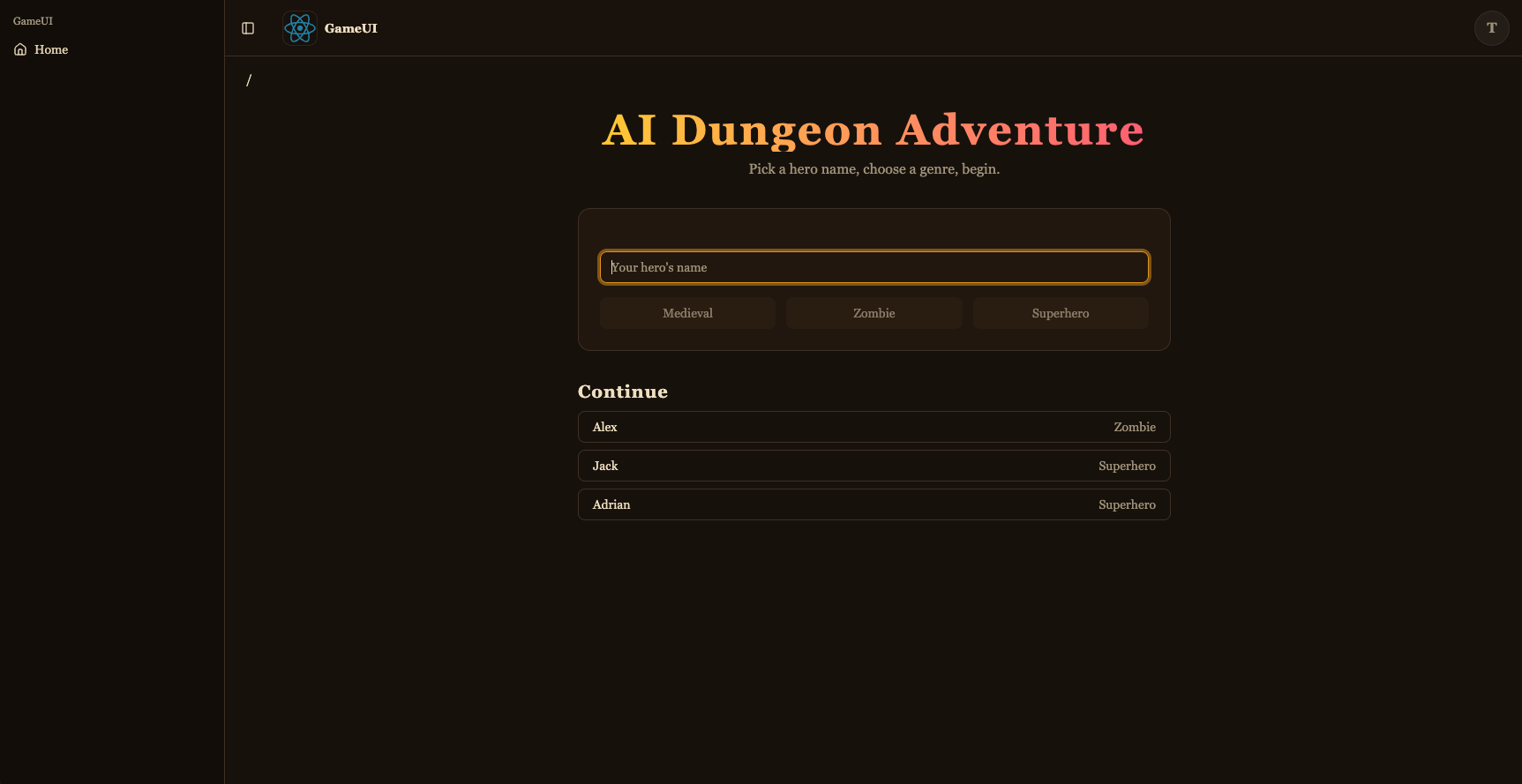
<div className="flex flex-col gap-2"> <h2 className="flex items-center gap-2 text-xl font-semibold"> Continue {(firstLoad || games.isFetching) && <Spinner className="size-4" />} </h2> {!firstLoad && savedGames.length === 0 && ( <p className="text-muted-foreground text-sm"> No saved games yet — start a new adventure above. </p> )} {savedGames.map((g) => ( <Button key={g.playerName} variant="outline" className="justify-between" disabled={busy} onClick={() => startGame(g.playerName, g.genre)} > <span>{g.playerName}</span> <span className="text-muted-foreground text-sm"> {g.genre[0].toUpperCase() + g.genre.slice(1)} </span> </Button> ))} <div ref={sentinel} aria-hidden className="h-1" /> {games.isFetchingNextPage && ( <div className="flex justify-center py-2"> <Spinner /> </div> )} </div> </div> );}C’est le sélecteur de jeu : formulaire de nouveau jeu (shadcn Input + Button + Card) plus une liste “Continuer” alimentée par useGameApi().games.query avec useInfiniteQuery — une sentinelle <div> en bas surveillée par un IntersectionObserver appelle automatiquement fetchNextPage() lorsqu’elle est défilée dans la vue, et des spinners à côté du titre et en dessous de la liste affichent l’état de chargement. Démarrer un jeu saveGame la paire (playerName, genre) (pour qu’elle apparaisse la prochaine fois) et navigue vers la route de jeu.
import { UseAgentUpdate, useAgent } from '@copilotkit/react-core/v2';import { useQuery } from '@tanstack/react-query';import { createFileRoute } from '@tanstack/react-router';import { useEffect, useMemo, useRef } from 'react';import { CopilotChat } from '../../components/copilot';import { useGameApi } from '../../hooks/useGameApi';import type { IGame } from '@dungeon-adventure/game-api';
// AgentCore session ids must be at least 33 characters. The AG-UI hook pads// the threadId to this length before sending, so the thread id is stable for// a given (player, genre) pair — revisiting the URL continues the same story.const buildThreadId = (playerName: string, genre: string) =>  `${playerName}-${genre}`.padEnd(33, '0');
export const Route = createFileRoute('/game/$playerName')({  component: RouteComponent,  validateSearch: (search: Record<string, unknown>) => ({    genre: search.genre as IGame['genre'],  }),});
function RouteComponent() {  const { playerName } = Route.useParams();  const { genre } = Route.useSearch();  const threadId = useMemo(    () => buildThreadId(playerName, genre),    [playerName, genre],  );
  const gameApi = useGameApi();  const inventory = useQuery(    gameApi.inventory.query.queryOptions({ playerName, limit: 100 }),  );  // Conversation history persisted by the agent's ``S3SessionManager``. Each  // turn is stored as ``session_<threadId>/agents/agent_default/messages/…``.  //  // `staleTime: 0` + `refetchOnMount: 'always'` together force a fresh read  // on every visit — the cached snapshot from the *first* time we loaded  // this route (before the agent had written any turns back to S3) would  // otherwise look like an empty thread on revisit and trigger re-priming.  const pastActions = useQuery({    ...gameApi.actions.query.queryOptions({ sessionId: threadId }),    staleTime: 0,    refetchOnMount: 'always',  });
  const { agent } = useAgent({    agentId: 'agent',    updates: [UseAgentUpdate.OnMessagesChanged],  });
  // Hydrate the chat once the history query resolves. For a fresh thread  // (no stored messages) the agent's system prompt expects the player's  // name and genre in the first user message, so send that priming line.  //  // We wait for `isFetching` to go false (rather than just `isLoading`) so  // that revisits with a cached empty result from the first visit aren't  // mistaken for a fresh thread — the background refetch is what sees the  // turns the agent wrote since.  const primedRef = useRef(false);  useEffect(() => {    if (!agent || primedRef.current) return;    if (pastActions.isFetching || !pastActions.isSuccess) return;    primedRef.current = true;    const items = pastActions.data.items;    if (items.length > 0) {      agent.setMessages(        items.map((a) => ({          id: `m-${a.messageId}`,          role: a.role,          content: a.content,        })),      );      return;    }    agent.addMessage({      id: crypto.randomUUID(),      role: 'user',      content: `My name is ${playerName}. Start my ${genre} adventure.`,    });    void agent.runAgent();  }, [    agent,    pastActions.data,    pastActions.isFetching,    pastActions.isSuccess,    playerName,    genre,  ]);
  // The agent's ``add-to-inventory`` tool calls mutate DynamoDB directly, so  // the inventory query needs a nudge to refetch as turns complete. The  // ``useAgent({ updates: [OnMessagesChanged] })`` subscription re-renders  // this route on each message event — refetch whenever the message count  // changes, which covers both the initial populate and every subsequent  // turn.  const seenMessages = useRef(0);  useEffect(() => {    if (!agent) return;    if (agent.messages.length !== seenMessages.current) {      seenMessages.current = agent.messages.length;      void inventory.refetch();    }  });
  return (    <div className="relative flex h-[calc(100vh-10rem)] min-h-0 flex-col">      {!!inventory.data?.items.length && (        <aside className="bg-accent text-accent-foreground pointer-events-none absolute right-4 top-4 z-10 w-56 rounded-lg border p-3 shadow-lg">          <div className="mb-1 font-semibold">📦 Inventory</div>          <ul className="flex flex-col gap-0.5 text-sm">            {inventory.data.items.map((item) => (              <li key={item.itemName}>                {item.emoji ?? '•'} {item.itemName}                {item.quantity > 1 ? ` (x${item.quantity})` : ''}              </li>            ))}          </ul>        </aside>      )}      <CopilotChat        agentId="agent"        threadId={threadId}        labels={{          chatInputPlaceholder: 'What do you do?',          welcomeMessageText: `${playerName}'s ${genre} adventure`,        }}      />    </div>  );}
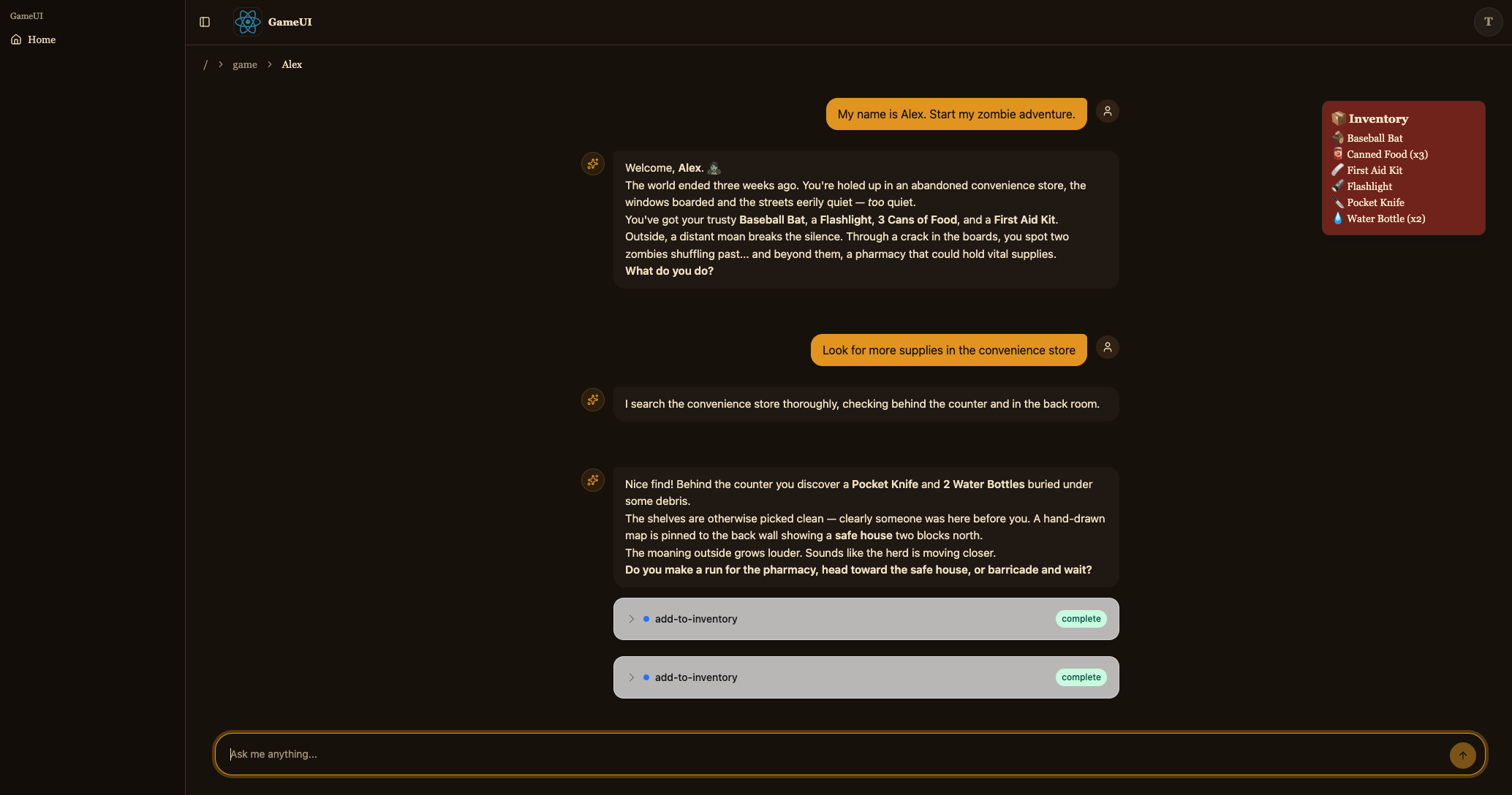
C’est la route de jeu. Elle construit le threadId déterministe ({player}-{genre} complété à 33 caractères — le hook AG-UI l’enverra tel quel comme identifiant de session AgentCore), rend <CopilotChat agentId="agent" threadId={threadId} />, et superpose l’inventaire de useGameApi().inventory.query par-dessus. Au montage, useGameApi().actions.query({ sessionId: threadId }) lit l’historique de conversation que l’agent a stocké dans S3 et — s’il y en a — appelle agent.setMessages(...) pour réhydrater le chat ; sinon il envoie un message utilisateur d’amorçage pour lancer l’histoire. agent.messages est souscrit via useAgent({ updates: [OnMessagesChanged] }) donc chaque nouveau tour récupère également la requête d’inventaire (les appels d’outils MCP mutent DynamoDB directement).
Une fois enregistré, le serveur de développement devrait maintenant vous permettre de commencer une aventure et de discuter avec le Story Agent.
Tâche 5 : Déployer sur AWS
Section intitulée « Tâche 5 : Déployer sur AWS »Votre jeu est complet et vous avez testé chaque élément localement. Maintenant, déployons-le sur AWS pour que vous puissiez y jouer de n’importe où.
Construire votre code
Section intitulée « Construire votre code »pnpm buildyarn buildnpm run buildbun buildDéployer votre application
Section intitulée « Déployer votre application »pnpm nx deploy-sandbox infrayarn nx deploy-sandbox infranpx nx deploy-sandbox infrabunx nx deploy-sandbox infraLa cible deploy-sandbox déploie l’étape sandbox définie dans packages/infra/src/main.ts.
La cible deploy-sandbox utilise le mode express CloudFormation, qui termine chaque opération de ressource dès que sa configuration est appliquée plutôt que d’attendre la stabilisation complète. Votre premier déploiement prendra environ 4 minutes pour se terminer, et certaines ressources (telles que la distribution CloudFront) peuvent continuer à se provisionner en arrière-plan pendant un court moment par la suite. Les déploiements suivants sont plus rapides.
Étant donné que le mode express revient avant que les ressources ne se soient complètement stabilisées, deploy-sandbox est destiné au développement uniquement. Utilisez la cible deploy-ci pour les déploiements CI/CD et de production, qui attend toujours la stabilisation complète.
Une fois le déploiement terminé, vous verrez des sorties similaires à celles-ci :
dungeon-adventure-infra-sandbox-Applicationdungeon-adventure-infra-sandbox-Application: deploying... [2/2]
 ✅  dungeon-adventure-infra-sandbox-Application
✨  Deployment time: 220s
⚠️  Stack deployed using Express Mode. Resources still stabilizing: GameUICloudfrontDistribution, UserIdentityWebAcl, ...and more...
Outputs:dungeon-adventure-infra-sandbox-Application.GameApiEndpointXXX = https://xxx.execute-api.region.amazonaws.com/prod/dungeon-adventure-infra-sandbox-Application.GameUIDistributionDomainNameXXX = xxx.cloudfront.netdungeon-adventure-infra-sandbox-Application.InventoryMcpArn = arn:aws:bedrock-agentcore:region:xxxxxxx:runtime/dungeonadventureventoryMcpServerXXXX-YYYYdungeon-adventure-infra-sandbox-Application.RuntimeConfigApplicationId = xxxxdungeon-adventure-infra-sandbox-Application.StoryAgentArn = arn:aws:bedrock-agentcore:region:xxxxxxx:runtime/dungeonadventurecationStoryAgentXXXX-YYYYdungeon-adventure-infra-sandbox-Application.UserIdentityUserIdentityIdentityPoolIdXXX = region:xxxdungeon-adventure-infra-sandbox-Application.UserIdentityUserIdentityUserPoolClientIdXXX = xxxxxxxxxxdungeon-adventure-infra-sandbox-Application.UserIdentityUserIdentityUserPoolIdXXX = region_xxx
Naviguez vers votre URL CloudFront (GameUIDistributionDomainName des sorties CDK), inscrivez-vous pour un nouveau compte, et jouez à votre jeu fonctionnant entièrement sur AWS !
Tâche 6 : Mélanger les composants locaux et déployés
Section intitulée « Tâche 6 : Mélanger les composants locaux et déployés »Vous avez vu les deux extrêmes du spectre : tout local (dev) et tout déployé. Pendant le développement quotidien, il est souvent utile de mélanger les deux — par exemple, itérer sur le code du site web contre l’API et l’agent réels déployés, ou exécuter l’API localement contre la table DynamoDB réelle.
La clé est la variable d’environnement RUNTIME_CONFIG_APP_ID. Lorsqu’un projet s’exécute sans LOCAL_DEV=true, les recherches de configuration d’exécution récupèrent leur configuration depuis AWS AppConfig en utilisant cet identifiant d’application — la valeur RuntimeConfigApplicationId de vos sorties CDK.
Chaque site web a une cible load-runtime-config qui télécharge le runtime-config.json déployé (pool Cognito, points de terminaison API, ARN de l’agent) dans le serveur de développement local. Quelques combinaisons utiles :
-
Site web local → backend déployé. Tirez la configuration déployée une fois, puis exécutez la cible
servesimple pour que l’interface utilisateur communique avec l’API et l’agent déployés :Terminal window pnpm nx load-runtime-config game-uiTerminal window yarn nx load-runtime-config game-uiTerminal window npx nx load-runtime-config game-uiTerminal window bunx nx load-runtime-config game-uiTerminal window pnpm nx serve game-uiTerminal window yarn nx serve game-uiTerminal window npx nx serve game-uiTerminal window bunx nx serve game-ui -
API locale → table DynamoDB réelle. Exécutez la cible
servesimple avecRUNTIME_CONFIG_APP_IDdéfini sur l’identifiant d’application déployé :Terminal window RUNTIME_CONFIG_APP_ID=<RuntimeConfigApplicationId from CDK outputs> pnpm nx serve game-apiTerminal window RUNTIME_CONFIG_APP_ID=<RuntimeConfigApplicationId from CDK outputs> yarn nx serve game-apiTerminal window RUNTIME_CONFIG_APP_ID=<RuntimeConfigApplicationId from CDK outputs> npx nx serve game-apiTerminal window RUNTIME_CONFIG_APP_ID=<RuntimeConfigApplicationId from CDK outputs> bunx nx serve game-api
Cette flexibilité vous permet de tester exactement la partie sur laquelle vous travaillez, contre les composants — locaux ou déployés — qui ont du sens.
Félicitations. Vous avez construit, testé et déployé votre jeu d’aventure de donjon agentique ! 🎉🎉🎉