Image Chipping
Large satellite and aerial images are rarely consumed whole. Analysts
need small regions for exploitation, ML pipelines need labeled training
patches, and downstream systems need self-contained files they can
ingest without the original collection. The toolkit’s ChipFactory
extracts rectangular subsets from a multi-resolution pyramid, applies
optional display processing, derives geospatial metadata, and encodes
the result as a standalone image file. ChipFactory is safe for
concurrent create_chip calls from multiple threads. A call returns
None for sparse/empty regions, raises ValueError for invalid
windows or unsupported SICD scaling, and propagates encoding exceptions
from the underlying writer.
See also
Image Pyramids — building and reading the multi-resolution sources that ChipFactory reads from
Display Processing — constructing the processing chains that convert raw sensor data to 8-bit display
Image Warping — orthorectification and map tile generation from warped imagery
Conceptual Pipeline
The chip extraction pipeline proceeds through a fixed sequence of stages. Each stage is optional (controlled by ChipFactory configuration), but the order is invariant:
Window selection — caller specifies a
PixelWindowin full-resolution (R0) coordinatesLevel selection — the factory picks the coarsest pyramid level that avoids upsampling for the requested
output_size. State your request in R0 coordinates plus a desired output size — the factory handles the rest.Pixel read — tiles are decoded from the selected level (band-selective when a chain specifies
input_bands)Processing chain — optional
ndarray -> ndarraypipeline (DRA, band mapping, SAR remap) converts raw pixels to displayResample — final resize to
output_size(area-based for downsampling, bilinear for upsampling)Metadata derivation — IGEOLO, ICHIPB, GeoTransform, or SICD/SIDD DES are computed from the sensor model and chip bounds
Encoding — pixels + metadata are written to an in-memory file via osml-imagery-io’s
DatasetWriter
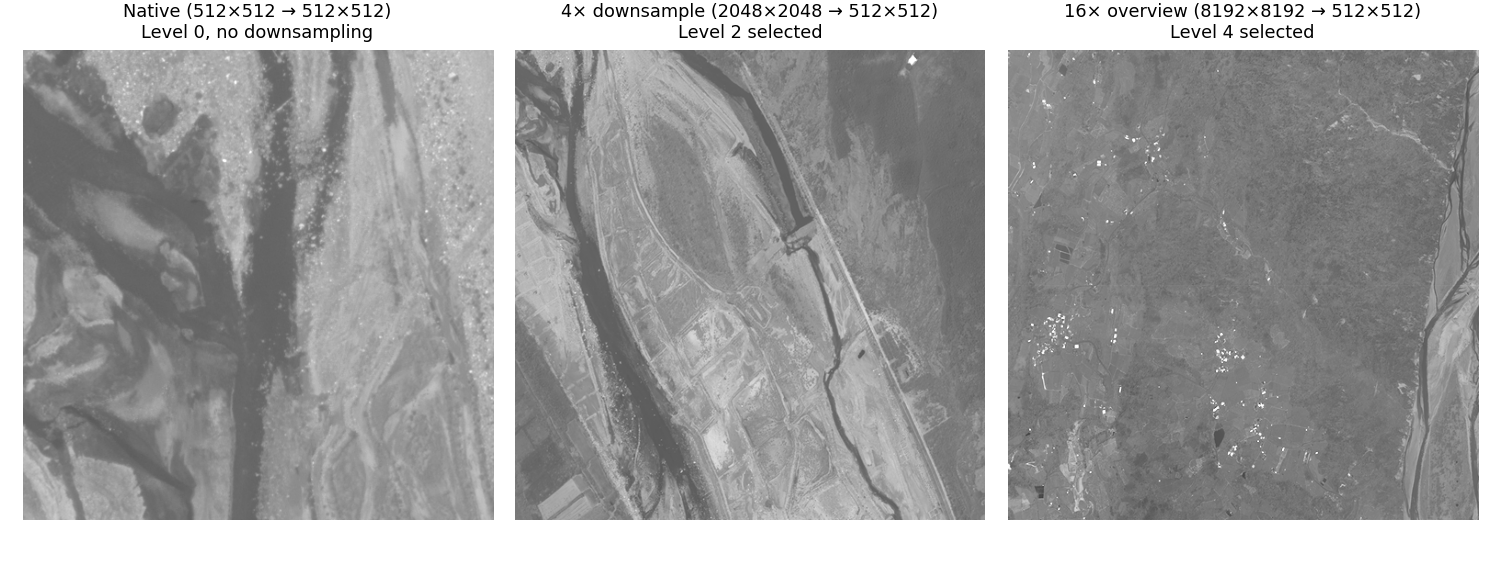
Chips from the same image at different resolution levels — all three outputs are 512×512 pixels, but the factory reads from progressively coarser levels as the ratio between source window and output size grows:
Display Chip for Viewing
Apply dynamic range adjustment and band mapping to produce a human-viewable image. Useful for thumbnails, quick-look products, or feeding web tile servers. See Display Processing for chain construction details.
from aws.osml.io import IO
from aws.osml.image_processing import (
    ChipFactory, DisplayChainFactory, ImageSize, PixelWindow, TiledImagePyramid,
)

with IO.open("image.ntf", "r") as reader:
    pyramid = TiledImagePyramid.from_dataset(reader)
    chain = DisplayChainFactory.build(pyramid)

    factory = ChipFactory(
        source=pyramid,
        output_format="png",
        processing_chain=chain,
    )

    # 2048x2048 source region rendered at 256x256 for a thumbnail
    chip = factory.create_chip(
        PixelWindow(0, 0, 2048, 2048),
        output_size=ImageSize(width=256, height=256),
    )
When a processing chain is provided:
Band-selective reads are used if the chain specifies
input_bandsThe chain output dtype/bands determine the encoded pixel format
SICD/SIDD DES metadata is omitted from output (the pixels have been transformed and no longer match the DES geometry model)
Raw Chip for Analysis
Preserve original pixel values and full metadata for downstream
exploitation or archival. No processing chain — the output file
contains sensor-native pixels. Pass a sensor_model to derive
geospatial metadata (IGEOLO, ICHIPB, DES) for the chip.
from aws.osml.io import IO
from aws.osml.image_processing import ChipFactory, TiledImagePyramid, PixelWindow
from aws.osml.metadata import load_sensor_model

with IO.open("collection.ntf", "r") as reader:
    pyramid = TiledImagePyramid.from_dataset(reader)
    sensor_model = load_sensor_model(reader)

    factory = ChipFactory(
        source=pyramid,
        sensor_model=sensor_model,
        output_format="nitf",
    )

    # Full-resolution chip with IGEOLO + ICHIPB + DES metadata
    chip_bytes = factory.create_chip(PixelWindow(x=1024, y=2048, width=512, height=512))
The returned chip_bytes is a complete encoded image file that can be
written to disk or served directly.
The factory auto-selects the appropriate metadata builder based on the output format:
NITF — IGEOLO + ICHIPB + DES
GeoTIFF — GeoTransform + CRS
PNG/JPEG — No geospatial metadata
Metadata Overrides
Override NITF subheader fields on the output chip. Useful for setting compression, security markings, or other file-level metadata that differs from the source:
from aws.osml.io import BufferedMetadataProvider

overrides = BufferedMetadataProvider()
overrides.set("IC", "C8")       # JPEG 2000 compression
overrides.set("COMRAT", "V1")   # Visually lossless compression ratio
overrides.set("IREP", "MONO")   # Override image representation

factory = ChipFactory(
    source=pyramid,
    output_format="nitf",
    metadata_overrides=overrides,
)
Common override fields for NITF output:
Field |
Purpose |
Example Values |
|---|---|---|
|
Image compression |
|
|
Compression ratio |
|
|
Image representation |
|
|
Image category |
|
SAR Constraints
SICD
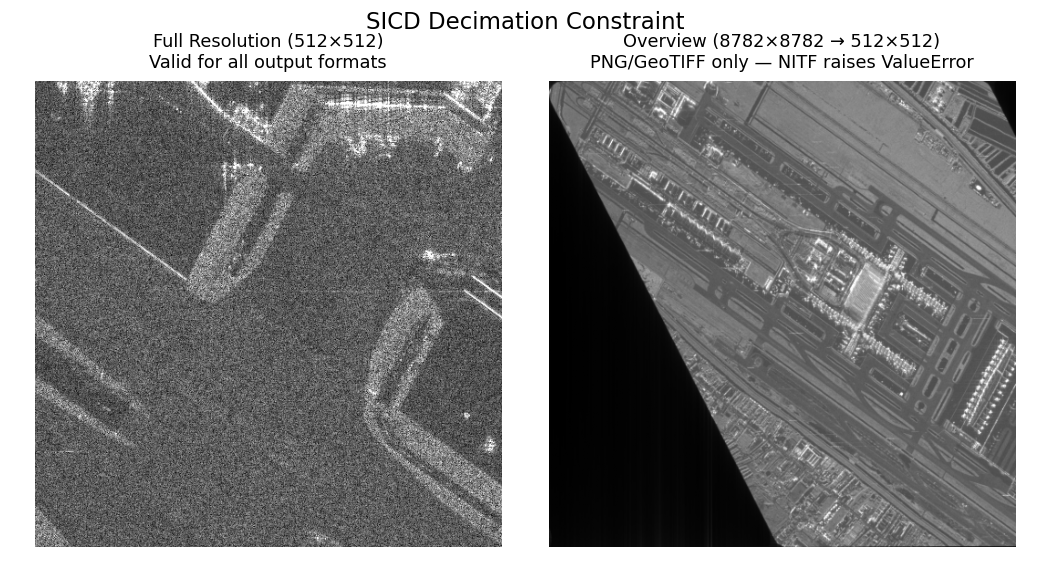
A SICD product is an intermediate data product — a complex-valued pixel grid paired with metadata that precisely describes the radar collection geometry, image formation algorithm, and spatial frequency support. The SICD metadata is valid only for the exact pixel sampling produced by the image formation processor. Decimating (spatially subsampling) complex pixels changes the effective bandwidth and sampling grid, invalidating the metadata’s description of the image. There is no general way to update SICD metadata for a downsampled array because the relationship between pixels and the collection geometry is destroyed.
For 1:1 chips (sub-images extracted without resampling), the factory
updates ImageData.FirstRow, FirstCol, NumRows, and NumCols in
the SICD XML — this is the only valid metadata operation. Requesting
output_size different from src_window dimensions with NITF output
raises ValueError.
When a processing chain is applied (e.g. ComplexRemapFactory converts
I/Q to display magnitudes), the output is no longer a SICD product —
the complex phase information has been irreversibly discarded. The
factory omits the SICD DES and produces a standard display image. These
display chips can be generated at any resolution since they are not
governed by the SICD standard; they are ordinary derived imagery.
SIDD
SIDD products contain already-detected (scalar) pixels with
exploitation metadata describing the output coordinate system and
display transformations. Unlike SICD, the pixels can be spatially
resampled without violating the data model. The SIDD standard defines a
GeometricChip structure (NGA.STND.0025-1, Section 5.1) that maps
chip pixel coordinates back to the original full image via bilinear
interpolation of corner points — this mapping is valid at any output
resolution, so the factory can produce both 1:1 and downsampled SIDD
chips with valid metadata.
When a processing chain is applied, the DES is omitted — the pixels no longer match the product definition described by the SIDD metadata.
Note
Producing a SIDD product from a SICD source (complex-to-detected conversion with full exploitation metadata) is a more involved processing pipeline that this toolkit does not implement. The display chain produces viewable imagery from SICD data, but the result is not a standards-compliant SIDD product.