Visual Asset Management System (VAMS)
VAMS is provided as a near-production-grade solution at its default configuration. Consult with your organizational security team prior to production use. See Security for details.
Visual Asset Management System (VAMS) is a purpose-built, AWS-native, open-source solution for managing, visualizing, and processing specialized visual assets used in Physical AI and Spatial Computing. VAMS provides a single pane of glass for an organization's spatial data source of truth — enabling any authorized user to store, search, visualize, transform, and distribute 3D models, point clouds, CAD files, and other spatial data through a web interface, CLI, or REST API.
What is VAMS?
VAMS empowers users with a web browser, command-line interface, or direct API access to manage visual assets at scale. The solution leverages Amazon Simple Storage Service (Amazon S3) for high-availability, low-cost storage and provides a purpose-built API layer for digital asset management that enables custom integrations with the full breadth of the AWS ecosystem.
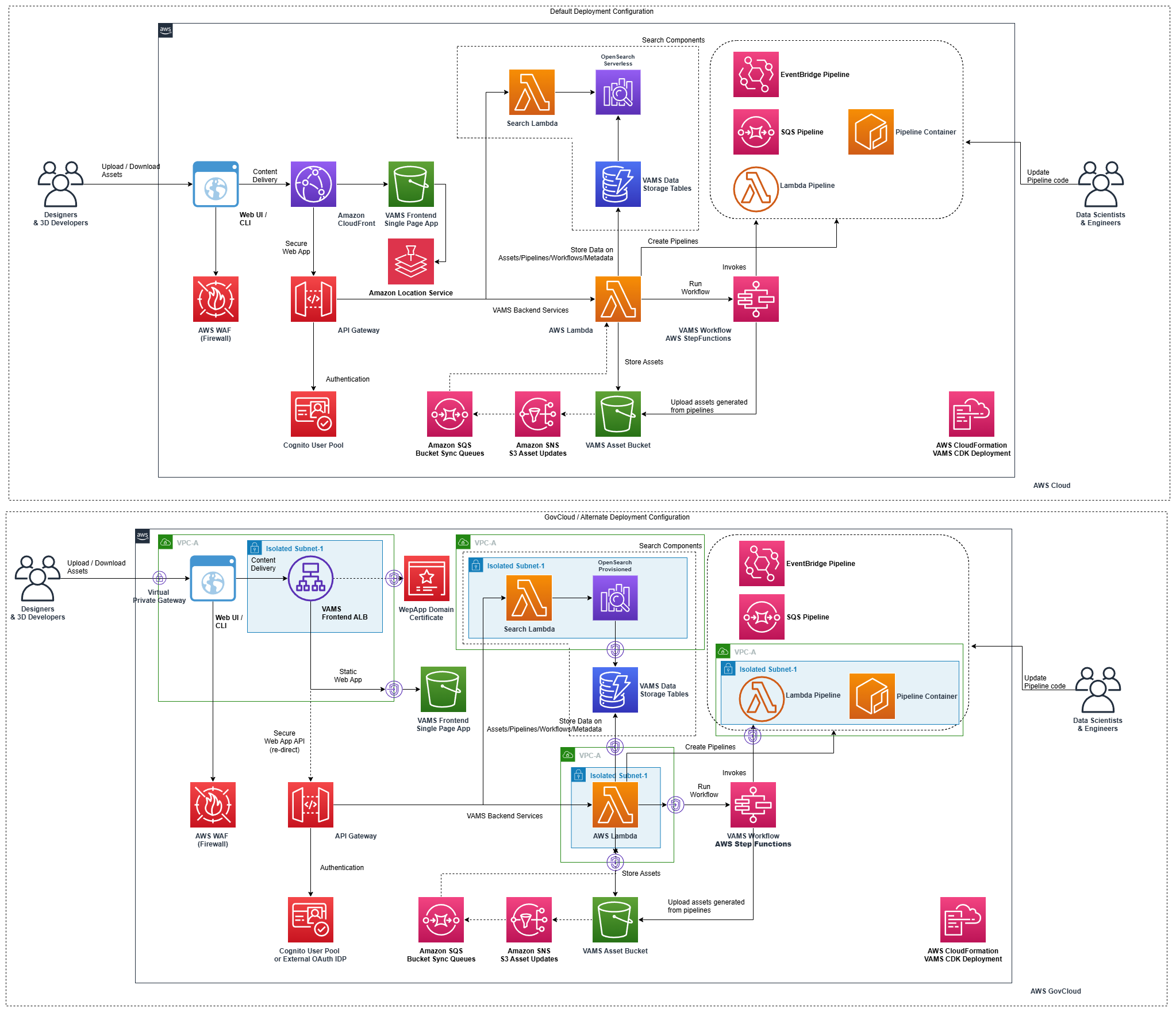
VAMS deploys as a serverless architecture on AWS, supporting commercial, GovCloud (US), and European Sovereign Cloud regions.
Key capabilities
| Capability | Description |
|---|---|
| Centralized asset storage | Store and organize 3D models, point clouds, CAD files, and media in Amazon S3 with versioning and access control |
| Interactive visualization | View assets directly in the browser with 20 built-in viewer plugins for 3D, point cloud, CAD, media, and document formats |
| Automated processing | Transform assets using configurable pipelines backed by AWS Lambda, Amazon SQS, or Amazon EventBridge |
| Metadata management | Attach, search, and validate metadata with schema enforcement across databases, assets, and files |
| Fine-grained access control | Control access with attribute-based and role-based access control (ABAC/RBAC) at both API and data entity levels |
| Search and discovery | Full-text and metadata search powered by Amazon OpenSearch with map-based geographic views |
| Multi-region deployment | Deploy to AWS commercial regions, AWS GovCloud (US), or the AWS European Sovereign Cloud |
Access methods
VAMS provides three primary methods for interacting with your visual assets:
- Web Interface — Browser-based interface for visual asset browsing, interactive 3D viewing, drag-and-drop uploads, and workflow management.
- Command Line Interface — Python CLI tool (
vamscli) for scripted operations, CI/CD integration, bulk management, and headless environments. - REST API — Direct API access for custom application development, third-party integrations, and advanced workflow automation.
Get started
| Guide | Description | |
|---|---|---|
| 📖 | Core Concepts | Understand how VAMS organizes data using Databases, Assets, and Files |
| 🚀 | Deploy VAMS | Prerequisites, configuration, and step-by-step deployment instructions |
| 📤 | Upload Your First Asset | Walk through creating a database, uploading files, and viewing assets |
| 🔌 | API Reference | Complete REST API documentation with request and response examples |
Data organization
VAMS uses a three-level hierarchy to organize visual assets:
- Databases are the top-level organizational boundary. Each database maps to an Amazon S3 bucket and defines access control, metadata schemas, and file upload restrictions.
- Assets are versioned collections of files representing a logical unit of spatial data (such as a 3D scan, a building model, or a simulation environment).
- Files are individual data items within an asset, stored with full version history and optional metadata and attributes.
Learn more in Core Concepts.