Architecture Overview
VAMS (Visual Asset Management System) is a serverless, event-driven application built on AWS that provides comprehensive management, visualization, and processing capabilities for 3D assets, point clouds, CAD files, and other visual content. This page describes the high-level architecture, key design principles, and supported deployment modes.
High-Level Architecture
VAMS is organized into three distinct layers that separate concerns across the client interface, application deployment, and underlying AWS services.
Request Flow
Every authenticated request to VAMS follows a consistent path through the system, with two tiers of authorization enforced at each step.
Every request is authorized at two levels. Tier 1 checks whether the user's role grants access to the API route itself. Tier 2 checks whether the user has permission to access the specific data entity being requested. Both tiers must allow for the request to succeed. This defense-in-depth model is enforced by the Casbin policy engine in every Lambda handler.
Key Architectural Principles
Serverless-First Design
All compute in VAMS runs on serverless services. AWS Lambda handles API request processing and event-driven logic. AWS Step Functions orchestrates multi-step pipeline workflows. AWS Batch with Fargate manages container-based processing tasks. This eliminates server management overhead and provides automatic scaling.
Event-Driven Data Flow
VAMS uses event-driven patterns throughout the system. Amazon S3 event notifications trigger file indexing and workflow auto-execution. Amazon DynamoDB Streams drive search index updates through Amazon SNS and Amazon SQS queues. This decoupled architecture ensures that data changes propagate reliably without tight coupling between components.
Defense-in-Depth Security
Security is enforced at every layer. The custom Lambda authorizer validates JWT tokens and optionally checks IP allowlists. The Casbin policy engine provides fine-grained ABAC/RBAC authorization within every handler. All data at rest is encrypted using AWS KMS or Amazon S3 managed keys. All data in transit requires TLS. For details, see the Security Architecture page.
Multi-Partition Support
VAMS is designed to run on the commercial AWS, AWS GovCloud (US), and AWS European Sovereign Cloud partitions. A partition-aware service helper generates correct ARNs, endpoints, and service principals for any target partition. No AWS partition strings, service endpoints, or regional URLs are hardcoded anywhere in the codebase.
Configuration-Driven Deployment
A centralized configuration system (config.json) controls which features, pipelines, and deployment options are enabled. Feature switches stored in Amazon DynamoDB propagate to the frontend at runtime, enabling conditional UI rendering without redeployment. See Detailed Architecture for the full configuration flow.
Deployment Modes
VAMS supports three deployment modes to accommodate different compliance and network isolation requirements.
| Deployment Mode | Web Distribution | API Access | VPC | Notes |
|---|---|---|---|---|
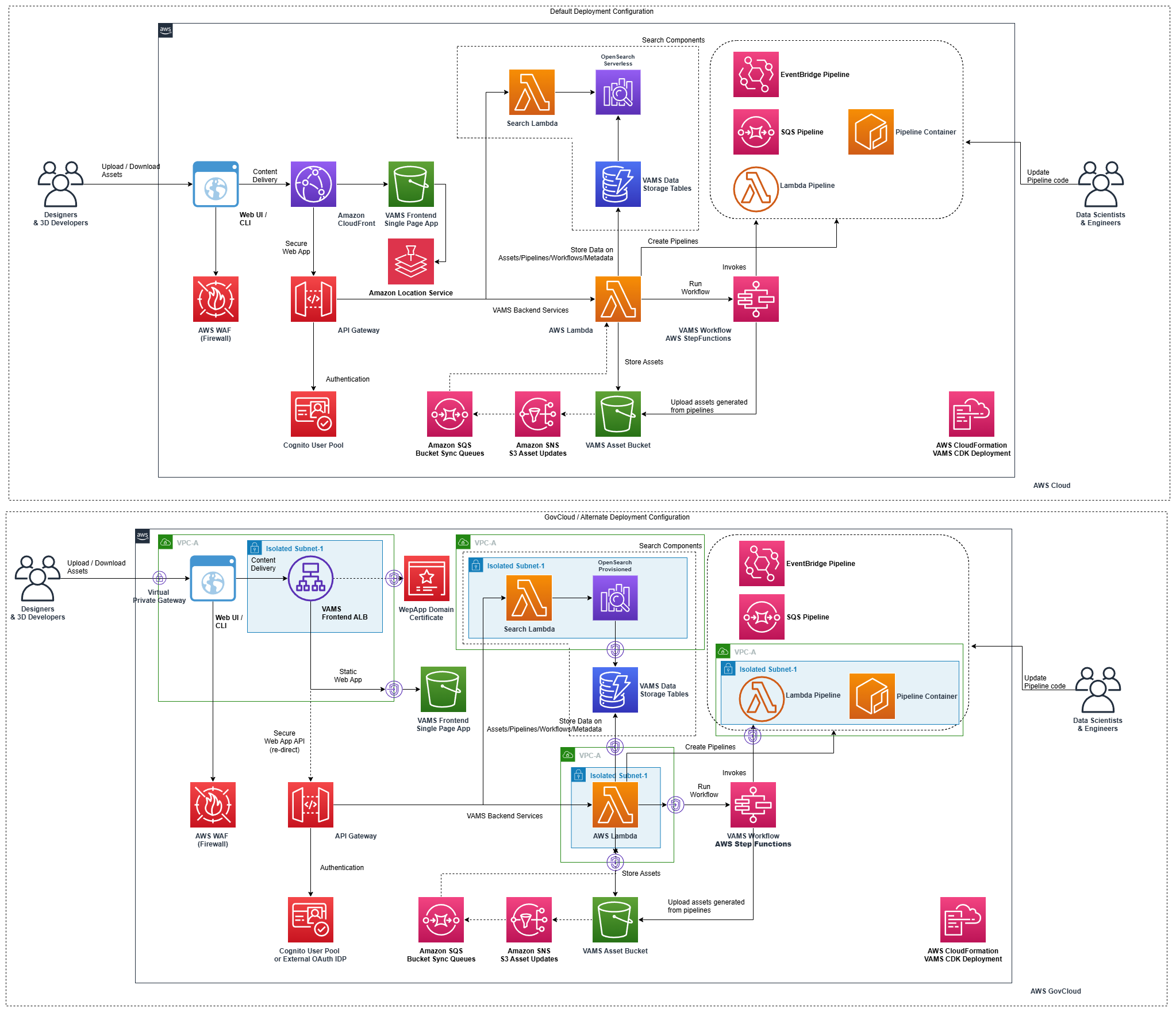
| Commercial AWS | Amazon CloudFront + Amazon S3 | REST API (v1) | Optional | Default mode. Regional or private endpoint. Supports optional Amazon Location Service. |
| AWS GovCloud (US) | Application Load Balancer + Amazon S3 | REST API (v1) | Required | No Amazon CloudFront. Regional or private endpoint, FIPS-compliant by default. No Amazon Location Service. Supports full VPC isolation for restricted environments. |
| AWS European Sovereign Cloud | Application Load Balancer + Amazon S3 | REST API (v1) | Required | Deploys with the GovCloud guardrails. No Amazon CloudFront. No Amazon Location Service. Region exposes two Availability Zones. |
In AWS GovCloud (US), Amazon API Gateway APIs are FIPS-compliant by default. The app.useFips option, which the GovCloud configuration template turns on, adds the AWS KMS FIPS interface VPC endpoint when VPC endpoints and AWS KMS CMK encryption are enabled; it does not move other VAMS service calls to FIPS endpoints. See FIPS Endpoints.
When deploying to AWS GovCloud (US) or the AWS European Sovereign Cloud, the VPC must be enabled, Amazon CloudFront must be disabled, and Amazon Location Service must be disabled.
Architecture Diagram
The following diagram provides a visual overview of the VAMS architecture across commercial and GovCloud/EU Sovereign Cloud deployments.
CDK Stack Organization
VAMS deploys as a set of nested AWS CloudFormation stacks managed by the AWS CDK. The root stack (CoreVAMSStack) creates every nested stack, and the diagram below shows the deployment order between them.
Each solid arrow is an explicit addStackDependency() call in infra/lib/core-stack.ts, drawn from the prerequisite stack to the stack that deploys after it; the arrows from the root mark the stacks that declare none. The dotted arrow is a cross-stack reference that AWS CloudFormation orders implicitly: StaticWeb reads the REST API endpoint. CustomFeatureEnabledConfig declares no stack dependency; it reads the feature table and AWS KMS key from storageResources, so AWS CloudFormation orders it after StorageResourcesBuilder through those references. See Nested Stack Dependency Chain for the stacks that are built only under certain configurations.
Next Steps
- Detailed Architecture -- Authentication flow, data indexing, pipeline execution, and configuration flow
- AWS Resources -- Complete inventory of deployed AWS resources
- Security Architecture -- Encryption, authorization, CSP, and compliance
- Network Architecture -- VPC configuration, endpoints, and deployment modes
- Data Model -- DynamoDB schemas, S3 organization, and OpenSearch indexes