Detailed Architecture
This page describes the key architectural flows within VAMS, including authentication, data indexing, file upload, pipeline execution, and the configuration propagation system.
Authentication Flow
VAMS supports multiple authentication providers: Amazon Cognito (with optional SAML federation), external OAuth identity providers, and API keys. Regardless of the provider, all requests pass through the same custom Lambda authorizer.
Authorization Tiers
The Casbin policy engine enforces two authorization tiers within every Lambda handler:
| Tier | Scope | What It Controls | Casbin Method |
|---|---|---|---|
| Tier 1 | API Route | Can this role call this endpoint? | enforceAPI(event) |
| Tier 2 | Data Entity | Can this user access this specific resource? | enforce(event, item) |
Both tiers must allow for the request to succeed. Tier 1 is evaluated using api and web object type constraints. Tier 2 is evaluated against entity-type constraints (database, asset, pipeline, workflow, etc.).
Before calling Tier 2 enforcement, handlers must annotate the data object with its object__type field (e.g., item['object__type'] = 'asset'). Failing to set this field causes the authorization check to silently deny access.
Supported Authentication Providers
| Provider | Configuration | Use Case |
|---|---|---|
| Amazon Cognito (native) | authProvider.useCognito.enabled = true | Default. Managed user pool with password auth. |
| Amazon Cognito + SAML | authProvider.useCognito.useSaml = true | Enterprise SSO via SAML federation. |
| External OAuth IDP | authProvider.useExternalOAuthIdp.enabled = true | Third-party identity providers (Okta, Azure AD, etc.). |
| API Keys | Always available | Machine-to-machine authentication. Keys stored as SHA-256 hashes. |
Data Indexing Flow
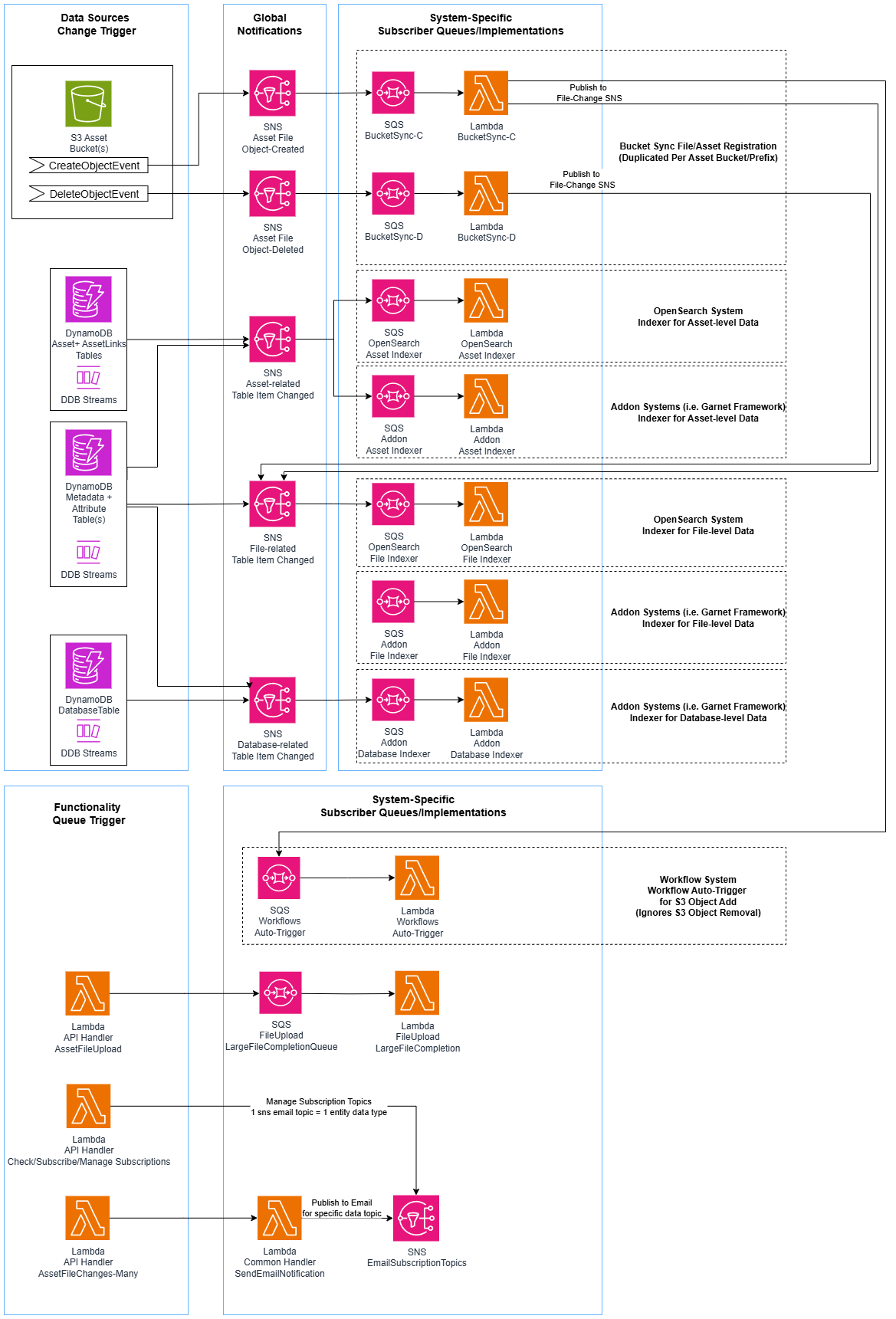
VAMS maintains search indexes in Amazon OpenSearch that mirror data from Amazon DynamoDB. The indexing pipeline uses Amazon DynamoDB Streams, Amazon SNS, and Amazon SQS to decouple producers from consumers.
VAMS uses a dual-index architecture with separate file index and asset index in Amazon OpenSearch. The file index stores per-file metadata, attributes, and S3 information. The asset index stores per-asset metadata, version information, tags, and relationship flags. Both indexes use flat_object fields for dynamic metadata and attributes to prevent field explosion.
File Upload Flow
File uploads to VAMS use Amazon S3 presigned URLs for direct browser-to-S3 transfers. After upload, Amazon S3 event notifications trigger automatic indexing and optional workflow execution.
Upload Process Details
- The web application requests a presigned URL from the upload API endpoint, providing file metadata (name, size, content type).
- The Lambda handler validates the file against blocked extension and MIME type lists, then generates an Amazon S3 presigned URL.
- The browser uploads the file directly to Amazon S3 using the presigned URL (supporting multipart for large files).
- Amazon S3 emits an
ObjectCreatedevent to the bucket-specific Amazon SNS topic. - The Amazon SNS topic fans out to an Amazon SQS queue subscribed by the bucket sync Lambda.
- The bucket sync Lambda creates or updates file records in Amazon DynamoDB and optionally queues workflow auto-execution.
Pipeline Execution Flow
VAMS supports three pipeline execution types: Lambda (synchronous or asynchronous invocation), SQS (asynchronous message delivery), and EventBridge (asynchronous event delivery). All pipeline types are orchestrated through AWS Step Functions.
Pipeline S3 Output Paths
Each pipeline step in a workflow receives designated Amazon S3 output paths from the workflow state machine:
| Path Variable | Target Bucket | Purpose |
|---|---|---|
outputS3AssetFilesPath | Asset bucket | File-level outputs including .previewFile.* thumbnails (versioned) |
outputS3AssetPreviewPath | Asset bucket | Asset-level preview images only (versioned) |
outputS3AssetMetadataPath | Asset bucket | Metadata files produced by the pipeline (versioned) |
inputOutputS3AssetAuxiliaryFilesPath | Auxiliary bucket | Temporary working files or non-versioned viewer data |
Available Pipelines
| Pipeline | Compute | Description |
|---|---|---|
| 3D Basic Conversion | AWS Batch (Fargate) | Convert 3D file formats |
| CAD/Mesh Metadata Extraction | AWS Batch (Fargate) | Extract metadata from CAD and mesh files |
| Point Cloud Potree Viewer | AWS Batch (Fargate) | Generate Potree octree data for point cloud visualization |
| 3D Preview Thumbnail | AWS Batch (Fargate) | Generate GIF/JPG/PNG preview thumbnails for 3D files |
| Gaussian Splatting (Splat Toolbox) | AWS Batch (Fargate) | Generate Gaussian splat reconstructions |
| GenAI Metadata 3D Labeling | AWS Batch (Fargate) | AI-powered metadata labeling using Amazon Bedrock and Amazon Rekognition |
| Model Optimization (ModelOps) | AWS Batch (Fargate) | Optimize 3D models for web delivery |
| RapidPipeline (ECS) | AWS Batch (Fargate) | RapidPipeline integration via Amazon ECS |
| RapidPipeline (EKS) | Amazon EKS | RapidPipeline integration via Amazon EKS |
| Isaac Lab Training | AWS Batch (GPU) | NVIDIA Isaac Lab simulation training |
Configuration Flow
VAMS uses a three-stage configuration system that flows from CDK deployment configuration through Amazon DynamoDB to the frontend at runtime.
Configuration Resolution Order
Configuration values resolve through a four-tier fallback chain:
- CDK context (
-c key=valueon command line) - config.json file (
infra/config/config.json) - Environment variables
- Hardcoded defaults (in
getConfig())
Feature Flags
| Feature Flag | Description |
|---|---|
GOVCLOUD | AWS GovCloud deployment mode (also set for AWS European Sovereign Cloud deployments) |
ALLOWUNSAFEEVAL | Allow unsafe-eval in Content Security Policy |
LOCATIONSERVICES | Amazon Location Service enabled |
ALBDEPLOY | Application Load Balancer deployment mode |
CLOUDFRONTDEPLOY | Amazon CloudFront deployment mode |
NOOPENSEARCH | Amazon OpenSearch disabled |
AUTHPROVIDER_COGNITO | Amazon Cognito authentication provider |
AUTHPROVIDER_COGNITO_SAML | Amazon Cognito with SAML federation |
AUTHPROVIDER_COGNITO_OIDC | Amazon Cognito with OIDC federation |
AUTHPROVIDER_EXTERNALOAUTHIDP | External OAuth identity provider |
PHYSNA_ADDON | Physna add-on frontend features enabled |
DEADLINECLOUD_PIPELINES | AWS Deadline Cloud pipeline execution type enabled |
Nested Stack Dependency Chain
The following diagram shows the nested stacks that CoreVAMSStack builds and the deployment order declared between them. Each solid arrow is an explicit addStackDependency() call in infra/lib/core-stack.ts, drawn from the prerequisite stack to the stack that deploys after it; the stacks the root points at declare no dependency. RestApi renders the routes that ApiBuilder, ApiBuilder2, SearchBuilder, and AddonBuilder register into a single Amazon API Gateway REST API, so it deploys after each of them.
Stacks also read each other's outputs (the Lambda layers, storageResources, authResources, and the VPC), and AWS CloudFormation orders each such reference implicitly. The dotted arrow marks the one that places StaticWeb: it reads the REST API endpoint, so it deploys after RestApi. When env.loadContextIgnoreVPCStacks is true, ApiBuilder, ApiBuilder2, SearchBuilder, PipelineBuilder, AddonBuilder, RestApi, and StaticWeb are not built.
Resource Name Resolution
VAMS Lambda functions resolve AWS resource names (Amazon DynamoDB tables, Amazon S3 buckets, Amazon CloudWatch log groups) from AWS Systems Manager Parameter Store at cold start. The CDK deployment publishes one SSM String parameter per registered resource name under /{config.name}-{baseStackName}/resourceNames/ — 65 in the shipped configuration (53 DynamoDB tables, of which 7 are deprecated tables retained for migration under dynamoTables/legacy/; 9 audit log groups; 2 S3 buckets; 1 Lambda function name). The set is derived from the resourceNameRegistry, so it grows with each registered resource. The Resource Names nested stack materializes 64 of them; the Amazon OpenSearch Service stack publishes the remaining one, because the reindexer function it names is created there. Non-pipeline handlers receive a single VAMS_RESOURCE_PARAM_PREFIX environment variable pointing to this SSM prefix, plus AWS IAM permissions for ssm:GetParameter, ssm:GetParameters, and ssm:GetParametersByPath.
At cold start, each handler calls get_table_name(ResourceKeys.*), get_bucket_name(ResourceKeys.*), or get_log_group_name(ResourceKeys.*) from backend/backend/common/resourceNames.py, which caches the parameter fetch for 60 minutes. This centralizes name management, enables environment variable overrides for testing, and reduces CDK template size by removing per-handler table/bucket/log-group environment variables (pipelines in backendPipelines/ retain their direct environment variables).
Resolution Order
- Environment variable override — check for a legacy-style env var (e.g.,
ASSET_STORAGE_TABLE_NAME), used by tests and local utilities - In-module cache — 60-minute TTL per resource key
- Negative record — a key a completed sweep did not carry is remembered as absent for a short window, so an unpublished parameter costs one sweep per window rather than one call. A later sweep that does carry the key clears the record.
- SSM GetParametersByPath — one paginated call fetching all parameters under the prefix on first access
Every Lambda function is constructed by a builder function in infra/lib/lambdaBuilder/. Non-pipeline builders inject only handler-specific environment variables (e.g., PRESIGNED_URL_TIMEOUT_SECONDS); resource names are resolved from SSM. Each builder calls four required security helpers: kmsKeyLambdaPermissionAddToResourcePolicy, setupSecurityAndLoggingEnvironmentAndPermissions, globalLambdaEnvironmentsAndPermissions (injects VAMS_RESOURCE_PARAM_PREFIX and grants SSM read), and suppressCdkNagErrorsByGrantReadWrite.
Next Steps
- AWS Resources -- Complete inventory of all deployed AWS resources
- Security Architecture -- Encryption, authorization, and compliance details
- Network Architecture -- VPC, endpoints, and deployment connectivity
- Data Model -- Amazon DynamoDB table schemas and Amazon OpenSearch index mappings