Assets
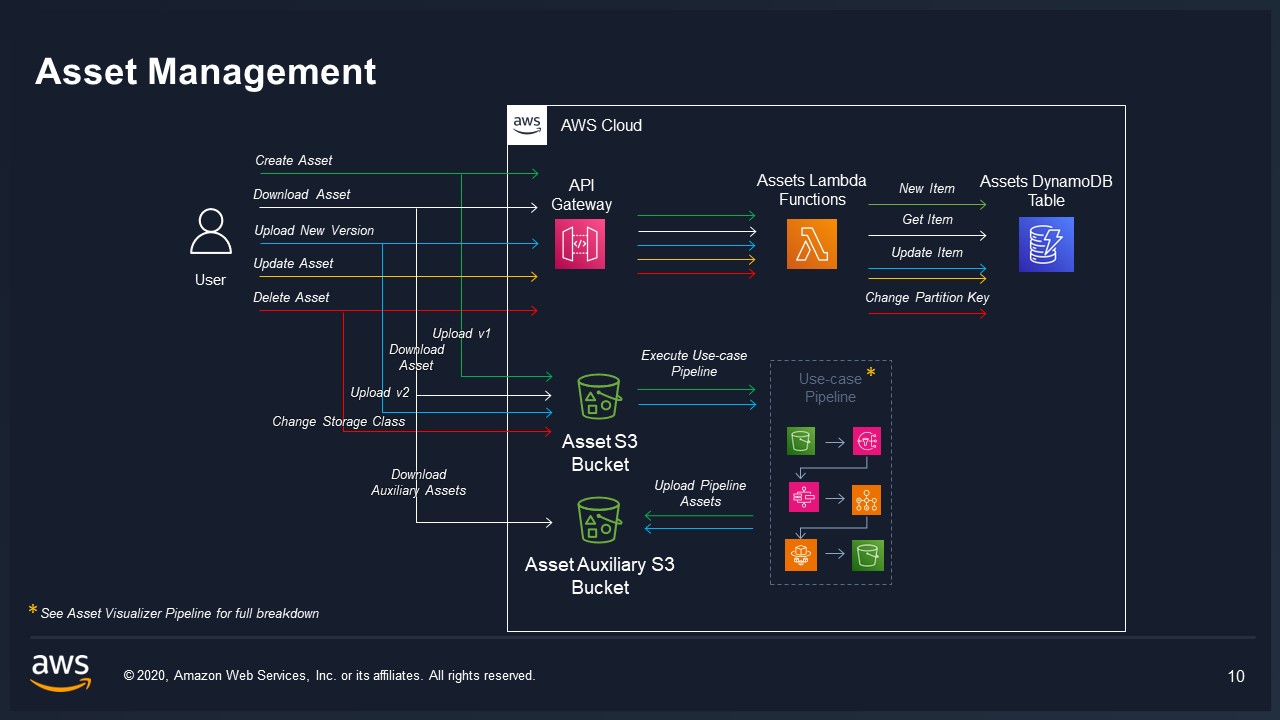
An asset is a versioned collection of files that represents a single logical entity within a database. Assets are the primary unit of content in VAMS -- a 3D scan, a CAD model, a point cloud, a photogrammetry capture, or any grouping of related visual files.
What an asset represents
Each asset acts as a container that groups related files under a single identity. An asset:
- Belongs to exactly one database.
- Contains one or more files stored under a unique Amazon S3 prefix.
- Maintains a version history that snapshots the state of all files and metadata at a point in time.
- Can carry metadata, tags, a preview image, and relationship links to other assets.
- Has a lifecycle with active, archived, and permanently deleted states.
Creating an asset
To create an asset, provide the following fields:
| Field | Required | Description |
|---|---|---|
databaseId | Yes | The database this asset belongs to. 4-63 characters, must match an existing database. |
assetId | No | Unique identifier within the database. If omitted, VAMS generates one. ASCII characters only, cannot contain forward slashes, 2-255 characters. |
assetName | Yes | Human-readable display name. 1-256 characters, alphanumeric plus -, _, ., and spaces. |
description | Yes | Describes the asset. 4-256 characters. |
isDistributable | Yes | Boolean flag controlling whether files in this asset can be downloaded. |
tags | No | Array of string tags for categorization. Each tag up to 256 characters. |
bucketExistingKey | No | Optional. Points to an existing key in the database's Amazon S3 bucket to register as the asset's location without uploading new files. |
The assetId cannot contain forward slashes (/) because it is used as an Amazon S3 prefix component. If you provide a custom assetId, choose a value that is unique within the database and made up of ASCII characters — two identifiers that render identically but differ in a non-ASCII character are two separate assets, which an operator reading an asset listing or an audit record cannot tell apart. The restriction applies where you name a new asset; an identifier already stored stays valid everywhere it is used, and an asset VAMS discovers in an external Amazon S3 bucket takes its identifier from the folder name it is found under.
Example: creating an asset
{
    "databaseId": "building-scans-2025",
    "assetName": "Headquarters Lobby Scan",
    "description": "Full 3D scan of the main lobby captured on 2025-03-15",
    "isDistributable": true,
    "tags": ["lobby", "headquarters", "2025-Q1"]
}
Asset location in Amazon S3
Each asset's files are stored under a unique prefix within the database's Amazon S3 bucket:
s3://{bucketName}/{baseAssetsPrefix}{assetId}/
The asset record stores this location in the assetLocation.Key field. For example, an asset with ID scan-001 in a database using prefix assets/ would have its files stored at:
s3://vams-assets-bucket/assets/scan-001/
    scan-001/model.e57
    scan-001/textures/diffuse.png
    scan-001/textures/normal.png
Updating an asset
After creation, the following asset fields can be updated:
assetName-- Change the display name.description-- Update the description.isDistributable-- Toggle download permissions.tags-- Replace the tag list.
At least one field must be provided in an update request. The databaseId and assetId cannot be changed after creation.
Asset versioning
Asset versioning provides point-in-time snapshots of an asset's complete state. Each version records which Amazon S3 version ID of every file was current when the version was created.
Creating a version
A new asset version can be created in two ways:
| Method | Description |
|---|---|
useLatestFiles: true | Automatically captures the latest Amazon S3 version of every file currently in the asset. |
| Explicit file list | Specify exact files and their Amazon S3 version IDs to include in the snapshot. |
Each version requires a comment (1-256 characters) and supports an optional versionAlias (up to 64 characters) for human-friendly labeling (e.g., "v1.0-final", "client-review").
Version properties
| Property | Description |
|---|---|
assetVersionId | Unique identifier for this version. |
dateCreated | Timestamp when the version was created. |
comment | Required description of what changed in this version. |
versionAlias | Optional human-readable label. Can be set or cleared after creation. |
createdBy | User who created the version. |
fileCount | Number of files included in this version snapshot. |
isArchived | Whether this version has been archived. |
files | List of file keys and their Amazon S3 version IDs at the time of snapshot. |
versionedMetadata | Metadata and attributes captured with this version (if revert with metadata is used). |
Reverting to a previous version
You can revert an asset to a previous version by specifying the target assetVersionId. This creates a new version (not an in-place modification) that restores the file state from the target version. The revertMetadata flag controls whether metadata and attributes are also reverted.
{
    "assetVersionId": "v-abc123",
    "comment": "Reverting to pre-review state",
    "revertMetadata": true
}
Archiving and unarchiving versions
Individual asset versions can be archived (soft-deleted) and later unarchived. Archiving a version does not affect the underlying Amazon S3 files -- it only marks the version record as archived in Amazon DynamoDB.
Updating version details
After creation, you can update a version's comment and versionAlias. To clear an alias, send an empty string for versionAlias.
Asset preview files
Each asset can have a preview image that serves as a visual thumbnail or representative image. The preview location is stored in the previewLocation.Key field.
- Preview images are uploaded separately from asset files, using the
assetPreviewupload type. - Exactly one file is uploaded per preview operation.
- Allowed preview formats include
.png,.jpg,.jpeg,.svg, and.gif. - Processing pipelines (such as the 3D thumbnail pipeline) can automatically generate preview images for assets.
- Previews can be deleted independently of the asset's files.
The isDistributable flag
The isDistributable boolean controls whether the content of an asset's files leaves VAMS:
- When
true, users with appropriate permissions can generate download URLs for the asset's files, stream them, and view them in the visualizer. - When
false, the API refuses every operation that serves file content -- download URL generation, file streaming, and the auxiliary preview stream -- regardless of the user's role permissions.
This flag provides content-level distribution control independent of the permission system.
The flag governs file content, not the asset's existence. An asset marked as not distributable still appears in listings and search results, and its metadata, file listing, version history, and comments remain readable to users whose permissions allow it.
Behavior in the web interface
The web application does not offer the actions the API refuses, so a user is not led to an error:
- The file manager omits the Export menu (file, folder, and multi-selection download and share-URL actions), the View File button, and the viewer popup links.
- The asset detail page omits the asset preview thumbnail and its enlarged view.
- The file view page renders the file's versions and metadata in place of the visualizer. This page is normally reached from the file manager, which offers no entry point to it for such an asset; opening a direct link to it is still permitted and shows the same versions and metadata.
Setting the flag back to true restores all of these.
The flag governs distribution to callers of the API. Pipelines and workflows continue to read and write the asset's files during an execution: they are granted access to the asset's Amazon S3 buckets directly rather than through the download and streaming endpoints, so processing, conversion, preview generation, and output write-back all run normally for an asset marked as not distributable. Use the permission system to control which pipelines and workflows may run against an asset.
Asset relationships and links
Assets can be linked to other assets using two relationship types:
| Relationship Type | Description |
|---|---|
related | A peer relationship indicating that two assets are related but without hierarchy. Bidirectional -- creating a link from A to B also makes B related to A. |
parentChild | A hierarchical relationship. The source asset is the parent and the target is the child. Supports an optional assetLinkAliasId for distinguishing multiple parent-child relationships. |
Key characteristics of asset links:
- Cross-database -- Links can connect assets in different databases.
- Metadata on links -- Each link can carry its own metadata, stored in a separate Amazon DynamoDB table.
- Alias support -- Parent-child links support an optional alias ID (up to 128 characters) to differentiate multiple relationships between the same pair of assets.
- Links reference assets by both
assetIdanddatabaseId, enabling relationships across organizational boundaries.
Example: creating a link
{
    "fromAssetId": "scan-001",
    "fromAssetDatabaseId": "building-scans-2025",
    "toAssetId": "cad-model-001",
    "toAssetDatabaseId": "cad-models",
    "relationshipType": "related"
}
Asset archive and unarchive
VAMS uses a soft delete pattern for archiving assets. Archiving does not permanently remove data.
Archiving an asset
When an asset is archived:
- All files in Amazon S3 are archived by creating delete markers (leveraging Amazon S3 versioning).
- The preview file (if present) is also archived.
- The asset record in Amazon DynamoDB is moved from
{databaseId}to{databaseId}#deleted. - Archive metadata is recorded:
archivedAt,archivedBy, and an optionalarchivedReason. - The asset's
statusis set toarchived. - The database's asset count is updated.
- Subscription notifications are sent to subscribers.
Unarchiving an asset
Unarchiving restores the asset record. By default the asset's files stay archived:
- The asset record is moved back from
{databaseId}#deletedto{databaseId}. - Archive metadata fields are removed and unarchive metadata is recorded.
- The asset count is updated and notifications are sent.
When the request sets unarchiveFiles to true, VAMS first removes the Amazon S3 delete markers that the asset archive created (matched by assetArchive provenance in the file version history), restoring access to those files' latest versions, and removes the preview file's delete marker. Files archived individually before the asset archive keep their delete markers and stay archived; restore them with Unarchive File. An asset archived before provenance tracking has no restorable file set, so no files are restored for it. An asset whose database has been deleted cannot be unarchived until a database with the same ID is created again.
Use the showArchived=true query parameter when listing or getting assets to include archived assets in results.
Permanent deletion
Permanent deletion is an irreversible operation that removes an asset and the data listed below. It requires explicit confirmation via confirmPermanentDelete: true.
When an asset is permanently deleted, the following are removed:
| Component | Details |
|---|---|
| Amazon S3 files | All versions of every object under the asset prefix and of its auxiliary files. |
| Amazon S3 preview | All versions of the preview file. |
| Asset record | Both active and archived records in Amazon DynamoDB. |
| Metadata | All asset-level and file-level metadata and attributes. |
| Asset links | All relationship links where this asset is source or target, including link metadata. |
| Upload records | All upload tracking records for this asset. |
| Comments | All comments associated with this asset. |
| Version records | All asset version records and file version snapshots. |
| Metadata version records | All versioned metadata snapshots. |
| Amazon SNS topic | The asset's subscription notification topic. |
| Subscription records | Subscription records for this asset. |
Auxiliary files are the previews and viewer data derived from the asset's files. Temporary working files that a workflow execution writes to the auxiliary bucket under pipelines/{pipelineName}/{executionId}/, and staged export payloads under assetExports/, belong to the execution or the export request rather than the asset, and permanent deletion does not remove them.
Unlike archiving, permanent deletion removes all Amazon S3 object versions. The data cannot be recovered after this operation completes.
Subscription notifications
Users can subscribe to receive email notifications when an asset changes. Changes that trigger notifications include file uploads, version creation, metadata updates, and asset updates. Notifications are sent through Amazon Simple Notification Service (Amazon SNS).
What's next
- Understand how files are managed within assets: Files and Versions
- Learn about metadata and schemas: Metadata and Schemas
- Explore the permission model for controlling asset access: Permissions Model