File Viewers
VAMS includes a plugin-based viewer system that enables browser-based visualization of 3D models, point clouds, media files, documents, and data -- without requiring desktop software or specialized licenses. This page is the single source of truth for all built-in viewers and their supported file extensions.
VAMS ships 20 built-in viewer plugins across five categories. Fourteen are available in every deployment. The remaining six are conditional:
- Two licensed viewers — VNTANA and VEERUM — ship disabled and require both a vendor license and enabling them in the viewer configuration.
- Three viewers require
app.webUi.allowUnsafeEvalFeatures— Needle USD, the SuperSplat Editor, and ThatOpen IFC BIM. Their loaders useeval, so VAMS does not offer them at all when a deployment has not enabled that setting. - The Physna Viewer appears only when the Physna Sync add-on is enabled.
The master viewer table lists all 20; any other page quoting a viewer count is checked against this one.
What are file viewers
File viewers are browser-based rendering components that display asset files directly in the VAMS web interface. When you open a file from the file manager, VAMS finds the viewers that support its file extension. If only one viewer supports it, VAMS opens the file in that viewer. If several do, VAMS lists them in a dropdown in the viewer UI and opens the file once you choose one; you can switch between them from the same dropdown.
The viewer system is built on a plugin architecture. Each viewer is an independent module with its own dependencies, configuration, and supported file types. New viewers can be added without modifying any core system code -- only a configuration entry and the viewer component are required.
How viewer selection works
- VAMS reads the file extension (e.g.,
.glb,.e57,.pdf). - All enabled viewers that support that extension are identified.
- If exactly one viewer matches, VAMS opens the file in it.
- If multiple viewers match, the dropdown lists them with the lowest priority number first, and VAMS loads none of them until you choose one. You can then switch between them from the same dropdown.
- If the file has a preview image, the file page also offers a Preview option that shows the image in the Preview Viewer, including for a file whose extension no viewer matches.
Viewer categories
Viewers are organized into five categories based on the type of content they render.
3D
Interactive 3D model, point cloud, CAD, BIM, USD, and Gaussian splat viewing. The viewers cover a wide range of spatial data formats, from mesh files (glTF, OBJ, FBX) to point clouds (E57, LAS) to Building Information Models (IFC) to Universal Scene Description (USD). Some 3D viewers support multi-file mode, allowing multiple files to be loaded into a single scene.
Media
Image, video, and audio playback. The Image Viewer supports zoom and pan. The Video Player and Audio Player provide standard browser-native playback controls.
Document
Rendering of PDF, HTML, and text-based files. The Text Viewer provides syntax highlighting for over 20 programming and configuration file types.
Data
Tabular display of columnar data formats: CSV and FCS files. Other tabular formats, including R serialization (.rds) and Apache Parquet (.parquet), have no dedicated viewer; when such a file has a preview image, the file page's Preview option shows it in the Preview Viewer.
Preview
Displays a file's preview image when you choose the Preview option on the file page, which offers that option only for a file that has a preview image. The Preview Viewer matches all file extensions as a wildcard (priority 10) but is used only for that option and is never listed among a file's viewers, so the file view of a file with no dedicated viewer reports that no compatible viewers were found.
Master viewer table
This table is the definitive reference for all built-in viewer plugins.
| Viewer Name | Category | Supported Extensions | Priority | Multi-File | Notes |
|---|---|---|---|---|---|
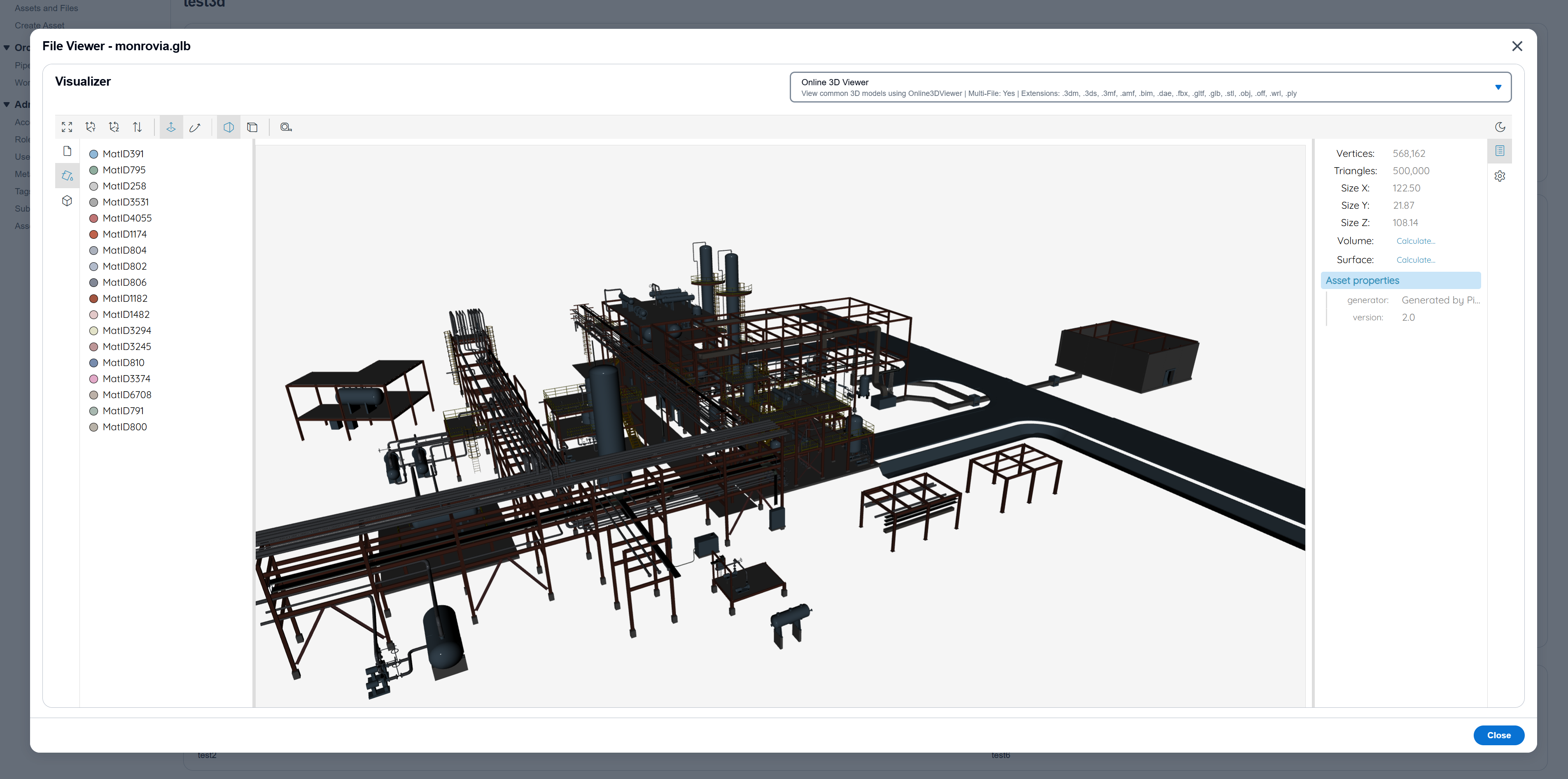
| Three.js Viewer | 3D | .gltf, .glb, .obj, .fbx, .stl, .ply, .dae, .3ds, .3mf, .stp, .step, .iges, .igs, .brep | 1 | No | Primary mesh and CAD viewer. Scene graph, material editing, transform controls. Loads a glTF file's external dependencies, but renders one selected file at a time. CAD formats (.stp, .step, .iges, .igs, .brep) require WASM and ALLOWUNSAFEEVAL. |
| Potree Viewer | 3D | .e57, .las, .laz, .ply | 1 | No | Octree-based point cloud streaming. Requires the Potree preprocessing pipeline. Shows latest version only. |
| BabylonJS Gaussian Splat Viewer | 3D | .ply, .spz | 1 | No | Gaussian splat visualization with WebXR support. |
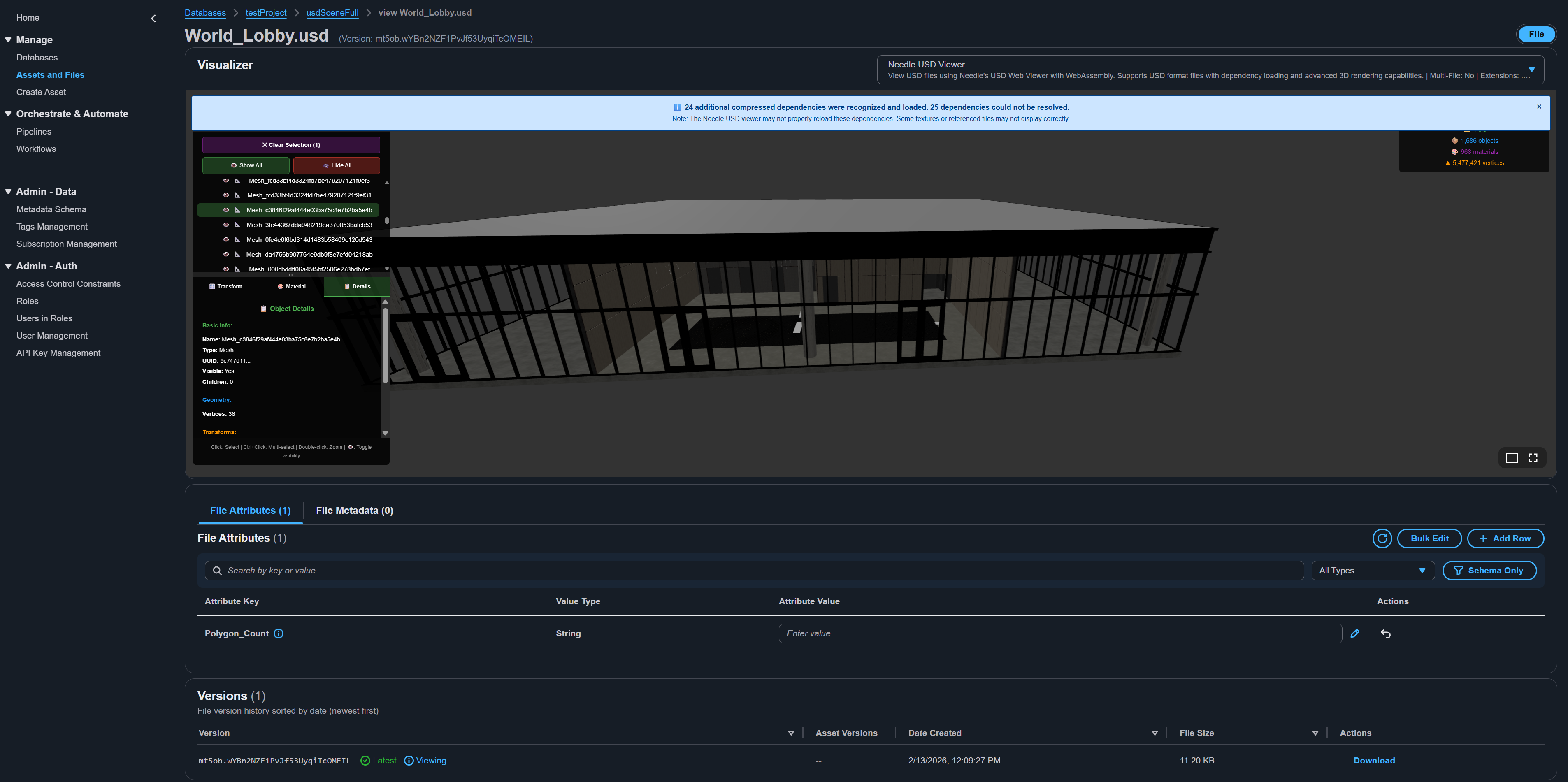
| Needle USD Viewer (Experimental) | 3D | .usd, .usda, .usdc, .usdz | 1 | No | Universal Scene Description via WebAssembly. Requires ALLOWUNSAFEEVAL. Experimental -- may not display all USD files correctly or load all dependencies. |
| ThatOpen IFC BIM Viewer | 3D | .ifc, .ifczip | 1 | No | Industry Foundation Classes (BIM) via the open-source That Open Engine (web-ifc, WebAssembly). Spatial model tree, element properties, hide/isolate, section planes, and measurements. Uses the multithreaded WASM build when cross-origin isolation is available and falls back to single-thread otherwise. Requires ALLOWUNSAFEEVAL. |
| SuperSplat Editor (PlayCanvas) | 3D | .lcc, .ply, .sog, .splat | 1 | No | Full PlayCanvas SuperSplat Gaussian-splat editor UI embedded via iframe (scene panel, transform/selection tools, camera animation, export menus). Default viewer for splat formats. Sole viewer for .lcc (XGRIDS multi-LOD). Requires ALLOWUNSAFEEVAL and a WebGPU-capable browser. Editing/export is local-only (not saved back to VAMS). Use bundled .sog rather than unbundled SOGS. |
| Online 3D Viewer | 3D | .3dm, .amf, .bim, .off, .wrl | 2 | Yes | Rhinoceros 3D, AMF, BIM, OFF, and VRML formats. |
| Cesium 3D Tileset Viewer | 3D | .json | 2 | No | 3D Tileset viewing with geospatial capabilities via the CesiumJS engine (@cesium/engine) with VAMS custom scene controls. |
| PlayCanvas Gaussian Splat Viewer | 3D | .ply, .sog | 5 | No | Gaussian splat visualization with orbit camera and auto-focus. |
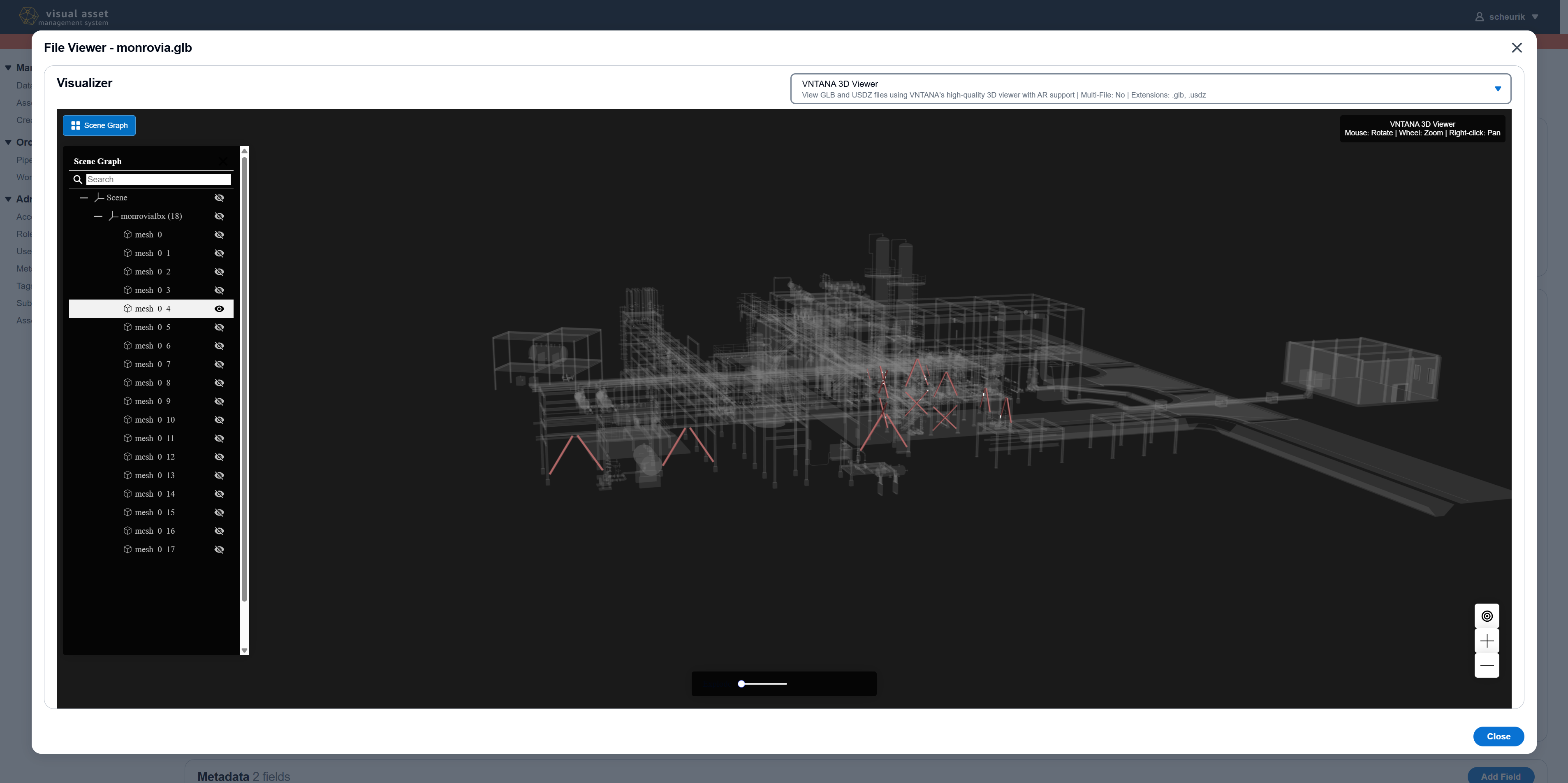
| VNTANA 3D Viewer | 3D | .glb | 2 | No | Licensed viewer for high-quality GLB rendering. See Licensed viewers. |
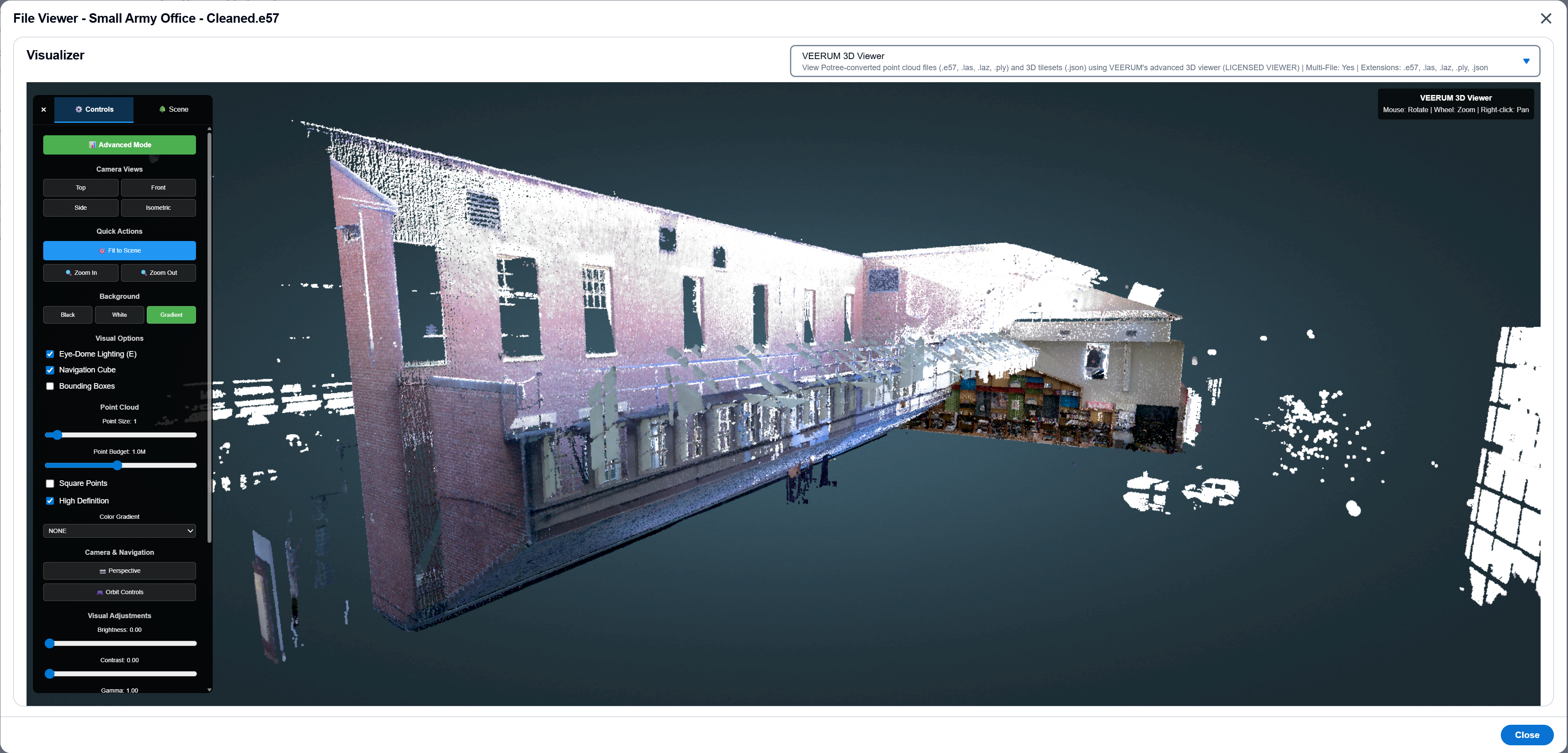
| VEERUM 3D Viewer | 3D | .e57, .las, .laz, .ply, .json | 2 | Yes | Licensed viewer for point clouds and 3D tilesets. Requires Potree pipeline. Shows latest version only. See Licensed viewers. |
| Physna Viewer | 3D | .3ds, .asm, .catpart, .catproduct, .glb, .iam, .iges, .igs, .ipt, .jt, .obj, .par, .prt, .sldasm, .sldprt, .stl, .step, .stp, .x_b, .x_t | 5 | No | Embeds the Physna-hosted 3D/CAD viewer through a VAMS authorization proxy. Requires the Physna Sync add-on. See Add-on viewers. |
| Image Viewer | Media | .png, .jpg, .jpeg, .svg, .gif | 1 | No | Zoom and pan capabilities. Eager load strategy. |
| Video Player | Media | .mp4, .webm, .mov, .mkv, .m4v | 1 | No | Standard browser-native playback controls. |
| Audio Player | Media | .mp3, .wav, .ogg, .aac, .flac, .m4a | 1 | No | Standard browser-native playback controls. |
| PDF Viewer | Document | .pdf | 1 | No | Navigation, zoom, and page management controls. |
| HTML Viewer | Document | .html | 1 | No | Renders HTML presentations and documents. |
| Text Viewer | Document | .txt, .json, .xml, .html, .htm, .yaml, .yml, .toml, .ini, .ipynb, .inf, .cfg, .md, .sh, .csv, .py, .log, .js, .ts, .sql, .ps1 | 1 | No | Syntax highlighting for 20+ text file types. |
| Columnar Data Viewer | Data | .fcs, .csv | 2 | No | Tabular data display with column headers. |
| Preview Viewer | Preview | * (all extensions) | 10 | No | Displays a file's preview image when you choose the file page's Preview option, which appears only for a file that has one. Not offered in the File view. |
File extension to viewer mapping
This table provides a quick lookup from file extension to the viewer(s) that handle it. When more than one viewer is available for an extension, VAMS does not open the file automatically: the viewer dropdown lists the viewers with the lowest priority number first, and the file opens once you choose one. You can switch to any other listed viewer from the same dropdown.
3D model extensions
| Extension | Default Viewer | Other Available Viewers |
|---|---|---|
.3dm | Online 3D Viewer | -- |
.3ds | Three.js Viewer | -- |
.3mf | Three.js Viewer | -- |
.amf | Online 3D Viewer | -- |
.bim | Online 3D Viewer | -- |
.brep | Three.js Viewer | -- |
.dae | Three.js Viewer | -- |
.fbx | Three.js Viewer | -- |
.glb | Three.js Viewer | VNTANA 3D Viewer |
.gltf | Three.js Viewer | -- |
.ifc | ThatOpen IFC BIM Viewer | -- |
.ifczip | ThatOpen IFC BIM Viewer | -- |
.iges | Three.js Viewer | -- |
.igs | Three.js Viewer | -- |
.obj | Three.js Viewer | -- |
.off | Online 3D Viewer | -- |
.step / .stp | Three.js Viewer | -- |
.stl | Three.js Viewer | -- |
.wrl | Online 3D Viewer | -- |
The tables in this section list the viewers available in every deployment. The Physna Viewer adds a further set of proprietary CAD formats -- .asm, .catpart, .catproduct, .iam, .ipt, .jt, .par, .prt, .sldasm, .sldprt, .x_b, .x_t -- and becomes an additional choice for several of the formats above, but only on a deployment with the Physna Sync add-on enabled. See Add-on viewers.
Point cloud and Gaussian splat extensions
| Extension | Default Viewer | Other Available Viewers |
|---|---|---|
.e57 | Potree Viewer | VEERUM 3D Viewer |
.las | Potree Viewer | VEERUM 3D Viewer |
.laz | Potree Viewer | VEERUM 3D Viewer |
.lcc | SuperSplat Editor (PlayCanvas) | -- |
.ply | Potree Viewer, BabylonJS Gaussian Splat Viewer, Three.js Viewer, SuperSplat Editor (PlayCanvas) | PlayCanvas Gaussian Splat Viewer, VEERUM 3D Viewer |
.sog | SuperSplat Editor (PlayCanvas) | PlayCanvas Gaussian Splat Viewer |
.splat | SuperSplat Editor (PlayCanvas) | -- |
.spz | BabylonJS Gaussian Splat Viewer | -- |
The .ply extension is used for both point cloud data and Gaussian splat data. Three viewers match at priority 1 (Potree, BabylonJS Gaussian Splat, Three.js), and the SuperSplat Editor is a fourth when ALLOWUNSAFEEVAL is enabled. VAMS presents all compatible viewers and you can select the appropriate one for your data type.
USD extensions
| Extension | Default Viewer | Other Available Viewers |
|---|---|---|
.usd | Needle USD Viewer (Experimental) | -- |
.usda | Needle USD Viewer (Experimental) | -- |
.usdc | Needle USD Viewer (Experimental) | -- |
.usdz | Needle USD Viewer (Experimental) | -- |
The Needle USD Viewer is experimental. It may not display all USD files correctly or load all file dependencies, particularly with compressed USDC files or complex scene hierarchies with external references. For production workflows requiring reliable USD viewing, consider using a desktop USD viewer such as NVIDIA Omniverse or Pixar's usdview.
Media extensions
| Extension | Default Viewer | Other Available Viewers |
|---|---|---|
.aac | Audio Player | -- |
.flac | Audio Player | -- |
.gif | Image Viewer | -- |
.jpg / .jpeg | Image Viewer | -- |
.m4a | Audio Player | -- |
.m4v | Video Player | -- |
.mkv | Video Player | -- |
.mov | Video Player | -- |
.mp3 | Audio Player | -- |
.mp4 | Video Player | -- |
.ogg | Audio Player | -- |
.png | Image Viewer | -- |
.svg | Image Viewer | -- |
.wav | Audio Player | -- |
.webm | Video Player | -- |
The Video Player plays a file through the browser's built-in <video> element, so a file plays only when the browser can open its container and decode its codecs. .mp4, .m4v, and .webm are broadly supported. .mov and .mkv play in some browsers and not in others. When the browser cannot open a file, the player shows Error: Failed to load video file; a file whose video codec the browser cannot decode may play only its audio track. Chrome, Edge, Firefox, and Safari cannot open AVI (.avi), Flash Video (.flv), or Windows Media Video (.wmv) files, so VAMS offers no viewer for them. Download these files to play them in a desktop media player.
Document and data extensions
| Extension | Default Viewer | Other Available Viewers |
|---|---|---|
.cfg | Text Viewer | -- |
.csv | Text Viewer | Columnar Data Viewer |
.fcs | Columnar Data Viewer | -- |
.htm | Text Viewer | -- |
.html | HTML Viewer | Text Viewer |
.inf | Text Viewer | -- |
.ini | Text Viewer | -- |
.ipynb | Text Viewer | -- |
.js | Text Viewer | -- |
.json | Text Viewer | Cesium 3D Tileset Viewer, VEERUM 3D Viewer |
.log | Text Viewer | -- |
.md | Text Viewer | -- |
.pdf | PDF Viewer | -- |
.ps1 | Text Viewer | -- |
.py | Text Viewer | -- |
.sh | Text Viewer | -- |
.sql | Text Viewer | -- |
.toml | Text Viewer | -- |
.ts | Text Viewer | -- |
.txt | Text Viewer | -- |
.xml | Text Viewer | -- |
.yaml / .yml | Text Viewer | -- |
Viewer screenshots
USD viewer (Needle Engine) -- Experimental
VEERUM point cloud viewer
VNTANA 3D viewer
Three.js 3D model viewer
WebAssembly requirements
Several viewers depend on WebAssembly (WASM) modules for rendering. WASM-based viewers require a Cross-Origin Isolation (COI) service worker to enable SharedArrayBuffer support in the browser. VAMS includes this service worker automatically in production deployments.
The following viewers use WASM:
| Viewer | WASM Library | Required Feature Flag |
|---|---|---|
| Needle USD Viewer (Experimental) | usd-wasm | ALLOWUNSAFEEVAL |
| Cesium 3D Tileset Viewer | @cesium/engine (draco/KTX2 decoding) | None |
| SuperSplat Editor (PlayCanvas) | PlayCanvas engine (WebGL shader compilation) | ALLOWUNSAFEEVAL |
| Three.js Viewer (CAD formats only) | OpenCascade (opencascade.js) | ALLOWUNSAFEEVAL |
| ThatOpen IFC BIM Viewer | web-ifc (That Open Engine) | ALLOWUNSAFEEVAL |
Enabling ALLOWUNSAFEEVAL adds unsafe-eval to the Content Security Policy script-src directive. This is required by the SuperSplat Editor and by WASM loaders for OpenCascade, Needle USD, and web-ifc (the ThatOpen IFC BIM viewer). Review this setting with your organization's security team before enabling. Set app.webUi.allowUnsafeEvalFeatures to true in the CDK config.json to enable.
The Three.js Viewer works without ALLOWUNSAFEEVAL for standard mesh formats (.gltf, .glb, .obj, .fbx, .stl, .ply, .dae, .3ds, .3mf). The WASM requirement applies only to CAD formats (.stp, .step, .iges, .igs, .brep) which use the OpenCascade library.
The ThatOpen IFC BIM Viewer uses the multithreaded web-ifc-mt.wasm build when cross-origin isolation is available (provided by the COI service worker) and transparently falls back to the single-threaded web-ifc.wasm otherwise. Both builds require ALLOWUNSAFEEVAL: the flag gates whether the viewer registers at all, so the thread mode does not affect it.
Licensed viewers
Two viewer plugins are integrations with commercial products and require separate licenses to use.
| Viewer | Vendor | Formats | License Required |
|---|---|---|---|
| VNTANA 3D Viewer | VNTANA | .glb | Yes |
| VEERUM 3D Viewer | Veerum | .e57, .las, .laz, .ply, .json | Yes |
Both licensed viewers ship disabled in the viewer configuration, so neither appears in the viewer selector until it is enabled. Enabling one also requires a valid license from the respective vendor: without a license the viewer will not render content. Contact the vendor directly for licensing details.
For more information on partner integrations, see Partner Integrations.
Add-on viewers
Some viewers are provided by optional VAMS add-ons and are gated by a feature flag emitted from the backend. They only appear in the viewer selector when the corresponding add-on is enabled in the deployment configuration.
| Viewer | Vendor | Formats | Feature flag | Add-on |
|---|---|---|---|---|
| Physna Viewer | Physna | .3ds, .asm, .catpart, .catproduct, .glb, .iam, .iges, .igs, .ipt, .jt, .obj, .par, .prt, .sldasm, .sldprt, .stl, .step, .stp, .x_b, .x_t | PHYSNA_ADDON | app.addons.usePhysnaSync.enabled is true |
The Physna Viewer renders the Physna-hosted 3D/CAD viewer inside VAMS. A VAMS-authorized endpoint applies both authorization tiers and returns a Physna viewer token to the browser, which then loads the viewer directly from Physna; the Physna client credentials stay in AWS Secrets Manager and never reach the browser. That token carries no asset scope, so Physna-hosted viewer access is flat across every synced database. See the Physna Integration developer guide for architecture, configuration, and the side effects of that limitation.
SuperSplat editor
The SuperSplat Editor is VAMS's first iframe-embedded viewer. It hosts the complete PlayCanvas SuperSplat Gaussian-splat editor UI (https://github.com/playcanvas/supersplat, MIT license) as a self-hosted static build served from /viewers/supersplat/. The editor provides a full-featured interface with scene panel, transform and selection tools, camera animation controls, and render/export menus.
SuperSplat is the default viewer for all Gaussian splat formats it supports and the sole viewer for .lcc files (XGRIDS proprietary multi-LOD Gaussian-splat format). When loading .lcc files, SuperSplat automatically selects the highest level-of-detail under 20 million Gaussians.
The viewer requires the ALLOWUNSAFEEVAL feature flag to be enabled in the deployment configuration. Without this flag, the SuperSplat Editor will not register in the viewer system. The editor renders through WebGPU and has no WebGL fallback: it runs in current Chrome and Edge, Safari 26 or later, and Firefox where WebGPU is enabled, and in any other browser it shows a startup message instead of the editor. Supported import formats are .lcc, .ply (including .compressed.ply), .sog, and .splat.
The SuperSplat editor's tools and export/download features operate in the browser. Edited or exported splats download to your local machine; VAMS does not currently persist edits back to the asset. Use a bundled single-file .sog for best results — unbundled SOGS (a meta.json with sibling .webp files) is not supported in the embedded editor.
Files are delivered to the SuperSplat editor via presigned Amazon S3 URLs passed through a ?load= query parameter. The presigned URLs enable direct range-request access to Amazon S3, supporting future streaming capabilities for large splat datasets.
Related pages
- Viewer Plugin Development -- How to create custom viewer plugins
- Web Interface Overview -- Using viewers in the web UI
- Viewer Plugins Reference -- Detailed configuration field reference
- Files and Versions -- File concepts and operations