Pipelines and Workflows
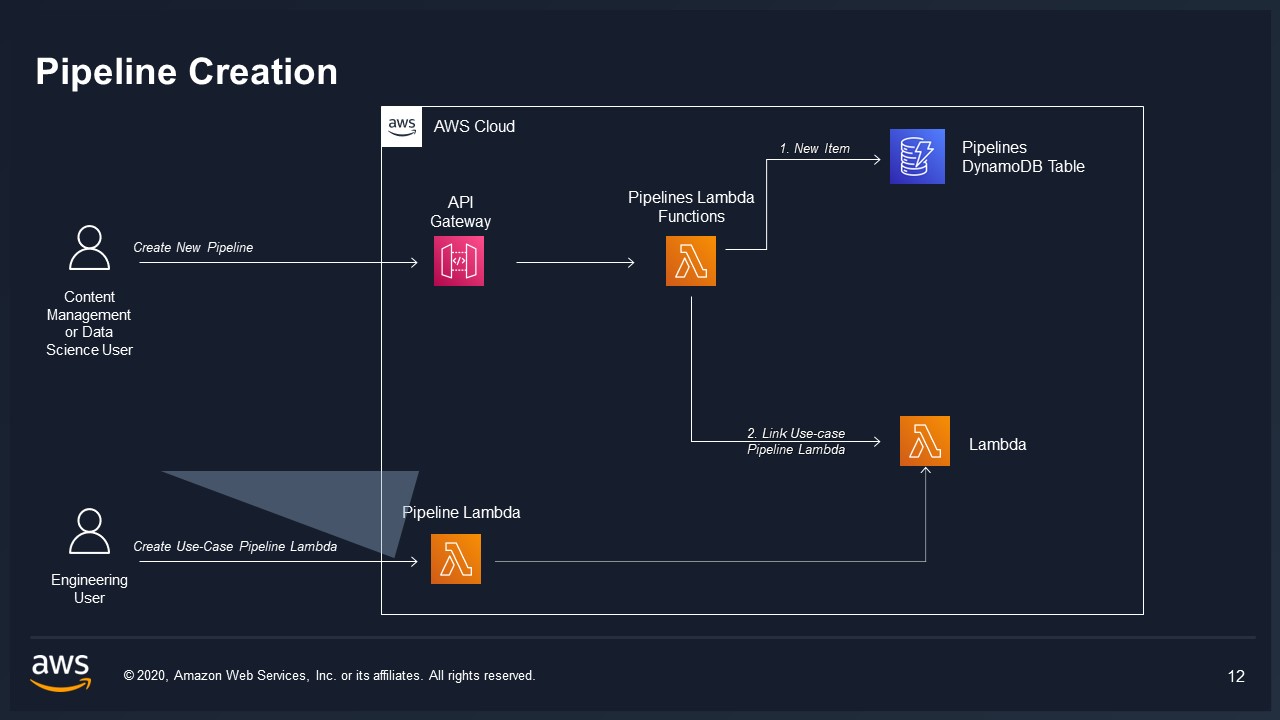
Pipelines, workflows, and executions are the processing engine of VAMS. A pipeline defines a single processing step -- such as converting a 3D model, generating a thumbnail, or running an AI labeling job. A workflow chains one or more pipelines into an ordered sequence powered by AWS Step Functions. An execution is a single run of a workflow over a selected set of input files.
Together, they enable automated, repeatable processing of visual assets at scale, with support for both synchronous and asynchronous execution patterns.
Pipelines
A pipeline represents a configurable processing step. Each pipeline binds to an AWS compute resource through its executionConfig, describes how it consumes input through its systemConfig, and can carry reusable configuration templates. Pipelines are scoped to a database (or GLOBAL).
A pipelineId is unique across every database, including GLOBAL -- creating a pipeline with an id that another database already uses is rejected. Workflow ids follow the same rule. Ids identify a pipeline or workflow on their own in execution records, per-pipeline execution parameters, and external references, so an id is never reused in a second database. Omit the id (or send null) to have VAMS generate one.
For the full pipeline, template, and tag-schema API, see the Pipelines API reference.
Pipeline execution types
VAMS supports four execution types, each suited to a different processing pattern.
| Execution Type | Invocation | Callback Support | Best For |
|---|---|---|---|
| Lambda | Synchronous or asynchronous AWS Lambda invocation | Optional (via waitForCallback) | Short-duration processing, built-in VAMS pipelines |
| SQS | Asynchronous message to an Amazon SQS queue | Optional (via task tokens) | Long-running jobs dispatched to external consumers, decoupled architectures |
| EventBridge | Asynchronous event to an Amazon EventBridge bus | Optional (via task tokens) | Event-driven integrations, fan-out to multiple consumers |
| DeadlineCloud | Asynchronous submission to AWS Deadline Cloud | Mandatory (task token callback) | Render-farm-style batch processing |
The executionConfig object selects the binding. Its executionType field is one of Lambda, SQS, EventBridge, or DeadlineCloud, and the matching nested block (lambda, sqs, eventBridge, or deadlineCloud) supplies the target resource -- for example a Lambda function name or ARN, an Amazon SQS queue URL, or an Amazon EventBridge bus ARN with its source and detail-type.
DeadlineCloud is selectable only when the deployment enables app.pipelines.deadlineCloudExecutionTypeEnabled (default false); pipeline create and update reject the type with 400 otherwise. It is unavailable in the GovCloud and EU Sovereign partitions. See the configuration reference.
The target named in executionConfig is validated for form -- an AWS Lambda function ARN or function name, an Amazon SQS queue URL, an Amazon EventBridge bus ARN -- and not for existence or ownership, so a pipeline may point at a resource VAMS did not create. IAM is the boundary. The shared VAMS workflow role that the generated state machines assume allows lambda:InvokeFunction and sqs:SendMessage on functions and queues in the deployment's own account and Region whose names contain the top-level name configuration value (default vams), plus Lambda functions matching vams-*, and events:PutEvents on event buses matching the same name pattern together with the account's default bus. A target outside those patterns is accepted when the pipeline is saved and the execution fails at invoke time with an access-denied error. Treat pipeline create and update as an administrator-equivalent capability when assigning permissions.
When waitForCallback is Enabled, AWS Step Functions sends a task token along with the pipeline payload and pauses until the pipeline calls SendTaskSuccess or SendTaskFailure. This lets a pipeline run for hours or days without timing out the workflow. taskTimeout (maximum 604,800 seconds, one week) and taskHeartbeatTimeout control how long the workflow waits. The DeadlineCloud type is asynchronous only, so its callback is mandatory and waitForCallback is always Enabled.
System configuration
A pipeline's systemConfig governs how the pipeline consumes input and whether it uses templates.
| Field | Description |
|---|---|
inputFileArity | Number of input files the pipeline consumes: none (no input file), one (exactly one), or multi (one or more). |
assetScope | Booleans crossAssetAllowed, singleAssetOnly, wholeAssetAllowed, and folderAllowed controlling accepted selections. The shorthand wholeAsset is accepted for wholeAssetAllowed. |
metadataInputs | Booleans assetMetadata, fileMetadata, fileAttributes, and databaseMetadata — which metadata is gathered and passed to the pipeline. See Metadata inputs. |
inputFileFilters | allow and exclude lists matching by extension, exact path, file name, or wildcard (*.previewFile.*). See Input-file filters. |
requireTemplate | When true, every execution of this pipeline must select one of its configuration templates. |
allowCustomTemplateOverride | When true, an execution may supply its own raw configuration body in place of a saved template. |
Templates and tag schemas
A pipeline can carry one or more templates -- reusable configuration bodies (JSON, YAML, OpenJD, XML, or raw text) that supply the parameters an execution passes to the pipeline. A template body may contain {{tagName}} placeholders. These are either the template's own schema tags (filled in at execution time) or system tags that the engine resolves automatically per pipeline task — execution and pipeline-task identity, timestamps, the input files, the output and auxiliary locations, the resolved metadata, and the Deadline Cloud farm values. See System template tags for the full catalog. A system tag name is reserved: a template's own tag key may not reuse one, nor begin with the reserved metadata_ prefix, and such a key is rejected when the tag schema is saved.
Each template can define a tag schema describing the typed tags (string, integer, number, boolean, string-list, or enum) that fill those placeholders, including labels, defaults, and whether each is required. In a json config body the declared type also fixes where the placeholder sits: a tag that renders a JSON number, boolean, or array is the whole value and takes no quotes ("steps": {{STEPS}}), while a string or enum tag goes inside the string it fills ("prompt": "{{PROMPT}}"). The body is checked against its own tag schema when it is saved, so a placeholder in the wrong position is reported then rather than delivering the wrong type to the pipeline at run time. A pipeline may designate one template as its default (isDefault); the default is pre-selected on the execute form and is used automatically when a pipeline that requires a template is run without one specified.
A template may also carry overrides that replace parts of the pipeline's systemConfig (inputFileArity, assetScope, metadataInputs, and inputFileFilters) for executions that choose that template.
GLOBAL pipelines versus database-specific pipelines
Pipelines can be scoped to a specific database or declared as GLOBAL.
- Database-specific pipelines set
databaseIdto a specific database identifier and appear only when working within that database. - GLOBAL pipelines set
databaseIdto the literal stringGLOBAL. They are available across all databases and are typically used for shared processing capabilities such as format conversion or thumbnail generation.
VAMS includes several built-in pipelines that are auto-registered as GLOBAL during deployment. These include 3D model conversion, point cloud processing, Gaussian splatting, GenAI metadata labeling, and 3D preview thumbnail generation. Built-in pipelines are configured through the CDK deployment configuration. For details, see the Pipelines section.
A built-in pipeline, its workflow, its shipped templates, and its file-upload trigger are defined by a vamsSchema bundle that lives with the pipeline's source and is registered by the deployment. The deployment is the owner of those records: a change made to one through the web interface, the API, or the CLI is replaced by the bundle's definition when the deployment next registers it, and the pipeline and workflow are written back as enabled and unarchived. Disabling or archiving a built-in in the web interface is therefore temporary — a deployment re-enables it.
Control a built-in through the deployment configuration instead: autoRegisterWithVAMS decides whether it is registered at all (turning it off archives the pipeline and workflow), and autoRegisterAutoTriggerOnFileUpload decides whether its file-upload trigger fires. Records you create yourself are never touched by a deployment — a workflow of your own that references a built-in pipeline, and a template or an additional trigger added to a built-in under an identifier of its own — so those are the durable places to put a customization. For the field-level detail of what a registration rewrites and what it preserves, see Update the solution.
Pipeline permissions
Pipeline access is controlled through the VAMS permissions model. The pipeline object type supports constraint fields including databaseId, pipelineId, category, and pipelineExecutionType. Administrators can grant users permission to view and execute pipelines without granting them permission to create or delete pipelines.
Workflows
A workflow defines an ordered sequence of pipeline steps. When created, VAMS generates an AWS Step Functions state machine that runs each pipeline in order. A workflow is scoped to a database (or GLOBAL) and references pipelines by identity.
For the full workflow, trigger, and execution API, see the Workflows API reference.
Specified pipelines
specifiedPipelines is an ordered, non-empty array of pipeline references. Each entry names one pipeline:
| Field | Description |
|---|---|
pipelineId | Identifier of the referenced pipeline. |
pipelineDatabaseId | Database that owns the referenced pipeline. Defaults to the workflow's database. |
jobName | Label for this pipeline step within the workflow. Optional. |
defaultTemplateId | Template this step resolves against when the execute request supplies no templateId for it. Optional. |
A GLOBAL workflow may reference only GLOBAL pipelines; a database workflow may reference GLOBAL pipelines or pipelines from its own database. The pipelines execute in the order they are listed.
A workflow cannot use the same pipeline for two of its steps. Everything resolved per step — the execution parameters, the template configuration, and the filtered input files — is keyed by pipelineDatabaseId:pipelineId, so a second reference to the same pipeline overwrites the first step's resolved configuration. Both steps then run with the same settings, and nothing reports a problem.
When one model or container needs to run twice in a workflow with different settings — train and then evaluate, say — define two pipelines that share a container image, and list one of each. That also gives each step its own default template and its own output folder.
Job names
A step's jobName labels the step within the workflow. It does two things: it names the step in the workflow's state machine, and — for the workflow's first step — it names the folder that holds the whole execution's output.
An execution writes to one shared set of output prefixes, derived from the first step:
{baseAssetsPrefix}pipelines/{firstStepName}/{generatedJobName}/output/{executionId}/files/
firstStepName is the first step's jobName, or its pipelineId when the jobName is empty. generatedJobName is that same name with a short generated prefix, assigned when the workflow's state machine is built. baseAssetsPrefix is the prefix the deployment's default asset bucket is registered under — empty for the bucket VAMS creates, so the run area sits at that bucket's root. Every step of the run writes beneath these prefixes; the steps do not each get a folder of their own.
The value is 3–63 characters of letters, numbers, hyphens, and underscores, and each step in a workflow is expected to carry its own: a job name repeated across two steps names both of them identically in the state machine and in the run's logs, leaving no way to tell the two apart. The web workflow editor refuses a repeat, comparing case-insensitively.
It is a fixed label rather than a template: {{tag}} placeholders are not substituted in a jobName and are rejected on save, because the name is written into the state machine once when the workflow is deployed, not per execution.
When to set a job name
Leaving jobName blank is the normal choice — the pipeline id already labels the step. Setting one is worth it when that id does not describe the step's role clearly enough:
- The first step's role is narrower than its pipeline's name suggests. A general-purpose conversion pipeline used here specifically to produce a web preview gives the execution a folder named after the pipeline; naming the step
convert-for-webrecords what the run was for. - The first step's pipeline id is opaque. A generated or abbreviated id (for example
pl-7f3a91) produces an output folder nobody can interpret later. - The step is one of several in a busy workflow and the state machine is easier to follow with each step named for what it does.
Only the first step's name reaches the output path, and the generated portion of the folder name is reassigned whenever the workflow's pipeline list changes — so an S3 prefix built from a job name is neither per-step nor stable across edits. To give runs their own predictable folders, set the workflow's defaultOutputFileBaseExecutionPathExtension (or an execution's own output path prefix), which resolve {{tag}} placeholders at launch: /{{executionId}}/ gives every run its own folder, /{{jobStartDate}}/ a folder per day.
jobName the field versus {{jobName}} the tagThese are related but not interchangeable. The jobName field above is a fixed label you set on a pipeline reference and accepts no tags. The {{jobName}} tag is a system tag available in output path prefixes and template bodies, where it resolves to the generated job name of the step it renders for. Writing {{jobName}} into the jobName field is rejected.
System configuration
A workflow's systemConfig governs how the workflow consumes input, which asset selections it accepts, how concurrent runs are limited, and where output is written.
| Field | Description |
|---|---|
inputFileArity | Number of input files the workflow consumes: none, one, or multi. Authored, not derived — set it to the MAXIMUM any pipeline/template combination in the workflow can require, since a template may raise a pipeline's own arity at execute time. |
assetScope | Booleans crossAssetAllowed, singleAssetOnly, wholeAssetAllowed, and folderAllowed controlling selections. |
metadataInputs | Booleans assetMetadata, fileMetadata, fileAttributes, and databaseMetadata — which metadata is passed to the pipelines. See Metadata inputs. |
inputFileFilters | allow and exclude lists matching by extension, exact path, file name, or wildcard. An omitted or * allow list defers to the pipelines; see Input-file filters. |
concurrencyRestriction | How concurrent executions are limited: none, perAsset, or perInputFile. |
outputTarget | Where the workflow writes its output: locationType (asset or none) and allowOverride. |
allowWorkflowTriggerChaining | Whether another workflow's output may fire this workflow's triggers. A file whose provenance records this workflow as its writer never re-triggers it, whatever this is set to — narrower than it reads; see the warning below. Defaults to false. |
defaultOutputFileBaseExecutionPathExtension | Output path prefix used when an execution names none, stored unresolved so {{tag}} placeholders resolve per run (e.g. /{{executionId}}/). Empty means outputs land at the asset root. |
The outputTarget.locationType is asset to write output files and metadata to a VAMS asset, or none for a results-only workflow that records only results text and logs and writes no asset output. A results-only workflow may still take input files -- for example, reading files to emit a metadata report. When locationType is asset, allowOverride gates whether an execution may redirect output to a chosen asset.
Nothing bounds the length of a chain. Two workflows that each enable allowWorkflowTriggerChaining and each accept a file the other writes trigger one another indefinitely -- A fires on B's output, B fires on A's, and each round runs their pipelines again and writes their output again. VAMS applies no depth limit and performs no cycle detection: the self-output rule compares a file only against the workflow that produced that file, not against the chain of runs that led to it.
The self-output rule also depends on the file's recorded provenance. A file whose provenance does not name the workflow that produced it is treated as another workflow's output, because it cannot be shown to be self-output, so a workflow with chaining enabled can fire on a file it wrote itself.
Keeping a chain finite is therefore an administrative responsibility. Before enabling chaining, an administrator reviews the input-file filters and the output file types of every workflow involved, so that no group of them accepts one another's output in a cycle.
Triggers
Triggers auto-launch a workflow in response to an event. A fileUpload trigger runs the workflow when files matching its inputFileFilters are uploaded. A new file version that changes only the file's primary type is not an upload and starts no trigger. A version restored by a file revert is recorded as that operation rather than as the workflow output it restores, so it starts triggers as an upload does. Filters match by extension (*.e57), exact path, file name, or wildcard. A trigger's defaultTemplateIds map supplies the template each included pipeline uses when the trigger launches the workflow, keyed by the composite <pipelineDatabaseId>:<pipelineId>.
A file written directly to an asset's Amazon S3 location, outside the VAMS upload API, fires matching fileUpload triggers once, as an upload does. Bucket sync stamps the object with its database and asset identifiers by copying it onto itself. On a versioned bucket that copy is a newer Amazon S3 version with the same content, and the execution's input file is the version that was written.
A workflow may carry several triggers of one type, each with its own filters and default templates, and an upload launches the workflow once per matching trigger — so one workflow can process different uploads with different templates. Each trigger is addressed by its key: the bare type for a workflow's first trigger of that type, or <type>#<triggerId> for an additional one. A workflow that restricts concurrency per asset supports only one trigger of a type, and two triggers of one type may not name the same default templates.
Input-file filters accept extension patterns such as *.jpg (or the .jpg shorthand), exact paths, file names, and wildcards. Matching is case-insensitive. A non-empty allow list restricts eligibility to matching files; exclude removes matches and takes precedence. The same rules described in Input-file filters apply to a trigger's filters.
A trigger-launched execution runs as the reserved system identity, not as the user whose action fired the trigger. This is intentional: a user may be permitted to upload a file without being permitted to run the workflow, yet the trigger must still process that upload reliably. Running the execution as the system identity decouples the trigger from the acting user's permissions so it functions consistently regardless of who performed the triggering action. Executions launched directly through the execute endpoint run as the calling user; trigger-launched executions are attributed to the system identity in their execution record and provenance.
Input-file filters
An inputFileFilters block has two lists, and each is optional:
| List | Meaning |
|---|---|
allow | The file types eligible to be processed. Omitted, empty, or * means every file is eligible. |
exclude | Files removed from that set. Omitted or empty means nothing is excluded. |
exclude is applied after allow, so an exclusion always wins over an inclusion.
Because an absent allow list means "everything", a filter is a way to narrow eligibility, never to grant it. A pipeline that declares no filters accepts any file its container can read.
exclude may not match everythingA match-everything pattern (*, **, *.*, /*, /**) in an exclude list is rejected when the pipeline, template, workflow, or trigger is saved. Since exclude is applied last, such a pattern would remove every file and leave the pipeline or workflow permanently unable to run. To exclude nothing, leave the list empty or omit it. The same patterns are valid in an allow list, where they simply mean "allow everything".
The resolution chain
Filters are declared at up to three levels, and a file must satisfy all of them to reach a pipeline:
workflow.systemConfig.inputFileFilters       the outer boundary for the whole execution
  └── pipeline.systemConfig.inputFileFilters what that step accepts
        └── template.overrides.inputFileFilters  replaces the pipeline's, when the step uses a template
Resolution reads down the chain, and an open list at one level defers to the next:
- When the workflow's
allowlist names specific types, that list is the boundary for the execution. No pipeline can widen it — a file the workflow excludes never reaches any step. - When the workflow's
allowlist is open, eligibility comes from the pipelines instead. A file is eligible when any step in the workflow accepts it, so a workflow combining a mesh pipeline and a point-cloud pipeline accepts both kinds of file. - A chosen template's
overrides.inputFileFiltersreplaces its pipeline's list entirely for that execution, which is how one pipeline supports several modes with different inputs. excludelists accumulate: an exclusion at any level removes the file.
Validation applies this order at execution time. The selected files are first narrowed by the workflow's filters, and each pipeline is then checked against that narrowed set. If any pipeline is left without the input it requires, the whole execution is rejected rather than launching a step that cannot run.
Seeing what a workflow accepts
Because the chain spans several records, a workflow response reports the restriction it effectively imposes in aggregateWorkflowPipelineInputFileFilters — the workflow's own allow list when it names specific types, otherwise the combined lists of its pipelines.
aggregateWorkflowPipelineInputFileFilters carries includesTemplateOverrides: false. A template is chosen per execution, so its overrides cannot be known in advance and are not folded in. Treat the aggregate as a guide when browsing workflows, and resolve the full chain — including the chosen template — when validating a specific set of files. The web interface does this, which is why the file types it shows can narrow once a template is selected.
GLOBAL workflows
Like pipelines, workflows can be scoped to a database or declared as GLOBAL. GLOBAL workflows are available for execution using assets in any database and are typically used for common processing sequences that apply across the entire organization.
Executions
An execution is a single run of a workflow. The execute request is asset-less and multi-file: input files are supplied in the request body and may span more than one asset, subject to the workflow's configuration.
POST /workflows/{workflowDatabaseId}/{workflowId}/execute
The request carries an inputFiles array, where each entry has a databaseId, assetId, and relativeFileKey (asset-relative, beginning with /; / selects the whole asset and /folder/ a folder). When the workflow's outputTarget allows override, the request may set outputAssetId and outputDatabaseId to redirect the output. Per-pipeline parameters (templateId, template tag values, or a custom template override) are supplied in pipelineExecutionParameters, keyed by pipeline.
metadataSourceDatabaseId and metadataSourceAssets name entities whose stored metadata the run reads. They are not input files: they carry no file key, are exempt from the arity and filter checks, and do not resolve an output target. Both are optional at every arity, and they are how an inputFileArity: none workflow — one whose pipelines generate rather than transform — is still given asset and database metadata to work from. metadataSourceDatabaseId names one concrete database (GLOBAL is rejected); metadataSourceAssets is a list of {databaseId, assetId} bounded by the workflow's asset span.
Metadata inputs
Alongside its input files, an execution gathers the stored metadata its pipelines declared through metadataInputs and writes it into a metadata file each pipeline step reads. Four kinds of metadata are gathered independently: each involved asset's own metadata (assetMetadata), each input file's metadata (fileMetadata) and attributes (fileAttributes), and each involved database's own metadata (databaseMetadata). The workflow's booleans are the outer gate and each pipeline's own decide what that step receives, so a type reaches a pipeline only when both have it on.
Which entities a run gathers from follows from its selection: every asset an input file belongs to, every asset the request named purely as a metadata source, and every distinct database of those assets. A run with no input files has nothing to derive from, so it gathers the assets and the single database the request named as sources.
A named source database the caller cannot read fails the launch, since the caller asked for metadata they may not have. A database merely derived from an input or source asset is skipped instead, because an asset GET does not imply a database GET — the run then captures no metadata for it, and the launch reports that in its warnings.
Database metadata is read-only. It is supplied to a pipeline as input, and a pipeline never writes metadata back to a database — metadata write-back targets assets and files.
Naming metadata sources is optional at every arity, and nothing makes it mandatory. A pipeline that needs particular metadata to run checks for it itself and fails its own step when it is absent, rather than the execution being rejected for omitting a source.
The metadata gathered for one entity is bounded independently of every other, so a run over many entities leaves each entity its own budget: at most 1,000 metadata entries and 300 KB for each database, each asset, each file's metadata, and each file's attributes. A run over three databases holding five assets and ten files therefore gathers up to 1,000 entries for each of the three databases, each of the five assets, and each of the ten files. An execution never truncates silently — a bounded entity is named in the warnings the execute response returns. An execution reads at most 1,000 input files and 1,000 metadata-source assets. For the full field reference, see Metadata inputs in the Workflows API.
Execution flow
- A user (or a trigger) submits input files to the workflow's execute endpoint.
- VAMS authorizes the workflow, every referenced pipeline, each input and output asset, and every asset and database the run gathers metadata from; resolves per-pipeline templates and validates their tags; then cross-validates input-file arity, asset scope, and file filters.
- VAMS starts the workflow's AWS Step Functions state machine.
- Each pipeline step runs in sequence, receiving the input files, gathered metadata, and its rendered configuration.
- An end-state step collects pipeline outputs and, for an asset output target, writes them back to the output asset.
Execution tracking
Each execution is identified by a workflow execution id and tracked in Amazon DynamoDB, independent of any single asset (an execution may span input files across multiple assets). The main execution record holds the workflow identity, status (NEW, RUNNING, SUCCEEDED, FAILED, TIMED_OUT, ABORTED), start and stop dates, trigger type, and the initiating user. Related records capture the input files (with the exact Amazon S3 version read), the gathered metadata, per-pipeline configuration snapshots, and the produced outputs.
An output index keyed by databaseId:assetId records which execution wrote to each output asset, so a caller with access to an output asset can see the runs that produced it. Execution listings are permission-filtered: an execution is visible when the caller can view its workflow, every asset the run read — each input file's asset plus each asset named as a metadata source — and the asset the run wrote to whenever it wrote to one. Every asset is required rather than any one of them because the listing and the details both return the metadata of all of them, and the output asset counts on the same footing: the same views return its identity, the inventory of files written into it, and the metadata and results produced against it. A results-only run neither reads nor writes an asset, leaving the workflow as its whole gate. An asset that has been permanently deleted is authorized on the database it lived in, so deleting an asset leaves the history of the runs against it reachable by whoever can read that database rather than by nobody. Archiving an asset is not a deletion: its record is retained, so it stays authorized on its own attributes.
The execution details endpoint returns full input/output traceability -- the underlying pipelines with their rendered configuration, the input files and metadata, the output target, and a listing of all output files, metadata, and results. The logs endpoint returns the stored execution log, falling back to a live Amazon CloudWatch Logs search, and can be narrowed to a single pipeline execution.
Log data is redacted before it is stored or returned: credential-bearing values -- authorization headers, bearer tokens, AWS access-key IDs, JSON web tokens, and labelled secret fields such as SecretAccessKey and SessionToken -- are replaced with <redacted> so they are never surfaced to a caller viewing execution or pipeline logs.
Pipeline outputs
During an execution, each pipeline writes to a set of Amazon S3 output locations that VAMS provisions and passes to the step. Outputs are categorized so the end-state step can route them correctly:
| Category | Purpose |
|---|---|
| Files | File-level outputs: new asset files and file previews (.previewFile.*). |
| Previews | Asset-level preview images that represent the asset as a whole. |
| Metadata | Metadata files produced by the pipeline. |
| Results | Structured result files recorded against the execution. Collected for every run, whatever the output target — not only for a results-only workflow. |
A separate auxiliary location holds temporary working files and special non-versioned viewer data (such as Potree octree files). For output-path conventions and the assetId threading pattern that pipeline authors follow, see Amazon S3 output path conventions and Threading assetId through the pipeline.
An execution records the files, metadata, and results it wrote to its output asset, each with the version it produced. Anything a pipeline writes to the auxiliary location is not recorded and does not appear in the execution's outputs — including special preview-file locations. Those are working and viewer-support files rather than tracked asset outputs, so they exist in the auxiliary bucket without a corresponding output record.
Related topics
- Pipelines API -- creating pipelines, templates, and tag schemas
- Workflows API -- creating workflows, triggers, and running executions
- Permissions Model -- controlling who can view, execute, and manage pipelines and workflows
- Files and Versions -- how pipeline outputs interact with asset versioning
- Metadata and Schemas -- how pipeline-generated metadata is stored