Pipeline System Overview
VAMS provides a configurable pipeline system for processing visual assets through automated workflows. Pipelines are modular processing steps that transform, analyze, or generate previews from files stored in VAMS. They execute within orchestrated workflows powered by AWS Step Functions and can be triggered manually, via API, or automatically on file upload.
Core Concepts
What Are Pipelines?
A pipeline is a registered processing unit that accepts input files from Amazon S3, performs a specific operation (such as format conversion, metadata extraction, or preview generation), and writes output back to Amazon S3. Each pipeline is defined by its execution type, supported file formats, and compute requirements. VAMS ships with several built-in pipelines and also supports registering custom pipelines.
Pipeline Execution Types
VAMS supports four pipeline execution types, each suited for different processing patterns:
| Execution Type | Invocation | Callback | Best For |
|---|---|---|---|
| Lambda | Synchronous or asynchronous invocation of an AWS Lambda function | Immediate response | Lightweight operations under 15 minutes |
| SQS | Asynchronous message to an Amazon SQS queue | AWS Step Functions Task Token | Decoupled, long-running workloads |
| EventBridge | Asynchronous event to an Amazon EventBridge bus | AWS Step Functions Task Token | Event-driven architectures and fan-out |
| DeadlineCloud | Asynchronous job submission to an AWS Deadline Cloud queue | AWS Step Functions Task Token | Render-farm and batch job submission |
SQS, EventBridge, and Deadline Cloud pipelines are always asynchronous. They use AWS Step Functions Task Tokens to signal completion back to the orchestrating workflow. The workflow pauses until the pipeline sends a success or failure callback. Deadline Cloud always requires the callback.
The Deadline Cloud execution type is available only when the deployment sets app.pipelines.deadlineCloudExecutionTypeEnabled. It is unavailable in the AWS GovCloud and European Sovereign Cloud partitions.
Pipeline Lifecycle
Every pipeline follows a consistent lifecycle from registration through execution:
- Create -- Register a pipeline in VAMS with its execution type, supported formats, and compute target.
- Add to Workflow -- Attach one or more pipelines to a VAMS workflow. Workflows define the execution order and pass data between pipeline steps.
- Execute -- Trigger the workflow manually, via API, or automatically on file upload. AWS Step Functions orchestrates the execution.
- Process -- The pipeline reads input from Amazon S3, performs its operation, and writes output to the designated S3 path.
- Output -- The workflow's process-output step picks up generated files and registers them in VAMS (new files, previews, metadata).
Pipeline Execution Flow
The following diagram shows how a workflow execution moves through the VAMS pipeline system:
Built-in Pipelines
VAMS includes the following built-in pipelines, each controlled by a configuration flag in config.json:
| Pipeline | Config Flag | Description | Supported Formats | Compute | VPC Required |
|---|---|---|---|---|---|
| 3D Basic Conversion | useConversion3dBasic | Convert 3D mesh files between formats; XYZ is input only | STL, OBJ, PLY, GLTF, GLB, XYZ | Lambda | No |
| CAD/Mesh Metadata Extraction | useConversionCadMeshMetadataExtraction | Extract metadata from CAD and mesh files | STEP, STP, DXF, STL, OBJ, PLY, GLTF, GLB, XYZ | Lambda | No |
| Coordinate Transform | useConversionCoordinateTransform | Reproject point clouds between coordinate reference systems | E57, LAS, LAZ | AWS Batch (Fargate) | Yes |
| Potree Point Cloud Viewer | usePreviewPcPotreeViewer | Convert point clouds to Potree octree format | E57, PLY, LAS, LAZ | AWS Batch (Fargate) | Yes |
| 3D Preview Thumbnail | usePreview3dThumbnail | Generate animated GIF/static image previews | PLY, STL, OBJ, GLB, GLTF, FBX, DRC, LAS, LAZ, E57, PTX, PCD, FLS, FWS, STP, STEP, USD, USDA, USDC, USDZ | AWS Batch (Fargate) | Yes |
| Gaussian Splatting | useSplatToolbox | Generate 3D Gaussian splats from images/video | ZIP (images), MP4, MOV | AWS Batch (GPU) | Yes |
| GenAI Metadata Labeling | useGenAiMetadata3dLabeling | AI-powered metadata labeling for 3D files | GLB, FBX, OBJ, STL, PLY, USD, DAE, ABC | AWS Batch (Fargate) | Yes |
| NVIDIA Cosmos Predict | useNvidiaCosmos.modelsPredict | Generate videos from text or image/video input using Cosmos-Predict2.5 world foundation models in 2B and 14B sizes, in Text2World and Video2World modes | Text2World: text only; Video2World: MP4, MOV, JPG, JPEG, PNG, WEBP | AWS Batch (GPU) | Yes |
| NVIDIA Cosmos Reason | useNvidiaCosmos.modelsReason | Analyze video content and generate text-based analysis, captions, and reasoning using Cosmos-Reason2 (2B, 8B) Vision Language Models | MP4, MOV | AWS Batch (GPU) | Yes |
| NVIDIA Cosmos Transfer | useNvidiaCosmos.modelsTransfer | Transform videos with control signal conditioning using Cosmos-Transfer2.5-2B for style transfer and video-to-video transformation | MP4, MOV, AVI (source video); edge, depth, seg, vis (control signals) | AWS Batch (GPU) | Yes |
| NVIDIA Cosmos 3 | useNvidiaCosmos3 | Omnimodal world-model generation (text/image → image/video) using Cosmos3-Nano (16B) and Cosmos3-Super (64B) models with text2image, text2video, and image2video modes | Text modes: text only; Image2Video: JPG, JPEG, PNG | AWS Batch (GPU) | Yes |
| NVIDIA Gr00t Fine-Tuning | useNvidiaGr00t | Fine-tune NVIDIA GR00T-N1.5-3B embodied AI model on custom LeRobot v2.1 robot manipulation datasets with LoRA or full fine-tuning support | LeRobot v2.1 dataset (asset-level) | AWS Batch (GPU) | Yes |
| NVIDIA Isaac Lab Training | useIsaacLabTraining | NVIDIA Isaac Lab reinforcement learning training and evaluation for robotic simulation | Custom simulation configs | AWS Batch (GPU) | Yes |
| RapidPipeline | useRapidPipeline.useEcs or useRapidPipeline.useEks | Optimize and convert 3D models with the licensed DGG RapidPipeline engine | GLB, GLTF, OBJ, FBX, STL, PLY, USD, USDZ, DAE, ABC | Amazon ECS (Fargate) or Amazon EKS | Yes |
| ModelOps | useModelOps | Optimize and convert 3D models with the licensed VNTANA Intelligent 3D Optimization Engine | GLB, GLTF, OBJ, FBX, STL, PLY, USD, USDZ, DAE, ABC | Amazon ECS (Fargate) | Yes |
RapidPipeline and ModelOps run third-party container images that require a subscription from the vendor. Supply the image through the pipeline's ecrContainerImageURI option as an Amazon ECR image URI. See RapidPipeline and ModelOps for licensing details and prerequisites.
Pipeline Configuration
All built-in pipelines are configured through the CDK deployment configuration file at infra/config/config.json under the app.pipelines section.
Common Configuration Options
Every built-in pipeline supports the following configuration options:
| Option | Type | Description |
|---|---|---|
enabled | boolean | Whether to deploy this pipeline's infrastructure during CDK deployment. |
autoRegisterWithVAMS | boolean | Automatically register the pipeline and its workflow in the global VAMS database during deployment. When enabled, the pipeline is available immediately without manual registration. |
autoRegisterAutoTriggerOnFileUpload | boolean | Automatically trigger the pipeline when matching files are uploaded to VAMS. Requires autoRegisterWithVAMS to also be enabled. |
When autoRegisterWithVAMS is enabled, the CDK deployment creates a custom resource that invokes the pipeline's registration Lambda function. This registers both the pipeline definition and an associated workflow in the global VAMS database so that users can execute the pipeline immediately after deployment.
Example Configuration
{
    "app": {
        "pipelines": {
            "useConversion3dBasic": {
                "enabled": true,
                "autoRegisterWithVAMS": true
            },
            "usePreviewPcPotreeViewer": {
                "enabled": true,
                "autoRegisterWithVAMS": true,
                "autoRegisterAutoTriggerOnFileUpload": true
            }
        }
    }
}
VPC and Network Requirements
Pipelines that run containers on AWS Batch, Amazon ECS, or Amazon EKS require a VPC. When any VPC-requiring pipeline is enabled, app.useGlobalVpc.enabled must be set to true — VAMS does not enable it automatically, and configuration validation fails with an error listing the offending features if it is left false. With the VPC enabled, the VPC builder provisions the subnets, security groups, and VPC interface endpoints that each enabled pipeline needs.
This chart is the single source of truth for per-pipeline networking requirements. The Network Architecture page references it rather than duplicating the list, so when a pipeline is added or changed, only this table needs updating.
All container pipelines share a common set of interface endpoints: AWS Batch, Amazon ECR API, and Amazon ECR Docker (created whenever any container pipeline is enabled). The Additional VPC Interface Endpoints column lists endpoints required beyond that shared set.
| Pipeline | VPC Required | Compute Target | Additional VPC Interface Endpoints |
|---|---|---|---|
| 3D Basic Conversion | No | AWS Lambda | — (runs outside VPC) |
| CAD/Mesh Metadata Extraction | No | AWS Lambda | — (runs outside VPC) |
| Coordinate Transform | Yes | AWS Batch (Fargate) | Amazon ECS |
| Potree Point Cloud Viewer | Yes | AWS Batch (Fargate) | — (shared Batch/ECR endpoints only) |
| 3D Preview Thumbnail | Yes | AWS Batch (Fargate) | — (shared Batch/ECR endpoints only) |
| GenAI Metadata Labeling | Yes | AWS Batch (Fargate) | Amazon Bedrock Runtime, Amazon Rekognition¹ |
| Gaussian Splatting | Yes | AWS Batch (GPU) | Amazon ECS |
| NVIDIA Cosmos (Predict/Reason/Transfer) | Yes | AWS Batch (GPU) | Amazon EFS, Amazon ECS |
| NVIDIA Cosmos 3 | Yes | AWS Batch (GPU) | Amazon EFS, Amazon ECS |
| NVIDIA Gr00t Fine-Tuning | Yes | AWS Batch (GPU) | Amazon EFS, Amazon ECS |
| NVIDIA Isaac Lab Training | Yes | AWS Batch (GPU) | Amazon ECS, Amazon ECS Agent, Amazon ECS Telemetry |
| RapidPipeline | Yes | Amazon ECS (Fargate) or Amazon EKS | Amazon ECS² |
| ModelOps | Yes | Amazon ECS (Fargate) | Amazon ECS² |
¹ Amazon Bedrock Runtime and Amazon Rekognition endpoints are created only when GenAI Metadata Labeling is enabled and all Lambda functions run in the VPC (useGlobalVpc.useForAllLambdas).
² RapidPipeline and ModelOps containers run in private subnets with internet egress so they can reach the AWS Marketplace metering API. Enabling either pipeline adds public and private subnets to the VAMS VPC; when importing an external VPC, supply both public and private subnet IDs in app.useGlobalVpc, or configuration validation fails.
Pipeline interface endpoints are placed in the isolated subnets, except the Amazon ECS endpoint, which is placed in private subnets for the container pipelines that need egress (Coordinate Transform, Gaussian Splatting, NVIDIA Cosmos, NVIDIA Cosmos 3, NVIDIA Gr00t, RapidPipeline, ModelOps) and in isolated subnets for Isaac Lab Training. Only one Amazon ECS interface endpoint can exist per VPC when private DNS is enabled, so VAMS consolidates ECS endpoint subnets across pipeline types — private subnets take priority over isolated subnets when both are needed. Amazon ECS Agent and Amazon ECS Telemetry are distinct services from Amazon ECS and do not conflict with that single ECS endpoint.
Enabling VPC-required pipelines creates several VPC interface endpoints, each of which incurs hourly charges. Review the Configuration Guide for details on VPC endpoint management.
Pipeline S3 Output Paths
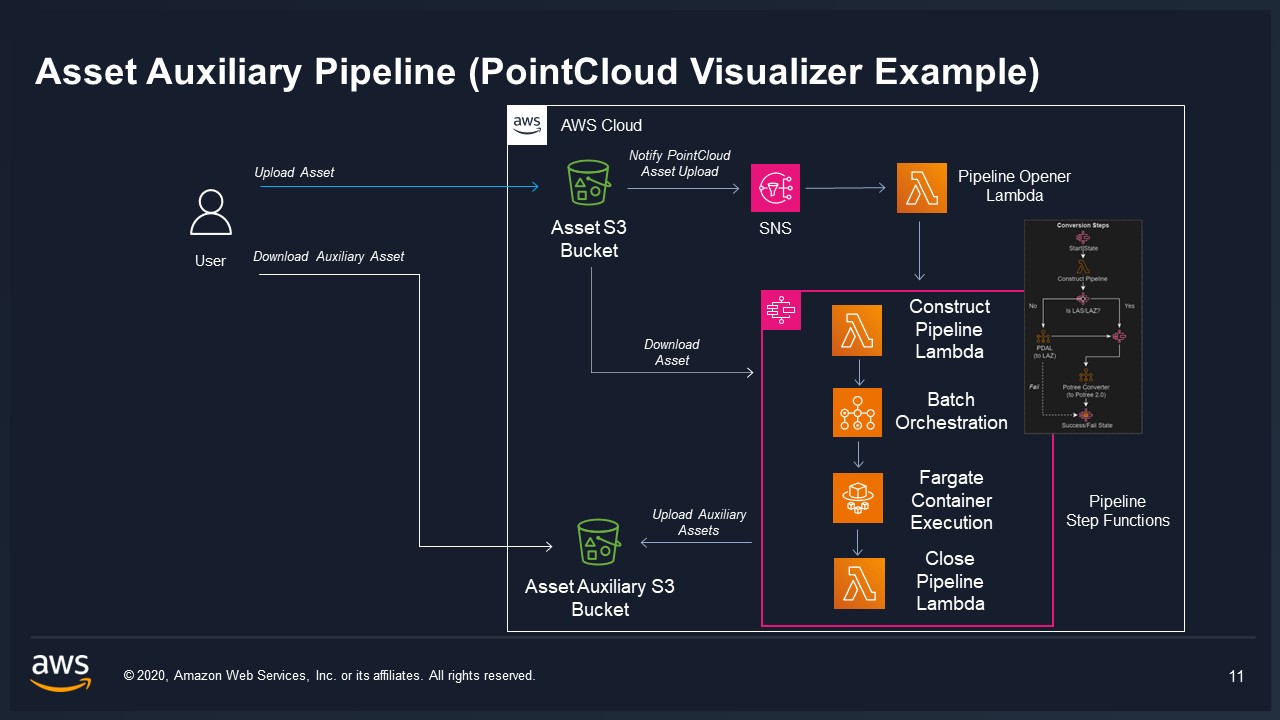
The workflow orchestrator generates specific S3 paths for each pipeline step. Understanding these paths is important for custom pipeline development and troubleshooting.
| Path Variable | Target Bucket | Purpose | Versioned |
|---|---|---|---|
outputS3AssetFilesPath | Asset bucket | File-level outputs: new files, file previews (.previewFile.*) | Yes |
outputS3AssetPreviewPath | Asset bucket | Asset-level preview images (whole-asset representative image) | Yes |
outputS3AssetMetadataPath | Asset bucket | Metadata files produced by the pipeline | Yes |
inputOutputS3AssetAuxiliaryFilesPath | Auxiliary bucket | Temporary working files or special non-versioned viewer data | No |
outputS3AssetFilesPath is for file-level outputs, including .previewFile.gif/.jpg/.png thumbnails tied to specific files. outputS3AssetPreviewPath is reserved for asset-level preview images that represent the asset as a whole. Most pipelines producing per-file previews write to outputS3AssetFilesPath. The auxiliary path is used only for temporary files or special non-versioned data such as Potree octree viewer files.
Custom Pipelines
In addition to the built-in pipelines, you can register custom pipelines through the VAMS API or web interface. Custom pipelines can use any of the four execution types (Lambda, SQS, EventBridge, Deadline Cloud) and can target any compute resource accessible from your AWS account.
For detailed guidance on creating custom pipelines, see Custom Pipelines.