

UIを構築する
タスク1: すべてをローカルで実行する
Section titled “タスク1: すべてをローカルで実行する”フルローカルスタック(game-ui開発サーバーとローカルGame API、およびローカルAG-UI Story Agent(これがInventory MCPサーバーを起動します))を1つのコマンドで起動します:
pnpm nx dev game-uiyarn nx dev game-uinpx nx dev game-uibunx nx dev game-uigame-uiのdevターゲットはgame-api:devとdungeon_adventure.story:agent-devにdependsOnしているため、Nxは各プロジェクトのローカルサーバーを並列で起動します。モジュール1で設定した接続を通じて、これらはInventory MCPサーバーとDynamoDB Localを起動します。コンテナエンジンが実行されていることを確認してから、ブラウザでhttp://localhost:4200/の開発サーバーを開いてください。
タスク2: CopilotKitがすでに配線されている場所
Section titled “タスク2: CopilotKitがすでに配線されている場所”モジュール1でgame-ui → storyのconnectionジェネレーターを実行したとき、ShadcnウェブサイトのAG-UI統合が生成されました。簡単に見てみる価値があります:
Directorypackages/game-ui/src/
Directorycomponents/
- AguiProvider.tsx すべてのAG-UIエージェントに登録された単一の
CopilotKitProvider。 Directorycopilot/
- index.tsx テーマ付きの
CopilotChat/CopilotSidebar/CopilotPopupを再エクスポート。 - ShadcnAssistantMessage.tsx, ShadcnUserMessage.tsx, ShadcnChatInput.tsx, ShadcnCursor.tsx, copilot.css
- index.tsx テーマ付きの
- story-agent-chat.tsx Story Agentの
agentIdに事前バインドされたCopilotChat。
- AguiProvider.tsx すべてのAG-UIエージェントに登録された単一の
Directoryhooks/
- useAguiStoryAgent.tsx デプロイされたStory Agentを指す
@ag-ui/clientHttpAgentをインスタンス化し、threadIdをAgentCoreの33文字の最小セッションIDにパディングします。
- useAguiStoryAgent.tsx デプロイされたStory Agentを指す
- main.tsx
<App />を<AguiProvider>でラップします
必要なのは、ルートに<CopilotChat agentId="agent" threadId={...} />をドロップするだけです。統合がどのように構成されているかの詳細については、React → AG-UI接続ガイドを参照してください。
タスク3: ダンジョン用にリスタイルする
Section titled “タスク3: ダンジョン用にリスタイルする”packages/game-ui/src/styles.cssを置き換えます。これはスタイリングのために変更する唯一のファイルです。共有Shadcnグローバルをインポートし、パレットをたいまつで照らされたダンジョンテーマにオーバーライドし、CopilotKitにそれらの色を継承させます:
@import '../../common/shadcn/src/styles/globals.css';@source './**/*.{ts,tsx}';
/* Dungeon theme — torch-lit parchment on stone. Applied to `:root` for the * page and to `[data-copilotkit][data-copilotkit]` for CopilotKit's chat * surface; CopilotKit ships a same-specificity `[data-copilotkit]` rule that * resets `--background` back to white, so we bump specificity with the * doubled selector. */:root,[data-copilotkit][data-copilotkit] {  --background: oklch(0.18 0.02 60);  --foreground: oklch(0.92 0.04 85);  --card: oklch(0.22 0.03 60);  --card-foreground: oklch(0.92 0.04 85);  --popover: oklch(0.2 0.02 60);  --popover-foreground: oklch(0.92 0.04 85);  --primary: oklch(0.75 0.15 75);  --primary-foreground: oklch(0.15 0.02 60);  --secondary: oklch(0.28 0.04 60);  --secondary-foreground: oklch(0.92 0.04 85);  --muted: oklch(0.25 0.02 60);  --muted-foreground: oklch(0.7 0.04 85);  --accent: oklch(0.4 0.12 30);  --accent-foreground: oklch(0.95 0.04 85);  --destructive: oklch(0.55 0.22 25);  --border: oklch(0.35 0.03 60);  --input: oklch(0.3 0.03 60);  --ring: oklch(0.75 0.15 75);  --sidebar: oklch(0.15 0.02 60);  --sidebar-foreground: oklch(0.88 0.04 85);  --sidebar-primary: oklch(0.75 0.15 75);  --sidebar-primary-foreground: oklch(0.15 0.02 60);  --sidebar-accent: oklch(0.28 0.04 60);  --sidebar-accent-foreground: oklch(0.92 0.04 85);  --sidebar-border: oklch(0.3 0.03 60);  --sidebar-ring: oklch(0.75 0.15 75);}
body {  font-family: 'Georgia', 'Cambria', serif;  background:    radial-gradient(circle at 20% 10%, oklch(0.25 0.05 70 / 0.4), transparent 40%),    radial-gradient(circle at 80% 90%, oklch(0.25 0.1 30 / 0.3), transparent 40%),    var(--background);}
h1, h2, h3 {  letter-spacing: 0.05em;}
タスク4: ゲームルートを作成する
Section titled “タスク4: ゲームルートを作成する”2つのルートが必要です。1つはヒーローを選ぶため、もう1つはプレイするためです。両方ともshadcnコンポーネントとCopilotKitチャットを使用します。手作りのチャットUIはありません。
import { useInfiniteQuery, useMutation } from '@tanstack/react-query';import { createFileRoute, useNavigate } from '@tanstack/react-router';import { useEffect, useMemo, useRef, useState } from 'react';import { Button } from '@dungeon-adventure/common-shadcn/components/ui/button';import { Input } from '@dungeon-adventure/common-shadcn/components/ui/input';import {  Card,  CardContent,} from '@dungeon-adventure/common-shadcn/components/ui/card';import { Spinner } from '@dungeon-adventure/common-shadcn/components/ui/spinner';import { useGameApi } from '../hooks/useGameApi';import type { IGame } from '@dungeon-adventure/game-api';
const GENRES = ['medieval', 'zombie', 'superhero'] as const;
export const Route = createFileRoute('/')({ component: RouteComponent });
function RouteComponent() {  const [playerName, setPlayerName] = useState('');  const [pending, setPending] = useState<IGame['genre'] | null>(null);  const navigate = useNavigate();  const gameApi = useGameApi();  const saveGame = useMutation(gameApi.games.save.mutationOptions());  const games = useInfiniteQuery(    gameApi.games.query.infiniteQueryOptions(      { limit: 10 },      { getNextPageParam: ({ cursor }) => cursor ?? undefined },    ),  );  const savedGames = useMemo(    () => games.data?.pages.flatMap((p) => p.items) ?? [],    [games.data],  );
  // Auto-fetch subsequent pages when the sentinel at the bottom of the list  // scrolls into view — keeps the homepage a simple infinite scroll without  // a "Load more" button.  const sentinel = useRef<HTMLDivElement | null>(null);  useEffect(() => {    const el = sentinel.current;    if (!el || !games.hasNextPage) return;    const io = new IntersectionObserver(      (entries) => {        if (          entries.some((e) => e.isIntersecting) &&          !games.isFetchingNextPage        ) {          void games.fetchNextPage();        }      },      { rootMargin: '120px' },    );    io.observe(el);    return () => io.disconnect();  }, [games.hasNextPage, games.isFetchingNextPage, games.fetchNextPage]);
  const startGame = async (player: string, genre: IGame['genre']) => {    if (!player.trim()) return;    setPending(genre);    try {      if (!savedGames.find((g) => g.playerName === player)) {        await saveGame.mutateAsync({ playerName: player, genre });      }      await navigate({        to: '/game/$playerName',        params: { playerName: player },        search: { genre },      });    } finally {      setPending(null);    }  };
  const busy = pending !== null;  const firstLoad = games.isLoading;
  return (    <div className="mx-auto flex w-full max-w-2xl flex-col gap-8">      <div className="text-center">        <h1 className="bg-gradient-to-r from-amber-300 to-rose-400 bg-clip-text text-5xl font-bold text-transparent">          AI Dungeon Adventure        </h1>        <p className="text-muted-foreground mt-2">          Pick a hero name, choose a genre, begin.        </p>      </div>
      <Card>        <CardContent className="flex flex-col gap-4 pt-6">          <Input            placeholder="Your hero's name"            value={playerName}            disabled={busy}            onChange={(e) => setPlayerName(e.target.value)}          />          <div className="grid grid-cols-3 gap-3">            {GENRES.map((genre) => (              <Button                key={genre}                variant="secondary"                disabled={!playerName.trim() || busy}                onClick={() => startGame(playerName, genre)}              >                {pending === genre && <Spinner />}                {genre[0].toUpperCase() + genre.slice(1)}              </Button>            ))}          </div>        </CardContent>      </Card>
      <div className="flex flex-col gap-2">        <h2 className="flex items-center gap-2 text-xl font-semibold">          Continue          {(firstLoad || games.isFetching) && <Spinner className="size-4" />}        </h2>        {!firstLoad && savedGames.length === 0 && (          <p className="text-muted-foreground text-sm">            No saved games yet — start a new adventure above.          </p>        )}        {savedGames.map((g) => (          <Button            key={g.playerName}            variant="outline"            className="justify-between"            disabled={busy}            onClick={() => startGame(g.playerName, g.genre)}          >            <span>{g.playerName}</span>            <span className="text-muted-foreground text-sm">              {g.genre[0].toUpperCase() + g.genre.slice(1)}            </span>          </Button>        ))}        <div ref={sentinel} aria-hidden className="h-1" />        {games.isFetchingNextPage && (          <div className="flex justify-center py-2">            <Spinner />          </div>        )}      </div>    </div>  );}
import { createFileRoute } from '@tanstack/react-router';import { useInfiniteQuery, useMutation } from '@tanstack/react-query';import { createFileRoute, useNavigate } from '@tanstack/react-router';import { useEffect, useMemo, useRef, useState } from 'react';import { Button } from '@dungeon-adventure/common-shadcn/components/ui/button';import { Input } from '@dungeon-adventure/common-shadcn/components/ui/input';import { Card, CardContent,} from '@dungeon-adventure/common-shadcn/components/ui/card';import { Spinner } from '@dungeon-adventure/common-shadcn/components/ui/spinner';import { useGameApi } from '../hooks/useGameApi';import type { IGame } from '@dungeon-adventure/game-api';
export const Route = createFileRoute('/')({ component: RouteComponent,});const GENRES = ['medieval', 'zombie', 'superhero'] as const;
export const Route = createFileRoute('/')({ component: RouteComponent });
function RouteComponent() { const [playerName, setPlayerName] = useState(''); const [pending, setPending] = useState<IGame['genre'] | null>(null); const navigate = useNavigate(); const gameApi = useGameApi(); const saveGame = useMutation(gameApi.games.save.mutationOptions()); const games = useInfiniteQuery( gameApi.games.query.infiniteQueryOptions( { limit: 10 }, { getNextPageParam: ({ cursor }) => cursor ?? undefined }, ), ); const savedGames = useMemo( () => games.data?.pages.flatMap((p) => p.items) ?? [], [games.data], );
// Auto-fetch subsequent pages when the sentinel at the bottom of the list // scrolls into view — keeps the homepage a simple infinite scroll without // a "Load more" button. const sentinel = useRef<HTMLDivElement | null>(null); useEffect(() => { const el = sentinel.current; if (!el || !games.hasNextPage) return; const io = new IntersectionObserver( (entries) => { if ( entries.some((e) => e.isIntersecting) && !games.isFetchingNextPage ) { void games.fetchNextPage(); } }, { rootMargin: '120px' }, ); io.observe(el); return () => io.disconnect(); }, [games.hasNextPage, games.isFetchingNextPage, games.fetchNextPage]);
const startGame = async (player: string, genre: IGame['genre']) => { if (!player.trim()) return; setPending(genre); try { if (!savedGames.find((g) => g.playerName === player)) { await saveGame.mutateAsync({ playerName: player, genre }); } await navigate({ to: '/game/$playerName', params: { playerName: player }, search: { genre }, }); } finally { setPending(null); } };
const busy = pending !== null; const firstLoad = games.isLoading;
return ( <div className="text-center"> <header> <h1>Welcome</h1> <p>Welcome to your new React website!</p> </header> <div className="mx-auto flex w-full max-w-2xl flex-col gap-8"> <div className="text-center"> <h1 className="bg-gradient-to-r from-amber-300 to-rose-400 bg-clip-text text-5xl font-bold text-transparent"> AI Dungeon Adventure </h1> <p className="text-muted-foreground mt-2"> Pick a hero name, choose a genre, begin. </p> </div>
<Card> <CardContent className="flex flex-col gap-4 pt-6"> <Input placeholder="Your hero's name" value={playerName} disabled={busy} onChange={(e) => setPlayerName(e.target.value)} /> <div className="grid grid-cols-3 gap-3"> {GENRES.map((genre) => ( <Button key={genre} variant="secondary" disabled={!playerName.trim() || busy} onClick={() => startGame(playerName, genre)} > {pending === genre && <Spinner />} {genre[0].toUpperCase() + genre.slice(1)} </Button> ))} </div> </CardContent> </Card>
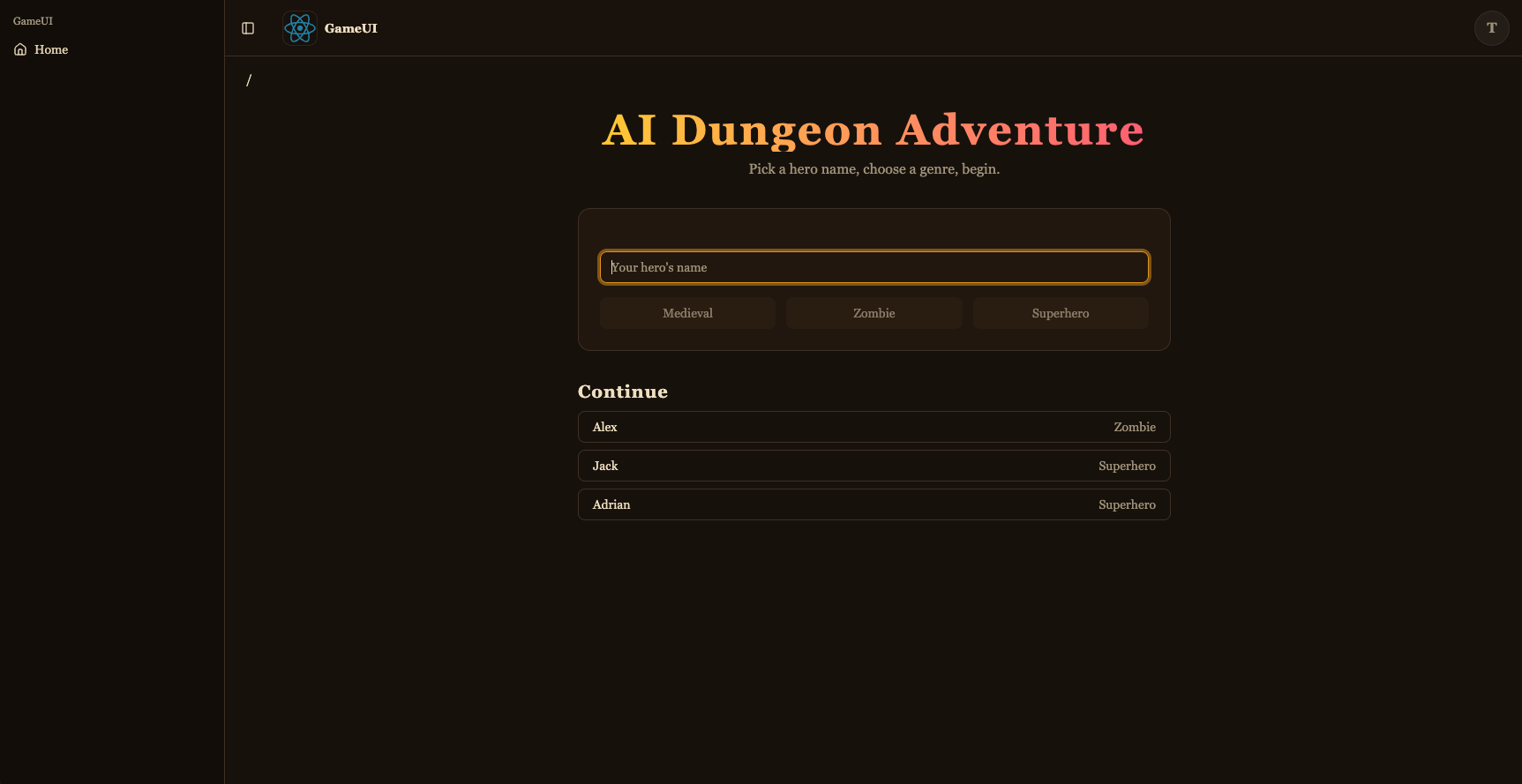
<div className="flex flex-col gap-2"> <h2 className="flex items-center gap-2 text-xl font-semibold"> Continue {(firstLoad || games.isFetching) && <Spinner className="size-4" />} </h2> {!firstLoad && savedGames.length === 0 && ( <p className="text-muted-foreground text-sm"> No saved games yet — start a new adventure above. </p> )} {savedGames.map((g) => ( <Button key={g.playerName} variant="outline" className="justify-between" disabled={busy} onClick={() => startGame(g.playerName, g.genre)} > <span>{g.playerName}</span> <span className="text-muted-foreground text-sm"> {g.genre[0].toUpperCase() + g.genre.slice(1)} </span> </Button> ))} <div ref={sentinel} aria-hidden className="h-1" /> {games.isFetchingNextPage && ( <div className="flex justify-center py-2"> <Spinner /> </div> )} </div> </div> );}これはゲームピッカーです:新規ゲームフォーム(shadcn Input + Button + Card)と、useGameApi().games.queryとuseInfiniteQueryによって供給される「続ける」リスト。IntersectionObserverによって監視される下部のセンチネル<div>がビューにスクロールされると自動的にfetchNextPage()を呼び出し、見出しの横とリストの下のスピナーがローディング状態を表示します。ゲームを開始すると、(playerName, genre)ペアをsaveGameし(次回表示されるように)、プレイルートに移動します。
import { UseAgentUpdate, useAgent } from '@copilotkit/react-core/v2';import { useQuery } from '@tanstack/react-query';import { createFileRoute } from '@tanstack/react-router';import { useEffect, useMemo, useRef } from 'react';import { CopilotChat } from '../../components/copilot';import { useGameApi } from '../../hooks/useGameApi';import type { IGame } from '@dungeon-adventure/game-api';
// AgentCore session ids must be at least 33 characters. The AG-UI hook pads// the threadId to this length before sending, so the thread id is stable for// a given (player, genre) pair — revisiting the URL continues the same story.const buildThreadId = (playerName: string, genre: string) =>  `${playerName}-${genre}`.padEnd(33, '0');
export const Route = createFileRoute('/game/$playerName')({  component: RouteComponent,  validateSearch: (search: Record<string, unknown>) => ({    genre: search.genre as IGame['genre'],  }),});
function RouteComponent() {  const { playerName } = Route.useParams();  const { genre } = Route.useSearch();  const threadId = useMemo(    () => buildThreadId(playerName, genre),    [playerName, genre],  );
  const gameApi = useGameApi();  const inventory = useQuery(    gameApi.inventory.query.queryOptions({ playerName, limit: 100 }),  );  // Conversation history persisted by the agent's ``S3SessionManager``. Each  // turn is stored as ``session_<threadId>/agents/agent_default/messages/…``.  //  // `staleTime: 0` + `refetchOnMount: 'always'` together force a fresh read  // on every visit — the cached snapshot from the *first* time we loaded  // this route (before the agent had written any turns back to S3) would  // otherwise look like an empty thread on revisit and trigger re-priming.  const pastActions = useQuery({    ...gameApi.actions.query.queryOptions({ sessionId: threadId }),    staleTime: 0,    refetchOnMount: 'always',  });
  const { agent } = useAgent({    agentId: 'agent',    updates: [UseAgentUpdate.OnMessagesChanged],  });
  // Hydrate the chat once the history query resolves. For a fresh thread  // (no stored messages) the agent's system prompt expects the player's  // name and genre in the first user message, so send that priming line.  //  // We wait for `isFetching` to go false (rather than just `isLoading`) so  // that revisits with a cached empty result from the first visit aren't  // mistaken for a fresh thread — the background refetch is what sees the  // turns the agent wrote since.  const primedRef = useRef(false);  useEffect(() => {    if (!agent || primedRef.current) return;    if (pastActions.isFetching || !pastActions.isSuccess) return;    primedRef.current = true;    const items = pastActions.data.items;    if (items.length > 0) {      agent.setMessages(        items.map((a) => ({          id: `m-${a.messageId}`,          role: a.role,          content: a.content,        })),      );      return;    }    agent.addMessage({      id: crypto.randomUUID(),      role: 'user',      content: `My name is ${playerName}. Start my ${genre} adventure.`,    });    void agent.runAgent();  }, [    agent,    pastActions.data,    pastActions.isFetching,    pastActions.isSuccess,    playerName,    genre,  ]);
  // The agent's ``add-to-inventory`` tool calls mutate DynamoDB directly, so  // the inventory query needs a nudge to refetch as turns complete. The  // ``useAgent({ updates: [OnMessagesChanged] })`` subscription re-renders  // this route on each message event — refetch whenever the message count  // changes, which covers both the initial populate and every subsequent  // turn.  const seenMessages = useRef(0);  useEffect(() => {    if (!agent) return;    if (agent.messages.length !== seenMessages.current) {      seenMessages.current = agent.messages.length;      void inventory.refetch();    }  });
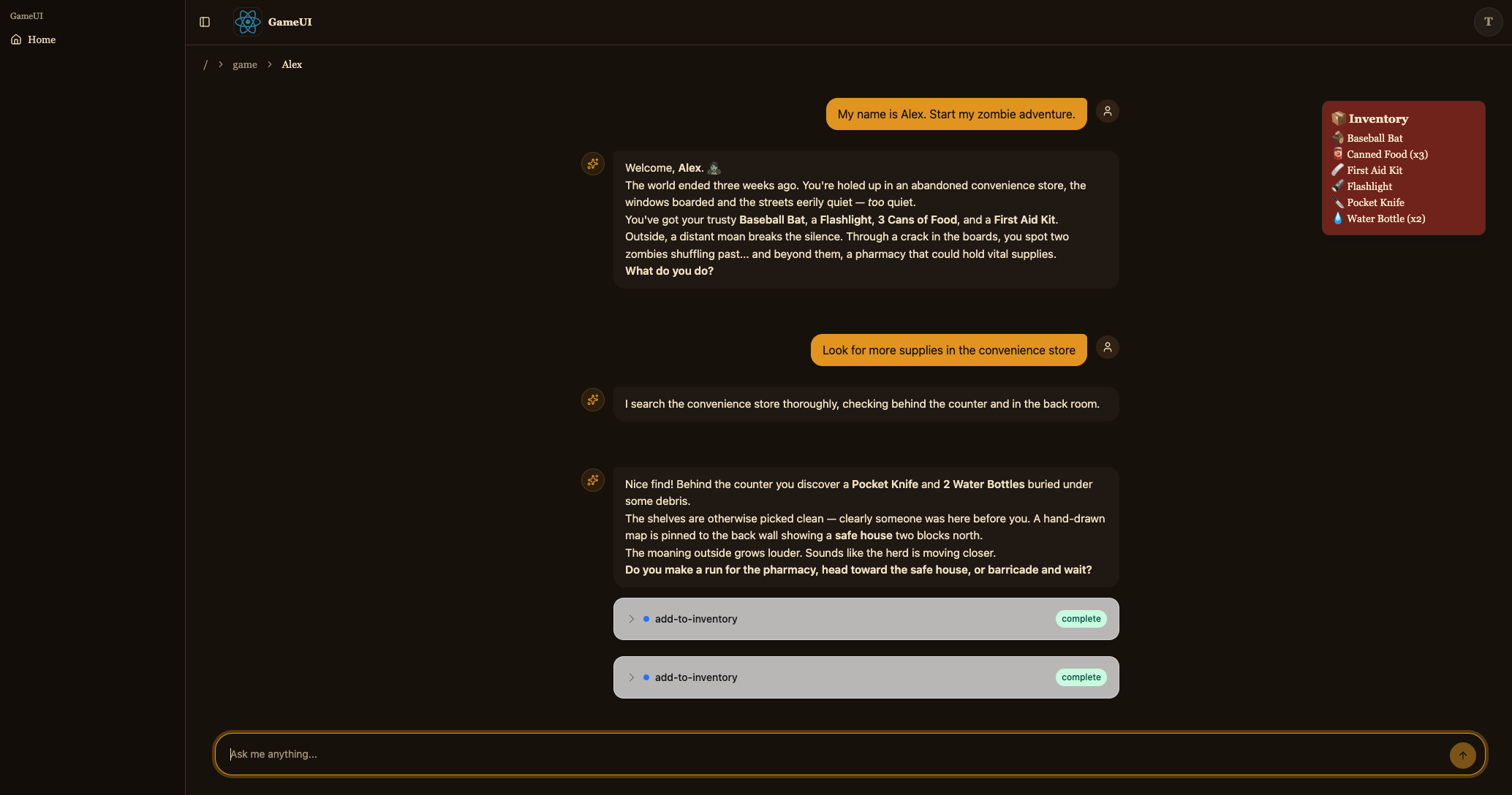
return ( <div className="relative flex h-[calc(100vh-10rem)] min-h-0 flex-col"> {!!inventory.data?.items.length && ( <aside className="bg-accent text-accent-foreground pointer-events-none absolute right-4 top-4 z-10 w-56 rounded-lg border p-3 shadow-lg"> <div className="mb-1 font-semibold">📦 Inventory</div> <ul className="flex flex-col gap-0.5 text-sm"> {inventory.data.items.map((item) => ( <li key={item.itemName}> {item.emoji ?? '•'} {item.itemName} {item.quantity > 1 ? ` (x${item.quantity})` : ''} </li> ))} </ul> </aside> )} <CopilotChat agentId="agent" threadId={threadId} labels={{ chatInputPlaceholder: 'What do you do?', welcomeMessageText: `${playerName}'s ${genre} adventure`, }} /> </div> );}これはプレイルートです。決定論的なthreadId({player}-{genre}を33文字にパディング。AG-UIフックはこれをそのままAgentCoreセッションIDとして送信します)を構築し、<CopilotChat agentId="agent" threadId={threadId} />をレンダリングし、useGameApi().inventory.queryからのインベントリを上にオーバーレイします。マウント時に、useGameApi().actions.query({ sessionId: threadId })がエージェントがS3に保存した会話履歴を読み取り、履歴がある場合はagent.setMessages(...)を呼び出してチャットを再水和します。それ以外の場合は、ストーリーを開始するために1つのプライミングユーザーメッセージを送信します。agent.messagesはuseAgent({ updates: [OnMessagesChanged] })を介してサブスクライブされているため、新しいターンごとにインベントリクエリも再フェッチされます(MCPツール呼び出しはDynamoDBを直接変更します)。
保存すると、開発サーバーで冒険を開始し、Story Agentとチャットできるようになります。
タスク5: AWSにデプロイする
Section titled “タスク5: AWSにデプロイする”ゲームが完成し、すべてのピースをローカルでテストしました。次に、どこからでもプレイできるようにAWSにデプロイしましょう。
コードをビルドする
Section titled “コードをビルドする”pnpm buildyarn buildnpm run buildbun buildアプリケーションをデプロイする
Section titled “アプリケーションをデプロイする”pnpm nx deploy-sandbox infrayarn nx deploy-sandbox infranpx nx deploy-sandbox infrabunx nx deploy-sandbox infradeploy-sandboxターゲットは、packages/infra/src/main.tsで定義されたサンドボックスステージをデプロイします。
deploy-sandboxターゲットはCloudFormation expressモードを使用します。これは、完全な安定化を待つのではなく、構成が適用されるとすぐに各リソース操作を完了します。最初のデプロイメントは完了するまで約4分かかり、一部のリソース(CloudFrontディストリビューションなど)はその後もしばらくの間バックグラウンドでプロビジョニングを続ける場合があります。その後のデプロイメントはより高速です。
expressモードはリソースが完全に安定する前に戻るため、deploy-sandboxは開発専用です。CI/CDおよび本番デプロイメントには、常に完全な安定化を待つdeploy-ciターゲットを使用してください。
デプロイメントが完了すると、次のような出力が表示されます:
dungeon-adventure-infra-sandbox-Applicationdungeon-adventure-infra-sandbox-Application: deploying... [2/2]
 ✅  dungeon-adventure-infra-sandbox-Application
✨  Deployment time: 220s
⚠️  Stack deployed using Express Mode. Resources still stabilizing: GameUICloudfrontDistribution, UserIdentityWebAcl, ...and more...
Outputs:dungeon-adventure-infra-sandbox-Application.GameApiEndpointXXX = https://xxx.execute-api.region.amazonaws.com/prod/dungeon-adventure-infra-sandbox-Application.GameUIDistributionDomainNameXXX = xxx.cloudfront.netdungeon-adventure-infra-sandbox-Application.InventoryMcpArn = arn:aws:bedrock-agentcore:region:xxxxxxx:runtime/dungeonadventureventoryMcpServerXXXX-YYYYdungeon-adventure-infra-sandbox-Application.RuntimeConfigApplicationId = xxxxdungeon-adventure-infra-sandbox-Application.StoryAgentArn = arn:aws:bedrock-agentcore:region:xxxxxxx:runtime/dungeonadventurecationStoryAgentXXXX-YYYYdungeon-adventure-infra-sandbox-Application.UserIdentityUserIdentityIdentityPoolIdXXX = region:xxxdungeon-adventure-infra-sandbox-Application.UserIdentityUserIdentityUserPoolClientIdXXX = xxxxxxxxxxdungeon-adventure-infra-sandbox-Application.UserIdentityUserIdentityUserPoolIdXXX = region_xxx
CloudFront URL(CDK出力のGameUIDistributionDomainName)に移動し、新しいアカウントにサインアップして、完全にAWS上で実行されているゲームをプレイしてください!
タスク6: ローカルとデプロイされたコンポーネントを混在させる
Section titled “タスク6: ローカルとデプロイされたコンポーネントを混在させる”スペクトラムの両端を見てきました:すべてローカル(dev)とすべてデプロイ済み。日常的な開発では、2つを混在させることがしばしば有用です。たとえば、実際のデプロイされたAPIとエージェントに対してウェブサイトコードを反復したり、実際のDynamoDBテーブルに対してAPIをローカルで実行したりします。
鍵はRUNTIME_CONFIG_APP_ID環境変数です。プロジェクトがLOCAL_DEV=trueなしで実行される場合、ランタイム構成ルックアップはこのアプリケーションIDを使用してAWS AppConfigから構成を取得します。これはCDK出力のRuntimeConfigApplicationId値です。
各ウェブサイトには、デプロイされたruntime-config.json(Cognitoプール、APIエンドポイント、エージェントARN)をローカル開発サーバーにダウンロードするload-runtime-configターゲットがあります。いくつかの有用な組み合わせ:
-
ローカルウェブサイト → デプロイされたバックエンド。 デプロイされた構成を一度プルしてから、プレーンな
serveターゲットを実行して、UIがデプロイされたAPIとエージェントと通信するようにします:Terminal window pnpm nx load-runtime-config game-uiTerminal window yarn nx load-runtime-config game-uiTerminal window npx nx load-runtime-config game-uiTerminal window bunx nx load-runtime-config game-uiTerminal window pnpm nx serve game-uiTerminal window yarn nx serve game-uiTerminal window npx nx serve game-uiTerminal window bunx nx serve game-ui -
ローカルAPI → 実際のDynamoDBテーブル。 デプロイされたアプリケーションIDに設定された
RUNTIME_CONFIG_APP_IDでプレーンなserveターゲットを実行します:Terminal window RUNTIME_CONFIG_APP_ID=<RuntimeConfigApplicationId from CDK outputs> pnpm nx serve game-apiTerminal window RUNTIME_CONFIG_APP_ID=<RuntimeConfigApplicationId from CDK outputs> yarn nx serve game-apiTerminal window RUNTIME_CONFIG_APP_ID=<RuntimeConfigApplicationId from CDK outputs> npx nx serve game-apiTerminal window RUNTIME_CONFIG_APP_ID=<RuntimeConfigApplicationId from CDK outputs> bunx nx serve game-api
この柔軟性により、作業している正確なスライスを、意味のあるコンポーネント(ローカルまたはデプロイ済み)に対してテストできます。
おめでとうございます。エージェント型ダンジョンアドベンチャーゲームを構築、テスト、デプロイしました!🎉🎉🎉