AWS Parallel Computing Service (PCS)
Configure EDH installer to deploy Slurm
While not required, we recommend enabling Slurm on EDH. This will deploy a slurmctld server on the EDH Controller and configure all the necessary libraries needed for your PCS connector.
Navigate to default_config.yml and add slurm to the scheduler.scheduler_engine section:
  scheduler:
    # Scheduler(s) to install/configure on the SOCA_CONTROLLER host
    scheduler_engine:
      - "openpbs" # Production ready - Stable & Tested
      # - "lsf" # Preview - Development, not stable, not fully tested and not suitable for production.
      - "slurm" # Preview - Development, not stable, not fully tested and not suitable for production.
Note
You can keep openpbs / lsf to run a multi-scheduler setup, or choose to use only Slurm.
Then, navigate to system.scheduler.slurm to review the default parameters:
slurm:
    # Install path. We recommend you to not change this path
    # if you do, make sure to update relevant cluster_analytics / log_backup  paths as well
    # Note: $EDH_CLUSTER_ID will be automatically replaced by the EDH Cluster Name specified at install time
    install_prefix_path: "/opt/edh/$EDH_CLUSTER_ID/schedulers/default/slurm"
    install_sysconfig_path: "/opt/edh/$EDH_CLUSTER_ID/schedulers/default/slurm/etc"

    version: "25-05-3-1"
    url: "https://github.com/SchedMD/slurm/archive/refs/tags/slurm-25-05-3-1.tar.gz"
    sha256: "a24d9a530e8ae1071dd3865c7260945ceffd6c65eea273d0ee21c85d8926782e"

    compatibility_packages:
        # Note: SLURM is only compatible with libjwt 1.x as there is a dependency with jwt_add_header()
        libjwt:
            url: "https://github.com/benmcollins/libjwt/releases/download/v1.17.0/libjwt-1.17.0.tar.bz2"
            sha256: "b8b257da9b64ba9075fce3a3f670ae02dee7fc95ab7009a2e1ad60905e3f8d48"
You're all set! You can now continue with a regular EDH installation. While your cluster provisions, we recommend reviewing the EDH Slurm bootstrap scripts to familiarize yourself with the automation running behind the scenes.
Deploy an AWS PCS Cluster
In this example, we'll deploy a new AWS PCS cluster using the same VPC as EDH. To simplify the setup, we'll use the same security group for both AWS PCS and the EDH Controller.
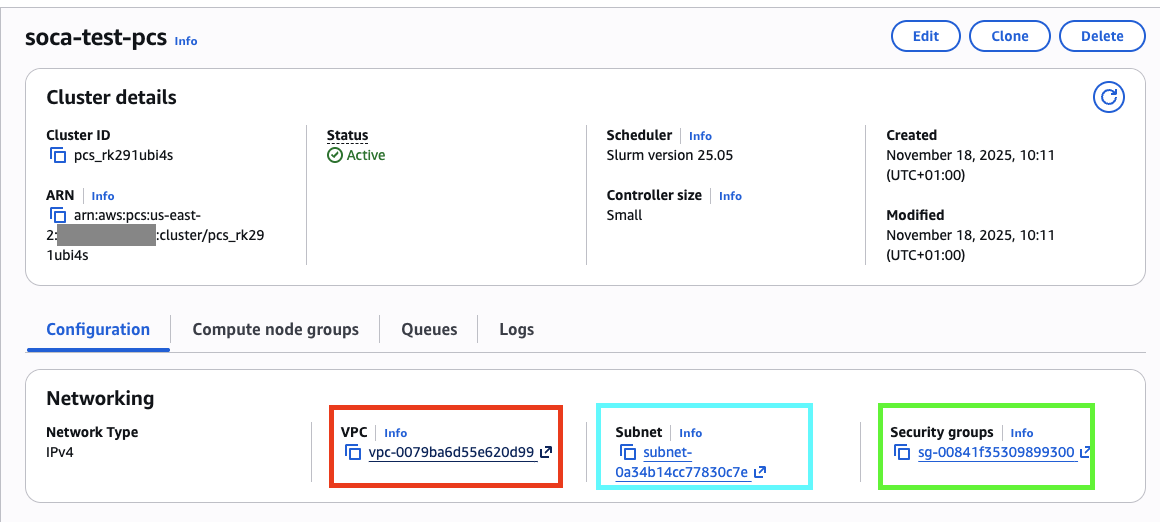
- RED: VPC where EDH is deployed
- BLUE: A subnet within the same VPC
- GREEN: EDH Controller Security Group, or a security group that allows
TCPtraffic on port6817between the PCS and EDH Controller security groups (if using separate security groups)
Tip
EDH can be installed on existing VPC/Subnets if needed.
Connect EDH with AWS PCS
Next, configure EDH as a client for your PCS cluster. This step is currently manual and must be executed on the EDH Controller:
# Run these commands as root
sudo su -

# CD into the directory where the Slurm code is copied
pushd /root/edh_bootstrap_<instance_id>/slurm/

# Clean the previous build
make distclean

# Export custom path where we will install the Slurm client for PCS
export SLURM_SOCA_INSTALL_DIR="/opt/edh/schedulers/pcs"
export SLURM_SOCA_INSTALL_SYSCONFIG_DIR="/opt/edh/schedulers/conf/pcs"

# Compile SLURM
./configure --prefix=${SLURM_SOCA_INSTALL_DIR} \
          --exec-prefix=${SLURM_SOCA_INSTALL_DIR} \
          --libdir=${SLURM_SOCA_INSTALL_DIR}/lib64 \
          --bindir=${SLURM_SOCA_INSTALL_DIR}/bin  \
          --sbindir=${SLURM_SOCA_INSTALL_DIR}/sbin \
          --includedir=${SLURM_SOCA_INSTALL_DIR}/include \
          --sysconfdir=${SLURM_SOCA_INSTALL_SYSCONFIG_DIR} \
          --with-munge=/usr \
          --disable-dependency-tracking \
          --enable-pkgconfig \
          --enable-cgroupv2 \
          --with-pmix \
          --enable-pam

make -j$(nproc)
make -j$(nproc) contrib
make install -j$(nproc)
make install-contrib -j$(nproc)
mkdir -p ${SLURM_SOCA_INSTALL_SYSCONFIG_DIR}
Navigate to AWS Secrets Manager to find the PCS authentication key (begins with pcs!slurm-secret)

Click “Retrieve Secret Value”, then copy the base64-encoded string. Make sure to trim any extra whitespace or newline characters.
# Copy the Slurm/PCS key and decode it
echo "Efe4/yUOoiAl<REDACTED>" | base64 --decode > ${SLURM_SOCA_INSTALL_SYSCONFIG_DIR}/slurm.key

# Adjust permissions for your key
chmod 600 ${SLURM_SOCA_INSTALL_SYSCONFIG_DIR}/slurm.key
Navigate to your PCS console, locate the IP address of your slurmctld endpoint, and note it down. You'll need it to complete the configuration.
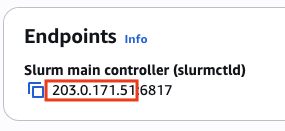
# Configure your slurm.conf
cat << EOF > "${SLURM_SOCA_INSTALL_SYSCONFIG_DIR}/slurm.conf"
ClusterName="soca-test-pcs"
ControlMachine="203.0.171.51" ## REPLACE WITH YOUR PCS SLURM CONTROLLER
SlurmUser=root
SlurmdUser=root
AuthType=auth/slurm
StateSaveLocation=${SLURM_SOCA_INSTALL_SYSCONFIG_DIR}/var/spool/slurmctld
SlurmdSpoolDir=${SLURM_SOCA_INSTALL_SYSCONFIG_DIR}/var/spool/slurmd
NodeName="localhost"
EOF

# Create the spoolers
mkdir -p ${SLURM_SOCA_INSTALL_SYSCONFIG_DIR}/var/spool/slurmctld
mkdir -p ${SLURM_SOCA_INSTALL_SYSCONFIG_DIR}/var/spool/slurmd
Validate the connectivity between the EDH Controller and PCS:
telnet 203.0.171.51 6817
Trying 203.0.171.51...
Connected to 203.0.171.51.
Escape character is '^]'.
Note
If your telnet command fails, verify the security group configuration between your PCS cluster and EDH Controller.
Ensure TCP:6817 traffic is authorized between the two environments. Also allow traffic for relevant security groups (ComputeNodeSG, LoginNodeSG, etc.) if you plan to access your PCS environment from EDH nodes other than the EDH Controller.
Now register PCS on EDH using the edhctl utility:
source /etc/environment
/opt/edh/$EDH_CLUSTER_ID/cluster_manager/edhctl schedulers set --binary-folder-paths "/opt/edh/schedulers/pcs/bin:/opt/edh/schedulers/pcs/sbin" \
  --enabled "true" \
  --scheduler-identifier "soca-test-pcs" \
  --endpoint "203.0.171.51" \
  --provider "slurm" \
  --manage-host-provisioning "false" \
  --slurm-configuration '{"install_prefix_path": "/opt/edh/schedulers/pcs", "install_sysconfig_path": "/opt/edh/schedulers/conf/pcs"}'

{
    "enabled": true,
    "provider": "slurm",
    "endpoint": "203.0.171.51",
    "binary_folder_paths": "/opt/edh/schedulers/pcs/bin:/opt/edh/schedulers/pcs/sbin",
    "soca_managed_nodes_provisioning": false,
    "identifier": "soca-test-pcs",
    "slurm_configuration": "{\"install_prefix_path\": \"/opt/edh/schedulers/pcs\", \"install_sysconfig_path\": \"/opt/edh/schedulers/conf/pcs\"}"
}
Do you want to create this new scheduler (add --force to skip this confirmation)? (yes/no) yes
Cache updated
Success: Key has been updated successfully

# Restart the web ui
/opt/edh/$EDH_CLUSTER_ID/cluster_manager/web_interface/socawebui.sh restart
Finally, start your slurmd process (not slurmctld, as we only need the client).
cd ${SLURM_SOCA_INSTALL_DIR}
./sbin/slurmd -Dvv &
Validate connectivity between EDH and the PCS cluster using the lsid utility:
${SLURM_SOCA_INSTALL_DIR}/bin/lsid
Slurm 25.05.4, May 1 2025
Copyright SchedMD LLC, 2010-2017.

My cluster name is soca-test-pcs
My master name is slurmctld-primary
If you've already created PCS queues, you can view them by running sinfo:

${SLURM_SOCA_INSTALL_DIR}/bin/sinfo
PARTITION      AVAIL  TIMELIMIT  NODES  STATE NODELIST
pcs-test-queue    up   infinite      1  idle# pcs-computenode-group-1-1
Interact with your PCS cluster
Warning
Compute provisioning is managed by AWS PCS, and EDH Job Resources are not supported on PCS. You must configure your PCS Compute Node Groups first.
Submit a PCS job
CLI
Submit a PCS job using the sbatch command from any EDH host (DCV, Login Nodes, or other HPC nodes).
First, create a simple Slurm job:
#!/bin/bash
#SBATCH --partition=pcs-test-queue
#SBATCH --job-name=soca-pcs
#SBATCH --output=test.out

echo "Hello from pcs-test-queue!"
/opt/edh/schedulers/pcs/bin/sbatch test_script.slurm
Submitted batch job 1
Web Interface
Submit your PCS jobs using the EDH Web Interface:
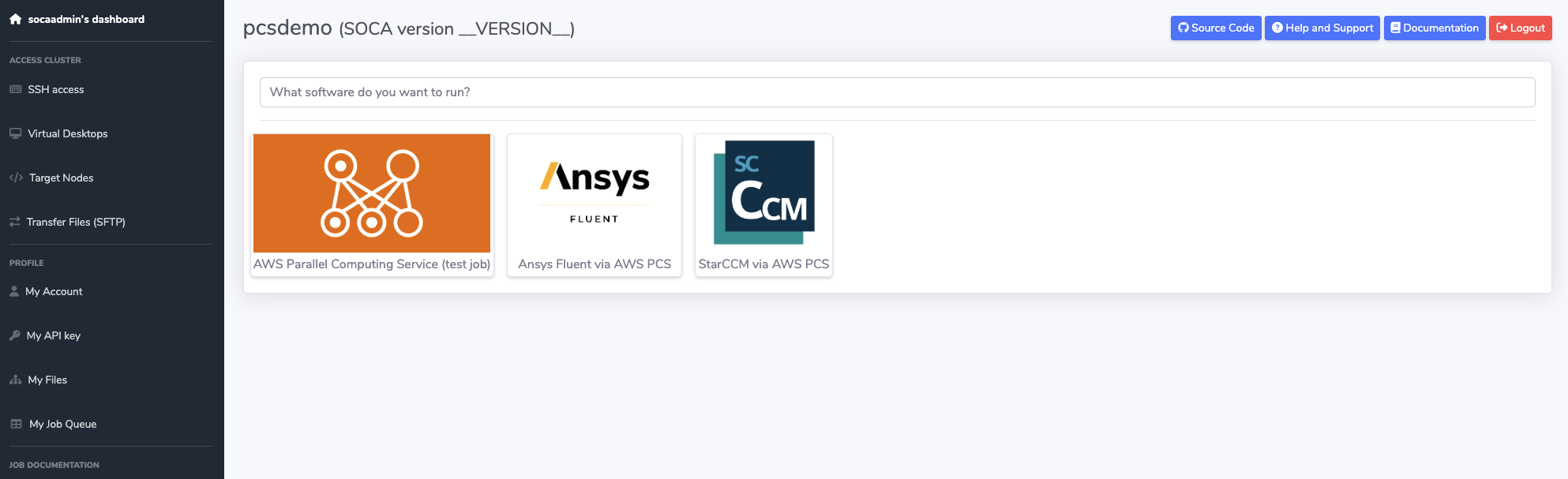
Note
Select your soca-test-pcs scheduler as the job interpreter during Step 2 - Design your Job Script:

HTTP API
Submit your PCS job using the EDH HTTP REST API.
Note
Specify interpreter=soca-test-pcs when submitting your POST request.
View PCS Jobs using EDH Web Interface
View and control your PCS HPC jobs using the "My Job Queue" page on the EDH Web Interface:
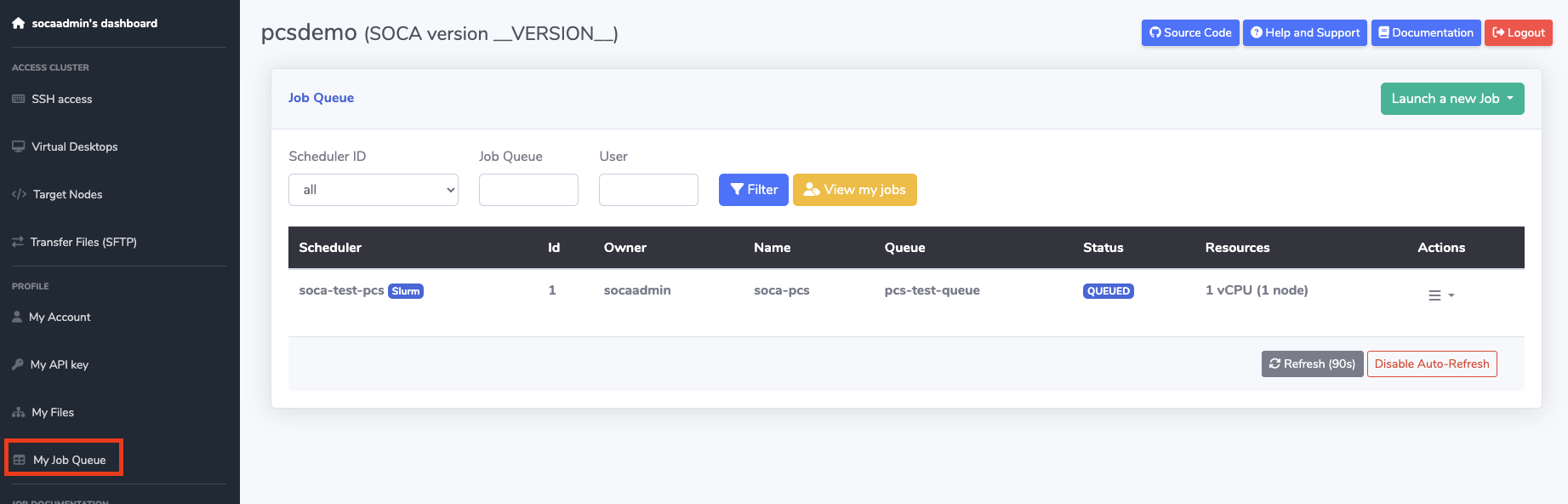
Delete PCS Jobs using EDH Web Interface
Delete a job using the CLI command scancel or directly via the web interface:

SocaAWSPCSClient
Preview
SocaPCSClient is currently in preview and is considered experimental.
SocaAWSPCSClient is an EDH client for managing PCS clusters from the EDH environment. You can create, delete, and edit PCS clusters on the fly and submit jobs via the SocaHpcJob framework.
In this example, we'll demonstrate how EDH can instantiate multiple PCS clusters across different regions and enable cloud bursting from on-premises to AWS.
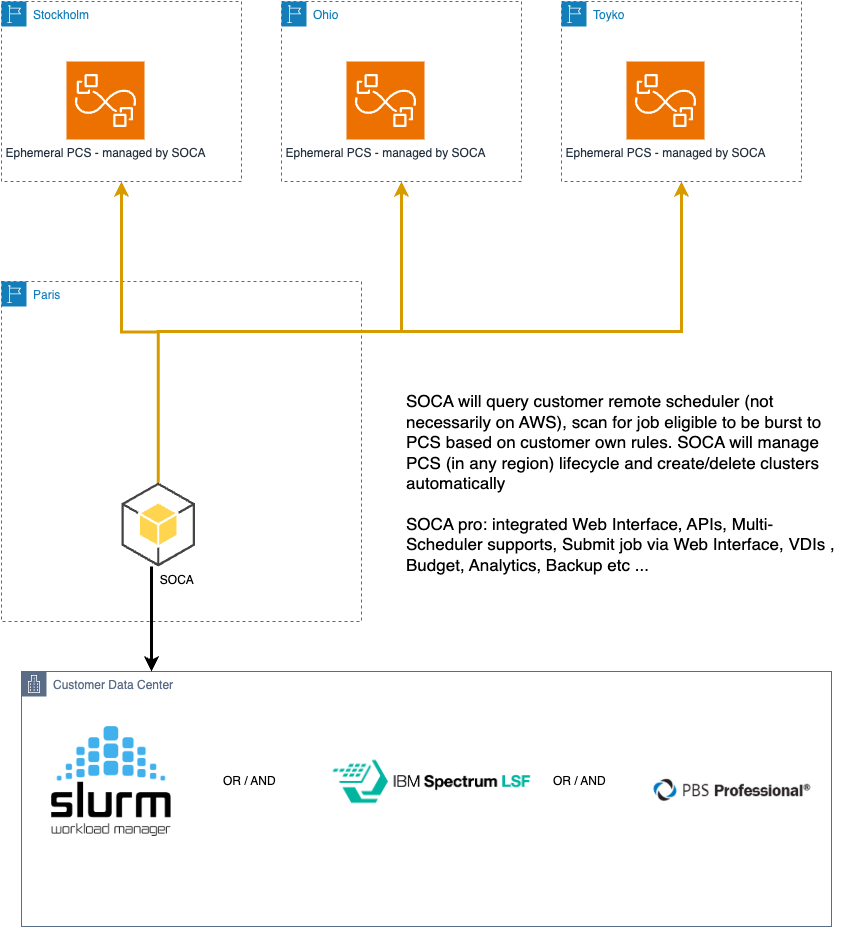
Info
Run these commands within the edhpython environment.
>>> from utils.aws.pcs_client import SocaAWSPCSClient

# Although SOCA is in eu-west-3, we want to burst to PCS in a different region
>>> _soca_pcs = SocaAWSPCSClient(cluster_name="soca-test", region_name="eu-north-1")

# Access `SocaAWSPCSClient` attributes:
>>> _soca_pcs.cluster_name
'soca-test'
>>> _soca_pcs.cluster_identifier # Empty as we haven't queried the PCS endpoint
>>> _soca_pcs.cluster_state # Empty as we haven't queried the PCS endpoint

# Try to fetch the PCS cluster, You will get an error because the cluster does not yet exist
>>> _soca_pcs.get_cluster()
Error ID: GENERIC_ERROR | Error Message:  Unable to find a PCS cluster named soca-test or invalid permissions. Call create_cluster() to first create this cluster | Status Code: 500 | Error RequestId 1381b52d-54d6-439a-84eb-fdbac44daa13


# Create the cluster (subnet_id / security_group_ids already exist in the target region)
>>> _soca_pcs.create_cluster(
    subnet_ids=["subnet-0a99688795e7d48a2"],
    security_group_ids=["sg-04289edbc98c18ac3"],
    size="SMALL",
)
<SocaResponse: {'success': True, 'message': 'pcs_ybg5vqjc7o', 'status_code': 200, 'request': None, 'trace': None}>

# cluster_identifier and cluster_state are now set (note: you can always refresh # cluster_state by calling get_cluster() again)
>>> _soca_pcs.cluster_identifier
'pcs_ybg5vqjc7o'
>>> _soca_pcs.cluster_state
'CREATING'

# get_cluster returns a dictionary:
# - `cluster` -> PCS cluster info
#- `queues` -> List of PCS queues associated (ignored if cluster_state is not ACTIVE)
# - `compute_node_groups` -> List of PCS Compute Nodes group associated to the PCS cluster (ignored if cluster_state is not ACTIVE)
>>> _soca_pcs.get_cluster()
<SocaResponse: {'success': True, 'message': {'cluster': {'name': 'soca-test', 'id': 'pcs_ybg5vqjc7o', 'arn': 'arn:aws:pcs:eu-north-1:REDACTED:cluster/pcs_ybg5vqjc7o', 'status': 'ACTIVE', 'createdAt': datetime.datetime(2026, 1, 10, 18, 49, 10, tzinfo=tzlocal()), 'modifiedAt': datetime.datetime(2026, 1, 10, 18, 49, 10, tzinfo=tzlocal()), 'scheduler': {'type': 'SLURM', 'version': '25.05'}, 'size': 'SMALL','slurmConfiguration': {'scaleDownIdleTimeInSeconds': 600, 'authKey': {'secretArn': 'arn:aws:secretsmanager:eu-north-1:REDACTED:secret:pcs!slurm-secret-pcs_ybg5vqjc7o-Mce9D2', 'secretVersion': '14402cbd-5770-4319-b83a-fa8fe8a6b95a'}, 'accounting': {'mode': 'NONE'}}, 'networking': {'subnetIds': ['subnet-0a99688795e7d48a2'], 'securityGroupIds': ['sg-04289edbc98c18ac3'], 'networkType': 'IPV4'}, 'endpoints':[{'type': 'SLURMCTLD', 'privateIpAddress': '172.31.31.118', 'port': '6817'}]}, 'queues': [], 'compute_node_groups': []}, 'status_code': 200, 'request': None, 'trace': None}>

# By default, get_cluster returns queues and compute_node groups. You can disable them via `get_cluster(list_queues=False, list_compute_node_groups=False)`

# Query compute nodes directly , none exists (yet)
>>> _soca_pcs.list_compute_node_groups()
<SocaResponse: {'success': True, 'message': [], 'status_code': 200, 'request': None, 'trace': None}>

# Create compute node group
>>> _soca_pcs.create_compute_node_group(
       group_name="mytest2",
       launch_template_id="lt-0fff6ae5163d1cfd7", # launch template created manually directly on EC2 console.
       launch_template_version="1",
       instance_types=["c6i.xlarge"],
       desired_capacity=1,
       ami_id="ami-095d0c391b2eb465e", #  aws-pcs-sample_ami-amzn2-x86_64-slurm-25.05-2026-01-05T19-29-09.548Z
       instance_profile_arn="arn:aws:iam::REDACTED:instance-profile/AWSPCStest"
)

<SocaResponse: {'success': True, 'message': {'id': 'pcs_07hi03iy7y', 'name': 'mytest2'}, 'status_code': 200, 'request': None, 'trace': None}>

# Compute Node Group is now visible
>>> _soca_pcs.list_compute_node_groups()
<SocaResponse: {'success': True, 'message': [{'name': 'mytest2', 'id': 'pcs_07hi03iy7y', 'arn': 'arn:aws:pcs:eu-north-1:REDACTED:cluster/pcs_3f3ndig33q/computenodegroup/pcs_07hi03iy7y', 'clusterId': 'pcs_3f3ndig33q', 'createdAt': datetime.datetime(2026, 1, 11, 11, 40, 38, tzinfo=tzlocal()), 'modifiedAt': datetime.datetime(2026, 1, 11, 11, 40, 38, tzinfo=tzlocal()), 'status': 'CREATING'}], 'status_code': 200, 'request': None, 'trace': None}>

# Check queues, none are configured yet
>>> _soca_pcs.list_queues()
<SocaResponse: {'success': True, 'message': [], 'status_code': 200, 'request': None, 'trace': None}>

#  Create queue and assign compute node group
>>> _soca_pcs.create_queue(queue_name="mytestqueue", compute_node_group_ids=["pcs_07hi03iy7y"])
<SocaResponse: {'success': True, 'message': 'Queue mytestqueue created successfully with id pcs_4zrlhi3ix9', 'status_code': 200, 'request': None, 'trace': None}>

# Queue is now visible
>>> _soca_pcs.list_queues()
<SocaResponse: {'success': True, 'message': [{'name': 'mytestqueue', 'id': 'pcs_4zrlhi3ix9', 'arn': 'arn:aws:pcs:eu-north-1:REDACTED:cluster/pcs_3f3ndig33q/queue/pcs_4zrlhi3ix9', 'clusterId': 'pcs_3f3ndig33q', 'createdAt': datetime.datetime(2026, 1, 11, 11, 47, 8, tzinfo=tzlocal()), 'modifiedAt':datetime.datetime(2026, 1, 11, 11, 47, 8, tzinfo=tzlocal()), 'status': 'CREATING'}], 'status_code': 200, 'request': None, 'trace': None}>

# (Do not run at this time, just for future reference)
# Clean the entire environment
>>> _soca_pcs.delete_queue(queue_identifier="pcs_4zrlhi3ix9")
<SocaResponse: {'success': True, 'message': 'Delete initiated for pcs_4zrlhi3ix9 for soca-test, your queue  will be removed shortly', 'status_code': 200, 'request': None, 'trace': None}>

>>> _soca_pcs.delete_compute_node_group(compute_node_group_identifier="pcs_07hi03iy7y")
<SocaResponse: {'success': True, 'message': 'Delete initiated for pcs_07hi03iy7y for soca-test, your compute node group will be removed shortly', 'status_code': 200, 'request': None, 'trace': None}>

>>> _soca_pcs.delete_cluster()
<SocaResponse: {'success': True, 'message': 'Delete initiated for soca-test, your PCS cluster will be removed shortly', 'status_code': 200, 'request':None, 'trace': None}>
Assume the following is our testjob.sbatch script:
#!/bin/bash
#SBATCH --job-name=test_job
#SBATCH --partition normal
#SBATCH --output=test_job_%j.out
#SBATCH --error=test_job_%j.err
#SBATCH --ntasks=1
#SBATCH --comment "instance_type=c6i.xlarge scratch_size=50"
# Note how we pass SOCA parameters via --comment
# https://awslabs.github.io/engineering-development-hub-documentation/documentation/High-Performance-Computing/integration-ec2-job-parameters/

echo "Job started on $(date)"
echo "Running on host: $(hostname)"
echo "Working directory: $(pwd)"

sleep 30

echo "Job finished on $(date)"
Load the SLURM shell on EDH and submit a test job to the corporate/local Slurm cluster (non-PCS). Refer to the first section of this page to deploy your Slurm connector on your EDH environment:
[socaadmin@ip-63-0-113-184 ~]$ edh_slurm-default-soca-poc1
========= SOCA =========
>> SLURM environment loaded, you can now run commands such as sbatch/squeue/srun etc ...
>> SLURM is installed under: /opt/edh/soca-poc1/schedulers/default/slurm
>> Add /bin/soca_slurm-default-soca-poc1 to your .bashrc / .bash_profile to automatically run this script
>> Type exit to close this shell
========================
(soca_slurm) socaadmin@ip-63-0-113-184:~# sbatch testjob.sbatch
Submitted batch job 4
Your job (job ID 4) is now submitted to a remote non-AWS managed Slurm cluster. Here are the steps to automatically burst this job to one of your PCS environments:
# Import custom SOCA library
>>> from utils.datamodels.hpc.scheduler import SocaHpcSchedulerProvider, get_schedulers
>>> from utils.hpc.job_fetcher import SocaHpcJobFetcher

# all_soca_schedulers contains all schedulers registered to the current SOCA environment.
>>> all_soca_schedulers = get_schedulers()

# In this example, I'm operating a SOCA multi-scheduler setup with:
# - OpenPBS
# - LSF
# - Slurm (which is the one I use to mimic customer local/on-prem environment)
>>> all_soca_schedulers
[SocaHpcScheduler(provider=<SocaHpcSchedulerProvider.LSF: 'lsf'>, enabled=True, endpoint='ip-63-0-113-184.eu-west-3.compute.internal', identifier='lsf-default-soca-poc1', soca_managed_nodes_provisioning=True, binary_folder_paths='', lsf_configuration=SocaHpcSchedulerLSFConfig(lsf_top='/opt/edh/soca-poc1/schedulers/default/lsf', version='10.1'), slurm_configuration=None, pbs_configuration=None, mirroring_scheduler=None), SocaHpcScheduler(provider=<SocaHpcSchedulerProvider.OPENPBS: 'openpbs'>, enabled=True, endpoint='ip-63-0-113-184.eu-west-3.compute.internal', identifier='openpbs-default-soca-poc1', soca_managed_nodes_provisioning=True, binary_folder_paths='/opt/edh/soca-poc1/schedulers/default/openpbs/bin', lsf_configuration=None, slurm_configuration=None, pbs_configuration=SocaHpcSchedulerPBSConfig(pbs_exec='/opt/edh/soca-poc1/schedulers/default/openpbs', pbs_home='/opt/edh/soca-poc1/schedulers/default/openpbs/var/spool/pbs'), mirroring_scheduler=None), SocaHpcScheduler(provider=<SocaHpcSchedulerProvider.SLURM: 'slurm'>, enabled=True, endpoint='ip-63-0-113-184.eu-west-3.compute.internal', identifier='slurm-default-soca-poc1', soca_managed_nodes_provisioning=False, binary_folder_paths='/opt/edh/soca-poc1/schedulers/default/slurm/bin:/opt/edh/soca-poc1/schedulers/default/slurm/sbin', lsf_configuration=None, slurm_configuration=SocaHpcSchedulerSlurmConfig(install_prefix_path='/opt/edh/soca-poc1/schedulers/default/slurm', install_sysconfig_path='/opt/edh/soca-poc1/schedulers/default/slurm/etc'), pbs_configuration=None, mirroring_scheduler=None)]

# Load my slurm-default-soca-poc1 which is my local Slurm
>>> for _registered_soca_scheduler in get_schedulers():
...     if _registered_soca_scheduler.identifier == "slurm-default-soca-poc1":
...         local_slurm = _registered_soca_scheduler
...         break
...
>>> local_slurm
SocaHpcScheduler(provider=<SocaHpcSchedulerProvider.SLURM: 'slurm'>, enabled=True, endpoint='ip-63-0-113-184.eu-west-3.compute.internal', identifier='slurm-default-soca-poc1', soca_managed_nodes_provisioning=False, binary_folder_paths='/opt/edh/soca-poc1/schedulers/default/slurm/bin:/opt/edh/soca-poc1/schedulers/default/slurm/sbin', lsf_configuration=None, slurm_configuration=SocaHpcSchedulerSlurmConfig(install_prefix_path='/opt/edh/soca-poc1/schedulers/default/slurm', install_sysconfig_path='/opt/edh/soca-poc1/schedulers/default/slurm/etc'), pbs_configuration=None, mirroring_scheduler=None)

# Fetch JOB ID 4
# note: you can fetch by_queue() / by_user() / by_state() / by_job_id() ...
>>> _my_slurm_job = SocaHpcJobFetcher(scheduler_info=local_slurm).by_job_id(job_id="4")

# _my_slurm_job is now a valid SocaHpcJobSlurm object
>>> _my_slurm_job
<SocaResponse: {'success': True, 'message': [SocaHpcJobSlurm(instance_type='c6i.xlarge', root_size=None, base_os=None, instance_ami=None, instance_profile=None, security_
groups=None, subnet_id=None, capacity_reservation_id=None, anonymous_metrics=True, fsx_lustre=None, fsx_lustre_size=None, fsx_lustre_deployment_type=None, fsx_lustre_per_unit_throughput=None, fsx_lustre_storage_type=None, scratch_iops=None, scratch_size='50', spot_price=None, spot_allocation_count=None, spot_allocation_strategy=None, keep_ebs=False, placement_group=False, efa_support=False, force_ri=False, ht_support=False, error_message=[], licenses='', job_id=4, job_name='test_job', job_owner='socaadmin', job_queue='normal', job_queue_time=1768135150, job_compute_node='tbd', nodes=1, cpus=1, job_state=<SocaHpcJobState.QUEUED: 'QUEUED'>, job_provisioning_state=<SocaHpcJobProvisioningState.PENDING: 'PENDING'>, job_failed_provisioning_retry_count=0, job_config_validated=False, stack_id=None, job_project='', job_working_directory=None, job_error_log_path='/data/home/socaadmin/test_job_4.err', job_output_log_path='/data/home/socaadmin/test_job_4.out', account='', accrue_time={'set': True, 'infinite': False,'number': 1768135150}, admin_comment='', allocating_node='ip-63-0-113-184', array_job_id={'set': True, 'infinite': False, 'number': 0}, array_max_tasks={'set': True, 'infinite': False, 'number': 0}, array_task_string='', association_id=0, batch_features='', batch_flag=True, batch_host='', flags=['EXACT_TASK_COUNT_REQUESTED', 'USING_DEFAULT_ACCOUNT', 'USING_DEFAULT_PARTITION', 'USING_DEFAULT_QOS', 'USING_DEFAULT_WCKEY', 'PARTITION_ASSIGNED'], burst_buffer='', burst_buffer_state='', cluster='soca-poc1', cluster_features='', command='/data/home/socaadmin/testjob.sbatch', comment='instance_type=c6i.xlarge scratch_size=50', container='', container_id='', contiguous=False, core_spec=0, thread_spec=32766, cores_per_socket={'set': False, 'infinite': False, 'number': 0}, billable_tres={'set': False, 'infinite': False, 'number': 0.0}, cpus_per_task={'set': True, 'infinite': False, 'number': 1}, cpu_frequency_minimum={'set': False, 'infinite': False, 'number': 0}, cpu_frequency_maximum={'set': False, 'infinite': False, 'number': 0}, cpu_frequency_governor={'set': False, 'infinite': False, 'number': 0}, cpus_per_tres='', cron='', deadline={'set': True, 'infinite': False, 'number': 0}, delay_boot={'set': True, 'infinite': False, 'number': 0}, dependency='', derived_exit_code={'status': ['SUCCESS'], 'return_code': {'set': True, 'infinite': False, 'number': 0}, 'signal': {'id': {'set': False, 'infinite': False, 'number': 0}, 'name': ''}}, eligible_time={'set': True, 'infinite': False, 'number': 1768135150}, end_time={'set': True, 'infinite': False, 'number': 0}, excluded_nodes='', exit_code={'status': ['SUCCESS'], 'return_code': {'set': True, 'infinite': False, 'number': 0}, 'signal': {'id': {'set': False, 'infinite': False, 'number': 0}, 'name': ''}}, extra='', failed_node='', features='', federation_origin='', federation_siblings_active='', federation_siblings_viable='', gres_detail=[], group_id=65140, group_name='socaadminsocagroup', het_job_id={'set': True, 'infinite': False, 'number': 0}, het_job_id_set='', het_job_offset={'set': True, 'infinite': False, 'number': 0}, job_resources=None, job_size_str=[], last_sched_evaluation={'set': True, 'infinite': False, 'number': 1768135237},licenses_allocated='', mail_type=[], mail_user='socaadmin', max_cpus={'set': True, 'infinite': False, 'number': 0}, max_nodes={'set': True, 'infinite': False, 'number': 0}, mcs_label='', memory_per_tres='', name='test_job', network='', nice=0, tasks_per_core={'set': False, 'infinite': True, 'number': 0}, tasks_per_tres={'set': True, 'infinite': False, 'number': 0}, tasks_per_node={'set': True, 'infinite': False, 'number': 0}, tasks_per_socket={'set': False, 'infinite': True, 'number': 0}, tasks_per_board={'set': True, 'infinite': False, 'number': 0}, node_count={'set': True, 'infinite': False, 'number': 1}, tasks={'set': True, 'infinite': False, 'number': 1}, partition='normal', prefer='', memory_per_cpu={'set': False, 'infinite': False, 'number': 0}, memory_per_node={'set': True, 'infinite': False, 'number': 0}, minimum_cpus_per_node={'set': True, 'infinite': False, 'number': 1}, minimum_tmp_disk_per_node={'set': True, 'infinite': False, 'number': 0}, power={'flags': []}, preempt_time={'set': True, 'infinite': False, 'number': 0}, preemptable_time={'set': True, 'infinite': False, 'number': 0}, pre_sus_time={'set': True, 'infinite': False, 'number': 0}, hold=False, priority={'set': True, 'infinite': False, 'number': 1}, priority_by_partition=[], profile=['NOT_SET'], qos='', reboot=False, required_nodes='', required_switches=0, requeue=True, resize_time={'set': True, 'infinite': False, 'number': 0}, restart_cnt=0, resv_name='', scheduled_nodes='', segment_size=0, selinux_context='', shared=[], sockets_per_board=0, sockets_per_node={'set': False, 'infinite': False, 'number': 0}, start_time={'set': True, 'infinite': False, 'number': 0}, state_description='Nodes required forjob are DOWN, DRAINED or reserved for jobs in higher priority partitions', state_reason='Resources', standard_input='/dev/null', standart_output=None, standard_error='/data/home/socaadmin/test_job_%j.err', stdin_expanded='/dev/null', stdout_expanded='/data/home/socaadmin/test_job_4.out', stderr_expanded='/data/home/socaadmin/test_job_4.err', submit_time={'set': True, 'infinite': False, 'number': 1768135150}, suspend_time={'set': True, 'infinite': False, 'number': 0}, system_comment='', time_limit={'set':False, 'infinite': True, 'number': 0}, time_minimum={'set': True, 'infinite': False, 'number': 0}, threads_per_core={'set': False, 'infinite': False, 'number': 0}, tres_bind='', tres_freq='', tres_per_job='', tres_per_node='', tres_per_socket='', tres_per_task='', tres_req_str='cpu=1,mem=2M,node=1,billing=1', tres_alloc_str='', user_id=43981, user_name='socaadmin', maximum_switch_wait_time=0, wckey='', current_working_directory='/data/home/socaadmin', job_scheduler_info=SocaHpcScheduler(provider=<SocaHpcSchedulerProvider.SLURM: 'slurm'>, enabled=True, endpoint='ip-63-0-113-184.eu-west-3.compute.internal', identifier='slurm-default-soca-poc1', soca_managed_nodes_provisioning=False, binary_folder_paths='/opt/edh/soca-poc1/schedulers/default/slurm/bin:/opt/edh/soca-poc1/schedulers/default/slurm/sbin', lsf_configuration=None, slurm_configuration=SocaHpcSchedulerSlurmConfig(install_prefix_path='/opt/edh/soca-poc1/schedulers/default/slurm', install_sysconfig_path='/opt/edh/soca-poc1/schedulers/default/slurm/etc'), pbs_configuration=None, mirroring_scheduler=None), job_scheduler_state='PENDING')], 'status_code': 200, 'request': None, 'trace': None}>

# You can now fetch the required parameters needed to rebuild the script
>>> _job_params = _my_slurm_job.get("message")[0]
>>> _job_params.job_owner
'socaadmin'
>>> _job_params.command
'/data/home/socaadmin/testjob.sbatch'
>>> _job_params.current_working_directory
'/data/home/socaadmin'

# NOTE SOCA Parameters passed via --comment are available
# this will be useful when building the PCS compute node group as you have all the compute/storage resources requirements defined for the job
>>> _job_params.instance_type
'c6i.xlarge'
>>> _job_params.scratch_size
'50'
At this point, we have all the information needed to forward the job to PCS.
Now register it on EDH using edhctl. Note that while you can interact with PCS via the standard Slurm CLI, you cannot automate operations using EDH Python until your PCS is registered via edhctl schedulers.
source /etc/environment
/opt/edh/$EDH_CLUSTER_ID/cluster_manager/edhctl schedulers set --binary-folder-paths "/opt/edh/schedulers/pcs/bin:/opt/edh/schedulers/pcs/sbin" \
  --enabled "true" \
  --scheduler-identifier "soca-test" \
  --endpoint "172.31.22.179" \
  --provider "slurm" \
  --manage-host-provisioning "false" \
  --slurm-configuration '{"install_prefix_path": "/opt/edh/schedulers/pcs", "install_sysconfig_path": "/opt/edh/schedulers/conf/pcs"}'
{
    "enabled": true,
    "provider": "slurm",
    "endpoint": "172.31.22.179",
    "binary_folder_paths": "/opt/edh/schedulers/pcs/bin:/opt/edh/schedulers/pcs/sbin",
    "soca_managed_nodes_provisioning": false,
    "identifier": "soca-test",
    "slurm_configuration": "{\"install_prefix_path\": \"/opt/edh/schedulers/pcs\", \"install_sysconfig_path\": \"/opt/edh/schedulers/conf/pcs\"}"
}
Do you want to create this new scheduler (add --force to skip this confirmation)? (yes/no)yes
Cache updated
Success: Key has been updated successfully

# It's always a good idea to get a complete snapshot of all Scheduler registered to your SOCA environment:
/opt/edh/$EDH_CLUSTER_ID/cluster_manager/edhctl schedulers get --output json
{
    "lsf-default-soca-poc1": {
        "enabled": true,
        "provider": "lsf",
        "endpoint": "ip-63-0-113-184.eu-west-3.compute.internal",
        "binary_folder_paths": "",
        "soca_managed_nodes_provisioning": true,
        "identifier": "lsf-default-soca-poc1",
        "lsf_configuration": {
            "version": "10.1",
            "lsf_top": "/opt/edh/soca-poc1/schedulers/default/lsf"
        }
    },
    "openpbs-default-soca-poc1": {
        "enabled": true,
        "provider": "openpbs",
        "endpoint": "ip-63-0-113-184.eu-west-3.compute.internal",
        "binary_folder_paths": "/opt/edh/soca-poc1/schedulers/default/openpbs/bin",
        "soca_managed_nodes_provisioning": true,
        "identifier": "openpbs-default-soca-poc1",
        "pbs_configuration": {
            "pbs_exec": "/opt/edh/soca-poc1/schedulers/default/openpbs",
            "pbs_home": "/opt/edh/soca-poc1/schedulers/default/openpbs/var/spool/pbs"
        }
    },
    "slurm-default-soca-poc1": {
        "enabled": true,
        "provider": "slurm",
        "endpoint": "ip-63-0-113-184.eu-west-3.compute.internal",
        "binary_folder_paths": "/opt/edh/soca-poc1/schedulers/default/slurm/bin:/opt/edh/soca-poc1/schedulers/default/slurm/sbin",
        "soca_managed_nodes_provisioning": false,
        "identifier": "slurm-default-soca-poc1",
        "slurm_configuration": {
            "install_prefix_path": "/opt/edh/soca-poc1/schedulers/default/slurm",
            "install_sysconfig_path": "/opt/edh/soca-poc1/schedulers/default/slurm/etc"
        }
    },
    "soca-test": {
        "enabled": true,
        "provider": "slurm",
        "endpoint": "172.31.22.179",
        "binary_folder_paths": "/opt/edh/schedulers/pcs/bin:/opt/edh/schedulers/pcs/sbin",
        "soca_managed_nodes_provisioning": false,
        "identifier": "soca-test",
        "slurm_configuration": "{\"install_prefix_path\": \"/opt/edh/schedulers/pcs\", \"install_sysconfig_path\": \"/opt/edh/schedulers/conf/pcs\"}"
    }
}
Run sinfo to confirm the Slurm client is connected to your PCS:
[root@ip-63-0-113-184 slurm]# ${SLURM_SOCA_INSTALL_DIR}/bin/sinfo
PARTITION   AVAIL  TIMELIMIT  NODES  STATE NODELIST
mytestqueue    up   infinite      1  idle# mytest2-1
Now submit the job to PCS using SocaHpcJobSubmit. While you can submit jobs via the EDH HTTP API, Slurm CLI, or EDH Web Interface, we'll demonstrate how EDH can automate this process using SocaHpcJobSubmit.
# Import custom SOCA library
>>> from utils.datamodels.hpc.scheduler import get_schedulers
>>> from utils.hpc.job_submit import SocaHpcJobSubmit

>>> _job_owner = _job_params.job_owner # or 'socaadmin' if not using the previous shell _
>>> _job_script_path = _job_params.command # or '/data/home/socaadmin/testjob.sbatch'
>>> _job_cwd = _job_params.current_working_directory # or '/data/home/socaadmin'

# Load SOCA PCS cluster you registered on SOCA
>>> for _registered_soca_scheduler in get_schedulers():
        if _registered_soca_scheduler.identifier == "soca-test": # validate based on whatever name you used to register your PCS client on SOCA
            pcs_stockholm = _registered_soca_scheduler
            break

# Verify
>>> pcs_stockholm
SocaHpcScheduler(provider=<SocaHpcSchedulerProvider.SLURM: 'slurm'>, enabled=True, endpoint='172.31.22.179', identifier='soca-test', soca_managed_nodes_provisioning=False, binary_folder_paths='/opt/edh/schedulers/pcs/bin:/opt/edh/schedulers/pcs/sbin', lsf_configuration=None, slurm_configuration=SocaHpcSchedulerSlurmConfig(install_prefix_path='/opt/edh/schedulers/pcs', install_sysconfig_path='/opt/edh/schedulers/conf/pcs'), pbs_configuration=None, mirroring_scheduler=None)

# The sbatch was expecting a queue named `normal, so let's create it
>>> _soca_pcs.create_queue(queue_name="normal",compute_node_group_ids=["pcs_07hi03iy7y"])
<SocaResponse: {'success': True, 'message': 'Queue normal created successfully with id pcs_1ylgck0qp1', 'status_code': 200, 'request': None, 'trace': None}>
Verify that the client sees the new queue (normal):
[root@ip-63-0-113-184 slurm]# ${SLURM_SOCA_INSTALL_DIR}/bin/sinfo
PARTITION   AVAIL  TIMELIMIT  NODES  STATE NODELIST
mytestqueue    up   infinite      1  idle# mytest2-1
normal         up   infinite      1  idle# mytest2-1
Return to edhpython to finalize the submission:
# Generate sbatch command specific to this PCS environment
>>> _submit_job = SocaHpcJobSubmit(scheduler_id=pcs_stockholm.identifier, user=_job_owner).submit_script_path(script_path=_job_script_path)

# View Reesults
>>> _submit_job
<SocaResponse: {'success': True, 'message': 'Submitted batch job 1\n', 'status_code': 200, 'request': None, 'trace': None}>


# Alternatively, you can use SocaAWSPCSClient which will automatize the `SocaHpcScheduler` step)
>>> _soca_pcs.send_job_to_cluster(script_path=_job_script_path)
Verify the job is queued (you can also use the web interface):
${SLURM_SOCA_INSTALL_DIR}/bin/squeue
JOBID PARTITION     NAME     USER ST       TIME  NODES NODELIST(REASON)
1    normal test_job socaadmi PD       0:00      1 (Nodes required for job are DOWN, DRAINED or reserved for jobs in higher priority partition
Use SocaJobFetcher to apply additional logic programmatically:
>>> SocaHpcJobFetcher(scheduler_info=pcs_stockholm).by_queue(queue="normal")
<SocaResponse: {'success': True, 'message': [SocaHpcJobSlurm(instance_type='c6i.xlarge', root_size=None, base_os=None, instance_ami=None, instance_profile=None, security_groups=None, subnet_id=None, capacity_reservation_id=None, anonymous_metrics=True, fsx_lustre=None, fsx_lustre_size=None, fsx_lustre_deployment_type=None, fsx_lustre_per_unit_throughput=None, fsx_lustre_storage_type=None, scratch_iops=None, scratch_size='50', spot_price=None, spot_allocation_count=None, spot_allocation_strategy=None, keep_ebs=False, placement_group=False, efa_support=False, force_ri=False, ht_support=False, error_message=[], licenses='', job_id=1, job_name='test_job', job_owner='socaadmin', job_queue='normal', job_queue_time=1768160043, job_compute_node='tbd', nodes=1, cpus=1, job_state=<SocaHpcJobState.QUEUED: 'QUEUED'>, job_provisioning_state=<SocaHpcJobProvisioningState.PENDING: 'PENDING'>, job_failed_provisioning_retry_count=0, job_config_validated=False, stack_id=None, job_project='', job_working_directory=None, job_error_log_path='/root/test_job_1.err', job_output_log_path='/root/test_job_1.out', account='', accrue_time={'set': True, 'infinite': False, 'number': 1768160043}, admin_comment='', allocating_node='ip-63-0-113-184', array_job_id={'set': True, 'infinite': False, 'number': 0}, array_max_tasks={'set': True, 'infinite': False, 'number': 0}, array_task_string='', association_id=0, batch_features='', batch_flag=True,batch_host='', flags=['EXACT_TASK_COUNT_REQUESTED', 'USING_DEFAULT_ACCOUNT', 'USING_DEFAULT_QOS', 'USING_DEFAULT_WCKEY', 'BACKFILL_ATTEMPTED', 'SCHEDULING_ATTEMPTED'], burst_buffer='', burst_buffer_state='', cluster='soca-test', cluster_features='', command='/data/home/socaadmin/testjob.sbatch', comment='instance_type=c6i.xlarge scratch_size=50', container='', container_id='', contiguous=False, core_spec=0, thread_spec=32766, cores_per_socket={'set': False, 'infinite': False, 'number': 0}, billable_tres={'set': False, 'infinite': False, 'number': 0.0}, cpus_per_task={'set': True, 'infinite': False, 'number': 1}, cpu_frequency_minimum={'set': False, 'infinite': False, 'number': 0}, cpu_frequency_maximum={'set': False, 'infinite': False, 'number': 0}, cpu_frequency_governor={'set': False, 'infinite': False, 'number': 0}, cpus_per_tres='', cron='', deadline={'set': True, 'infinite': False, 'number': 0}, delay_boot={'set': True, 'infinite': False, 'number': 0}, dependency='', derived_exit_code={'status': ['SUCCESS'], 'return_code': {'set': True, 'infinite': False, 'number': 0}, 'signal': {'id': {'set': False, 'infinite': False, 'number': 0}, 'name': ''}}, eligible_time={'set': True, 'infinite': False, 'number': 1768160043}, end_time={'set': True, 'infinite': False, 'number': 0}, excluded_nodes='', exit_code={'status': ['SUCCESS'], 'return_code': {'set': True, 'infinite': False, 'number': 0}, 'signal': {'id': {'set': False, 'infinite': False, 'number': 0}, 'name': ''}}, extra='', failed_node='', features='', federation_origin='', federation_siblings_active='', federation_siblings_viable='', gres_detail=[], group_id=65140, group_name='socaadminsocagroup', het_job_id={'set': True, 'infinite': False, 'number': 0}, het_job_id_set='', het_job_offset={'set': True, 'infinite': False, 'number': 0}, job_resources=None, job_size_str=[], last_sched_evaluation={'set': True, 'infinite': False, 'number': 1768160236}, licenses_allocated='', mail_type=[], mail_user='', max_cpus={'set': True, 'infinite': False, 'number': 0}, max_nodes={'set': True, 'infinite': False, 'number': 0}, mcs_label='', memory_per_tres='', name='test_job', network='', nice=0, tasks_per_core={'set': False, 'infinite': True, 'number': 0}, tasks_per_tres={'set': True, 'infinite': False, 'number': 0}, tasks_per_node={'set': True, 'infinite': False, 'number': 0}, tasks_per_socket={'set': False, 'infinite': True, 'number': 0}, tasks_per_board={'set': True, 'infinite': False, 'number': 0}, node_count={'set': True, 'infinite': False, 'number': 1}, tasks={'set': True, 'infinite': False, 'number': 1}, partition='normal', prefer='', memory_per_cpu={'set': False, 'infinite': False, 'number': 0}, memory_per_node={'set': True, 'infinite': False, 'number': 0}, minimum_cpus_per_node={'set': True, 'infinite': False, 'number': 1}, minimum_tmp_disk_per_node={'set': True, 'infinite': False, 'number': 0}, power={'flags': []}, preempt_time={'set': True, 'infinite': False, 'number': 0}, preemptable_time={'set': True, 'infinite': False, 'number': 0}, pre_sus_time={'set': True, 'infinite': False, 'number': 0}, hold=False, priority={'set': True, 'infinite': False, 'number': 1}, priority_by_partition=[], profile=['NOT_SET'], qos='', reboot=False, required_nodes='', required_switches=0, requeue=True, resize_time={'set': True, 'infinite': False, 'number': 0}, restart_cnt=0, resv_name='', scheduled_nodes='', segment_size=0, selinux_context='', shared=[], sockets_per_board=0, sockets_per_node={'set': False, 'infinite': False, 'number': 0}, start_time={'set': True, 'infinite': False, 'number': 0}, state_description='Nodes required for job are DOWN, DRAINED or reserved for jobs in higher priority partitions', state_reason='Resources', standard_input='/dev/null', standart_output=None, standard_error='/root/test_job_%j.err', stdin_expanded='/dev/null', stdout_expanded='/root/test_job_1.out', stderr_expanded='/root/test_job_1.err', submit_time={'set': True, 'infinite': False, 'number': 1768160043}, suspend_time={'set': True, 'infinite': False, 'number': 0}, system_comment='', time_limit={'set': False, 'infinite': True, 'number': 0}, time_minimum={'set': True, 'infinite': False, 'number': 0}, threads_per_core={'set': False, 'infinite': False, 'number': 0}, tres_bind='', tres_freq='', tres_per_job='', tres_per_node='', tres_per_socket='', tres_per_task='', tres_req_str='cpu=1,mem=7782M,node=1,billing=1', tres_alloc_str='', user_id=43981, user_name='socaadmin', maximum_switch_wait_time=0, wckey='', current_working_directory='/root', job_scheduler_info=SocaHpcScheduler(provider=<SocaHpcSchedulerProvider.SLURM: 'slurm'>, enabled=True, endpoint='172.31.22.179', identifier='soca-test', soca_managed_nodes_provisioning=False, binary_folder_paths='/opt/edh/schedulers/pcs/bin:/opt/edh/schedulers/pcs/sbin', lsf_configuration=None, slurm_configuration=SocaHpcSchedulerSlurmConfig(install_prefix_path='/opt/edh/schedulers/pcs', install_sysconfig_path='/opt/edh/schedulers/conf/pcs'), pbs_configuration=None, mirroring_scheduler=None), job_scheduler_state='PENDING')], 'status_code': 200, 'request': None, 'trace': None}>
That’s it! The job originally submitted to the local Slurm cluster has now been forwarded to an ephemeral PCS cluster.
This guide walks through each step manually to help you understand the workflow. However, you can automate these steps to dynamically create and delete PCS clusters across different regions as needed.