Virtual Desktops
Give your team a full Windows or Linux desktop in the cloud, powered by Amazon DCV. Work from any browser, scale up to powerful GPU hardware when you need it, and pay only for what you use. No workstation to ship, install, or maintain.
What you can do
-
Create and manage desktops
Launch a Windows or Linux desktop in minutes, then pause, schedule, resize, or terminate it whenever you like, so you only pay while you are working.
-
Ready-to-use Software Stacks
Pick a pre-built image from the catalog and start working right away, no setup required.
-
Bring your own applications
Build custom images with your applications already installed, so every desktop launches ready for your team.
-
Share a live desktop
Invite a colleague into a running desktop for pairing or support, with time-boxed, permission-scoped access you stay in control of.
-
Save and resume
Capture a desktop as a restore point, shut it down to stop paying for compute, and pick up exactly where you left off later.
-
Faster desktops with pools
Hand users a ready desktop instantly or in seconds from a pre-provisioned pool, trading a little cost for a lot of speed.
-
Hardware and USB control
Decide which instance types and physical USB devices are allowed, so desktops match your security and performance needs.
-
Fine-tune what users can pick
Set the instance types, storage, and networks available for each Software Stack to keep costs and access on guardrails.
See your desktops
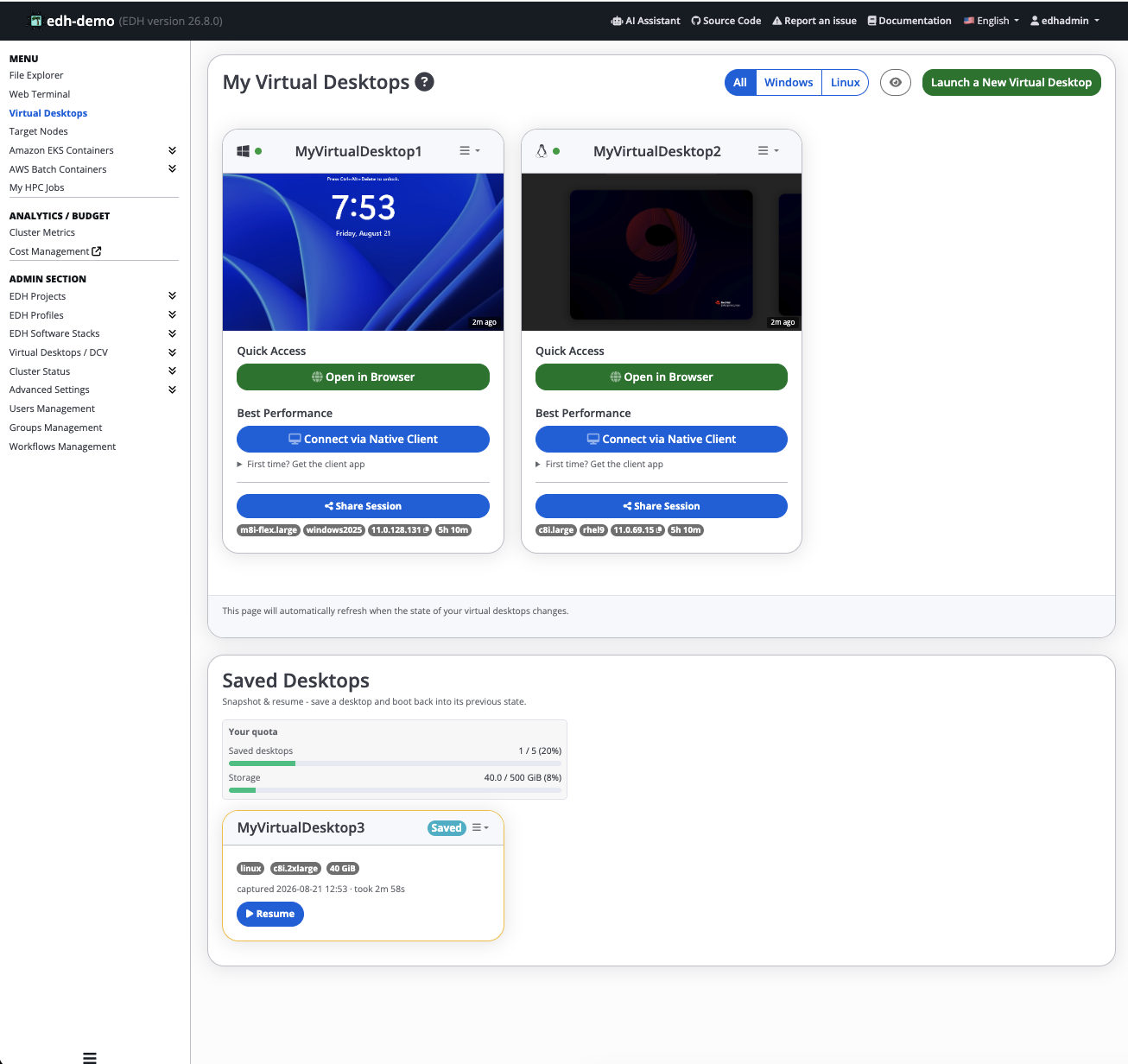
Open Virtual Desktops in the left sidebar to see your desktops. Each running desktop is shown as a tile with a live thumbnail, quick-connect options (open in the browser or via the native DCV client), its instance details, and a Share Session button.
Supported operating systems
| Operating System | Version | Supported |
|---|---|---|
| Windows | Windows Server 2019 | ✅ (Windows 10 Style & Appareance) |
| Windows | Windows Server 2022 | ✅ (Windows 10 Style & Appareance) |
| Windows | Windows Server 2025 | ✅ (Windows 11 Style & Appareance) |
| Linux | Amazon Linux 2 | ✅ |
| Linux | Amazon Linux 2023 | ✅ |
| Linux | Red Hat Enterprise Linux 8 | ✅ |
| Linux | Red Hat Enterprise Linux 9 | ✅ |
| Linux | Rocky 8 | ✅ |
| Linux | Rocky 9 | ✅ |
| Linux | Ubuntu 22.04 | ✅ |
| Linux | Ubuntu 24.04 | ✅ |
| Linux | Red Hat Enterprise Linux 7 | ⚠️ Tested successfully but OS is End-of-Life and won't receive updates from Red Hat, meaning destkop may stop provisioning in the future without notice. |
| Linux | CentOS 7 | ⚠️ Tested successfully but OS is End-of-Life and won't receive updates from Red Hat, meaning destkop may stop provisioning in the future without notice. |
Virtual Desktop Automation
-
EDH will automatically determine the EC2 Instance type and install the required packages.
-
Supported Linux and Windows OS have been validated on Non-GPU, GPU (Nvidia) and GPU (AMD).
-
Supported Linux OS have been tested for both Intel (
x86_64) and Graviton (aarch64) architectures.
Bootstrap Sequence
Here is a high level of the bootstrap sequence of the virtual Desktop machines. Click here to view Windows/Linux advanced bootstrap sequence details for VDI nodes.
  graph TD;
      A[New Virtual Desktop] --> B{Architecture?};
      B-- x86_64 -->C[Install x86_64 packages];
      B-- aarch64 -->D[Install aarch64 packages];
      C--> E{Has GPU?};
      D-->E
      E-- Nvidia -->F[Install Cuda+nvidia drivers];
      E-- AMD -->G[Install AMD drivers];
      E-- None -->H[Desktop ready];
      F --> H ;
      G --> H;