Index
This section list all storage options available on EDH:
- Amazon Elastic Filesystem (EFS)
- Elastic Block Storage (EBS), including Provisioned IO (
io1, io2) - Amazon FSx for Lustre
- Amazon FSx for NetApp ONTAP
- Amazon FSx for OpenZFS
- NVME Instance Storage
- Amazon S3 (via S3 Mountpoint)
- External (e.g: on-premise) NFS, NetApp, Lustre etc ... filesystems
Storage Type
EDH can deploy filesystems based on two storage configuration:
- Shared storage: Automatically mounted on all nodes
- Dedicated storage: Mounted only on specific node
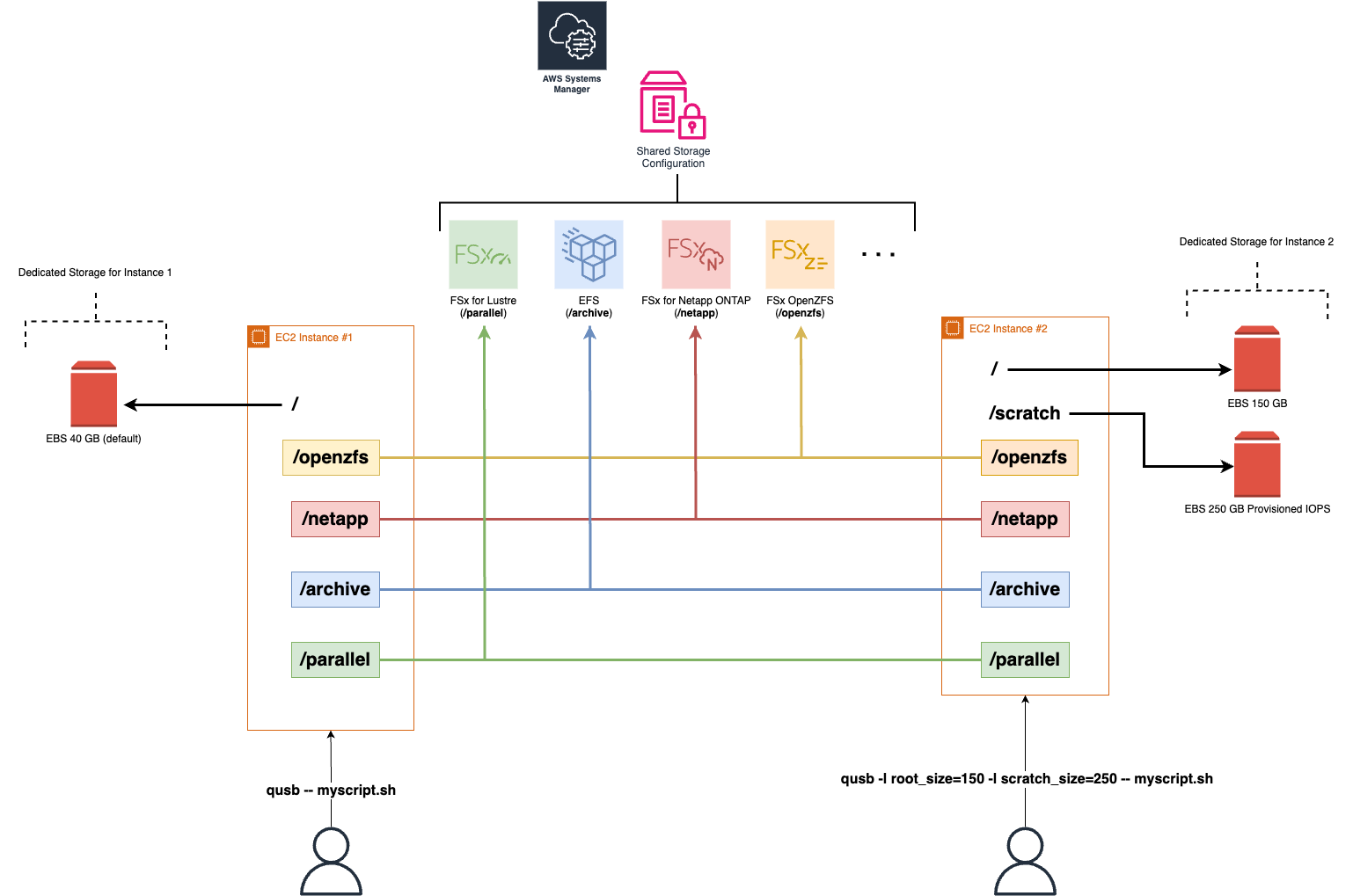
Shared Storage
Info
Shared Storage configuration is centralized and managed by SocaConfig. Shared Storage filesystems are automatically applied to new nodes deployed in your EDH environment.
You can have filesystems automatically mounted on all EDH Linux nodes (controller, hpc_nodes, login_nodes and dcv_nodes), regardless of user or project name.
Refer to Shared Storage to learn more about shared storage.
Dedicated Storage
Info
Dedicated Storage configuration is managed individually when you submit an HPC simulation or start a new virtual desktop. Dedicated storage is only applicable to the node(s) provisioned by the request.
EDH lets you customize storage for each HPC or virtual desktops Linux node.
For example, you can override the default / partition size via root_size parameter or add a custom /scratch partition via scratch_size parameter.
Refer to this page if you want to learn about all ephemeral storage capability of EDH
With this mechanism, node(s) provisioned by user1 could just have a 50GB / partition and node(s) provisioned by user2 a 150GB / partition as well as 200GB /scratch partition.
Refer to Dedicated Storage to learn more about custom storage that can be applied to compute or virtual desktop nodes.