API Keys
API keys enable application-to-application integration with VAMS. They allow external scripts, CI/CD pipelines, and third-party tools to authenticate with the VAMS API without requiring interactive user login.
Overview
An API key is a credential that impersonates a specific VAMS user. When an API call is made with an API key, the request is authorized as if the impersonated user made it directly. This means the API key inherits all roles and permissions assigned to the associated user.
API keys grant the same level of access as the associated user. Treat API keys with the same care as passwords. Store them securely, rotate them regularly, and set expiration dates whenever possible.
How API keys work
- An administrator creates an API key and associates it with an existing VAMS user ID, or a user creates a self-service key tied to their own user.
- The system generates a unique key value prefixed with
vams_. This value is displayed only once at creation time. - The API key is stored as a SHA-256 hash in Amazon DynamoDB. The plaintext key cannot be retrieved after creation.
- When the key is used in an API request, the system hashes the provided key, looks up the matching record, and resolves the associated user ID to determine permissions.
The user ID specified during API key creation must already have at least one VAMS role assigned. You cannot create an API key for a user with no roles.
Admin and self-service modes
The API Key Management page operates in two modes, depending on which API routes your roles grant access to:
- All Keys (Admin) -- View and manage API keys across all users. Keys may be created for any user, and an expiration date is optional.
- My Keys (self-service) -- View and manage only your own API keys. Created keys are always tied to your user, an expiration date is required, and the expiration may be at most 365 days from the key's creation. Later edits cannot extend the expiration beyond that window -- create a new key to rotate after it elapses.
Users with access to both modes see a toggle at the top of the page.
Creating an API key
- Navigate to User > API Key Management in the left sidebar. The page offers an All Keys (Admin) mode for administrators and a My Keys self-service mode for managing your own keys; users with access to both see a mode toggle.
- Choose Create API Key.
- Complete the form fields:
| Field | Description | Required |
|---|---|---|
| Name | A unique, human-readable name for the API key. Used for identification in the management console. | Yes |
| User ID | The VAMS user ID this key will impersonate. The user must have roles assigned. | Yes |
| Description | A description of the key's purpose. Maximum 256 characters. | Yes |
| Expiration Date | An optional date when the key will automatically become invalid. Format: YYYY/MM/DD. | No |
| Expiration Time | The time of day (UTC) when the key expires. Defaults to 23:59:59. Only available when an expiration date is set. | No |
- Choose Create API Key.
- Copy the generated key immediately. The key value is displayed only once in the confirmation dialog.
The API key value is shown only once after creation. If you close the dialog without copying the key, you must delete the API key and create a new one. There is no way to retrieve the key value after creation.
Using API keys
With direct API calls
Include the API key as a Bearer token in the Authorization header of your HTTP requests:
curl -X GET "https://your-vams-endpoint/api/databases" \
  -H "Authorization: Bearer vams_your-api-key-here" \
  -H "Content-Type: application/json"
With the VAMS CLI
Use the --token-override option with the auth login command to authenticate the CLI with an API key. Pass the key on standard input rather than on the command line -- every argument of a running process is readable from the operating system's process table, so a key given as --token-override "vams_..." is exposed to any other user on that machine:
# Authenticate the CLI using an API key (key read from stdin)
echo "$VAMS_API_KEY" | vamscli auth login --user-id "ci-bot@example.com" --token-override-stdin

# With expiration (recommended for CI/CD)
echo "$VAMS_API_KEY" | vamscli auth login --user-id "ci-bot@example.com" --token-override-stdin --expires-at "+3600"

# Then use the CLI normally -- all commands authenticate with the API key
vamscli database list
vamscli assets list --database-id my-database
--token-override "vams_your-key-here" accepts the key directly, but leaks it to the process table. Prefer --token-override-stdin as shown above, and keep the key in a secret variable rather than in the command itself.
For CI/CD pipelines, create a dedicated VAMS user with a role that has only the minimum permissions required by the pipeline. Set an expiration date on the API key and rotate it regularly.
Managing API keys
Listing API keys
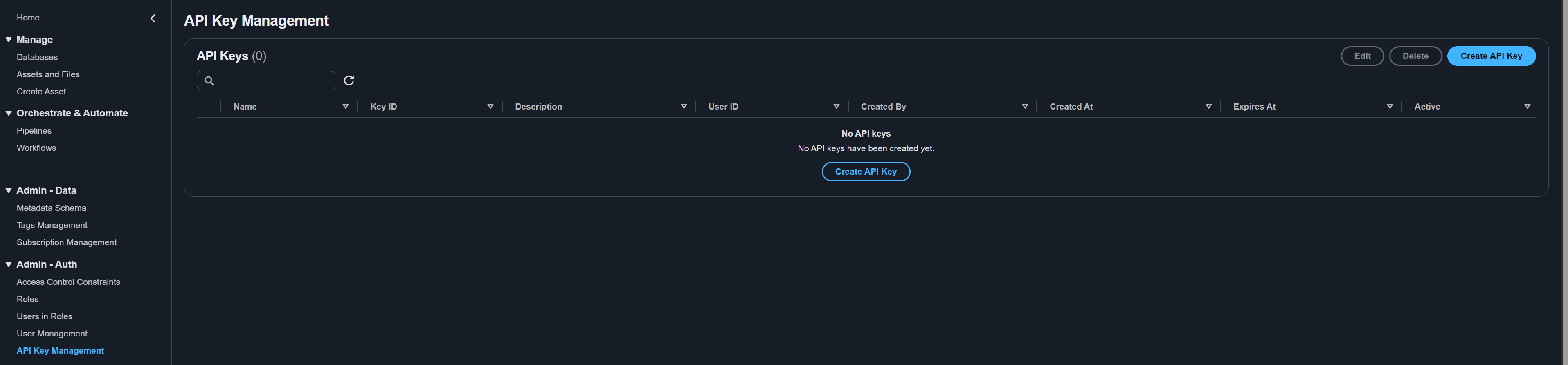
The API Key Management page displays all API keys in a table with the following columns:
| Column | Description |
|---|---|
| Name | The human-readable name assigned to the key. |
| Key ID | The unique identifier for the API key record. |
| Description | The description of the key's purpose. |
| User ID | The VAMS user ID the key impersonates. |
| Created By | The user who created the API key. |
| Created At | The date and time the key was created. |
| Expires At | The expiration date and time, or Never if no expiration is set. |
| Active | Whether the key is currently active or inactive. |
Use the text filter at the top of the table to search by name, user ID, or description.
The table requests up to 1000 keys at a time. A deployment holding more than that pages through them with the pagination control below the table, and the header then notes that the text filter and column sorting apply to the page shown rather than to every key. To search or export across all keys, use vamscli api-key list --auto-paginate --json-output.
Updating an API key
You can update the description, expiration date, and active status of an existing API key. The key name, key ID, and associated user ID cannot be changed after creation.
- Select the API key in the table.
- Choose Edit.
- Modify the available fields:
- Description -- Update the description (maximum 256 characters). Clear the expiration date to remove the expiration.
- Expiration Date -- Set or update the expiration date. Choose Clear to remove the expiration entirely.
- Expiration Time (UTC) -- Adjust the expiration time if a date is set.
- Active -- Toggle the key between active and inactive states.
- Choose Update API Key.
If you need to temporarily revoke access, toggle the key to Inactive instead of deleting it. This preserves the key record and allows you to reactivate it later.
Deleting an API key
Deleting an API key is permanent and cannot be undone. Any applications or scripts using the key will immediately lose access.
- Select the API key in the table.
- Choose Delete.
- In the confirmation dialog, choose Delete to confirm.
Security best practices
Follow these recommendations to maintain the security of your VAMS API keys:
| Practice | Description |
|---|---|
| Set expiration dates | Always set an expiration date on API keys, especially for CI/CD pipelines and automation. |
| Use least-privilege users | Associate API keys with users that have only the minimum permissions required for the use case. |
| Rotate keys regularly | Create new keys and decommission old ones on a regular schedule. |
| Never commit keys to source control | Store API keys in secrets managers (such as AWS Secrets Manager) or CI/CD secret variables. |
| Monitor key usage | Review the API Key Management page periodically to identify unused or expired keys. |
| Deactivate compromised keys | If a key is compromised, immediately set it to Inactive and create a replacement. |
All API key operations (creation, update, deletion) are recorded in the VAMS audit log. Administrators can review these logs in Amazon CloudWatch to track who created, modified, or deleted API keys.
API key operations can also be performed via the command line. See CLI Users and Keys Commands.
Related topics
- Automating VAMS -- Choosing between the web interface, CLI, AI agents, and the REST API
- Permissions -- How roles and constraints determine what a key can reach
- User Management -- Creating the dedicated user an automation key is issued against