
Character Splitter
Unstable API
0.8.0
@project-lakechain/character-text-splitter

The character text splitter can be used to split text documents at scale based on a string delimiter, a maximum chunk size, and a given chunk overlap. This implementation is based on Langchain’s CharacterTextSplitter.
📝 Splitting Text
Section titled “📝 Splitting Text”To use this middleware, you import it in your CDK stack, and connect it to a data source providing text documents, such as the S3 Trigger.
import { CharacterTextSplitter } from '@project-lakechain/character-text-splitter';import { CacheStorage } from '@project-lakechain/core';
class Stack extends cdk.Stack {  constructor(scope: cdk.Construct, id: string) {    // The cache storage.    const cache = new CacheStorage(this, 'Cache');
    // Create the character text splitter.    const splitter = new CharacterTextSplitter.Builder()      .withScope(this)      .withIdentifier('Splitter')      .withCacheStorage(cache)      .withSource(source) // 👈 Specify a data source      .build();  }}
Options
Section titled “Options”You can customize the way that the text splitter will split text documents by specifying a custom delimiter string, a maximum chunk size, and a chunk overlap.
ℹ️ The below example splits text documents based on the
\r\ndelimiter, with a maximum chunk size of4096characters, and a chunk overlap of200.
const splitter = new CharacterTextSplitter.Builder() .withScope(this) .withIdentifier('Splitter') .withCacheStorage(cache) .withSource(source) .withSeparator('\r\n') .withChunkSize(4096) .withChunkOverlap(200) .build();The default values for this middleware options are documented below.
| Option | Default | Description |
|---|---|---|
separator |
\n\n |
The delimiter to use to split text documents. |
chunkSize |
4000 |
The maximum size of each text chunk. |
chunkOverlap |
200 |
The characters to overlap between chunks. |
📄 Output
Section titled “📄 Output”This middleware takes as an input text documents of a given size, and outputs multiple text documents that are the result of the text splitting process. This allows to process each chunk of text in parallel in downstream middlewares.
In addition to producing new text documents, this middleware also associates metadata with each chunk, such as the chunk identifier and order relative to the original document. Below is an example of CloudEvent produced by this middleware.
💁 Click to expand example
{ "specversion": "1.0", "id": "1780d5de-fd6f-4530-98d7-82ebee85ea39", "type": "document-created", "time": "2023-10-22T13:19:10.657Z", "data": { "chainId": "6ebf76e4-f70c-440c-98f9-3e3e7eb34c79", "source": { "url": "s3://bucket/text.txt", "type": "text/plain", "size": 24536, "etag": "1243cbd6cf145453c8b5519a2ada4779" }, "document": { "url": "s3://bucket/text.txt", "type": "text/plain", "size": 24536, "etag": "1243cbd6cf145453c8b5519a2ada4779" }, "metadata": { "properties": { "kind": "text", "attrs": { "chunk": { "id": "4a5b6c7d8e9fd21dacb", "order": 0 } } } }, "callStack": [] }}🏗️ Architecture
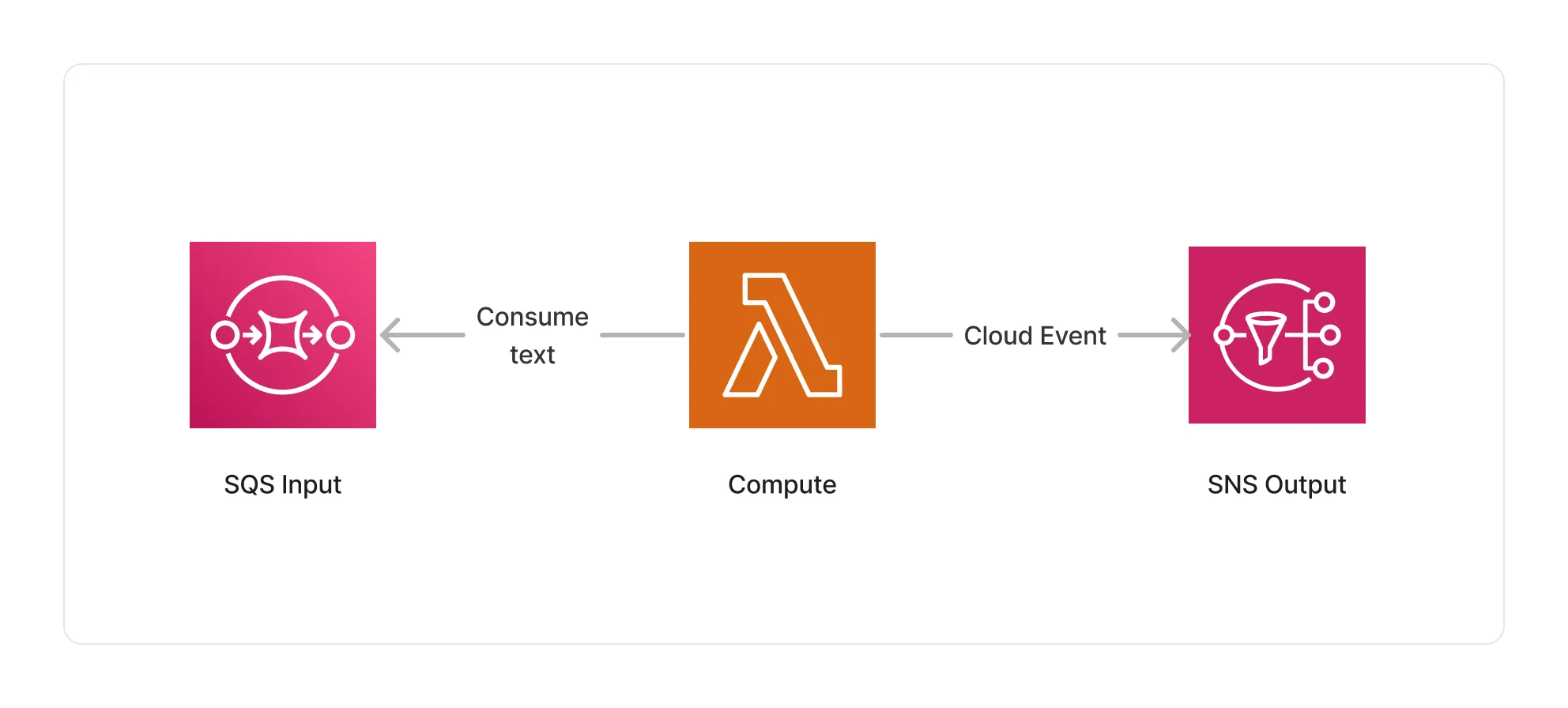
Section titled “🏗️ Architecture”This middleware runs within a Lambda compute based on the ARM64 architecture, and packages the Langchain library to run the text splitting process.
🏷️ Properties
Section titled “🏷️ Properties”Supported Inputs
Section titled “Supported Inputs”| Mime Type | Description |
|---|---|
text/plain |
UTF-8 text documents. |
Supported Outputs
Section titled “Supported Outputs”| Mime Type | Description |
|---|---|
text/plain |
UTF-8 text documents. |
Supported Compute Types
Section titled “Supported Compute Types”| Type | Description |
|---|---|
CPU |
This middleware only supports CPU compute. |
📖 Examples
Section titled “📖 Examples”- Text Splitting Pipeline - Builds a pipeline for splitting text documents using different text splitting algorithms.